Hi,
I've done some more tests, I've narrowed the issue down to the theme. We're using the Lepton theme, not LeptonX.
Okay, then this clarifies the situation. I've checked with LeptonX Theme, this is the reason why I was unable to reproduce.
The js for adding the unread message count badge would appear to rely on an element with id "lpx-toolbar". In lepton the equivalent element id is "navbarToolbar".
I'll check that but it seems in the Chat Module, there is a theme-specific selector used, and it should not be used normally. Thanks for pointing that out.
This is obviously a bit of a hack but not sure there's an alternative, if you can suggest a better fix please let me know.
Actually, since there are some selectors that are theme-specific we should update them. In the meantime, your solution can be a workaround. I'll create an internal issue for that.
Regards.
Also, I would like to ask you. will this works for Dynamic proxy also?
ABP dynamic proxying alone won’t work across microservices out of the box.
However, I find that there is a difference between our approach. I am using the intergrated UI option that appears when creating new solution.
Actually, this should not make any difference. Are you still unable to generate static proxies?
Hi, when you open a page of a Blazor Web App in a new browser tab, the browser indeed initiates a full page load, which is the default and the expected behavior. So, you cannot prevent a browser from reloading a fresh copy of the app when a page is opened in a new tab — that’s standard browser behavior.
You may want to consider Pre-rendering and Caching Techniques of Blazor. Please refer to Blazor's documentation for these: https://learn.microsoft.com/en-us/aspnet/core/blazor/fundamentals/routing?view=aspnetcore-9.0
For the ABP 9 project templated created by ABP studio. There are new micro services created, audit-logging and language. When I upgrade existing ABP 8 solution, do I have to add these two new micro services to solution?
No, you don't have to add them.
In administration micro service, there are three new connection strings added, do I have to add them when upgrading?
You don't need to add these connection strings if you don't have the related services. Since, you don't have the audit-logging and language services then you don't need to add their connection strings.
Do I have to modify DbConext accordingly?
Actually, you don't need to modify the DbContext, it should work seamlessly.
Best regards.
Hi, for dashboard authorization please refer to our documentation: https://abp.io/docs/latest/framework/infrastructure/background-jobs/hangfire#dashboard-authorization
Hi, can you confirm if I'll update hangfire code, it will be applicable for all background jobs added in application ?
Yes. When you integrate Hangfire, it replaces the default background job manager, and Hangfire’s own job manager will be used instead.
Hi, I referred document, I added permission, but it is not working, I'm getting 401 status code on accessing the dashboard even if permission is added, it is working in local but after deployment as my UI and backend is deployed on different server, I'm not able to access, what is the possible solution with this scenario?
Did you apply the all steps described at https://abp.io/docs/latest/framework/infrastructure/background-jobs/hangfire#dashboard-authorization-in-api-projects?
1-)
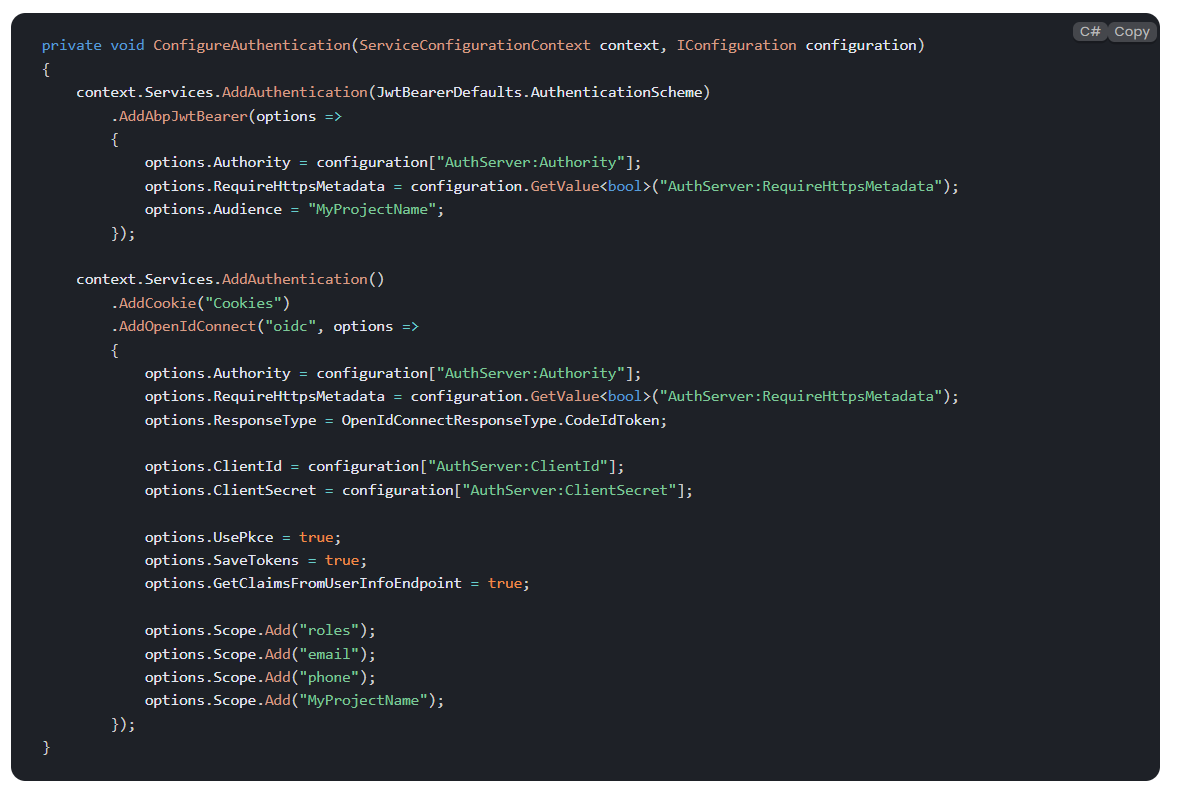
2-)
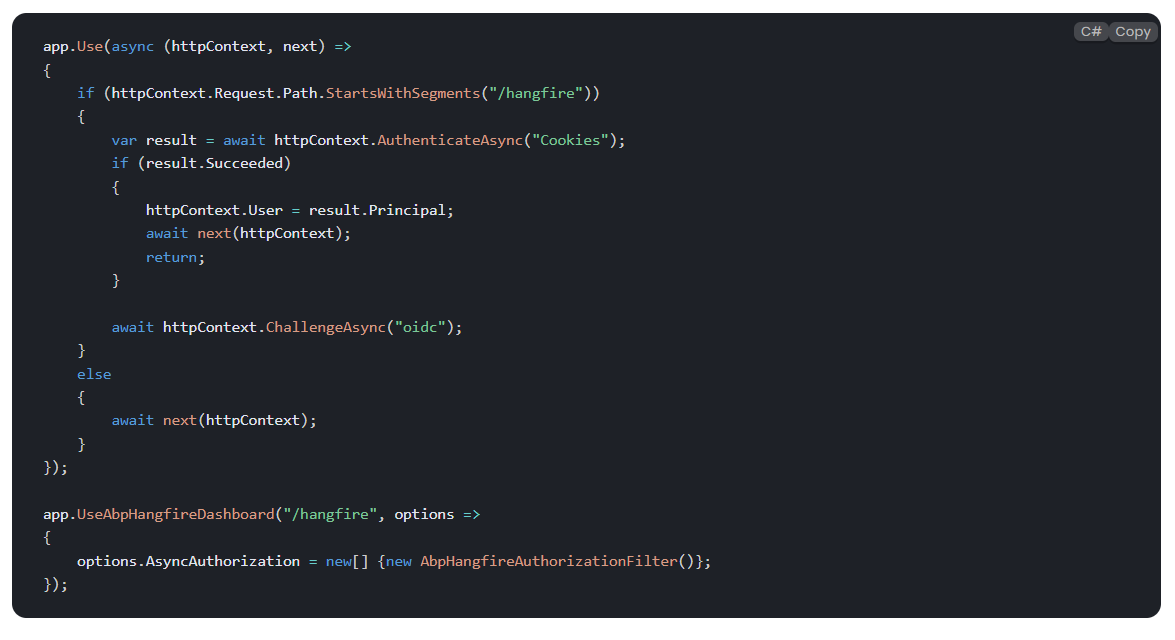
If you applied, can you share the error log?
as per the call can you confirm the mappings
  - name: Run migrations
    run: dotnet run -- "${{ secrets.CONNECTION_STRING }}" # Set your connection string as a secret in your repository settings
    working-directory: ./src/blazorservertierdemo.DbMigrator  # Replace with your project name

  - name: dotnet publish apihost
    run: dotnet publish -c Release -o ${{env.DOTNET_ROOT}}/apihost
    working-directory: ./src/blazorservertierdemo.HttpApi.Host # Replace with your project name

  - name: Generate authserver.pfx
    run: dotnet dev-certs https -v -ep ${{env.DOTNET_ROOT}}/apihost/authserver.pfx -p 2D7AA457-5D33-48D6-936F-C48E5EF468ED # Replace with your password

  - name: dotnet publish webapp
    run: dotnet publish -c Release -o ${{env.DOTNET_ROOT}}/webapp
    working-directory: ./src/blazorservertierdemo.Blazor # Replace with your project name
... which of these are viable for a Layered / non-tiered Blazor-interactive?
where the app projects of note are: .Blazor .Client .HttpApi .Http.Client ....etc
Hi,
This ticket was originally about the ABP Studio installation problem, and as far as I understand, your installation issue was resolved during the meeting. (If so, maybe we can close this question)
For your deployment-related questions or issues, could you please create a new ticket? That way, we can assign the appropriate team member to assist you.
Thank you for your understanding. Best regards.
Hi,
Q1/ Sidebar Menu and Toolbar Support: Our project is essentially an admin panel with features and menus that vary based on the user type. We’re currently using a layout that includes a sidebar menu and a toolbar, both of which are essential and must remain intact. If we proceed with the Basic Theme, will it support customizing or overriding these elements (SidebarMenu, Toolbar, etc.)? Or would we need to consider using Lepton Lite instead—so we can keep things open-source while also preserving those layout capabilities?
Here are the layout parts of Basic Theme:
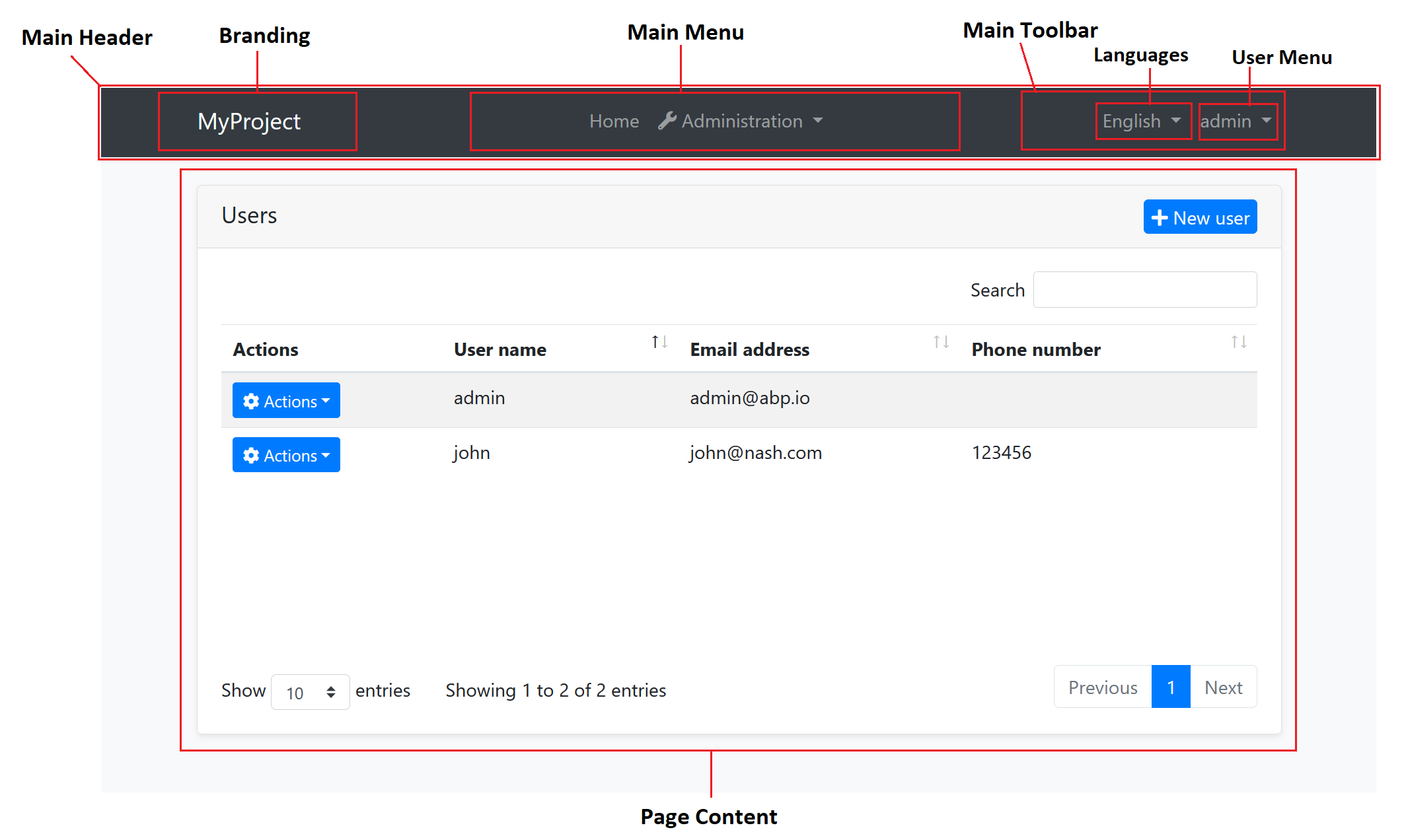
These parts are implemented for all of our supported themes and the only difference is the placement. If the placement is important for you, then you can continue with LeptonX Lite. Also, if you want to go with a side-bar menu, then yes it can be better to go with LeptonX Lite.
Q2 / Reusability and Upgrade Compatibility: Once created, will this custom package remain compatible with future updates to .NET, ABP, or the base theme it’s derived from? Or should we expect to manually modify and update the package each time a new version is released?
When you implement a layout or theme, unfortunately, you are on your own (we are always here for support, but I mean responsibility is on your shoulders). Since the related places are overridden, ABP's version upgrade might not work for you and you may need to manually update ABP's components (if needed). However, our themes are mature, so that means we are not making frequent changes to them, so this should not impact you for most of the time.
Hi, for dashboard authorization please refer to our documentation: https://abp.io/docs/latest/framework/infrastructure/background-jobs/hangfire#dashboard-authorization
Hi, can you confirm if I'll update hangfire code, it will be applicable for all background jobs added in application ?
Yes. When you integrate Hangfire, it replaces the default background job manager, and Hangfire’s own job manager will be used instead.
Hi, first of all, sorry for the late response, and thanks for the detailed explanation.
All 3 options can be the way to go, but our suggestion is to add the Basic Theme Source Code into your solution and then customize it according to your needs. Here is our documentation to briefly explain that: https://abp.io/docs/latest/framework/ui/blazor/theming?UI=Blazor#implementing-a-theme
Since our Basic Theme is built with Bootstrap 5 and Metronic Theme is also Bootstrap-based, pages that come from our modules should be used without having any trouble.
Also, there are some community articles and videos that demonstrate how to use another theme rather than LeptonX Theme ( - not for Metronic Theme but MudBlazor - (but the steps are similar)):
You can always check these contents for reference sources.
You can start with the basic theme and try to implement the Metronic Theme. If you face with an issue, feel free to write here or create a new question.
Regards.
Hi,
I have followed documentation for SignalR module (https://abp.io/docs/latest/framework/real-time/signalr). I added npm dependency for @abp/signalr, and added SignalRBrowserScriptContributor.
You don't need to do that, because the Chat module already uses signalR behind the scene in both the C# and JS side (NuGet & NPM packages).
Here are all the steps for the configuration:
abp add-module Volo.Chat command in your solution. (This command will add the all necessary packages for your solution and the related dependson statements. (also adds the related NPM package to your package.json file: "@volo/chat": "~8.2.2",)).HttpApi.Host project and ensure there is a reference to the Volo.Chat.SignalR package and in the right version.Then, your configuration should be done, and when you run your application, it should work seamlessly.
If your configuration is similar, and the real-time messaging is working then probably the "unread message count" badge had a problem in the related version and then it's fixed. So, please consider updating your ABP version, in that case.
Regards.