The ETO class:
using Volo.Abp.EventBus;

namespace MyProject.CustomerService.Customers;

[EventName("MyProject.CustomerService.Customers.CustomerUpdated")]
public class CustomerUpdatedEto
{
    public Guid Id { get; set; }
    public string Name { get; set; } = null!;
    public string Street { get; set; } = null!;
    public string ZipCode { get; set; } = null!;
    public string City { get; set; } = null!;
    public string PhoneNumber { get; set; } = null!;
    public string Email { get; set; }
    public bool IsCompany { get; set; }
    public string? IdentificationNumber { get; set; }
    public string? AttName { get; set; }
}
That's everything I have done in the CustomerService. In the subscriber, InvoiceService is only one added class CustomerServiceEventHandler
using MyProject.CustomerService.Customers;
using Volo.Abp.DependencyInjection;
using Volo.Abp.EventBus.Distributed;

namespace MyProject.InvoiceService;

public class CustomerServiceEventHandler : IDistributedEventHandler<CustomerUpdatedEto>, ITransientDependency
{
    public async Task HandleEventAsync(CustomerUpdatedEto eventData)
    {
        var customerId = eventData.Id;
    }
}
Now, I have started the both services, CustomerService and the InvoiceService, and the RabbitMQ queues are listed by using the RabbitMQ CLI:
$ docker exec -it rabbitmq rabbitmqctl list_queues
Timeout: 60.0 seconds ...
Listing queues for vhost / ...
name	messages
AbpBackgroundJobsDelayed.Volo.Abp.Emailing.BackgroundEmailSendingJobArgs	0
MyProject_AuthServer	0
MyProject_IdentityService	0
MyProject_CustomerService	0
AbpBackgroundJobs.Volo.Abp.Emailing.BackgroundEmailSendingJobArgs	0
MyProject_InvoiceService	0
So the queues seems to be registered. However, I can't see that any message is published, nor received at the subscribe. Notice that the receiver has a binding to the ETO class MyProject.CustomerService.Customers.CustomerUpdated.
$ docker exec -it rabbitmq rabbitmqctl list_bindings | grep MyProject_CustomerService
	exchange	MyProject_CustomerService	queue	MyProject_CustomerService	[]
MyProject	exchange	MyProject_CustomerService	queue	Volo.Abp.Localization.LanguageChangedEto	[]
MyProject	exchange	MyProject_CustomerService	queue	Volo.Payment.RecurringPaymentUpdated	[]
MyProject	exchange	MyProject_CustomerService	queue	Volo.Payment.SubscriptionCanceled	[]
MyProject	exchange	MyProject_CustomerService	queue	Volo.Payment.SubscriptionCreated	[]
MyProject	exchange	MyProject_CustomerService	queue	abp.data.apply_database_migrations	[]
MyProject	exchange	MyProject_CustomerService	queue	abp.multi_tenancy.tenant.connection_string.updated	[]
MyProject	exchange	MyProject_CustomerService	queue	abp.multi_tenancy.tenant.created	[]

$ docker exec -it rabbitmq rabbitmqctl list_bindings | grep MyProject_InvoiceService
	exchange	MyProject_InvoiceService	queue	MyProject_InvoiceService	[]
MyProject	exchange	MyProject_InvoiceService	queue	MyProject.CustomerService.Customers.CustomerUpdated	[]
MyProject	exchange	MyProject_InvoiceService	queue	Volo.Abp.Localization.LanguageChangedEto	[]
MyProject	exchange	MyProject_InvoiceService	queue	Volo.Payment.RecurringPaymentUpdated	[]
MyProject	exchange	MyProject_InvoiceService	queue	Volo.Payment.SubscriptionCanceled	[]
MyProject	exchange	MyProject_InvoiceService	queue	Volo.Payment.SubscriptionCreated	[]
MyProject	exchange	MyProject_InvoiceService	queue	abp.data.apply_database_migrations	[]
MyProject	exchange	MyProject_InvoiceService	queue	abp.multi_tenancy.tenant.connection_string.updated	[]
MyProject	exchange	MyProject_InvoiceService	queue	abp.multi_tenancy.tenant.created	[]
How can one seed the Language Management ? I would like to include new words that is not included default. This is what is generated:
using Volo.Abp.DependencyInjection;
using Volo.Abp.LanguageManagement.Data;
using Volo.Abp.Uow;
using Volo.Abp.MultiTenancy;

namespace GeoTicket.LanguageService.Data;

public class LanguageServiceDataSeeder : ITransientDependency
{
    private readonly ILogger<LanguageServiceDataSeeder> _logger;
    private readonly ICurrentTenant _currentTenant;
    private readonly IUnitOfWorkManager _unitOfWorkManager;
    private readonly LanguageManagementDataSeeder _languageManagementDataSeeder;

    public LanguageServiceDataSeeder(
        ILogger<LanguageServiceDataSeeder> logger,
        ICurrentTenant currentTenant,
        IUnitOfWorkManager unitOfWorkManager,
        LanguageManagementDataSeeder languageManagementDataSeeder)
    {
        _logger = logger;
        _unitOfWorkManager = unitOfWorkManager;
        _currentTenant = currentTenant;
        _languageManagementDataSeeder = languageManagementDataSeeder;
    }

    public async Task SeedAsync(Guid? tenantId = null)
    {
        using (_currentTenant.Change(tenantId))
        {
            using (var uow = _unitOfWorkManager.Begin(requiresNew: true, isTransactional: true))
            {
                await SeedLanguagesAsync(tenantId);
                await uow.CompleteAsync();
            }
        }
    }

    private async Task SeedLanguagesAsync(Guid? tenantId)
    {
        if (tenantId != null)
        {
            /* Language list is not multi-tenant */
            return;
        }

        await _languageManagementDataSeeder.SeedAsync();
    }
}
How do you edit the base UI itself? For example, how do we access the code for the login page if we want to add things to that page? Or if we want to use our own spinner in the main layout?
We want to be able to edit the existing layout as it is. If that’s the best way to do it?? Can you run some command in the ABP CLI to extract the layout from the DLLs? The layout we're using is LeptonX SideMenu.
How do you include all files in Blazor, such as MainLayout, so you can control what happens when you click the Admin button and be able to add more options to the menu?
The user profile button is not clickable. No log records or errors in the developer console in Safari or Chrome when click on the image. Any ideas?
Thanks, Carl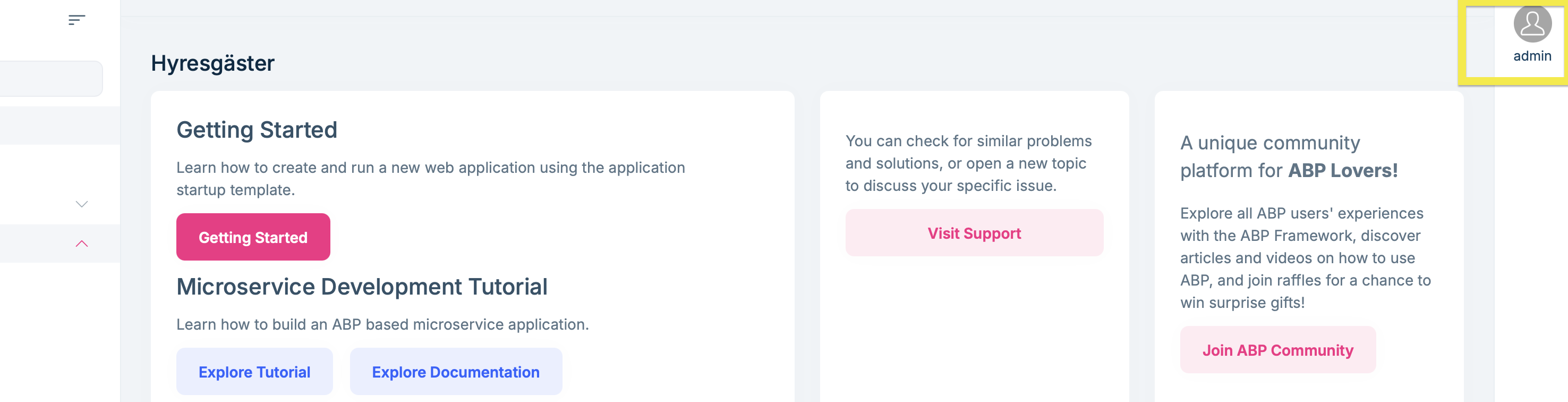
In the ABP 7 we successfully made deployments in public cloud (DigitalOcean) using the generated Helm charts. We modified the values.yaml file and configured the domain names, with TLS certificates using Certmanager and Lets Encrypt.
Now, the Helm charts looking totally different and seems to be used for local deployment?
Can you please give short instructions how to deploy on public cloud?
Thanks
We have a number of services, e.g., DocumentService, InvoiceService and CustomerService
InvoiceService do API calls to CustomerService and DocumentService. CustomerService do API calls to InvoiceService.
We have tried to create a new class library and generate all client proxies in there. But the generated classes contain includes to the specific project. That means that it will be circular references?
Can you please guide us how to deal with the client proxies when two services do requests to each other?
Thanks
Using Microservice template and got this in when trying out an endpoint in a microservice. I am using the auto controller feature, so I have not defined any controllers.
[22:50:26 ERR] An unhandled exception has occurred while executing the request. Microsoft.AspNetCore.Routing.Matching.AmbiguousMatchException: The request matched multiple endpoints. Matches:
Customer
Ticket
at Microsoft.AspNetCore.Routing.Matching.DefaultEndpointSelector.ReportAmbiguity(Span1 candidateState) at Microsoft.AspNetCore.Routing.Matching.DefaultEndpointSelector.ProcessFinalCandidates(HttpContext httpContext, Span1 candidateState)
at Microsoft.AspNetCore.Routing.Matching.DefaultEndpointSelector.Select(HttpContext httpContext, Span`1 candidateState)
at Microsoft.AspNetCore.Routing.Matching.DfaMatcher.MatchAsync(HttpContext httpContext)
at Microsoft.AspNetCore.Cors.Infrastructure.CorsMiddleware.Invoke(HttpContext context, ICorsPolicyProvider corsPolicyProvider)
at Microsoft.AspNetCore.Builder.UseMiddlewareExtensions.ReflectionMiddlewareBinder.<>c__DisplayClass6_0.
We have managed to get some sort of Hello World working with Blazor, but without any connection to the endpoints in our services.
Our plan was to try migrating the 7.3 project to 8.3.1, but we've had problems with it despite support.
Anyway, we don't quite understand where to place all the projects, and we would need a Hello World that includes the following:
This would be incredibly valuable. This is how we got started with ABP 6 and 7, as you had good documentation for a BookStore and tutorial, and with that knowledge from the ABP Framework, it was easy to start with microservice architecture.
I hope you can provide something like this, because we've completely lost the knowledge we had from version 7 now that we've started with 8.
Best regards.
We have previously used ABP 7, but now we created an ABP 8.3 microservice template, and it looked different.
Specifically, the Blazor WASM application was missing when adding a new microservice according to: https://abp.io/docs/latest/solution-templates/microservice/adding-new-microservices#adding-a-new-microservice
How do you add a Blazor project in an added microservice?
Additionally, there are two projects in the /apps/blazor directory, ProjectName.Blazor.Client and ProjectName.Blazor. How does the Blazor project in the microservice appends as dependency project in /apps/blazor (like it did in ABP 7)?
Thank you in advance for your help.









