Thank you for the support. I was able to fix the error by updating the project to use version 6.03.
Update: When I don't run visual studio in debug mode, I don't see the license error. We, however, need to run in debug mode, which is why I copied the access-token.bin to the docker containers in the first place.
Hi,
So I tried running the docker container using a value other than Development for ASPNETCORE_ENVIRONMENT but that did not change anything. All of the containers are copying access-token.bin to their respective docker containers, but only the one above is throwing this error after the app starts. Just for fun I removed the copy line in the Dockerfile for the problem container and I got the following (regardless of what the value for ASPNETCORE_ENVIRONMENT was):
ABP-LIC-0008 - License check failed for 'Volo.Abp.AspNetCore.Mvc.UI.Theme.Lepton-v4.4.3.0'.
You need to log in using the command `abp login <username>`.
For more information, contact to license@abp.io.
[15:05:44 ERR] ABP-LIC-0008 - License check failed for 'Volo.Abp.AspNetCore.Mvc.UI.Theme.Lepton-v4.4.3.0'.
You need to log in using the command `abp login <username>`.
For more information, contact to license@abp.io.
I also logged in on my host machine again. I don't have a AbpLicense.bin file though. When I try install abp suite, I get the following:
dotnet tool install -g Volo.Abp.Suite --add-source https://nuget.abp.io/myApiToken/v3/index.json
Unhandled exception: Response status code does not indicate success: 401 (Unauthorized).
It should be noted that I replaced myApiToken with my actual Api token.
Hi,
I tried every step mentioned above except for 2. I am not sure how to re-obtain the license code. Are you able to assist me in doing so?
Seeing the same error with that change.
Is it possible to see the working Bookstore example of this?
That definitely helped move it in the right direction. I am seeing the service show up in the api-definition now.
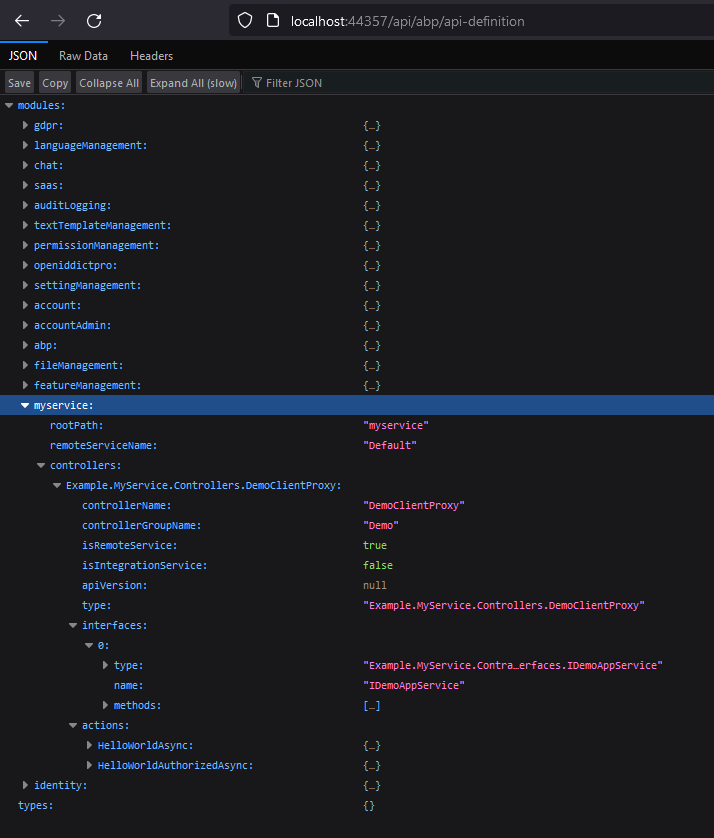
However, when I target the endpoint through the proxy I get this error now:
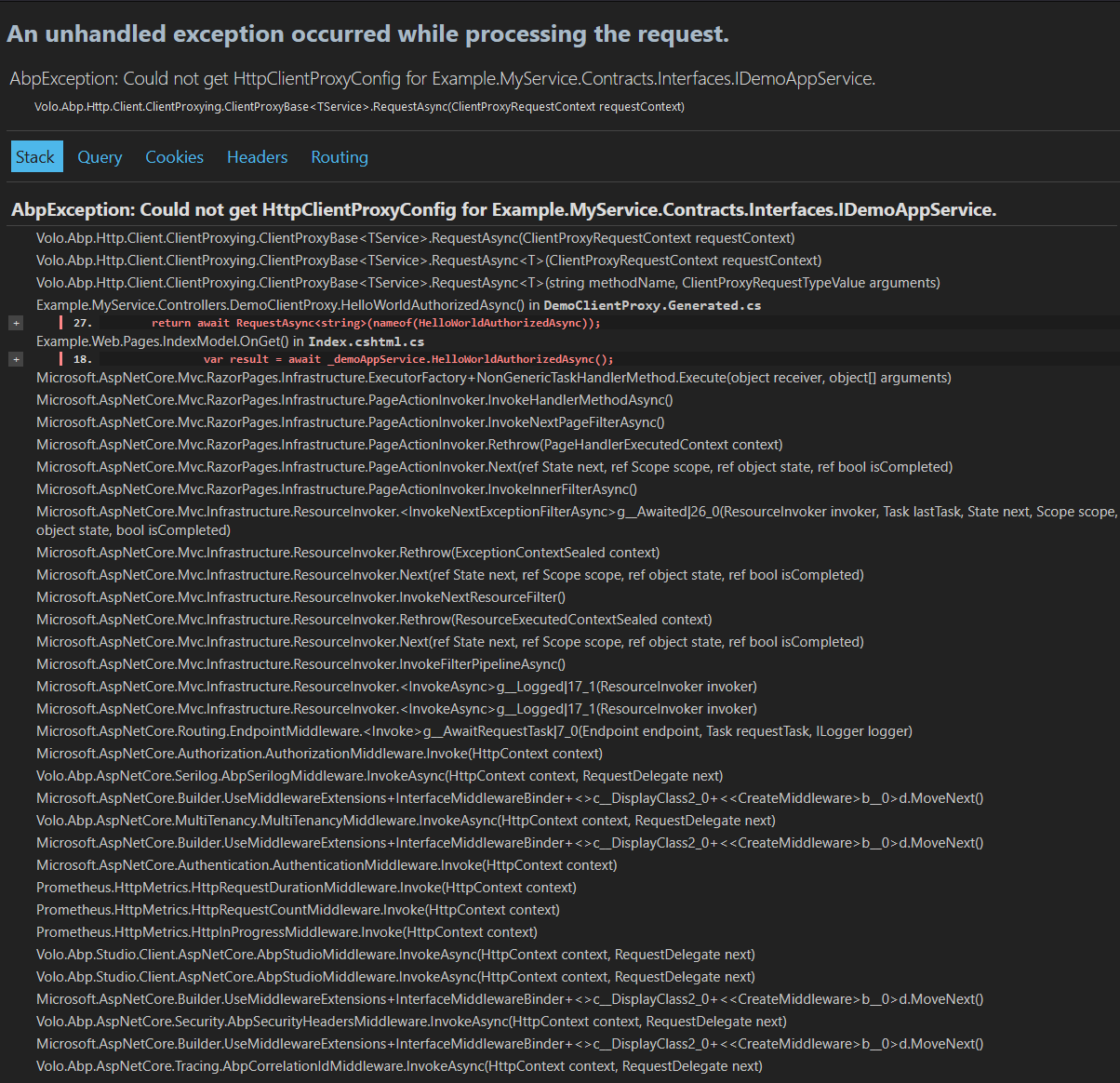
Here is the generated code it is targeting there:
// This file is automatically generated by ABP framework to use MVC Controllers from CSharp
using Example.MyService.Contracts.Interfaces;
using System;
using System.Collections.Generic;
using System.Threading.Tasks;
using Volo.Abp;
using Volo.Abp.Application.Dtos;
using Volo.Abp.DependencyInjection;
using Volo.Abp.Http.Client;
using Volo.Abp.Http.Client.ClientProxying;
using Volo.Abp.Http.Modeling;

// ReSharper disable once CheckNamespace
namespace Example.MyService.Controllers;

[Dependency(ReplaceServices = true)]
[ExposeServices(typeof(IDemoAppService), typeof(DemoClientProxy))]
public partial class DemoClientProxy : ClientProxyBase<IDemoAppService>, IDemoAppService
{
    public virtual async Task<string> HelloWorldAsync()
    {
        return await RequestAsync<string>(nameof(HelloWorldAsync));
    }

    public virtual async Task<string> HelloWorldAuthorizedAsync()
    {
        return await RequestAsync<string>(nameof(HelloWorldAuthorizedAsync));
    }
}
Let me know what you think, also if you want to see any specific files or configuration.
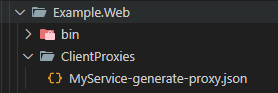
It seems like there is a bug with the CLI tool when generating the C# proxy. It's not able to create the ClientProxies folder as part of the generation command. I added that folder manually and it was able to generate the MyService-generate-proxy.json file.
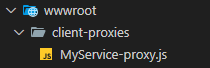
The Javascript proxy generates properly and creates the client-proxies folder in w wwroot without needing to manually add the folder.
I added a couple tests to see if these function. I will show my added code below:
services\MyService\Example.MyService\Controllers\DemoController.cs
[Route("api/myservice/demo")]
[RemoteService(Name = "MyService")]
[Area("MyService")]
public class DemoController : AbpController, IDemoAppService
{
	[HttpGet]
	[Route("hello")]
	public async Task<string> HelloWorld()
	{
		return await Task.FromResult("Hello World!");
	}

	[HttpGet]
	[Route("hello-authorized")]
	[Authorize]
	public async Task<string> HelloWorldAuthorized()
	{
		return await Task.FromResult("Hello World (Authorized)!");
	}
}
services\MyService\Example.MyService.Contracts\Interfaces\IDemoAppService.cs
public interface IDemoAppService : IApplicationService
    {
        Task<string> HelloWorld();
        Task<string> HelloWorldAuthorized();
    }
apps\web\Example.Web\Pages\Index.cshtml.cs
public class IndexModel : AbpPageModel
{
	private IDemoAppService _demoAppService;

	public IndexModel(IDemoAppService demoAppService)
	{
		_demoAppService = demoAppService;
	}

	public void OnGet()
	{
		var result = _demoAppService.HelloWorldAuthorized();
		ViewData["HelloWorldAuthorized"] = result.Result;
	}

	public async Task OnPostLoginAsync()
	{
		await HttpContext.ChallengeAsync("oidc");
	}
}
apps\web\Example.Web\Pages\Index.cshtml
@page
@model Example.Web.Pages.IndexModel
@using Example.Web.Navigation
@using Volo.Abp.AspNetCore.Mvc.UI.Layout
@using Volo.Abp.Users
@inject ICurrentUser CurrentUser
@inject IPageLayout PageLayout
@{
    PageLayout.Content.Title = "Welcome";
    PageLayout.Content.MenuItemName = ExampleMenus.Home;
}
@section scripts {
    <abp-script src="client-proxies/MyService-proxy.js" />

    <script>
        example.myService.controllers.demo.helloWorldAuthorized().then(function (result) {
            console.log(result);
        });
    </script>
}
<abp-card>
    <abp-card-body>
        <h2>
            About This Project
        </h2>

        <p>
            This is a startup template to build your own Microservice Solution on top of the <a href="https://commercial.abp.io/" target="_blank">ABP Commercial</a>.
        </p>

        <p>
            Hellow World OnGet
            <br />
            @ViewData["HelloWorldAuthorized"]
        </p>

        <hr/>
        <p class="text-end">
            <a href="https://commercial.abp.io?ref=tmpl" target="_blank">commercial.abp.io</a>
        </p>
    </abp-card-body>
</abp-card>
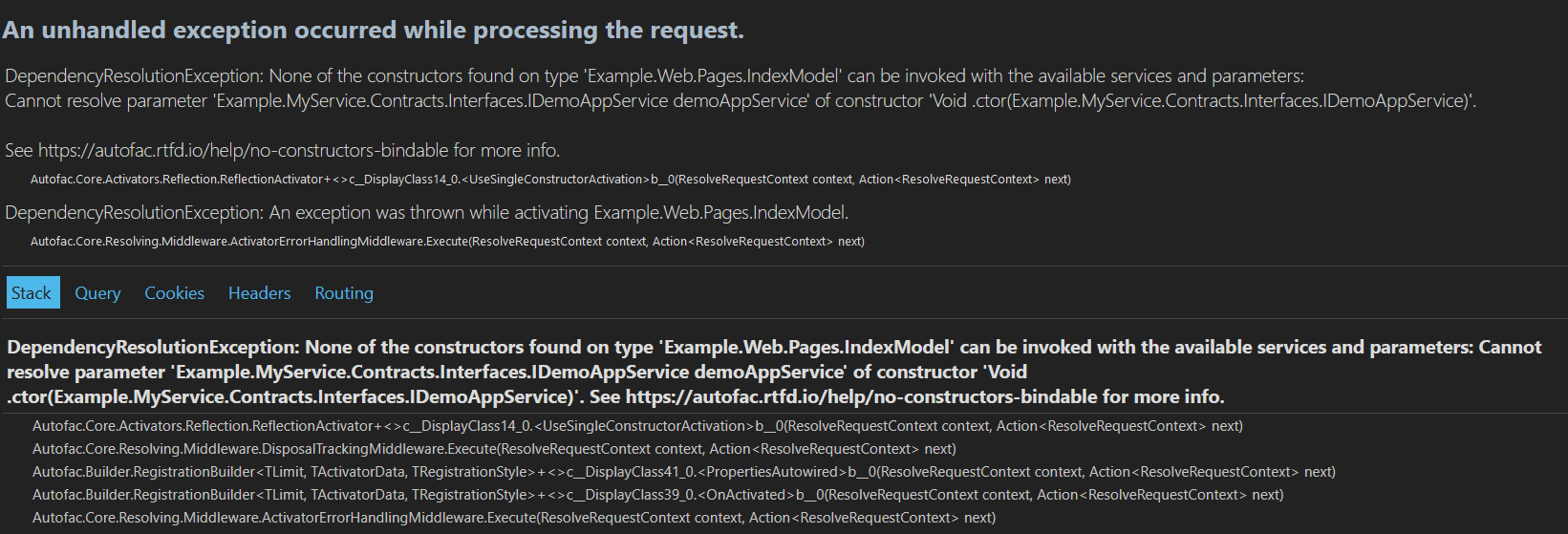
Running the project as detailed from above results in the Index page not being able to resolve the dependency for the C# client:
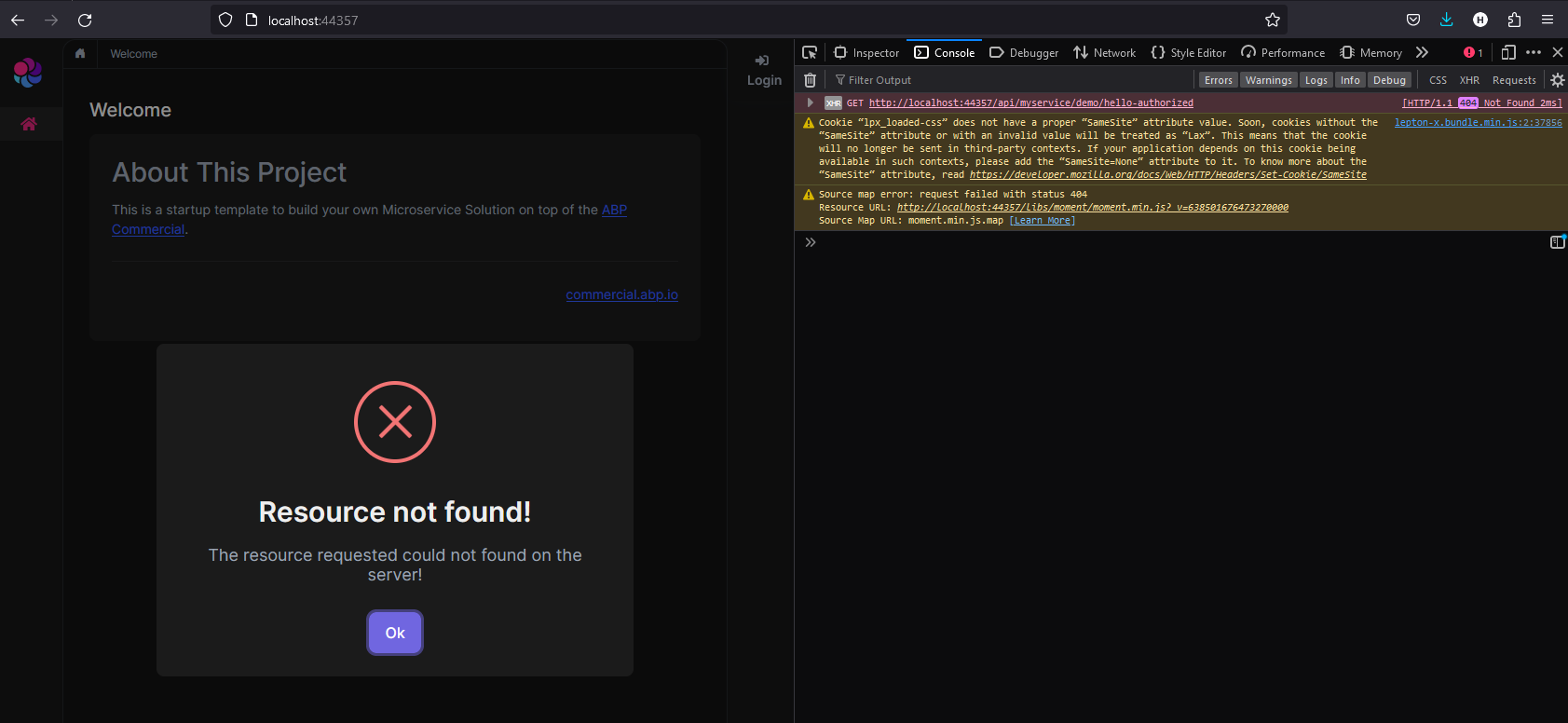
If I remove the C# client test from the Index.html.cs to test the Javascript alone it cannot resolve the endpoint and returns a 404.
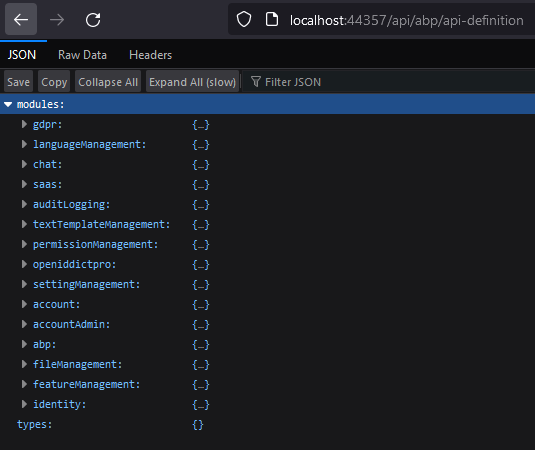
I notice that it is targeting http://localhost:44357/ which is the Web project. Looking at the api/abp/api-definition endpoint shows that the MyService module is not being surfaced here.
Not sure what I am missing at this point.
I also noticed that you had a Bookstore example of this template you were referencing earlier. Is it possible to access a copy of that code so I can compare it directly against my code to see if there are any discrepancies?
After implementing those changes it fixed the issue with the module name being invalid when I run the proxy generation command, but it still has the other issue with not being able to find a specific file. I'm not sure where this file is supposed to come from or what is supposed to be generating it.
PS C:\Source\Example\Example\apps\web\Example.Web> abp generate-proxy -t csharp -m MyService  --url http://localhost:44315 --without-contracts
ABP CLI 8.1.1
Could not find a part of the path 'C:\Source\Example\Example\apps\web\Example.Web\ClientProxies\MyService-generate-proxy.json'.
System.IO.DirectoryNotFoundException: Could not find a part of the path 'C:\Source\Example\Example\apps\web\Example.Web\ClientProxies\MyService-generate-proxy.json'.
   at Microsoft.Win32.SafeHandles.SafeFileHandle.CreateFile(String fullPath, FileMode mode, FileAccess access, FileShare share, FileOptions options)
   at Microsoft.Win32.SafeHandles.SafeFileHandle.Open(String fullPath, FileMode mode, FileAccess access, FileShare share, FileOptions options, Int64 preallocationSize, Nullable`1 unixCreateMode)
   at System.IO.Strategies.OSFileStreamStrategy..ctor(String path, FileMode mode, FileAccess access, FileShare share, FileOptions options, Int64 preallocationSize, Nullable`1 unixCreateMode)
   at System.IO.Strategies.FileStreamHelpers.ChooseStrategyCore(String path, FileMode mode, FileAccess access, FileShare share, FileOptions options, Int64 preallocationSize, Nullable`1 unixCreateMode)
   at System.IO.StreamWriter.ValidateArgsAndOpenPath(String path, Boolean append, Encoding encoding, Int32 bufferSize)
   at System.IO.StreamWriter..ctor(String path)
   at Volo.Abp.Cli.ServiceProxying.CSharp.CSharpServiceProxyGenerator.CreateJsonFile(GenerateProxyArgs args, ApplicationApiDescriptionModel applicationApiDescriptionModel) in D:\ci\Jenkins\workspace\abp-volo-release\abp\framework\src\Volo.Abp.Cli.Core\Volo\Abp\Cli\ServiceProxying\CSharp\CSharpServiceProxyGenerator.cs:line 166
   at Volo.Abp.Cli.ServiceProxying.CSharp.CSharpServiceProxyGenerator.GenerateProxyAsync(GenerateProxyArgs args) in D:\ci\Jenkins\workspace\abp-volo-release\abp\framework\src\Volo.Abp.Cli.Core\Volo\Abp\Cli\ServiceProxying\CSharp\CSharpServiceProxyGenerator.cs:line 154
   at Volo.Abp.Cli.Commands.ProxyCommandBase`1.ExecuteAsync(CommandLineArgs commandLineArgs) in D:\ci\Jenkins\workspace\abp-volo-release\abp\framework\src\Volo.Abp.Cli.Core\Volo\Abp\Cli\Commands\ProxyCommandBase.cs:line 57
   at Volo.Abp.Cli.CliService.RunInternalAsync(CommandLineArgs commandLineArgs) in D:\ci\Jenkins\workspace\abp-volo-release\abp\framework\src\Volo.Abp.Cli.Core\Volo\Abp\Cli\CliService.cs:line 173
   at Volo.Abp.Cli.CliService.RunAsync(String[] args) in D:\ci\Jenkins\workspace\abp-volo-release\abp\framework\src\Volo.Abp.Cli.Core\Volo\Abp\Cli\CliService.cs:line 80
Unhandled exception. System.IO.DirectoryNotFoundException: Could not find a part of the path 'C:\Source\Example\Example\apps\web\Example.Web\ClientProxies\MyService-generate-proxy.json'.
   at Microsoft.Win32.SafeHandles.SafeFileHandle.CreateFile(String fullPath, FileMode mode, FileAccess access, FileShare share, FileOptions options)
   at Microsoft.Win32.SafeHandles.SafeFileHandle.Open(String fullPath, FileMode mode, FileAccess access, FileShare share, FileOptions options, Int64 preallocationSize, Nullable`1 unixCreateMode)
   at System.IO.Strategies.OSFileStreamStrategy..ctor(String path, FileMode mode, FileAccess access, FileShare share, FileOptions options, Int64 preallocationSize, Nullable`1 unixCreateMode)
   at System.IO.Strategies.FileStreamHelpers.ChooseStrategyCore(String path, FileMode mode, FileAccess access, FileShare share, FileOptions options, Int64 preallocationSize, Nullable`1 unixCreateMode)
   at System.IO.StreamWriter.ValidateArgsAndOpenPath(String path, Boolean append, Encoding encoding, Int32 bufferSize)
   at System.IO.StreamWriter..ctor(String path)
   at Volo.Abp.Cli.ServiceProxying.CSharp.CSharpServiceProxyGenerator.CreateJsonFile(GenerateProxyArgs args, ApplicationApiDescriptionModel applicationApiDescriptionModel) in D:\ci\Jenkins\workspace\abp-volo-release\abp\framework\src\Volo.Abp.Cli.Core\Volo\Abp\Cli\ServiceProxying\CSharp\CSharpServiceProxyGenerator.cs:line 166
   at Volo.Abp.Cli.ServiceProxying.CSharp.CSharpServiceProxyGenerator.GenerateProxyAsync(GenerateProxyArgs args) in D:\ci\Jenkins\workspace\abp-volo-release\abp\framework\src\Volo.Abp.Cli.Core\Volo\Abp\Cli\ServiceProxying\CSharp\CSharpServiceProxyGenerator.cs:line 154
   at Volo.Abp.Cli.Commands.ProxyCommandBase`1.ExecuteAsync(CommandLineArgs commandLineArgs) in D:\ci\Jenkins\workspace\abp-volo-release\abp\framework\src\Volo.Abp.Cli.Core\Volo\Abp\Cli\Commands\ProxyCommandBase.cs:line 57
   at Volo.Abp.Cli.CliService.RunInternalAsync(CommandLineArgs commandLineArgs) in D:\ci\Jenkins\workspace\abp-volo-release\abp\framework\src\Volo.Abp.Cli.Core\Volo\Abp\Cli\CliService.cs:line 173
   at Volo.Abp.Cli.CliService.RunAsync(String[] args) in D:\ci\Jenkins\workspace\abp-volo-release\abp\framework\src\Volo.Abp.Cli.Core\Volo\Abp\Cli\CliService.cs:line 80
   at Volo.Abp.Cli.Program.Main(String[] args) in D:\ci\Jenkins\workspace\abp-volo-release\abp\framework\src\Volo.Abp.Cli\Volo\Abp\Cli\Program.cs:line 43
   at Volo.Abp.Cli.Program.<Main>(String[] args)
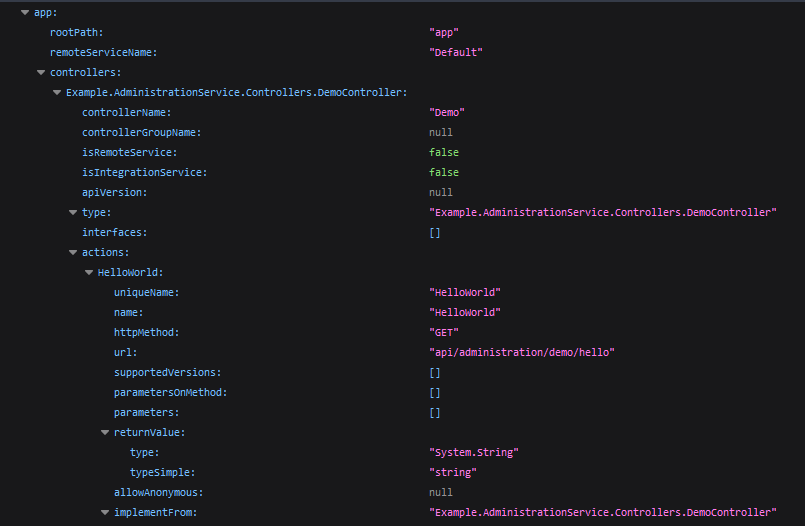
Another thing that I noticed is that the new module does not show up in the API definition on the Gateway.
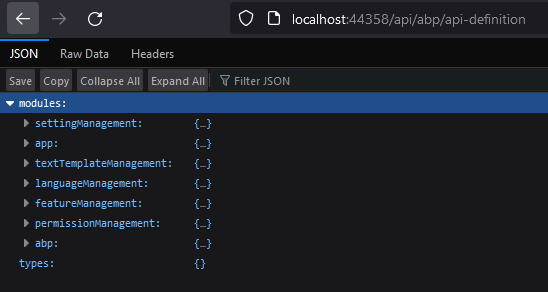 It also does not show up under "app" here if that is potentially expected.
Following the steps above when I try to generate the proxy I get:
 It gives the same result for a JS version as well.
I had the same result with my real project I am developing also.
To try a few extra things I also ran it with the module name as Example.MyService to no avail.
I also tried to generate the proxy directly in the MyService project instead of Web. (Assuming this is wrong generally, but I tried it nonetheless)
Running against the service directly without specifying the Module gave this error (Also guessing this is unimportant here and the running vs Web is what matters?) I also ran it from the Web directory and it gave the same basic error about not finding the file.
PS C:\Source\Example\Example\apps\web\Example.Web> abp generate-proxy -t csharp  --url http://localhost:44315 --without-contracts
ABP CLI 8.1.1
Could not find a part of the path 'C:\Source\Example\Example\apps\web\Example.Web\ClientProxies\app-generate-proxy.json'.
System.IO.DirectoryNotFoundException: Could not find a part of the path 'C:\Source\Example\Example\apps\web\Example.Web\ClientProxies\app-generate-proxy.json'.
   at Microsoft.Win32.SafeHandles.SafeFileHandle.CreateFile(String fullPath, FileMode mode, FileAccess access, FileShare share, FileOptions options)
   at Microsoft.Win32.SafeHandles.SafeFileHandle.Open(String fullPath, FileMode mode, FileAccess access, FileShare share, FileOptions options, Int64 preallocationSize, Nullable`1 unixCreateMode)
   at System.IO.Strategies.OSFileStreamStrategy..ctor(String path, FileMode mode, FileAccess access, FileShare share, FileOptions options, Int64 preallocationSize, Nullable`1 unixCreateMode)
   at System.IO.Strategies.FileStreamHelpers.ChooseStrategyCore(String path, FileMode mode, FileAccess access, FileShare share, FileOptions options, Int64 preallocationSize, Nullable`1 unixCreateMode)
   at System.IO.StreamWriter.ValidateArgsAndOpenPath(String path, Boolean append, Encoding encoding, Int32 bufferSize)
   at System.IO.StreamWriter..ctor(String path)
   at Volo.Abp.Cli.ServiceProxying.CSharp.CSharpServiceProxyGenerator.CreateJsonFile(GenerateProxyArgs args, ApplicationApiDescriptionModel applicationApiDescriptionModel) in D:\ci\Jenkins\workspace\abp-volo-release\abp\framework\src\Volo.Abp.Cli.Core\Volo\Abp\Cli\ServiceProxying\CSharp\CSharpServiceProxyGenerator.cs:line 166
   at Volo.Abp.Cli.ServiceProxying.CSharp.CSharpServiceProxyGenerator.GenerateProxyAsync(GenerateProxyArgs args) in D:\ci\Jenkins\workspace\abp-volo-release\abp\framework\src\Volo.Abp.Cli.Core\Volo\Abp\Cli\ServiceProxying\CSharp\CSharpServiceProxyGenerator.cs:line 154
   at Volo.Abp.Cli.Commands.ProxyCommandBase`1.ExecuteAsync(CommandLineArgs commandLineArgs) in D:\ci\Jenkins\workspace\abp-volo-release\abp\framework\src\Volo.Abp.Cli.Core\Volo\Abp\Cli\Commands\ProxyCommandBase.cs:line 57
   at Volo.Abp.Cli.CliService.RunInternalAsync(CommandLineArgs commandLineArgs) in D:\ci\Jenkins\workspace\abp-volo-release\abp\framework\src\Volo.Abp.Cli.Core\Volo\Abp\Cli\CliService.cs:line 173
   at Volo.Abp.Cli.CliService.RunAsync(String[] args) in D:\ci\Jenkins\workspace\abp-volo-release\abp\framework\src\Volo.Abp.Cli.Core\Volo\Abp\Cli\CliService.cs:line 80
Unhandled exception. System.IO.DirectoryNotFoundException: Could not find a part of the path 'C:\Source\Example\Example\apps\web\Example.Web\ClientProxies\app-generate-proxy.json'.
   at Microsoft.Win32.SafeHandles.SafeFileHandle.CreateFile(String fullPath, FileMode mode, FileAccess access, FileShare share, FileOptions options)
   at Microsoft.Win32.SafeHandles.SafeFileHandle.Open(String fullPath, FileMode mode, FileAccess access, FileShare share, FileOptions options, Int64 preallocationSize, Nullable`1 unixCreateMode)
   at System.IO.Strategies.OSFileStreamStrategy..ctor(String path, FileMode mode, FileAccess access, FileShare share, FileOptions options, Int64 preallocationSize, Nullable`1 unixCreateMode)
   at System.IO.Strategies.FileStreamHelpers.ChooseStrategyCore(String path, FileMode mode, FileAccess access, FileShare share, FileOptions options, Int64 preallocationSize, Nullable`1 unixCreateMode)
   at System.IO.StreamWriter.ValidateArgsAndOpenPath(String path, Boolean append, Encoding encoding, Int32 bufferSize)
   at System.IO.StreamWriter..ctor(String path)
   at Volo.Abp.Cli.ServiceProxying.CSharp.CSharpServiceProxyGenerator.CreateJsonFile(GenerateProxyArgs args, ApplicationApiDescriptionModel applicationApiDescriptionModel) in D:\ci\Jenkins\workspace\abp-volo-release\abp\framework\src\Volo.Abp.Cli.Core\Volo\Abp\Cli\ServiceProxying\CSharp\CSharpServiceProxyGenerator.cs:line 166
   at Volo.Abp.Cli.ServiceProxying.CSharp.CSharpServiceProxyGenerator.GenerateProxyAsync(GenerateProxyArgs args) in D:\ci\Jenkins\workspace\abp-volo-release\abp\framework\src\Volo.Abp.Cli.Core\Volo\Abp\Cli\ServiceProxying\CSharp\CSharpServiceProxyGenerator.cs:line 154
   at Volo.Abp.Cli.Commands.ProxyCommandBase`1.ExecuteAsync(CommandLineArgs commandLineArgs) in D:\ci\Jenkins\workspace\abp-volo-release\abp\framework\src\Volo.Abp.Cli.Core\Volo\Abp\Cli\Commands\ProxyCommandBase.cs:line 57
   at Volo.Abp.Cli.CliService.RunInternalAsync(CommandLineArgs commandLineArgs) in D:\ci\Jenkins\workspace\abp-volo-release\abp\framework\src\Volo.Abp.Cli.Core\Volo\Abp\Cli\CliService.cs:line 173
   at Volo.Abp.Cli.CliService.RunAsync(String[] args) in D:\ci\Jenkins\workspace\abp-volo-release\abp\framework\src\Volo.Abp.Cli.Core\Volo\Abp\Cli\CliService.cs:line 80
   at Volo.Abp.Cli.Program.Main(String[] args) in D:\ci\Jenkins\workspace\abp-volo-release\abp\framework\src\Volo.Abp.Cli\Volo\Abp\Cli\Program.cs:line 43
   at Volo.Abp.Cli.Program.<Main>(String[] args)









