hi
Can you try adding a custom functional interceptor that reads the XSRF-TOKEN cookie and adds the RequestVerificationToken header to mutating requests? Then register it in app.config.ts?
This ensures that the RequestVerificationToken header is always included in POST/PUT/DELETE requests, regardless of whether the URL is absolute or relative.
// src/app/shared/xsrf-absolute-url.interceptor.ts
import { HttpInterceptorFn } from '@angular/common/http';
import { inject } from '@angular/core';
import { DOCUMENT } from '@angular/common';

export const xsrfAbsoluteUrlInterceptor: HttpInterceptorFn = (req, next) => {
  if (req.method === 'GET' || req.method === 'HEAD') {
    return next(req);
  }
  if (req.headers.has('RequestVerificationToken')) {
    return next(req);
  }
  const doc = inject(DOCUMENT);
  const cookie = doc.cookie
    .split(';')
    .map(c => c.trim())
    .find(c => c.startsWith('XSRF-TOKEN='));
  const token = cookie ? decodeURIComponent(cookie.substring('XSRF-TOKEN='.length)) : null;
  if (token) {
    req = req.clone({ headers: req.headers.set('RequestVerificationToken', token) });
  }
  return next(req);
};
import { provideHttpClient, withInterceptors } from '@angular/common/http';
import { xsrfAbsoluteUrlInterceptor } from './shared/xsrf-absolute-url.interceptor';

// inside providers array:
provideHttpClient(withInterceptors([xsrfAbsoluteUrlInterceptor])),
Thanks.
Hi
Can you share your Angular app source code? maybe you disabled the withNoXsrfProtection
Thanks.
hi
I will check it again.
Thanks.
hi
https://us05web.zoom.us/j/85934722266?pwd=XJfv2RgTHITFKVzCoBwK2PhJhQuxiv.1
How to record the HTTP request and response of Chrome
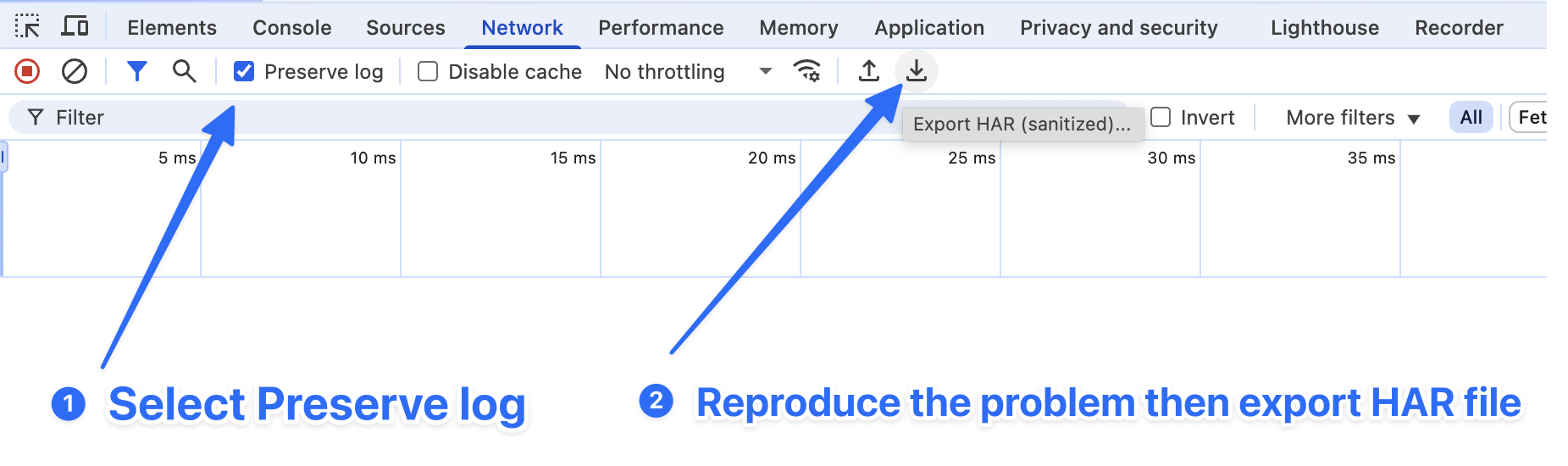
If you encounter problems in the development or production environment, we would like to see the log to troubleshoot the problem.
Since logging is now configured via appsettings.json, please modify the Serilog section to enable Debug logs.
Change:
"Serilog": {
  "MinimumLevel": {
    "Default": "Information",
    "Override": {
      "Microsoft": "Information",
      "Microsoft.EntityFrameworkCore": "Warning"
    }
  }
}
to:
"Serilog": {
  "MinimumLevel": {
    "Default": "Debug",
    "Override": {
      "Microsoft": "Information",
      "Microsoft.EntityFrameworkCore": "Warning"
    }
  }
}
We don't want to see EF Core's
Debuglogs when your problem has nothing to do with EF Core.
If you have an EF Core-related problem, you can change:
"Microsoft.EntityFrameworkCore": "Warning"
to:
"Microsoft.EntityFrameworkCore": "Debug"
You can also enable EnableSensitiveDataLogging to see EF Core debug logs.
actions.DbContextOptions.EnableSensitiveDataLogging();
If you have an OpenIddict related problem, please override the OpenIddict log level to Verbose.
"Serilog": {
  "MinimumLevel": {
    "Default": "Debug",
    "Override": {
      "Microsoft": "Information",
      "Microsoft.EntityFrameworkCore": "Warning",
      "OpenIddict": "Verbose"
    }
  }
}
If your API website experiences a JWT authentication problem, please ShowPII and output identity model logs.
IdentityModelEventSource.ShowPII = true;

IdentityModelEventSource.Logger.LogLevel = EventLevel.Verbose;
var wilsonTextLogger = new TextWriterEventListener("Logs/identitymodel.txt");
wilsonTextLogger.EnableEvents(IdentityModelEventSource.Logger, EventLevel.Verbose);
hi
Can you try to change TokenCookie.Path of AbpAntiForgeryOptions to /?
public override void ConfigureServices(ServiceConfigurationContext context)
{
    //...
    Configure<AbpAntiForgeryOptions>(options =>
    {
        options.TokenCookie.Path = "/";
    });
    //...
}
hi
Please join again
https://us05web.zoom.us/j/85322787279?pwd=X9wxa4ilbn4ekFtIJpnPkKTfuHa1jU.1
Thanks.
Please use zoom windows app to join the meeting https://zoom.us/download?os=win
https://us05web.zoom.us/j/86442867737?pwd=Ioq7oIc71V1AugwY0w3sMU4QcQro4d.1 Thanks
hi
Your logs level still Info instad of Debug.
Can you use the Zoom client app to join a meeting and share your screen?
https://us05web.zoom.us/j/84753270199?pwd=TOgWscguZl2oIO3wYRwMyV8NqE4bIZ.1









