hi
You can rename your SearchModel class to MySearchModel or inherit the Volo.Docs.Pages.Documents.SearchModel.
[Dependency(ReplaceServices = true)]
[ExposeServices(typeof(SearchModel), typeof(MySearchModel))]
public class MySearchModel : SearchModel
{
    private readonly IProjectAppService _projectAppService;
    private readonly IDocumentAppService _documentAppService;
    private readonly HtmlEncoder _encoder;

    public MySearchModel(
        IProjectAppService projectAppService,
        IDocumentAppService documentAppService,
        HtmlEncoder encoder)
        : base(projectAppService, documentAppService, encoder)
    {
        _projectAppService = projectAppService;
        _documentAppService = documentAppService;
        _encoder = encoder;
    }

    public override async Task<IActionResult> OnGetAsync(string keyword)
    {
        if (!await _documentAppService.FullSearchEnabledAsync())
        {
            return RedirectToPage("Index");
        }

        KeyWord = keyword;

        Project = await _projectAppService.GetAsync(ProjectName);

        var output = await _projectAppService.GetVersionsAsync(Project.ShortName);

        var versions = output.Items.ToList();

        if (versions.Any() &&
            string.Equals(Version, DocsAppConsts.Latest, StringComparison.OrdinalIgnoreCase))
        {
            if ((!Project.ExtraProperties.ContainsKey("GithubVersionProviderSource") ||
                 (GithubVersionProviderSource) (long) Project.ExtraProperties["GithubVersionProviderSource"] ==GithubVersionProviderSource.Releases) &&
                !string.IsNullOrEmpty(Project.LatestVersionBranchName))
            {
                Version = Project.LatestVersionBranchName;
            }
            else
            {
                Version = (versions.FirstOrDefault(v => !SemanticVersionHelper.IsPreRelease(v.Name)) ?? versions.First()).Name;
            }
        }

        SearchOutputs = await _documentAppService.SearchAsync(new DocumentSearchInput
        {
            ProjectId = Project.Id,
            Context = KeyWord,
            LanguageCode = LanguageCode,
            Version = Version
        });

        var highlightTag1 = Guid.NewGuid().ToString();
        var highlightTag2 = Guid.NewGuid().ToString();
        foreach (var searchOutput in SearchOutputs)
        {
            for (var i = 0; i < searchOutput.Highlight.Count; i++)
            {
                searchOutput.Highlight[i] = _encoder
                    .Encode(searchOutput.Highlight[i].Replace("<highlight>", highlightTag1)
                        .Replace("</highlight>", highlightTag2))
                    .Replace(highlightTag1, "<highlight>").Replace(highlightTag2, "</highlight>");
            }
        }

        return Page();
    }

}
hi
I think it's impossible by default.
https://docs.abp.io/en/commercial/latest/modules/chat
hi
It works the same.

hi
We will creating such a document, currently you can refer to the code of easy CRM
ok, can you try to change the current tenant to host?
If it still not working, I will try to reproduce it in a new project.
You can also try to reproduce it.
hi
You can take a look at this document.
https://docs.abp.io/en/commercial/latest/startup-templates/microservice/interservice-communication
Does the back-end application have any error logs?
hi
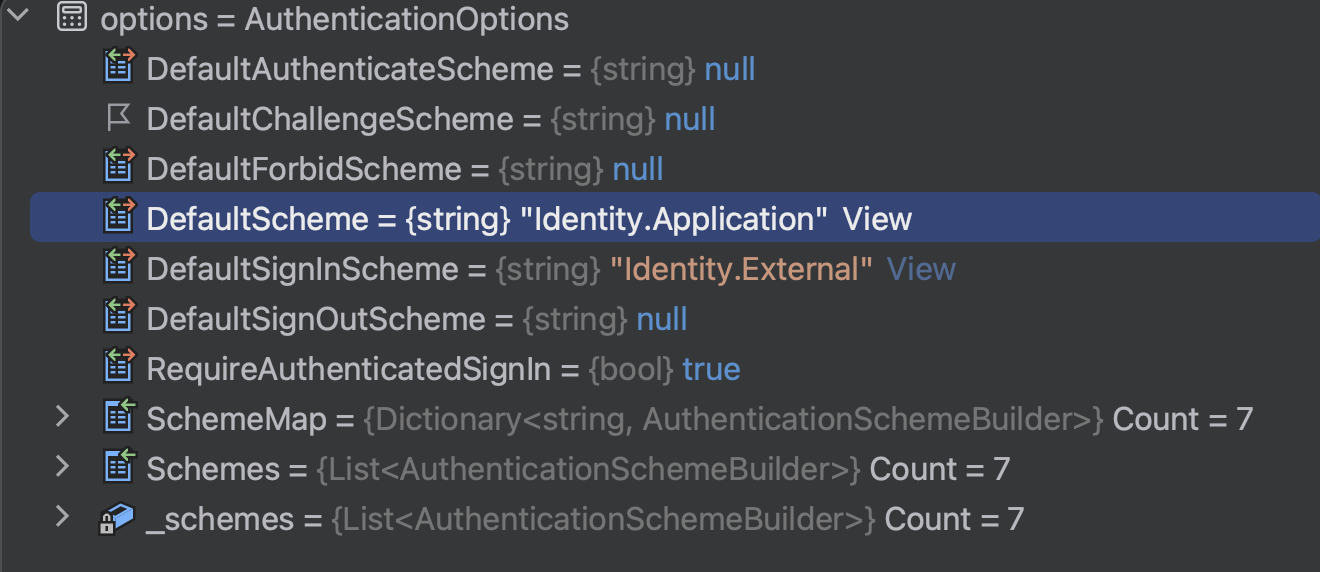
You are using IdentityConstants.ExternalScheme(https://localhost:5001/) as SignInScheme of OpenIdConnect.
but the default scheme is Identity.Application(account/login).
The Authorize of CustomPage will try authentication with Identity.Application(account/login).
I don't recommend you change DefaultSignInScheme.
hi
Please add ChatWebModule as well.
If still not working please share a project. liming.ma@volosoft.com
hi

public async Task<List<string>> GetOrgUnitUsers(CancellationToken cancellationToken = default)
{
    await EnsureConnectionOpenAsync(cancellationToken);
    using (var command = await CreateCommand("GetOrgUnitUsers", CommandType.StoredProcedure, new SqlParameter("OrgUnitIds", "1")))
    {
        using (var dataReader = await command.ExecuteReaderAsync(cancellationToken))
        {
            var result = new List<string>();

            while (await dataReader.ReadAsync(cancellationToken))
            {
                result.Add(dataReader["Id"].ToString());

            }
            return result;
        }
    }
}




