Hi @maliming, the PR updated the AbpAutoMapperModule.cs, may I know how can I override this module file?
so far, I know how to override the application service/controller only: https://docs.abp.io/en/abp/4.4/Customizing-Application-Modules-Overriding-Services
Thank you.
Hi @maliming, thank you for your prompt reply.
We dont have plan to upgrade the version yet, is there any workaround or any other solution to inject a service in AutoMapper?
If you're creating a bug/problem report, please include followings:
Hi, I am trying to figure out how to inject a service in AutoMapper profile, I have tried the IMappingAction method from the link below: https://docs.automapper.org/en/stable/Before-and-after-map-actions.html
but got this exception:
[21:31:09 ERR] Error mapping types.
Mapping types:
Object -> List`1
System.Object -> System.Collections.Generic.List`1[[TestA, TestProject.Application.Contracts, Version=0.1.0.0, Culture=neutral, PublicKeyToken=null]]
AutoMapper.AutoMapperMappingException: Error mapping types.
Mapping types:
Object -> List`1
System.Object -> System.Collections.Generic.List`1[[TestA, TestProject.Application.Contracts, Version=0.1.0.0, Culture=neutral, PublicKeyToken=null]]
 ---> System.MissingMethodException: No parameterless constructor defined for type 'TestProject.TestMappingAction'.
   at System.RuntimeType.CreateInstanceDefaultCtorSlow(Boolean publicOnly, Boolean wrapExceptions, Boolean fillCache)
   at System.RuntimeType.CreateInstanceDefaultCtor(Boolean publicOnly, Boolean skipCheckThis, Boolean fillCache, Boolean wrapExceptions)
   at System.Activator.CreateInstance(Type type, Boolean nonPublic, Boolean wrapExceptions)
   at System.Activator.CreateInstance(Type type)
   at AutoMapper.Configuration.MappingExpressionBase`3.<AfterMap>g__AfterFunction|11_0[TMappingAction](TSource src, TDestination dest, ResolutionContext ctxt)
   at lambda_method(Closure , Object , List`1 , ResolutionContext )
   --- End of inner exception stack trace ---
   at lambda_method(Closure , Object , List`1 , ResolutionContext )
   at Volo.Abp.AutoMapper.AutoMapperAutoObjectMappingProvider.Map[TSource,TDestination](Object source)
   at Volo.Abp.ObjectMapping.DefaultObjectMapper.AutoMap[TSource,TDestination](Object source)
   at Volo.Abp.ObjectMapping.DefaultObjectMapper.Map[TSource,TDestination](TSource source)
What did I miss in my configuration? Any help would be greatly appreciated.
Hi @liangshiwei, thanks, my host (server) application was not running when I ran the generate-proxy command.
If you're creating a bug/problem report, please include followings:
Hi, I am working on my corporate laptop with have limit on the internet access, we have our own npm registry, what should I do to be able to run the abp generate-proxy without internet access, so far I got the error below:
[13:42:20 INF] ABP CLI (https://abp.io)
[13:42:21 INF] Version 3.3.2 (Stable)
[13:42:22 WRN] 1. HTTP request attempt failed to https://abp.io/api/app/nugetPackage/proPackageNames with an error: 403-Forbidden. Waiting 2 secs for the next try...
[13:42:25 WRN] 2. HTTP request attempt failed to https://abp.io/api/app/nugetPackage/proPackageNames with an error: 403-Forbidden. Waiting 4 secs for the next try...
[13:42:29 WRN] 3. HTTP request attempt failed to https://abp.io/api/app/nugetPackage/proPackageNames with an error: 403-Forbidden. Waiting 7 secs for the next try...
[13:42:36 ERR] Remote server returns '403-Forbidden'.
[13:42:37 WRN] 1. HTTP request attempt failed to https://api.nuget.org/v3-flatcontainer/volo.abp.cli/index.json with an error: 403-Forbidden. Waiting 2 secs for the next try...
[13:42:39 WRN] 2. HTTP request attempt failed to https://api.nuget.org/v3-flatcontainer/volo.abp.cli/index.json with an error: 403-Forbidden. Waiting 4 secs for the next try...
[13:42:43 WRN] 3. HTTP request attempt failed to https://api.nuget.org/v3-flatcontainer/volo.abp.cli/index.json with an error: 403-Forbidden. Waiting 7 secs for the next try...
[13:42:51 WRN] Unable to retrieve the latest version
[13:42:51 WRN] Remote server returns '403-Forbidden'.
[13:42:51 WRN] Couldn't determinate version of "@abp/ng.schematics" package.
[API Not Available] Please double-check the URL in the source project environment and make sure your application is up and running.
Thank you.
Hi @maliming, it works now.
Thank you.
Hi maliming, I have implemented as the guide but it does not work.
If you look at my post, I already called the MapExtraPropertiesTo method:
user.MapExtraPropertiesTo(userDto);
I also added the mapping in the Mapper Profile:
CreateMap<IdentityUser, IdentityUserDto>().MapExtraProperties();
Hi, I have overridden the CreateAsync method in IdentityUserAppService, and added an extra property named "isActiveDirectory":
public override async Task<IdentityUserDto> CreateAsync(IdentityUserCreateDto input)
{
    ...
    user.SetProperty(IsActiveDirectoryPropertyName, isActiveDirectory);
    ...
}
the extra property has been added successfully in db:

However, when we retrieve the mapping userDto, the ExtraProperties returned null
var userDto = ObjectMapper.Map<IdentityUser, IdentityUserDto>(user);
user.MapExtraPropertiesTo(userDto);
return userDto;
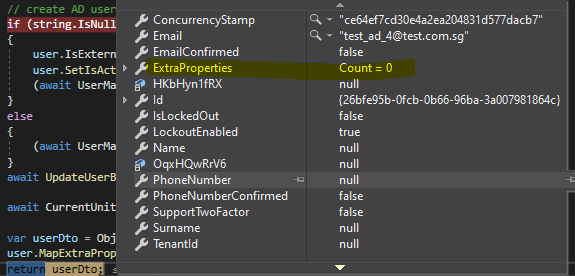
Could you please help me check?
Thank you.
Hi, I am looking for the other topics and found the answer, I have copied the access-token to the corp laptop
%UserProfile%\.abp\cli\access-token.bin
Hi, my corporate laptop has limited internet connection, it only allows to browse the internet using "virtual browser", the other tools such as cmd, powershell.... have been restricted to the internet connection which I could not login to abp using abp cli
I can access the abp openid using browser but could not with cmd:
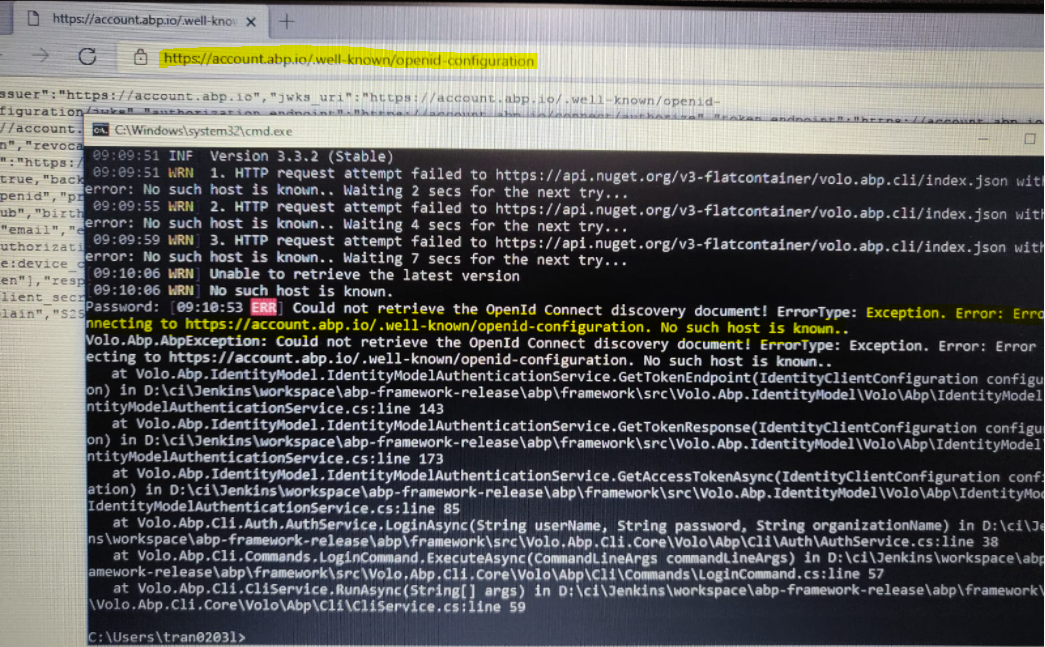
Now I got stuck at license check and unable to launch the application using Visual Studio:

Is there any workaround to resolve this issue?
Thank you.









