If you're creating a bug/problem report, please include followings:
Hi, I am trying to figure out how to inject a service in AutoMapper profile, I have tried the IMappingAction method from the link below: https://docs.automapper.org/en/stable/Before-and-after-map-actions.html
but got this exception:
[21:31:09 ERR] Error mapping types.
Mapping types:
Object -> List`1
System.Object -> System.Collections.Generic.List`1[[TestA, TestProject.Application.Contracts, Version=0.1.0.0, Culture=neutral, PublicKeyToken=null]]
AutoMapper.AutoMapperMappingException: Error mapping types.
Mapping types:
Object -> List`1
System.Object -> System.Collections.Generic.List`1[[TestA, TestProject.Application.Contracts, Version=0.1.0.0, Culture=neutral, PublicKeyToken=null]]
 ---> System.MissingMethodException: No parameterless constructor defined for type 'TestProject.TestMappingAction'.
   at System.RuntimeType.CreateInstanceDefaultCtorSlow(Boolean publicOnly, Boolean wrapExceptions, Boolean fillCache)
   at System.RuntimeType.CreateInstanceDefaultCtor(Boolean publicOnly, Boolean skipCheckThis, Boolean fillCache, Boolean wrapExceptions)
   at System.Activator.CreateInstance(Type type, Boolean nonPublic, Boolean wrapExceptions)
   at System.Activator.CreateInstance(Type type)
   at AutoMapper.Configuration.MappingExpressionBase`3.<AfterMap>g__AfterFunction|11_0[TMappingAction](TSource src, TDestination dest, ResolutionContext ctxt)
   at lambda_method(Closure , Object , List`1 , ResolutionContext )
   --- End of inner exception stack trace ---
   at lambda_method(Closure , Object , List`1 , ResolutionContext )
   at Volo.Abp.AutoMapper.AutoMapperAutoObjectMappingProvider.Map[TSource,TDestination](Object source)
   at Volo.Abp.ObjectMapping.DefaultObjectMapper.AutoMap[TSource,TDestination](Object source)
   at Volo.Abp.ObjectMapping.DefaultObjectMapper.Map[TSource,TDestination](TSource source)
What did I miss in my configuration? Any help would be greatly appreciated.
If you're creating a bug/problem report, please include followings:
Hi, I am working on my corporate laptop with have limit on the internet access, we have our own npm registry, what should I do to be able to run the abp generate-proxy without internet access, so far I got the error below:
[13:42:20 INF] ABP CLI (https://abp.io)
[13:42:21 INF] Version 3.3.2 (Stable)
[13:42:22 WRN] 1. HTTP request attempt failed to https://abp.io/api/app/nugetPackage/proPackageNames with an error: 403-Forbidden. Waiting 2 secs for the next try...
[13:42:25 WRN] 2. HTTP request attempt failed to https://abp.io/api/app/nugetPackage/proPackageNames with an error: 403-Forbidden. Waiting 4 secs for the next try...
[13:42:29 WRN] 3. HTTP request attempt failed to https://abp.io/api/app/nugetPackage/proPackageNames with an error: 403-Forbidden. Waiting 7 secs for the next try...
[13:42:36 ERR] Remote server returns '403-Forbidden'.
[13:42:37 WRN] 1. HTTP request attempt failed to https://api.nuget.org/v3-flatcontainer/volo.abp.cli/index.json with an error: 403-Forbidden. Waiting 2 secs for the next try...
[13:42:39 WRN] 2. HTTP request attempt failed to https://api.nuget.org/v3-flatcontainer/volo.abp.cli/index.json with an error: 403-Forbidden. Waiting 4 secs for the next try...
[13:42:43 WRN] 3. HTTP request attempt failed to https://api.nuget.org/v3-flatcontainer/volo.abp.cli/index.json with an error: 403-Forbidden. Waiting 7 secs for the next try...
[13:42:51 WRN] Unable to retrieve the latest version
[13:42:51 WRN] Remote server returns '403-Forbidden'.
[13:42:51 WRN] Couldn't determinate version of "@abp/ng.schematics" package.
[API Not Available] Please double-check the URL in the source project environment and make sure your application is up and running.
Thank you.
Hi, I have overridden the CreateAsync method in IdentityUserAppService, and added an extra property named "isActiveDirectory":
public override async Task<IdentityUserDto> CreateAsync(IdentityUserCreateDto input)
{
    ...
    user.SetProperty(IsActiveDirectoryPropertyName, isActiveDirectory);
    ...
}
the extra property has been added successfully in db:

However, when we retrieve the mapping userDto, the ExtraProperties returned null
var userDto = ObjectMapper.Map<IdentityUser, IdentityUserDto>(user);
user.MapExtraPropertiesTo(userDto);
return userDto;
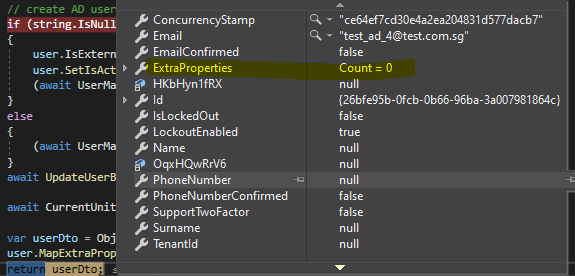
Could you please help me check?
Thank you.
Hi, my corporate laptop has limited internet connection, it only allows to browse the internet using "virtual browser", the other tools such as cmd, powershell.... have been restricted to the internet connection which I could not login to abp using abp cli
I can access the abp openid using browser but could not with cmd:
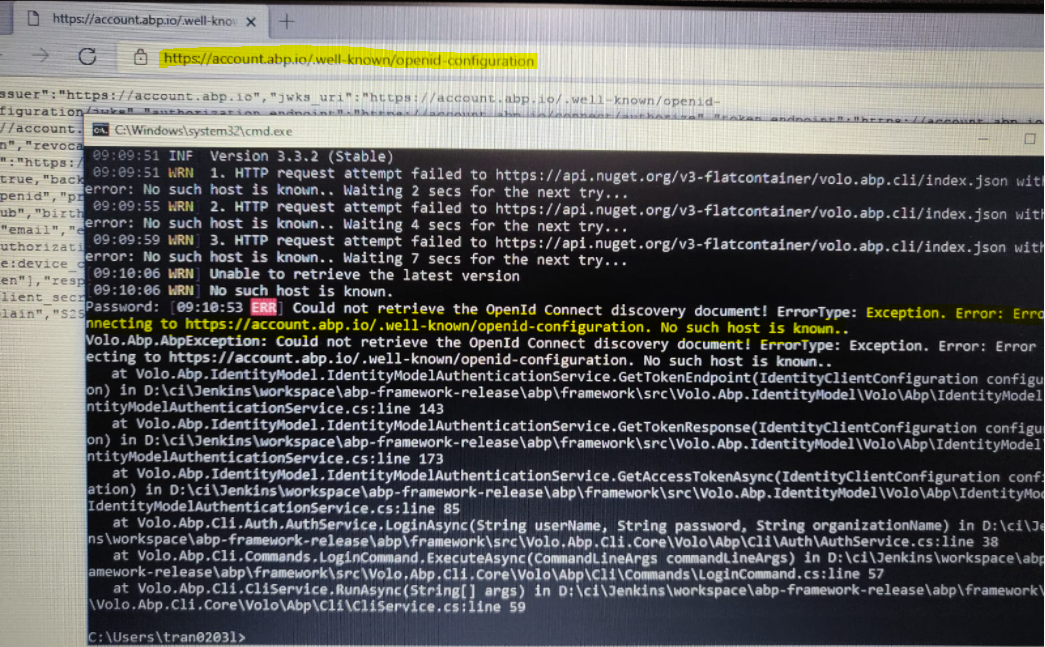
Now I got stuck at license check and unable to launch the application using Visual Studio:

Is there any workaround to resolve this issue?
Thank you.
Hi, please ignore the question, I found that our license has been expired, we are trying to renew it.
Thank you.
Hi Abp support team, we are exploring the "Form" module in the latest version (4.4.3) and got 500 error when clicking the Setting button, below are the screenshot and the log
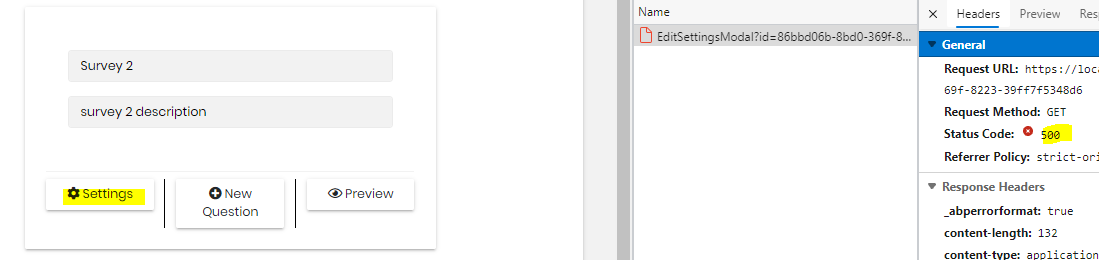
[17:20:13 INF] Executing endpoint '/Forms/Questions/EditSettingsModal' [17:20:13 INF] Route matched with {page = "/Forms/Questions/EditSettingsModal", action = "", controller = "", area = ""}. Executing page /Forms/Questions/EditSettingsModal [17:20:13 INF] Skipping the execution of current filter as its not the most effective filter implementing the policy Microsoft.AspNetCore.Mvc.ViewFeatures.IAntiforgeryPolicy [17:20:13 INF] Executing handler method Volo.Forms.Web.Pages.Forms.Questions.EditSettingsModalModel.OnGetAsync - ModelState is Valid [17:20:13 ERR] ---------- RemoteServiceErrorInfo ---------- { "code": null, "message": "An internal error occurred during your request!", "details": null, "data": {}, "validationErrors": null } [17:20:13 ERR] Missing path parameter value for id (id) Volo.Abp.AbpException: Missing path parameter value for id (id) at Volo.Abp.Http.Client.DynamicProxying.UrlBuilder.ReplacePathVariables(StringBuilder urlBuilder, IList1 actionParameters, IReadOnlyDictionary2 methodArguments, ApiVersionInfo apiVersion) at Volo.Abp.Http.Client.DynamicProxying.UrlBuilder.GenerateUrlWithParameters(ActionApiDescriptionModel action, IReadOnlyDictionary2 methodArguments, ApiVersionInfo apiVersion) at Volo.Abp.Http.Client.DynamicProxying.DynamicHttpProxyInterceptor1.MakeRequestAsync(IAbpMethodInvocation invocation) at Volo.Abp.Http.Client.DynamicProxying.DynamicHttpProxyInterceptor1.MakeRequestAndGetResultAsync[T](IAbpMethodInvocation invocation) at Volo.Abp.Http.Client.DynamicProxying.DynamicHttpProxyInterceptor1.GetResultAsync(Task task, Type resultType) at Volo.Abp.Http.Client.DynamicProxying.DynamicHttpProxyInterceptor1.InterceptAsync(IAbpMethodInvocation invocation) at Volo.Abp.Castle.DynamicProxy.CastleAsyncAbpInterceptorAdapter1.InterceptAsync[TResult](IInvocation invocation, IInvocationProceedInfo proceedInfo, Func3 proceed) at Castle.DynamicProxy.AsyncInterceptorBase.ProceedAsynchronous[TResult](IInvocation invocation, IInvocationProceedInfo proceedInfo) at Volo.Abp.Castle.DynamicProxy.CastleAbpMethodInvocationAdapterWithReturnValue1.ProceedAsync() at Volo.Abp.Validation.ValidationInterceptor.InterceptAsync(IAbpMethodInvocation invocation) at Volo.Abp.Castle.DynamicProxy.CastleAsyncAbpInterceptorAdapter1.InterceptAsync[TResult](IInvocation invocation, IInvocationProceedInfo proceedInfo, Func3 proceed) at Volo.Forms.Web.Pages.Forms.Questions.EditSettingsModalModel.OnGetAsync() at Microsoft.AspNetCore.Mvc.RazorPages.Infrastructure.ExecutorFactory.NonGenericTaskHandlerMethod.Execute(Object receiver, Object[] arguments) at Microsoft.AspNetCore.Mvc.RazorPages.Infrastructure.PageActionInvoker.InvokeHandlerMethodAsync() at Microsoft.AspNetCore.Mvc.RazorPages.Infrastructure.PageActionInvoker.InvokeNextPageFilterAsync() [17:20:13 INF] Executing ObjectResult, writing value of type 'Volo.Abp.Http.RemoteServiceErrorResponse'. [17:20:13 INF] Executed page /Forms/Questions/EditSettingsModal in 22.8952ms [17:20:13 INF] Executed endpoint '/Forms/Questions/EditSettingsModal'
Could you please help us check?
Thank you.
Hi, I was searching how to achieve the SSO for user when switching tenant and saw the linking user feature, could you please explain how does it work? I could not find any document about it.
I had logged in as user1 and selected "new link user" and logged in as user2, it prompted "The target user is not linked to you!", there was an error when request for the access token:
{"ClientId": null, "ClientName": null, "ValidateLifetime": true, "AccessTokenType": "Jwt", "ExpectedScope": null, "TokenHandle": null, "JwtId": null, "Claims": {"nbf": 1634111151, "exp": 1665647151, "iss": "https://localhost:44349", "aud": "abp_latest", "client_id": "abp_latest_App", "sub": "a8346126-26bd-e475-29df-39ff8ac671b5", "auth_time": 1634111150, "idp": "local", "preferred_username": "user1", "role": "user_role", "phone_number_verified": "False", "email": "user1@test.com.sg", "email_verified": "False", "name": "user1", "sid": "C9AD8A4E92DBF82F9D6A7A5900988C02", "iat": 1634111151, "scope": ["openid", "profile", "role", "email", "phone", "abp_latest", "offline_access"], "amr": "pwd"}, "$type": "TokenValidationLog"} [15:50:08 ERR] Invalid extension grant{"error": "The target user is not linked to you!"}, details: {"ClientId": "abp_latest_App", "ClientName": "abp_latest_App", "GrantType": "LinkLogin", "Scopes": "abp_latest email offline_access openid phone profile role", "AuthorizationCode": "********", "RefreshToken": "********", "UserName": null, "AuthenticationContextReferenceClasses": null, "Tenant": null, "IdP": null, "Raw": {"grant_type": "LinkLogin", "LinkUserId": "a8346126-26bd-e475-29df-39ff8ac671b5",
Hi, I am using Abp version 3.3.2, I have checked the code, it does not support upload/download content using stream, is there a way to override it to using stream same as 4.x version, how many files we need to override, could you please guide me the steps?
Another issue I found when trying Abp version 4.3.2, the downloaded file size is 0kb when downloading the large file (around ~500mb and above), there is no exception in the logs.
ABP Framework version: v3.3.2 UI type: Angular DB provider: EF Core Identity Server Separated: yes
Hi, I found an issue when user does first login with external login provider, the security log has logged one record with Action = 'LoginFailed' even I had logged in successfully.

Another question, after I completed the registration for new user, the new user has been inserted into AbpUsers table but the flag IsExternal = 0, it should be 1, right?
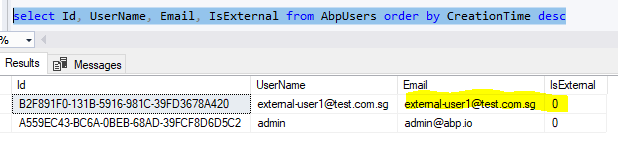
ABP Framework version: v3.3.2 UI type: Angular DB provider: EF Core Tiered (MVC) or Identity Server Separated (Angular): yes
Hi, I have installed the file management module as guided:
Backend:
Angular UI:
but the "File Management" is not displayed in the menu section:
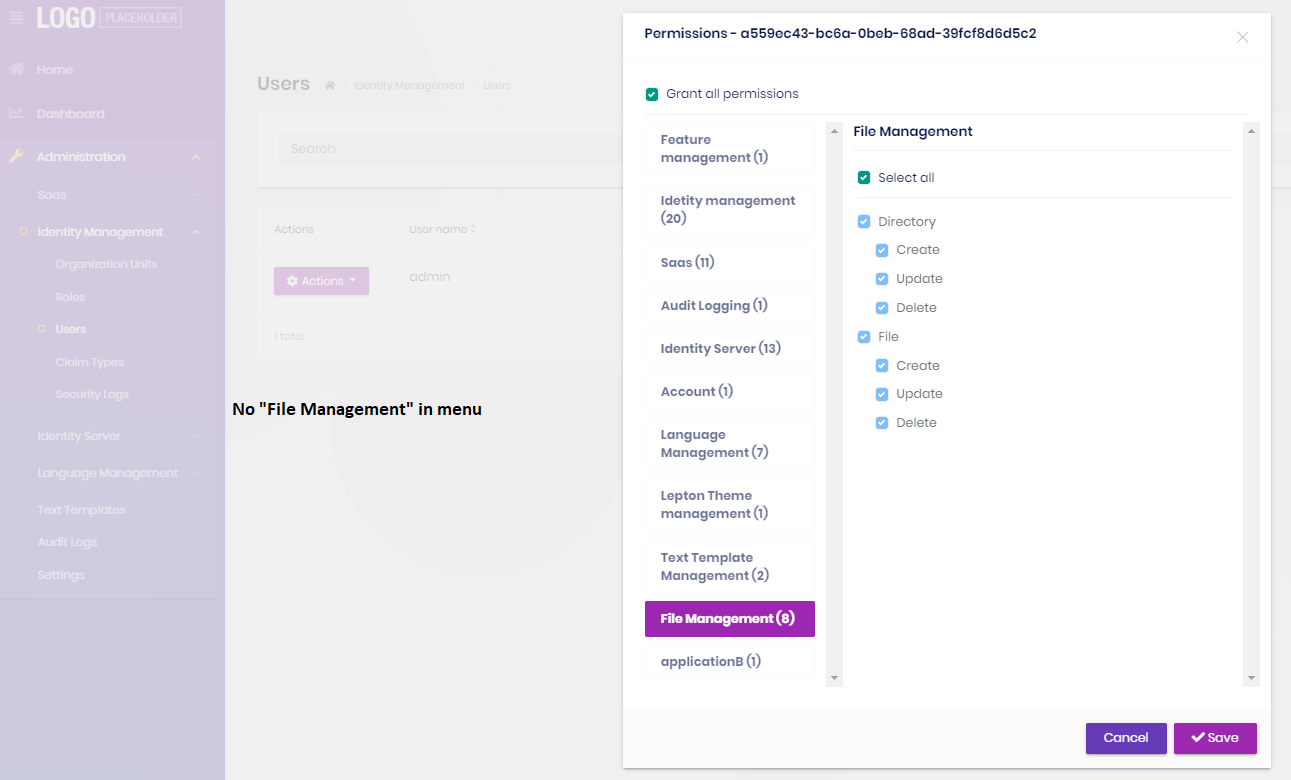
any idea?









