Hello,
I recommend using the ABP React Native templates to get started. You can refer to the following resources:
Overview: https://abp.io/docs/10.3/framework/ui/react-native?Architecture=Microservice Article: https://abp.io/community/articles/automate-localhost-access-for-expo-a-guide-to-dynamic-7cblqtj3#gsc.tab=0 Tutorial: https://abp.io/docs/10.3/tutorials/mobile/react-native
Please note that these templates require more manual effort compared to other UI options. They primarily demonstrate how to integrate an ABP backend with React Native components, but do not include ready-to-use libraries like those provided for Angular UI. As a result, you may need to modify or remove some of the default behaviors to suit your needs.
You can let us know if you need further assistance. Thank you for your cooperation.
Hello,
The switch-to-x commands (https://abp.io/docs/latest/cli#switch-to-stable) are used to update your current project to a specific version.
In contrast, the update command (https://abp.io/docs/latest/cli#installation) upgrades the ABP CLI tool installed on your system.
Since you're working with the Suite tool, it’s best to match its version with your project version to ensure smooth and consistent code generation. You can find more details here: https://abp.io/docs/latest/suite
Lastly, we follow Angular’s release cycle and wait for their versions to become stable before adopting them. You can track these updates in our release notes: https://abp.io/docs/latest/release-info/release-notes
If you need any further assistance, feel free to reach out. Thank you for your cooperation.
Hello,
You typically do not need to migrate your application to standalone, as module-based development is still supported. However, the issue you are experiencing may be related to configuration changes in angular.json, particularly since we updated the builder to use the application builder.
Additionally, with the upgrade to Angular version 21, some updates were made to tsconfig.json to comply with newer TypeScript requirements. We also introduced zone-based change detection in the application providers:
// app.module.ts
// ...
imports: [ /* ... */ ],
providers: [provideZoneChangeDetection()]
// ...
You can find more details in the migration guide: https://abp.io/docs/latest/release-info/migration-guides/abp-10-1#angular-version-upgraded-to-v21
If your application already reflects these changes and the issue persists, please feel free to share a minimal reproducible example: https://stackoverflow.com/help/minimal-reproducible-example
You can send it to my email at sumeyye.kurtulus@volosoft.com, or alternatively provide more details about your configuration.
Thank you for your cooperation.
After reviewing this with my colleague, we have decided to implement a fix that addresses this case. In short, ExtensibleLimitedResultRequestDto will be updated to extend ExtensibleObject instead of ExtensibleEntityDto.
Until this fix is released, I can suggest a temporary workaround on the generated proxy. You can either remove the unnecessary null checks on the properties causing the error, or remove those properties altogether.
You can follow the updates here: https://github.com/abpframework/abp/issues/25115 https://github.com/abpframework/abp/releases https://abp.io/docs/latest/release-info/release-notes
I will also process a refund for this ticket. Thank you for your cooperation.
Hello again,
There should not be a need to generate a separate proxy, as the npm package already includes it. You may need to grant the necessary permissions via the Roles page.

Also, could you share the response from the /api/abp/api-definition request so we can confirm whether the API has been added correctly? If you would prefer not to share it here, feel free to send it to my email at sumeyye.kurtulus@volosoft.com.
Thank you for your cooperation.
As mentioned at the beginning, this update was implemented intentionally to satisfy other requirements. Therefore, this part does not require a refactor or fix.
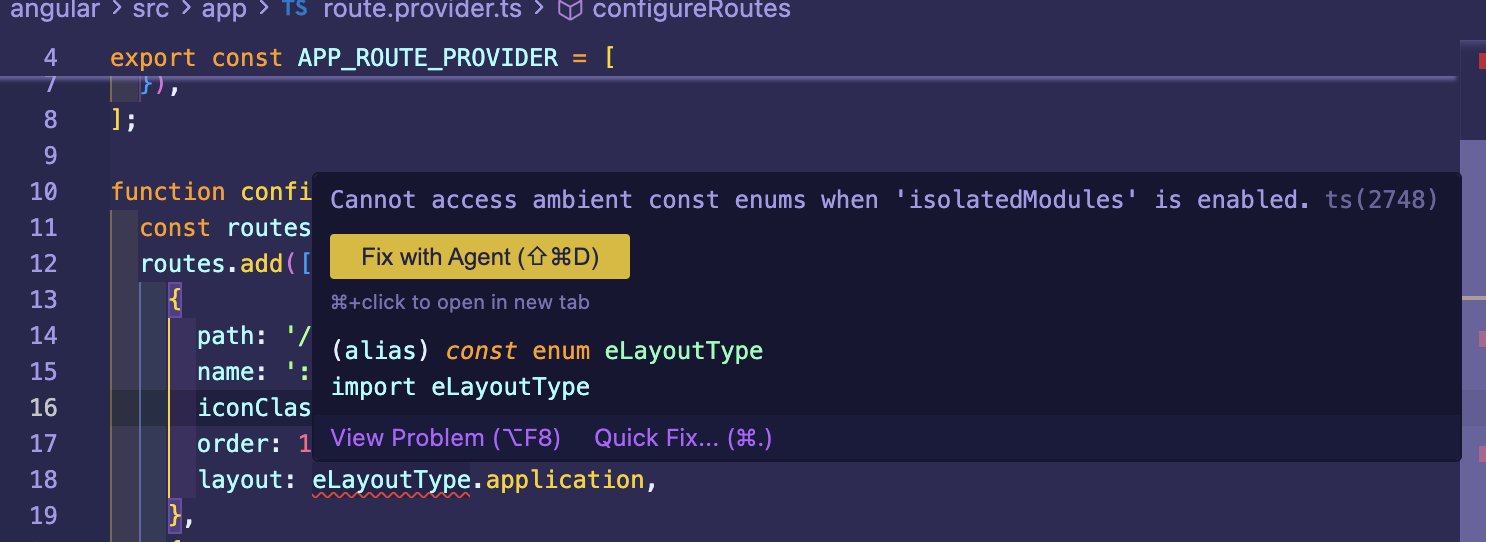
As a result, the decision on your side is whether to continue using the TypeScript configurations “strict” and “isolatedModules,” or to switch to a different version of schematics. We do not typically make such recommendations; however, version 9.3.x of schematics has worked successfully in my case.
If needed, I can also share the project I used to reproduce the issue.
Thank you for your cooperation.
Hello again,
our issue is not with isolatedModules configuration in TypeScript so perhaps we should concentrate on the original issue. Changing isolatedModules configuration has no effect on our issue.
I may have misunderstood the problem reproduction steps. When I disable these configurations, the issue no longer occurs. However, if you can share a minimal reproducible example, I would be happy to take another look and assist further. Here is my e-mail address: sumeyye.kurtulus@volosoft.com
Thank you for your cooperation once more.
The latest version of ABP Studio includes the updated React Native template. You can follow the README file within the project for guidance. Alternatively, refer to the official documentation: https://abp.io/docs/latest/framework/ui/react-native?Architecture=Monolith
You may also find this article helpful, as it explains different approaches for developing with this template: https://abp.io/community/articles/automate-localhost-access-for-expo-a-guide-to-dynamic-7cblqtj3#gsc.tab=0
I agree that the strict configuration will not produce errors when using embedded proxies instead of manually connected ones. However, the isolatedModules setting can still cause such errors, as the framework is not intentionally designed to meet these requirements.
Hello,
This package has been released for version 10.1.0 (stable). However, the ABP Studio update is not yet available. You can either wait a little longer or follow this guide in the meantime.
You can let us know if you need further assistance. Thank you for your cooperation.









