






- ABP Framework version: v5.1.1
- UI type: Blazor WebAssembly
- DB provider: EF Core
- Tiered (MVC) or Identity Server Separated (Angular): Microservice
I first posted this issue about 3 weeks ago when I tested a new Microservice solution in ABP v5.0 (https://support.abp.io/QA/Questions/2209/Bugs--Issues-v5X#answer-71ba46af-50dd-6d75-9e94-3a01087be8f6) and I tested again with the latest v5.1.1 but the issue still persisted. There seems to be something wrong with the way API calls are handled, and the API calls are often timed out. The timeout error message in the Edge browser console shows:
crit: Microsoft.AspNetCore.Components.WebAssembly.Rendering.WebAssemblyRenderer[100] Unhandled exception rendering component: An error occurred during the ABP remote HTTP request. (The request was canceled due to the configured HttpClient.Timeout of 100 seconds elapsing.) See the inner exception for details. Volo.Abp.Http.Client.AbpRemoteCallException: An error occurred during the ABP remote HTTP request. (The request was canceled due to the configured HttpClient.Timeout of 100 seconds elapsing.) See the inner exception for details.
You can see in the video I created here (https://www.youtube.com/watch?v=om3Yjp7bZAc) that the initial pages and their API calls work fine, but the later pages and API calls stopped working. If I wait a few minutes, the API calls will work again and then after a few more page loads and API calls, it will stop working again. Microservice solutions created on v4.4.4 didn't have such issues.
15 Answer(s)
-
0
Please see the log of the IdentityService here -> https://drive.google.com/file/d/1u_UdsrW61GUlpwodBCHS55g5p5tcZ1yq/view?usp=sharing
As you can see from the log, there are no errors in the API calls in the IdentityService. However, the errors in the browser console show:
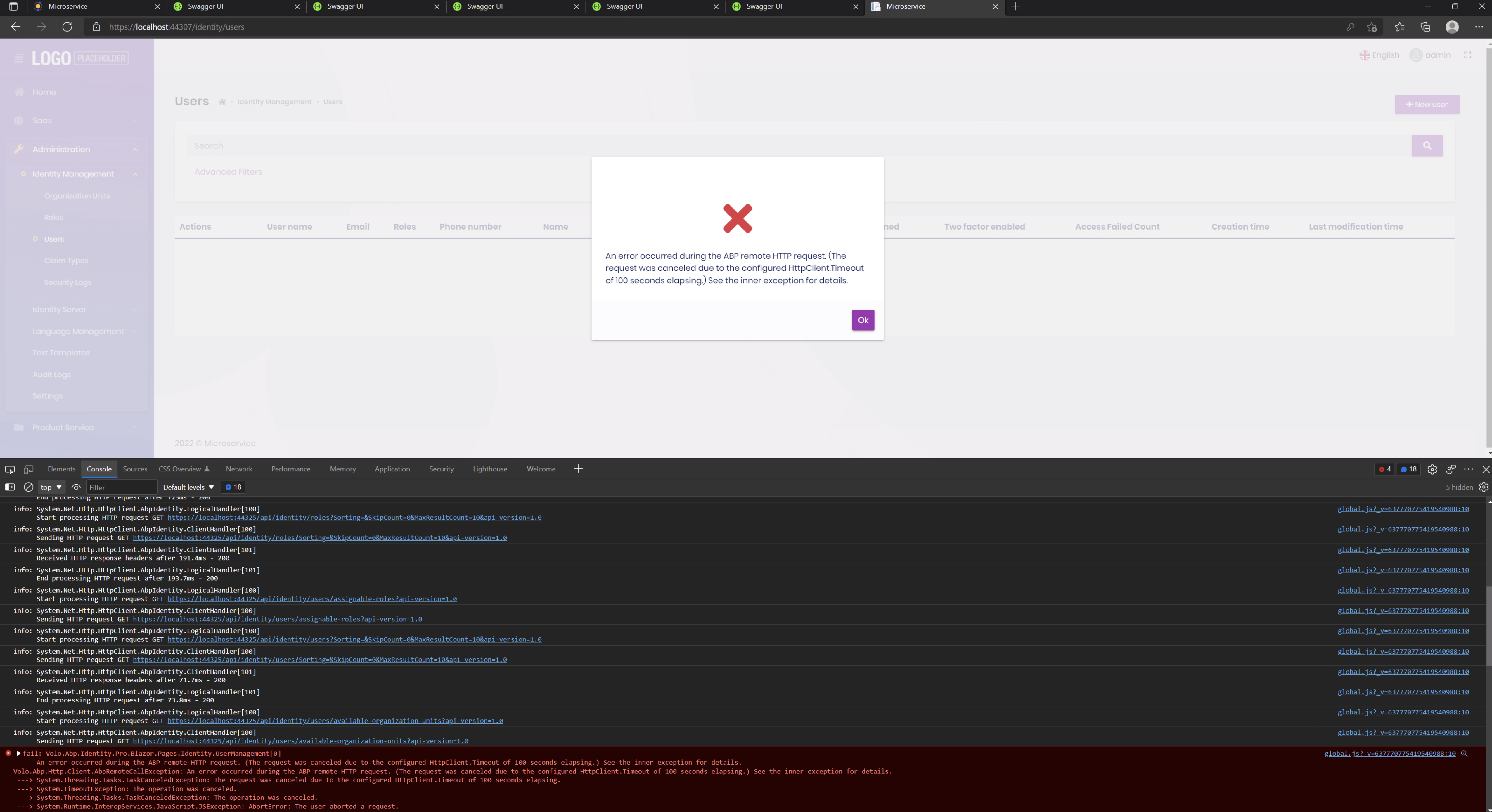
The Blazor WebAssembly app seems to have problems processing the API call results. Please try building a new v5.1.1 microservice solution with Blazor WebAssembly and see if you have the same issues.
Markdown supported.Copy, paste, or drag & drop images and files (max 100 MB per file, 100 MB total per post) -
0
I tried with Tye and the issues went away. I didn't realize Tye is necessary for running a microservice solution in ABP v5.X. It wasn't the case in v4.X. Is it because of localhost.pfx?
If I don't want to use Tye, how do I run the various projects within Visual Studio and not have this issue?
Markdown supported.Copy, paste, or drag & drop images and files (max 100 MB per file, 100 MB total per post) -
0
It wasn't the case in v4.X. Is it because of localhost.pfx?
No, We use the Tye at the beginning.
If I don't want to use Tye, how do I run the various projects within Visual Studio and not have this issue?
https://docs.abp.io/en/commercial/latest/startup-templates/microservice/get-started#run-the-solution-on-ide
You can also try to use dotnet SDK to run the application.
dotnet runMarkdown supported.Copy, paste, or drag & drop images and files (max 100 MB per file, 100 MB total per post) -
0
I still cannot figure out why this issue exists when the projects are run in Visual Studio but not with Tye and dotnet run. This wasn't an issue in v4.X.
Is there anything you guys can do to make the v5.X microservice solutions work in Visual Studio? Running the projects in the Visual Studio IDE is a documented method in https://docs.abp.io/en/commercial/latest/startup-templates/microservice/get-started and I believe is the easiest way for most people to develop and debug their code.
Markdown supported.Copy, paste, or drag & drop images and files (max 100 MB per file, 100 MB total per post) -
0
I just tried on another computer and the same issue occurs in Visual Studio. Does this not happen for you in Visual Studio?
Markdown supported.Copy, paste, or drag & drop images and files (max 100 MB per file, 100 MB total per post) -
0
What's your Visual Studio version?
Can you try to upgrade it to the latest? https://docs.microsoft.com/en-us/visualstudio/releases/2022/release-notes
Markdown supported.Copy, paste, or drag & drop images and files (max 100 MB per file, 100 MB total per post) -
0
I was using Visual Studio 17.0.4 and upgraded to the latest 17.0.5 to test for this issue.
Unfortunately, the issue is still there with the latest Visual Studio version.
Markdown supported.Copy, paste, or drag & drop images and files (max 100 MB per file, 100 MB total per post) -
0
You mean it runs well on your Visual Studio without using Tye or dotnet run?
Markdown supported.Copy, paste, or drag & drop images and files (max 100 MB per file, 100 MB total per post) -
0
Ok let me test further on other machines and environments and see if I get the same issues there.
Markdown supported.Copy, paste, or drag & drop images and files (max 100 MB per file, 100 MB total per post)



