- ABP Framework version: v5.1
- UI type: Blazor
- DB provider: EF Core
- Tiered (MVC) or Identity Server Separated (Angular): No
- Exception message and stack trace:
- Steps to reproduce the issue: I would like to build API that can access from client (chrome plugin), with some basic functions like : login, logout, CRUD to some data table and that using JWT to authenticate. Can I use IdentityServer4 and its API or I should create new module for it? If so can you give me some document that I can refer?
23 Answer(s)
-
0
hi
ABP's identity module uses cookies as the authentication scheme by default.
You can use the Identity Server module. You can use the Authorization Code flow in the chrome plugin to get the access token.
https://www.google.com/search?q=asp+net+core+jwt+authentication&oq=ASP+NET+CORE+JWR&aqs=chrome.2.69i57j0i13l9.7064j0j9&sourceid=chrome&ie=UTF-8 https://www.codemag.com/Article/2105051/Implementing-JWT-Authentication-in-ASP.NET-Core-5
Markdown supported.Copy, paste, or drag & drop images and files (max 100 MB per file, 100 MB total per post) -
0
Thanks @maliming,
At server, what is interface or class that I need to use to verify user? I tried to use IdentityUserAppService but it does not work. Can you give a sample code to allow user login?
Markdown supported.Copy, paste, or drag & drop images and files (max 100 MB per file, 100 MB total per post) -
0
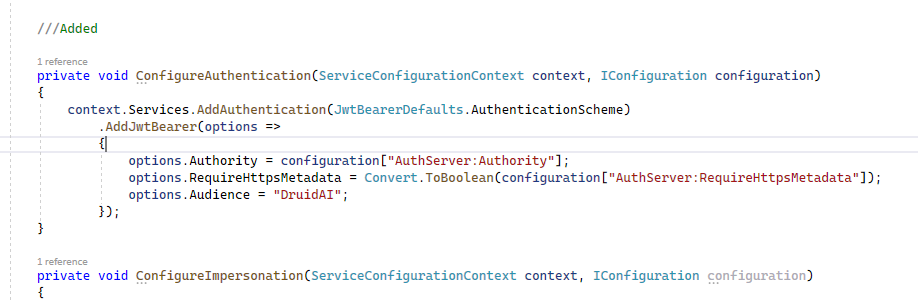
Hi Maliming again, I have a question related to JWT. I saw in our solution there is a configure of JWT already
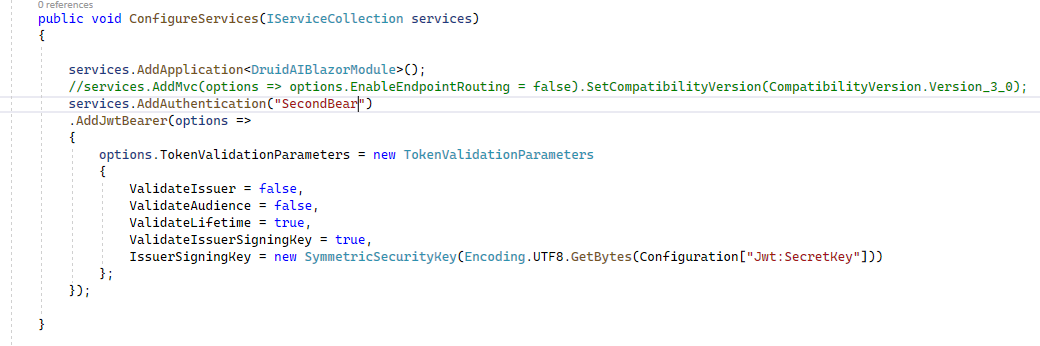
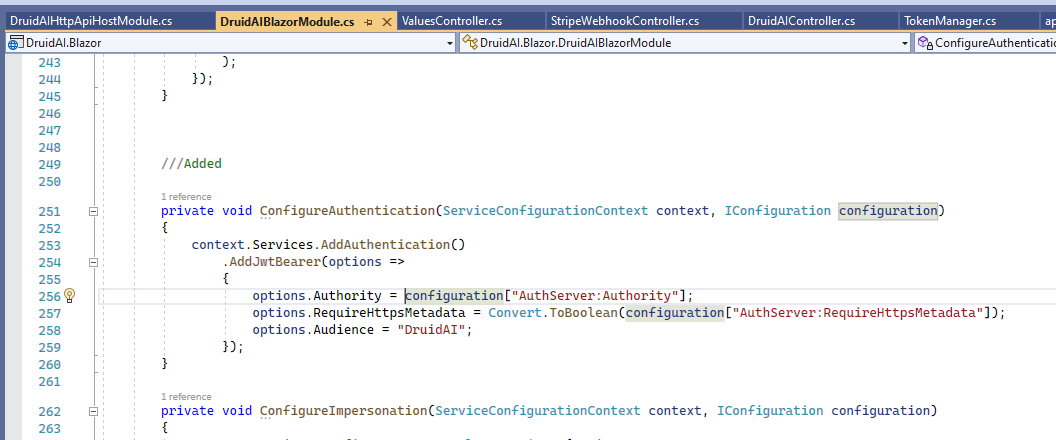 So that I can not add JWT bear configure (I have code to use Security key).
In this case, how can I generate token to use for API? The token generated by using security key is not workingMarkdown supported.Copy, paste, or drag & drop images and files (max 100 MB per file, 100 MB total per post)
So that I can not add JWT bear configure (I have code to use Security key).
In this case, how can I generate token to use for API? The token generated by using security key is not workingMarkdown supported.Copy, paste, or drag & drop images and files (max 100 MB per file, 100 MB total per post) -
0
But when I add my custom JWT bear, it gives error so I think I can only use this default or custom JWT, is that right? Autofac.Core.DependencyResolutionException: An exception was thrown while activating λ:Microsoft.Extensions.Hosting.IHostedService[] -> Microsoft.AspNetCore.Hosting.GenericWebHostService -> Microsoft.AspNetCore.Server.IIS.Core.IISHttpServer -> Microsoft.AspNetCore.Authentication.AuthenticationSchemeProvider. ---> Autofac.Core.DependencyResolutionException: An exception was thrown while invoking the constructor 'Void .ctor(Microsoft.Extensions.Options.IOptions
1[Microsoft.AspNetCore.Authentication.AuthenticationOptions])' on type 'AuthenticationSchemeProvider'. ---> System.InvalidOperationException: Scheme already exists: Bearer at Microsoft.AspNetCore.Authentication.AuthenticationOptions.AddScheme(String name, Action1 configureBuilder) at Microsoft.AspNetCore.Authentication.AuthenticationBuilder.<>c__DisplayClass4_0`2.Markdown supported.Copy, paste, or drag & drop images and files (max 100 MB per file, 100 MB total per post) -
0
System.InvalidOperationException: Scheme already exists: Bearer at Microsoft.AspNetCore.Authentication.AuthenticationOptions.AddScheme(String name
You can use a different scheme name.
Markdown supported.Copy, paste, or drag & drop images and files (max 100 MB per file, 100 MB total per post) -
0
Thank you I can get it work, but what is different about name? If I put second as default, it works (as image below) But if i put second with "CustomJWT" it does not work, and return 302 Found error. Does it take only default Bearer?
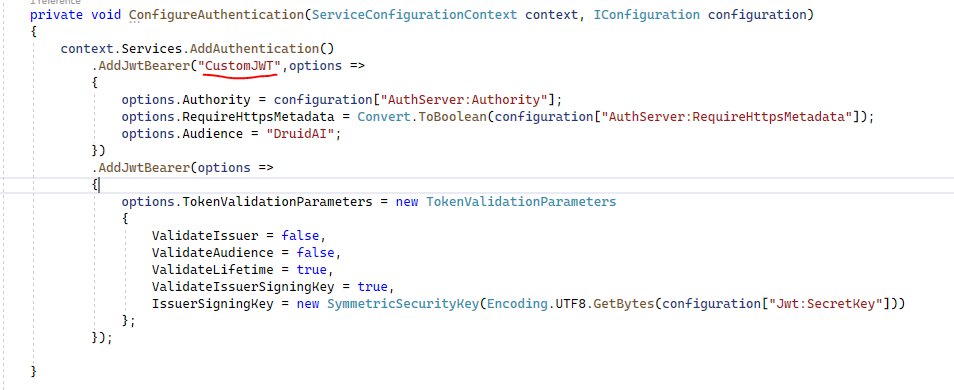 Markdown supported.Copy, paste, or drag & drop images and files (max 100 MB per file, 100 MB total per post)
 -
0
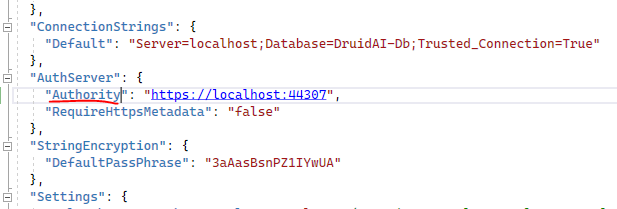
It gives another error 2022-03-08 09:28:46.233 +07:00 [ERR] An unhandled exception has occurred while executing the request. System.InvalidOperationException: IDX20803: Unable to obtain configuration from: 'System.String'. ---> System.IO.IOException: IDX20807: Unable to retrieve document from: 'System.String'. HttpResponseMessage: 'System.Net.Http.HttpResponseMessage', HttpResponseMessage.Content: 'System.String'. at Microsoft.IdentityModel.Protocols.HttpDocumentRetriever.GetDocumentAsync(String address, CancellationToken cancel) at Microsoft.IdentityModel.Protocols.OpenIdConnect.OpenIdConnectConfigurationRetriever.GetAsync(String address, IDocumentRetriever retriever, CancellationToken cancel) at Microsoft.IdentityModel.Protocols.ConfigurationManager
1.GetConfigurationAsync(CancellationToken cancel) --- End of inner exception stack trace --- at Microsoft.IdentityModel.Protocols.ConfigurationManager1.GetConfigurationAsync(CancellationToken cancel) at Microsoft.AspNetCore.Authentication.JwtBearer.JwtBearerHandler.HandleAuthenticateAsync() at Microsoft.AspNetCore.Authentication.JwtBearer.JwtBearerHandler.HandleAuthenticateAsync() at Microsoft.AspNetCore.Authentication.AuthenticationHandler`1.AuthenticateAsync() at Microsoft.AspNetCore.Authentication.AuthenticationService.AuthenticateAsync(HttpContext context, String scheme) at Microsoft.AspNetCore.Builder.ApplicationBuilderAbpJwtTokenMiddlewareExtension.<>c__DisplayClass0_0.<Markdown supported.Copy, paste, or drag & drop images and files (max 100 MB per file, 100 MB total per post) -
0
I suggest you first understand JWT authentication in asp net core.
https://www.google.com/search?q=JWT+authentication+in+asp+net+core.&oq=JWT+authentication+in+asp+net+core.&aqs=chrome..69i57.256j0j7&sourceid=chrome&ie=UTF-8
Markdown supported.Copy, paste, or drag & drop images and files (max 100 MB per file, 100 MB total per post) -
0
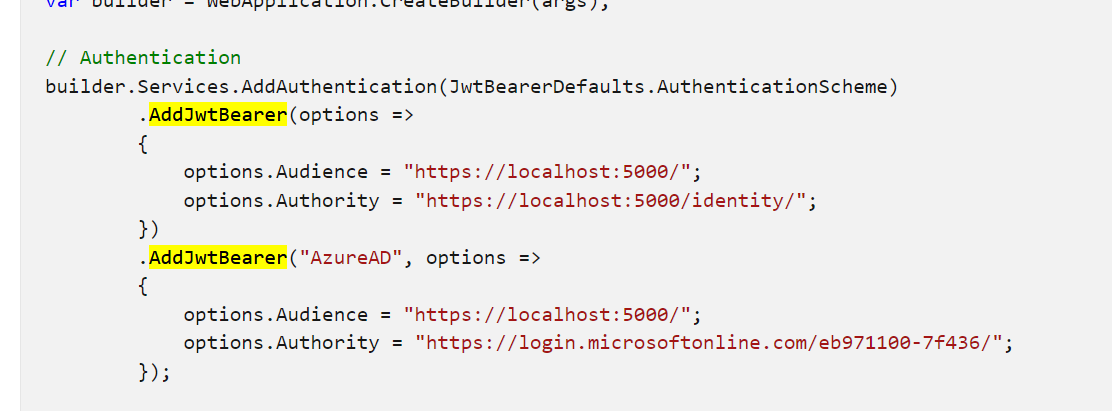
Yes I can get my JWT works, but I dont want to hurt current Jwt with Authority, so i want to keep them both. if I configure like that it will work with my JWT token (not sure Authority work or not)
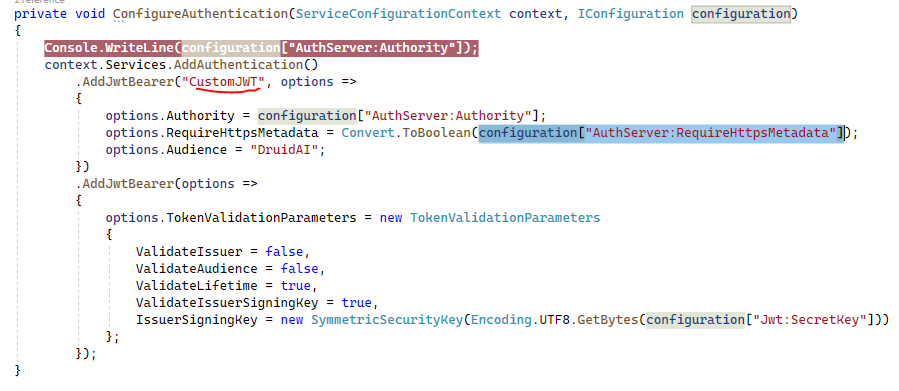
But if I configure
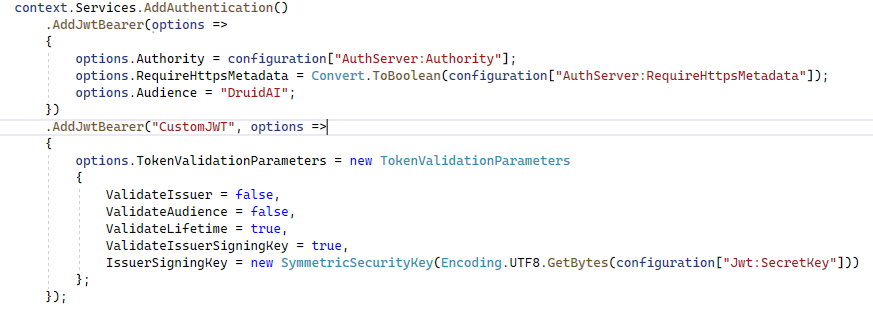 It will not work with my JTW token.
Can I make it work for both?Markdown supported.Copy, paste, or drag & drop images and files (max 100 MB per file, 100 MB total per post)
It will not work with my JTW token.
Can I make it work for both?Markdown supported.Copy, paste, or drag & drop images and files (max 100 MB per file, 100 MB total per post) -
0
I think my issue same as here https://support.abp.io/QA/Questions/1682/API-Fails-after-Authenticated
But I dont know what did he resolved it? Should I run .Host project before run Blazor project?
I will get and send you that code after lunch. Thank you
Markdown supported.Copy, paste, or drag & drop images and files (max 100 MB per file, 100 MB total per post) -
0
hi
IDX20803: Unable to obtain configuration from: 'System.String'.
Please set
ShowPIIto true to check the error detials.if (env.IsDevelopment()) { IdentityModelEventSource.ShowPII = true; }Markdown supported.Copy, paste, or drag & drop images and files (max 100 MB per file, 100 MB total per post)