






- ABP Framework version: v5.3.0
- Project type: Abp Microservice Template
- DB provider: MongoDB
I have updated logic/filtering data of getting products on the appservice and on the repository (GetListAsync). I am using the client proxy in a wpf but it seems not updated. Is there any way to re-generate the generated code in the HttpApi.Client client proxies? or I'll just need to manually update the source code of the generated client proxy?
5 Answer(s)
-
0
Hi,
If you haven't changed the method signature(method name, parameter, return type.. ) and route, then you don't need to regenerate.
However, you can run the abp generate command to re-generate client proxies.
Markdown supported.Copy, paste, or drag & drop images and files (max 100 MB per file, 100 MB total per post) -
0
Hi, Thanks for the response, I'm getting
Module name: app is invalidexecuting it inside my wpf root folder or on the host folder. There's no update after executingabp generate-proxy -t csharp -u https://localhost:44361/.Markdown supported.Copy, paste, or drag & drop images and files (max 100 MB per file, 100 MB total per post) -
1
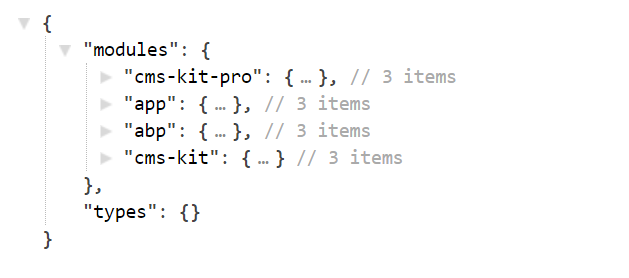
abp generate-proxy -t csharp -u https://localhost:44361/ -m YourModuleNameYou can get the modules on
https://YourWebsite/api/abp/api-definitioneg https://abp.io//api/abp/api-definition
 Markdown supported.Copy, paste, or drag & drop images and files (max 100 MB per file, 100 MB total per post)



