






0
andmattia created
ABP 5.3.1 Anuglar
I've create a new module now I need to test in multitenant.
I switch the tenant switch on API side but when I try to create a new tenant doesn't create the admin user
Markdown supported.
Copy, paste, or drag & drop images and files (max 100 MB per file, 100 MB total per post)
19 Answer(s)
-
0
Hi
step to reproduce:
- create new empty module (v 5.3.1 with Angular UI and separated IDS)
- set multi tenant = true on shared module
- start IDS+API+UI
- login as admin
- create a new tenant
- try to login with in the new tenant
You get an error because admin user doesn't exists. So if you look into db the user admin for tenant not exists
Markdown supported.Copy, paste, or drag & drop images and files (max 100 MB per file, 100 MB total per post) -
0
hi
Please create a same name
app-proproject and copyMyProjectNameTenantDatabaseMigrationHandlerto yourDm.DynamicTemplate.IdentityServerproject.Markdown supported.Copy, paste, or drag & drop images and files (max 100 MB per file, 100 MB total per post) -
0
hi
Add
MyProjectNameTenantDatabaseMigrationHandlerto yourDm.DynamicTemplate.IdentityServerproject.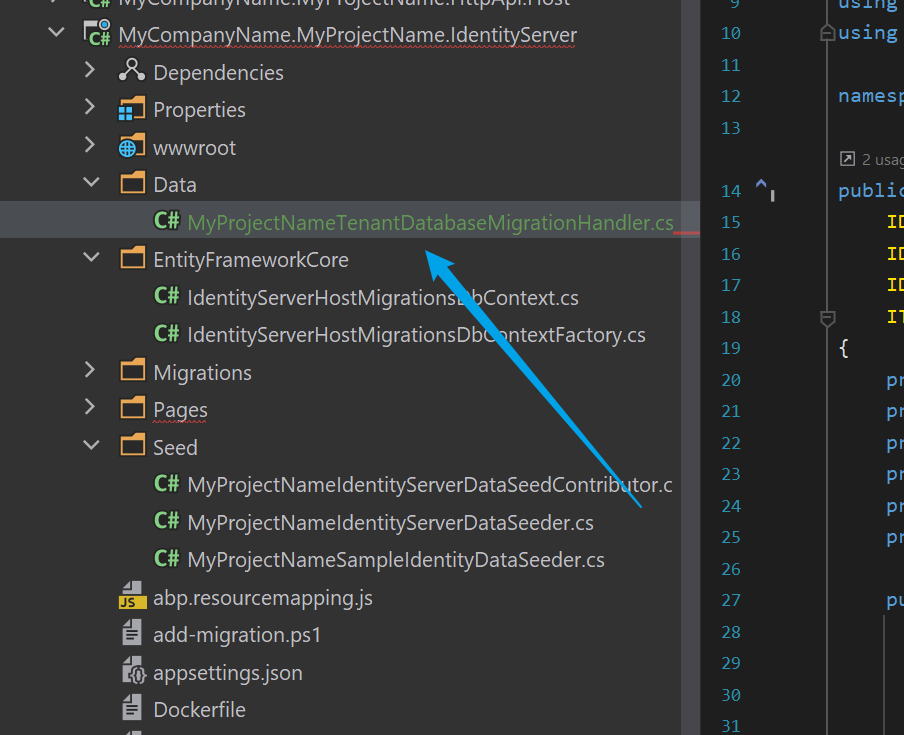
using System;
using System.Threading.Tasks;
using Microsoft.EntityFrameworkCore;
using Microsoft.Extensions.Logging;
using MyCompanyName.MyProjectName.EntityFrameworkCore;
using Volo.Abp.Data;
using Volo.Abp.DependencyInjection;
using Volo.Abp.EntityFrameworkCore;
using Volo.Abp.EventBus.Distributed;
using Volo.Abp.MultiTenancy;
using Volo.Abp.Uow;

namespace MyCompanyName.MyProjectName.Data;

public class MyProjectNameTenantDatabaseMigrationHandler :
    IDistributedEventHandler<TenantCreatedEto>,
    IDistributedEventHandler<TenantConnectionStringUpdatedEto>,
    IDistributedEventHandler<ApplyDatabaseMigrationsEto>,
    ITransientDependency
{
    private readonly IDbContextProvider<AuthServerHostMigrationsDbContext> _dbContextProvider;
    private readonly ICurrentTenant _currentTenant;
    private readonly IUnitOfWorkManager _unitOfWorkManager;
    private readonly IDataSeeder _dataSeeder;
    private readonly ITenantStore _tenantStore;
    private readonly ILogger<MyProjectNameTenantDatabaseMigrationHandler> _logger;

    public MyProjectNameTenantDatabaseMigrationHandler(
        IDbContextProvider<AuthServerHostMigrationsDbContext> dbContextProvider,
        ICurrentTenant currentTenant,
        IUnitOfWorkManager unitOfWorkManager,
        IDataSeeder dataSeeder,
        ITenantStore tenantStore,
        ILogger<MyProjectNameTenantDatabaseMigrationHandler> logger)
    {
        _dbContextProvider = dbContextProvider;
        _currentTenant = currentTenant;
        _unitOfWorkManager = unitOfWorkManager;
        _dataSeeder = dataSeeder;
        _tenantStore = tenantStore;
        _logger = logger;
    }

    public async Task HandleEventAsync(TenantCreatedEto eventData)
    {
        await MigrateAndSeedForTenantAsync(eventData.Id);
    }

    public async Task HandleEventAsync(TenantConnectionStringUpdatedEto eventData)
    {
        if (eventData.ConnectionStringName != ConnectionStrings.DefaultConnectionStringName ||
            eventData.NewValue.IsNullOrWhiteSpace())
        {
            return;
        }

        await MigrateAndSeedForTenantAsync(eventData.Id);

        /* You may want to move your data from the old database to the new database!
         * It is up to you. If you don't make it, new database will be empty
         * (and tenant's admin password is reset to 1q2w3E*).
         */
    }

    public async Task HandleEventAsync(ApplyDatabaseMigrationsEto eventData)
    {
        if (eventData.TenantId == null)
        {
            return;
        }

        await MigrateAndSeedForTenantAsync(eventData.TenantId.Value);
    }

    private async Task MigrateAndSeedForTenantAsync(Guid tenantId)
    {
        try
        {
            using (_currentTenant.Change(tenantId))
            {
                // Create database tables if needed
                using (var uow = _unitOfWorkManager.Begin(requiresNew: true, isTransactional: false))
                {
                    var tenantConfiguration = await _tenantStore.FindAsync(tenantId);
                    if (tenantConfiguration?.ConnectionStrings != null &&
                        !tenantConfiguration.ConnectionStrings.Default.IsNullOrWhiteSpace())
                    {

                        await (await _dbContextProvider.GetDbContextAsync()).Database.MigrateAsync();
                    }

                    await uow.CompleteAsync();
                }

                // Seed data
                using (var uow = _unitOfWorkManager.Begin(requiresNew: true, isTransactional: true))
                {
                    await _dataSeeder.SeedAsync(new DataSeedContext(tenantId));

                    await uow.CompleteAsync();
                }
            }
        }
        catch (Exception ex)
        {
            _logger.LogException(ex);
        }
    }
}
Markdown supported.Copy, paste, or drag & drop images and files (max 100 MB per file, 100 MB total per post)


