






Check the docs before asking a question: https://docs.abp.io/en/commercial/latest/ Check the samples, to see the basic tasks: https://docs.abp.io/en/commercial/latest/samples/index The exact solution to your question may have been answered before, please use the search on the homepage.
- ABP Framework version: v3.0.4
- UI type: Angular
- Tiered (MVC) or Identity Server Seperated (Angular): yes
- Exception message and stack trace:
- Steps to reproduce the issue:
Nav Menu Items not showing properly in Mozila firefox. I configured routes using routemodule to show/hide the routes based on some conditions,
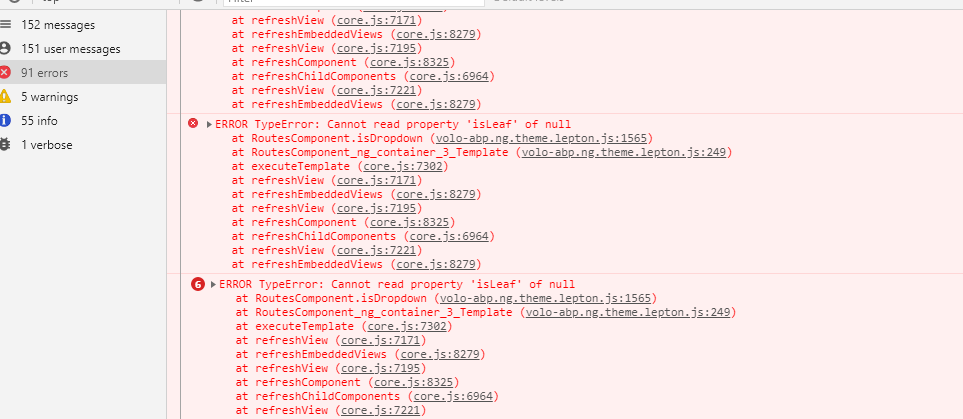
so as per the documetaion using patch route we acheived that. if I specify order propery in routing and not patch I am getting below error and If I specify order as 0 it's working fine in chrom, edge
const newHomeRouteShowConfig: Partial<ABP.Route> = { invisible: false, requiredPolicy: 'Admin', order: 0 };
const newHomeRouteHideConfig: Partial<ABP.Route> = {
  invisible: true,
  requiredPolicy: 'Admin',
  order: 0
};

  this.routes.patch('Entities', newHomeRouteShowConfig);
  this.routes.patch('Banks', newHomeRouteShowConfig);
  this.routes.patch('Suppliers', newHomeRouteShowConfig);
  this.routes.patch('Program', newHomeRouteHideConfig);
but not working as expected in firefox.
3 Answer(s)
-
0
Hi @vishalnikam
I can't reproduce the problem. How can I reproduce it? Can you describe the reproducing steps in detail?
Can you also update your app to v3.0.5 and try again? We have fixed some problems with v3.0.5.
Markdown supported.Copy, paste, or drag & drop images and files (max 100 MB per file, 100 MB total per post) -
0
If I specify the order in routes and not patching it againg getting that error as above image
const newHomeRouteShowConfig: Partial<ABP.Route> = { invisible: false, requiredPolicy: 'Admin', order: 0 };
const newHomeRouteHideConfig: Partial<ABP.Route> = { invisible: true, requiredPolicy: 'Admin', order: 0 };
this.routes.patch('Entities', newHomeRouteShowConfig); this.routes.patch('Banks', newHomeRouteShowConfig); this.routes.patch('Suppliers', newHomeRouteShowConfig); this.routes.patch('Program', newHomeRouteHideConfig);
this patch code is added to app.component.ts
If I specify the order 0 while pattch the menu is arrangeing the order of excuting the code
but in mozilla it showing different order in other browsers it showing differnt order.
1)app-routing.module.ts
const routes: Routes = [ { path: 'anchor-admin-dashboard', component: ApplicationLayoutComponent, loadChildren: () => import('./dashboard1/dashboard1.module').then((m) => m.Dashboard1Module), canActivate: [AuthGuard, PermissionGuard], data: { routes: { name: '::Menu:Dashboard', iconClass: 'fa fa-line-chart', requiredPolicy: 'Admin', order:1, } as ABP.Route, }, }, { path: 'suppliers', component: ApplicationLayoutComponent, loadChildren: () => import('./manage-supplier/manage-supplier.module').then((m) => m.ManageSupplierModule), canActivate: [AuthGuard, PermissionGuard], data: { routes: { name: 'Suppliers', iconClass: 'fa fa-line-chart', requiredPolicy: 'Admin', order: 2, } as ABP.Route, }, }, { path: 'banks', component: ApplicationLayoutComponent, loadChildren: () => import('./manage-bank/manage-bank.module').then((m) => m.ManageBankModule), canActivate: [AuthGuard, PermissionGuard], data: { routes: { name: 'Banks', iconClass: 'fa fa-line-chart', requiredPolicy: 'Admin', order: 3, } as ABP.Route, }, }, { path: 'entities', component: ApplicationLayoutComponent, loadChildren: () => import('./manage-entity/manage-entity.module').then((m) => m.ManageEntityModule), canActivate: [AuthGuard, PermissionGuard], data: { routes: { name: 'Entities', iconClass: 'fa fa-line-chart', requiredPolicy: 'Admin', order:4, } as ABP.Route, }, }, { path: 'program', component: ApplicationLayoutComponent, loadChildren: () => import('./manage-program/manage-program.module').then(m => m.ManageProgramModule), canActivate: [AuthGuard, PermissionGuard], data: { routes: { name: 'Program', iconClass: 'fa fa-line-chart', requiredPolicy: 'Admin' } as ABP.Route, } }
@NgModule({ imports: [RouterModule.forRoot(routes)], exports: [RouterModule], })
]
2)component code & app.component.ts
const newHomeRouteShowConfig: Partial<ABP.Route> = { invisible: false, requiredPolicy: 'Admin', order: 0 };
const newHomeRouteHideConfig: Partial<ABP.Route> = {
  invisible: true,
  requiredPolicy: 'Admin',
  order: 0
};


if ((currentmodule === null) || (currentmodule === false)) {

  this.routes.patch('Suppliers', newHomeRouteShowConfig);
  this.routes.patch('Entities', newHomeRouteShowConfig);
  this.routes.patch('Banks', newHomeRouteShowConfig);
  this.routes.patch('Program', newHomeRouteHideConfig);

} else {

  this.routes.patch('Suppliers', newHomeRouteHideConfig);
  this.routes.patch('Entities', newHomeRouteHideConfig);
  this.routes.patch('Banks', newHomeRouteHideConfig);
  this.routes.patch('Program', newHomeRouteShowConfig);

}
Markdown supported.Copy, paste, or drag & drop images and files (max 100 MB per file, 100 MB total per post)


