






0
tommy.reynolds@pentair.com created
Hi ABP Support
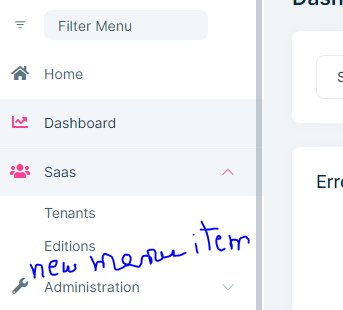
Can you help me the way I have to add a new menu item in Saas menu in the sidebar, please? So I can edit or add a new menu item in it, please!
If you're creating a bug/problem report, please include followings:
- ABP Framework version: 6
- UI type: Angular
- DB provider: EF Core
Markdown supported.
Copy, paste, or drag & drop images and files (max 100 MB per file, 100 MB total per post)
1 Answer(s)
-
0
Hello,
Can you add the following lines to your
route.provider.tsfile?import { eLayoutType, RoutesService } from '@abp/ng.core'; import { APP_INITIALIZER } from '@angular/core'; import { eSaasRouteNames } from '@volo/abp.ng.saas/config'; export const APP_ROUTE_PROVIDER = [ { provide: APP_INITIALIZER, useFactory: configureRoutes, deps: [RoutesService], multi: true }, ]; function configureRoutes(routes: RoutesService) { return () => { routes.add([ // other routes { path: '/my-path', name: 'MenuName', iconClass: 'fas fa-chart-line', order: 2, layout: eLayoutType.application, parentName: eSaasRouteNames.Saas, }, ]); }; }You can read the documentation about Modifying-the-Menu
Markdown supported.Copy, paste, or drag & drop images and files (max 100 MB per file, 100 MB total per post)


