

Open Closed

Some pages not working with "Separated tenant schema" #4252


User avatar
0
cala created

When accessing the "Claim Types" or "Linked accounts" page, you get an exception ( see [1] and [2] ). Looks like these pages are not working if you use separated tenant schema ( tested with default admin account )

  • ABP Framework version: v6.0.2
  • UI type: Blazor
  • DB provider: EF Core
  • Tiered (MVC) or Identity Server Separated (Angular): no
  • Exception message and stack trace: see below
  • Steps to reproduce the issue:" create new project with "Separated tenant schema" and open one of the problematic pages

[1] Claim Types exception https://pastebin.com/MaEEQeXb

[2] Linked Account exception https://pastebin.com/rZ2SxkBs

Markdown supported.
Copy, paste, or drag & drop images and files (max 100 MB per file, 100 MB total per post)

17 Answer(s)
  • User Avatar
    0
    maliming created
    Support Team Fullstack Developer

    hi

    Blazor or Blazor Server?

    Markdown supported.
    Copy, paste, or drag & drop images and files (max 100 MB per file, 100 MB total per post)
  • User Avatar
    0
    cala created

    Blazor Server

    Markdown supported.
    Copy, paste, or drag & drop images and files (max 100 MB per file, 100 MB total per post)

  • User Avatar
    0
    maliming created
    Support Team Fullstack Developer

    ok, I will check it.

    Markdown supported.
    Copy, paste, or drag & drop images and files (max 100 MB per file, 100 MB total per post)

  • User Avatar
    0
    maliming created
    Support Team Fullstack Developer

    hi

    I didn't reproduce the problem, can you share the full steps and a simple project?

    liming.ma@volosoft.com

    Markdown supported.
    Copy, paste, or drag & drop images and files (max 100 MB per file, 100 MB total per post)
  • User Avatar
    0
    cala created

    have sent you an email

    Markdown supported.
    Copy, paste, or drag & drop images and files (max 100 MB per file, 100 MB total per post)
  • User Avatar
    0
    maliming created
    Support Team Fullstack Developer

    hi

    Can you write some steps?

    Markdown supported.
    Copy, paste, or drag & drop images and files (max 100 MB per file, 100 MB total per post)
  • User Avatar
    0
    cala created

    .... 0. ( adjust connection string for your setup )

    1. install libs
    2. run dbmigrator
    3. run blazor
    4. login with admin account
    5. navigate to 'Linked accounts' or 'Claim Types'
    Markdown supported.
    Copy, paste, or drag & drop images and files (max 100 MB per file, 100 MB total per post)
  • User Avatar
    0
    maliming created
    Support Team Fullstack Developer

    ok

    Markdown supported.
    Copy, paste, or drag & drop images and files (max 100 MB per file, 100 MB total per post)
  • User Avatar
    0
    maliming created
    Support Team Fullstack Developer

    hi

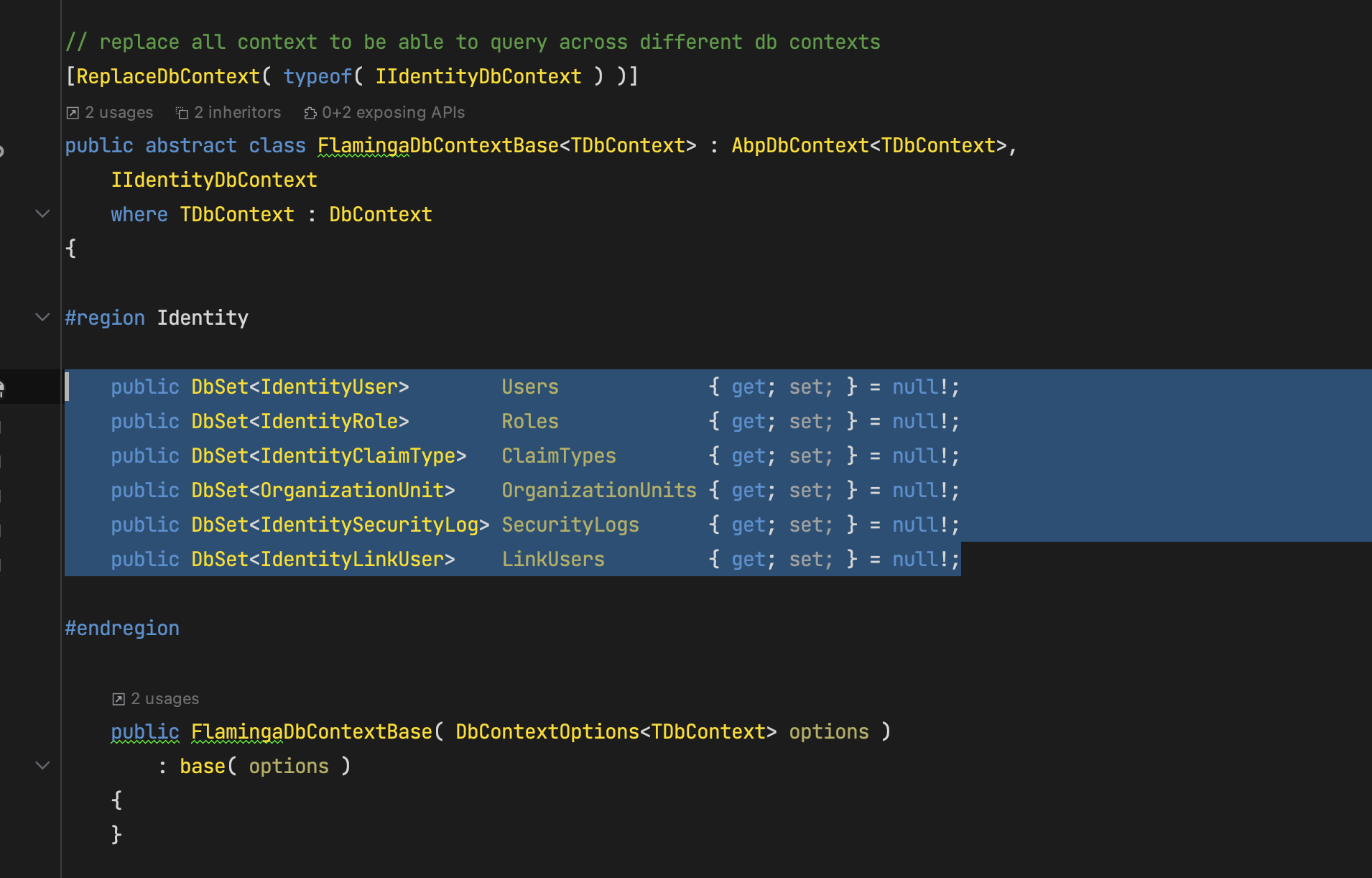
    The problem is [ReplaceDbContext( typeof( IIdentityDbContext ) )]

    Can you explain why you do this?

    Markdown supported.
    Copy, paste, or drag & drop images and files (max 100 MB per file, 100 MB total per post)
  • User Avatar
    0
    cala created

    we need to use user information ( like user name, last name, etc ) in our queries - this only works if the user is on the same context.

    so this moves also LinkUser and ClaimType to the tenant context :/ is there Identitydbcontext for user information (IdentityUser) only ?

    Markdown supported.
    Copy, paste, or drag & drop images and files (max 100 MB per file, 100 MB total per post)
  • User Avatar
    0
    maliming created
    Support Team Fullstack Developer

    hi

    Please try to remove ClaimTypes and IdentityLinkUser from FlamingaTenantDbContext

    https://github.com/abpframework/abp/blob/dev/modules/identity/src/Volo.Abp.Identity.EntityFrameworkCore/Volo/Abp/Identity/EntityFrameworkCore/IdentityDbContextModelBuilderExtensions.cs#L160

    https://github.com/abpframework/abp/blob/dev/modules/identity/src/Volo.Abp.Identity.EntityFrameworkCore/Volo/Abp/Identity/EntityFrameworkCore/IdentityDbContextModelBuilderExtensions.cs#L254

    Markdown supported.
    Copy, paste, or drag & drop images and files (max 100 MB per file, 100 MB total per post)
  • User Avatar
    0
    cala created

    well, you cant implement IIdentityDbContext without IdentityClaimType and IdentityLinkUser

    Markdown supported.
    Copy, paste, or drag & drop images and files (max 100 MB per file, 100 MB total per post)
  • User Avatar
    0
    maliming created
    Support Team Fullstack Developer

    ok, I will find a way. wait a moment.

    Markdown supported.
    Copy, paste, or drag & drop images and files (max 100 MB per file, 100 MB total per post)
  • User Avatar
    0
    cala created

    @christianharoh abp suite will do this for you, just check "Separated tenant schema", details can be found in thedocumentation

    Markdown supported.
    Copy, paste, or drag & drop images and files (max 100 MB per file, 100 MB total per post)
  • User Avatar
    0
    maliming created
    Support Team Fullstack Developer

    hi

    We will support this case in the next version.

    https://github.com/abpframework/abp/issues/15298

    Markdown supported.
    Copy, paste, or drag & drop images and files (max 100 MB per file, 100 MB total per post)
  • User Avatar
    1
    cala created

    ok thanks

    Markdown supported.
    Copy, paste, or drag & drop images and files (max 100 MB per file, 100 MB total per post)
  • User Avatar
    0
    maliming created
    Support Team Fullstack Developer

    We will fix it as soon as possible.

    Markdown supported.
    Copy, paste, or drag & drop images and files (max 100 MB per file, 100 MB total per post)
Boost Your Development
ABP Live Training
Packages
See Trainings
Mastering ABP Framework Book
The Official Guide
Mastering
ABP Framework
Learn More
Mastering ABP Framework Book
Made with ❤️ on ABP v10.8.0-preview. Updated on September 16, 2026, 14:50
1
ABP Assistant
🔐 You need to be logged in to use the chatbot. Please log in first.