






- ABP Framework version: v6.0.2
- UI type:Blazor
- DB provider: EF Core
- Tiered (MVC) or Identity Server Separated (Angular): yes
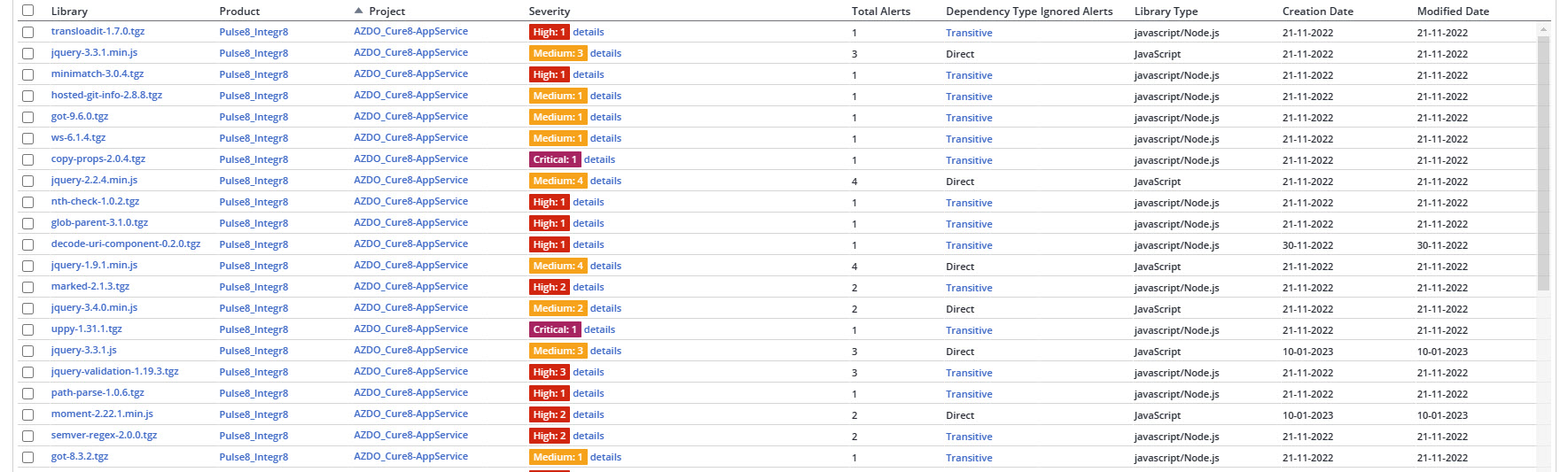
For our project we scan our source code during the pipeline build with the service MEND formerly known as WhiteSource. I use LeptonX in our project and the scan is finding a lot of javascript library vulnerabilities that the security team needs me to fix ASAP. The problem I see is, I don't seem to have much control over these files and how I can update them since they are apart of the LeptonX code base. Does anyone have any ideas of what I can do?
9 Answer(s)
-
0
Yes that is correct. We are using Blazor Server version.
How do I update those. I can't find the correct Package.json file
Markdown supported.Copy, paste, or drag & drop images and files (max 100 MB per file, 100 MB total per post) -
0
Hi joe@tronactive.com
You marked as you're using blazor with a tiered solution. So, you have 3 different projects whiches are
*.Blazor,*.HttpApi.Hostand*.AuthServer.All of them stands for a reason but users can only interact with
BlazorandHttpApi.Hostproject. So, you can update package.json file in those project folders.By the way, please don't add direct reference to those files, just use resolution parameter of package.json
If you don't have an idea for it, here is an easy usage: https://classic.yarnpkg.com/lang/en/docs/selective-version-resolutions/#toc-how-to-use-it
Markdown supported.Copy, paste, or drag & drop images and files (max 100 MB per file, 100 MB total per post) -
0
Awesome. Thank you very much. I appreciate the help.
Markdown supported.Copy, paste, or drag & drop images and files (max 100 MB per file, 100 MB total per post) -
0
Alper, you may want to consider using MEND (formerly WhiteSource, www.mend.io) to show vulnerabilities reported in .NET and NPM packages; it also tells you what versions the vulnerabilities have been fixed in. The second one you may want to look into is Sonarcloud (sonarcloud.io) which is incredible for finding security vulnerabilities in the actual source code.
My work uses both for compliance reasons, and they work fantastically to keep the codebase as secure as possible before deploying to the server.
Markdown supported.Copy, paste, or drag & drop images and files (max 100 MB per file, 100 MB total per post) -
0
That isn't going to find package level vulnerabilities. Completely different. Also, for code vulnerabilities, OWASP could catch a lot of those. But SonarCloud will find them much quicker and will point directly to the code that is a vulnerability. OWASP wouldn't do that. Just to a basic API Endpoint level. Also, SonarCloud and Mend can easily be put into the build pipeline to check during each build. Or on a schedule.
Markdown supported.Copy, paste, or drag & drop images and files (max 100 MB per file, 100 MB total per post)



