






- ABP Framework version: v7.0.3
- UI type: MVC
- DB provider: EF Core
- Tiered (MVC) or Identity Server Separated (Angular): yes
- Exception message and stack trace:
- Steps to reproduce the issue:" I tried to increase user session timeout but not successfully. I searched and added this code to both AuthServerModule and WebModule but no luck, the session is still expired after ~ 60 minutes (I guess). Pls help:
context.Services.ConfigureApplicationCookie(options =>
        {
            options.ExpireTimeSpan = TimeSpan.FromDays(1);
        });
        context.Services.Configure<SecurityStampValidatorOptions>(options =>
        {
            options.ValidationInterval = TimeSpan.FromDays(1);
        });
13 Answer(s)
-
0
Hi,
Can you try this one please ?
context.Services.Configure<SecurityStampValidatorOptions>(options => options.ValidationInterval = TimeSpan.FromHours(24));
https://stackoverflow.com/questions/49702256/why-does-my-identityserver4-based-server-timeout-in-30-minutes-and-only-support]
Markdown supported.Copy, paste, or drag & drop images and files (max 100 MB per file, 100 MB total per post) -
0
Hi,
In which module should I try that code?
Markdown supported.Copy, paste, or drag & drop images and files (max 100 MB per file, 100 MB total per post) -
0
context.Services.ConfigureApplicationCookie(options =>
        {
            options.ExpireTimeSpan = TimeSpan.FromDays(1);
        });
        context.Services.Configure<SecurityStampValidatorOptions>(options =>
        {
            options.ValidationInterval = TimeSpan.FromDays(1);
        });
I tried to add above code to both AuthServerModule and WebModule but it doesn't fix the issue.
Markdown supported.Copy, paste, or drag & drop images and files (max 100 MB per file, 100 MB total per post) -
0
context.Services.ConfigureApplicationCookie(options => { options.ExpireTimeSpan = TimeSpan.FromDays(1); }); context.Services.Configure<SecurityStampValidatorOptions>(options => { options.ValidationInterval = TimeSpan.FromDays(1); });
Markdown supported.Copy, paste, or drag & drop images and files (max 100 MB per file, 100 MB total per post) -
0
CB button is very strange: I copy and paste, it auto remove <SecurityStampValidatorOptions> part
Markdown supported.Copy, paste, or drag & drop images and files (max 100 MB per file, 100 MB total per post) -
0
Hello duyan11110
Is it user logging out or unauthorized after 60 mins automatically?
Markdown supported.Copy, paste, or drag & drop images and files (max 100 MB per file, 100 MB total per post) -
0
Hi,
Unauthorized after 60 mins automatically.
Markdown supported.Copy, paste, or drag & drop images and files (max 100 MB per file, 100 MB total per post) -
0
Hi,
could you please share the screenshot for the OpenIddict settings for the web client which is under administration -> OpenIddict ->Applications
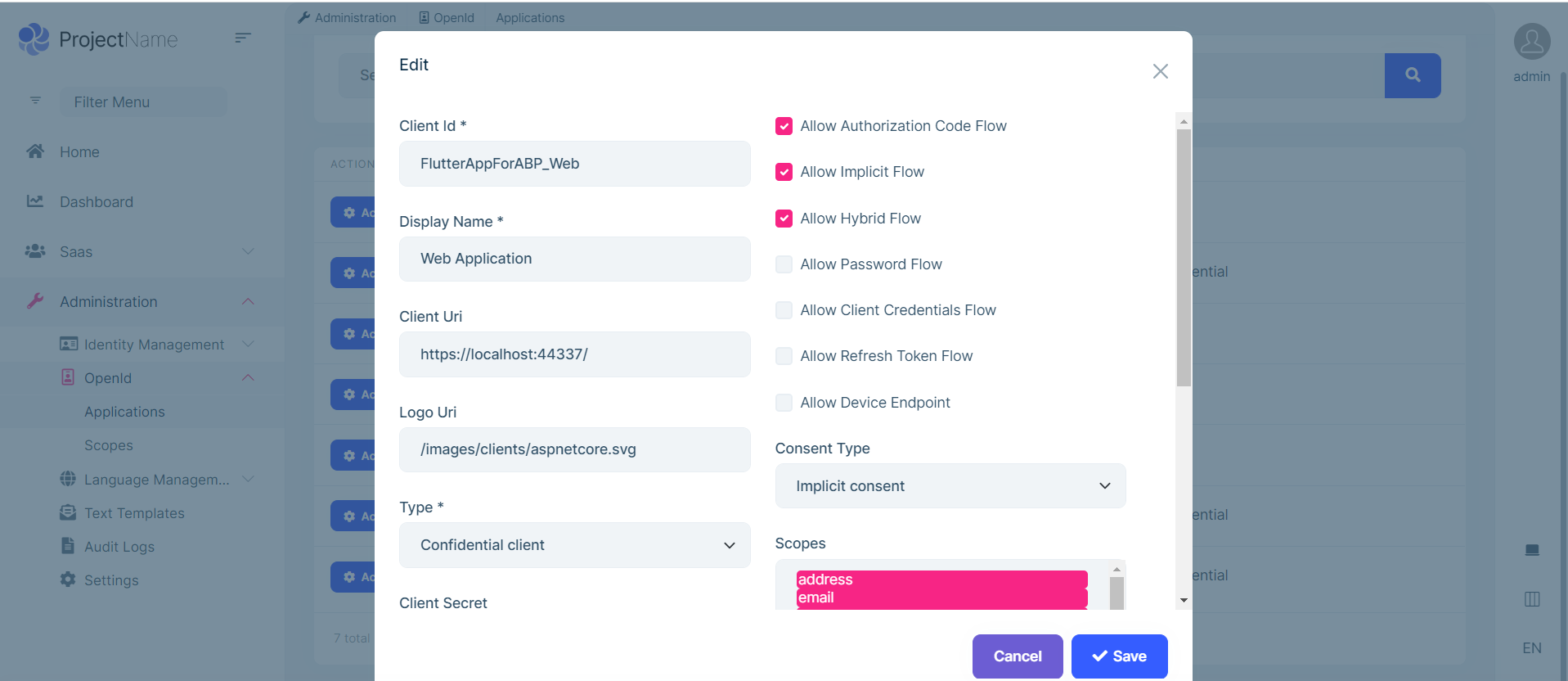 Markdown supported.Copy, paste, or drag & drop images and files (max 100 MB per file, 100 MB total per post)
 -
0
Hi,
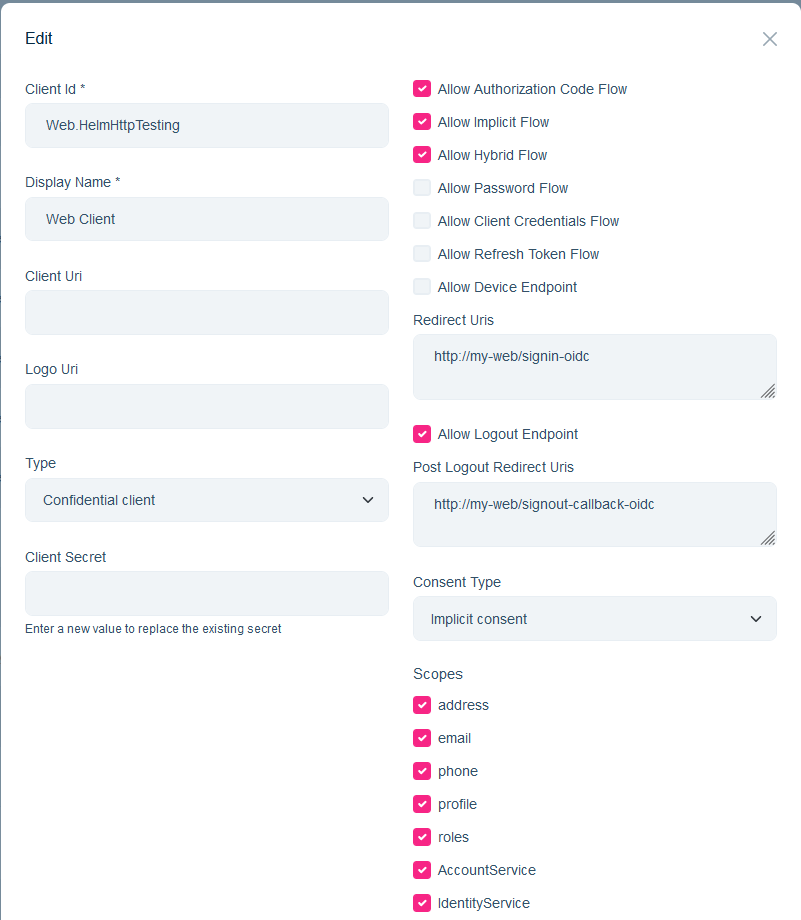 Markdown supported.Copy, paste, or drag & drop images and files (max 100 MB per file, 100 MB total per post)
 -
0
Hi
can you try after allowing "Allow Refresh Token Flow"?
Markdown supported.Copy, paste, or drag & drop images and files (max 100 MB per file, 100 MB total per post) -
0
Hi,
OK, let me try and monitor.
Markdown supported.Copy, paste, or drag & drop images and files (max 100 MB per file, 100 MB total per post) -
0
Hi
If my previous answer will not help you then please try this link https://github.com/abpframework/abp/blob/1863a619f172634b2eb4842f0c241c40a9642c91/docs/en/Modules/OpenIddict.md?plain=1#L425
Markdown supported.Copy, paste, or drag & drop images and files (max 100 MB per file, 100 MB total per post) -
0
Hi
If my previous answer will not help you then please try this link
https://github.com/abpframework/abp/blob/1863a619f172634b2eb4842f0c241c40a9642c91/docs/en/Modules/OpenIddict.md?plain=1#L425Hi,
This one is the solution for my issue. Thanks.
Markdown supported.Copy, paste, or drag & drop images and files (max 100 MB per file, 100 MB total per post)



