






Check the docs before asking a question: https://docs.abp.io/en/commercial/latest/ Check the samples, to see the basic tasks: https://docs.abp.io/en/commercial/latest/samples/index The exact solution to your question may have been answered before, please use the search on the homepage.
- ABP Framework version: v3.0.4
- UI type: Angular
- Tiered (MVC) or Identity Server Seperated (Angular): yes
- Exception message and stack trace:
- Steps to reproduce the issue: Identity server not working after hosted on AWS
5 Answer(s)
-
0
After enabling https for identity server still discovery shows http. we are using cloudfront --> nlb --> ECS
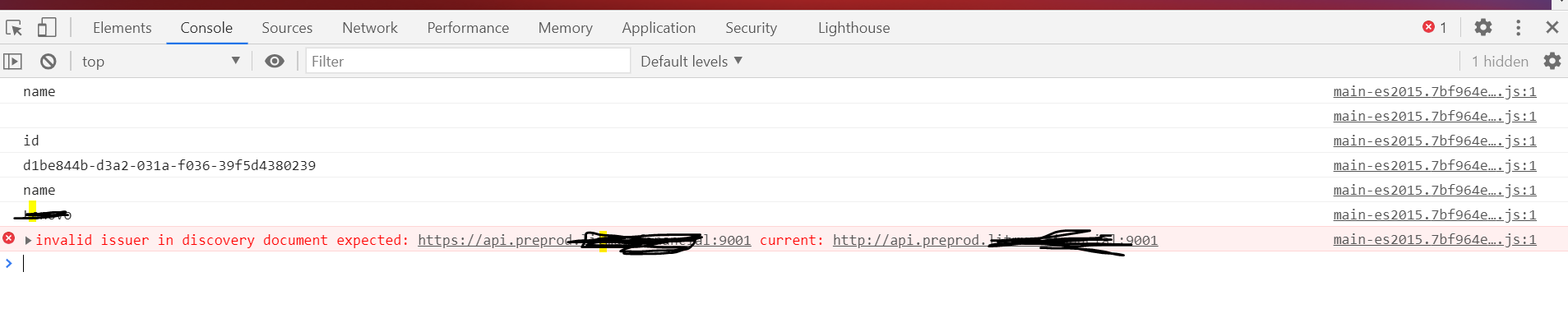
Also, try given solution on this but didnt worked
var forwardOptions = new ForwardedHeadersOptions { ForwardedHeaders = ForwardedHeaders.XForwardedFor | ForwardedHeaders.XForwardedProto, RequireHeaderSymmetry = false };
forwardOptions.KnownNetworks.Clear(); forwardOptions.KnownProxies.Clear();
// ref: https://github.com/aspnet/Docs/issues/2384 app.UseForwardedHeaders(forwardOptions);
https://github.com/IdentityServer/IdentityServer4/issues/1331
Markdown supported.Copy, paste, or drag & drop images and files (max 100 MB per file, 100 MB total per post) -
0
try this
app.Use((httpContext, next) =>
{
    httpContext.Request.Scheme = "https";
    return next();
});
https://github.com/abpframework/abp/blob/dev/docs/en/Migration-Guides/Abp-4_0.md#other-identityserver-changes
Markdown supported.Copy, paste, or drag & drop images and files (max 100 MB per file, 100 MB total per post) -
0
It worked but facing differet issue now. We have multiple identity-service instances are running in 2 servers and we are load balancing it behind NLB. The issue is the 1st request goes to Identity server1 and if the second goes server2, it fails saying 401-unauthorized because the server 1 could not able to share the token with server2. we are not using Radis cache and Key. What I have to do to make load balancing working here ? Is anything can be done for shared resources between two Identity server instance?
Markdown supported.Copy, paste, or drag & drop images and files (max 100 MB per file, 100 MB total per post)



