






0
nguyenngoc.son created
- ABP Framework version: v7.2.2
- UI type: Angular
- DB provider: EF Core
- Tiered (MVC) or Auth Server Separated (Angular): yes
- Exception message and stack trace: When rendering the text template for Vietnamese, the exception was thrown "Input string was not in a correct format. Source=System.Private.CoreLib StackTrace: at System.Text.ValueStringBuilder.ThrowFormatInvalidString() at System.Text.ValueStringBuilder.AppendFormatHelper(IFormatProvider provider, String format, ReadOnlySpan
1 args) at System.String.FormatHelper(IFormatProvider provider, String format, ReadOnlySpan1 args) at System.String.Format(String format, Object[] args) at Volo.Abp.Localization.AbpDictionaryBasedStringLocalizer.GetLocalizedStringFormatted(String name, String cultureName, Object[] arguments) at Volo.Abp.Localization.AbpDictionaryBasedStringLocalizer.GetLocalizedStringFormatted(String name, Object[] arguments) at Volo.Abp.Localization.AbpDictionaryBasedStringLocalizer.get_Item(String name, Object[] arguments) at Abp.Razor.Template.<ExecuteAsync>d__0.MoveNext() at Volo.Abp.TextTemplating.Razor.RazorTemplateRenderingEngine.<RenderTemplateContentWithRazorAsync>d__9.MoveNext() at Volo.Abp.TextTemplating.Razor.RazorTemplateRenderingEngine.<RenderSingleTemplateAsync>d__8.MoveNext() at Volo.Abp.TextTemplating.Razor.RazorTemplateRenderingEngine.<RenderInternalAsync>d__7.MoveNext() at Volo.Abp.TextTemplating.Razor.RazorTemplateRenderingEngine.<RenderInternalAsync>d__7.MoveNext() at Volo.Abp.TextTemplating.Razor.RazorTemplateRenderingEngine.<RenderAsync>d__6.MoveNext() at Volo.Abp.TextTemplating.AbpTemplateRenderer.<RenderAsync>d__10.MoveNext() - when I passed different CultureName to the RendenAsync method then it working fine,
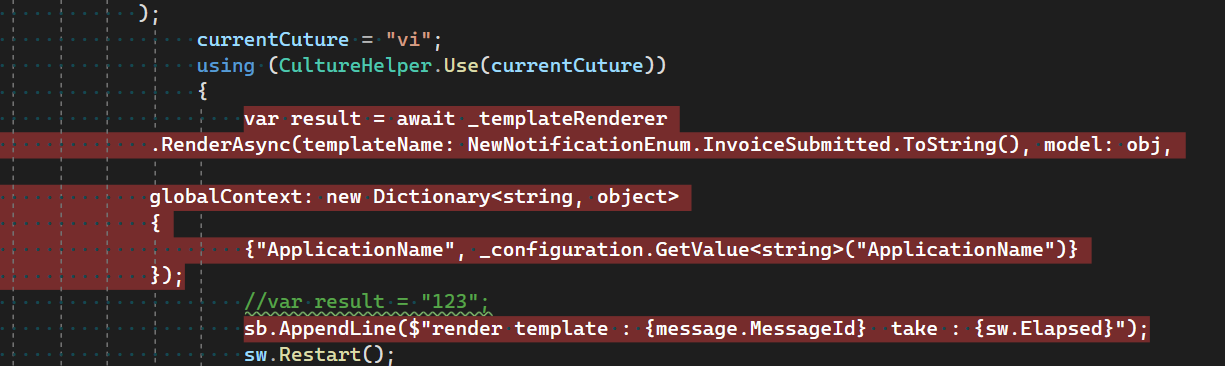 When using CultureHelper.Use and it recognize the vietnamese language and can switch to vi.json file.
 - Steps to reproduce the issue:"
Markdown supported.
Copy, paste, or drag & drop images and files (max 100 MB per file, 100 MB total per post)
4 Answer(s)
-
0
Hi, I found the root cause is the vi.json file. After delete that file it working fine. Any idea why the vi.json file is not loaded?
Markdown supported.Copy, paste, or drag & drop images and files (max 100 MB per file, 100 MB total per post) -
0
Closed it because wrong string was using in the vietnamese json file
Markdown supported.Copy, paste, or drag & drop images and files (max 100 MB per file, 100 MB total per post)


