






ABP Framework version: v7.3.3 UI Type: MVC Database System: EF Core Tiered (for MVC) or Auth Server Separated (for Angular): tiered
I am trying to dataseed an object with a many to many collection. I create the collection items first, and then try to use those ids on insert of the many to many, but it never actually saves them. The underlying checks SetAssetCategoriesAsync don't see them yet because they are not in the database, so it doesn't pull any to save.
assetCategoryList.Add(await _assetCategoryManager.CreateAsync("Corporate Laptop", "Corporate Laptop", true));
assetCategoryList.Add(await _assetCategoryManager.CreateAsync("Developer Laptop", "Developer Laptop", true));
This next line creates the my asset taxonomy item, but doesn't add the newly created asset categories.
assetTaxonomy = await _assetTaxonomyManager.CreateAsync(assetCategoryList.Select(e => e.Id).ToList(), "Asset Taxonomy", "Asset Taxonomy Description"); ;
In the SetAssetCategoriesAsync (created by abp suite), no categories are found:
var query = (await _assetCategoryRepository.GetQueryableAsync())
    .Where(x => assetCategoryIds.Contains(x.Id))
    .Select(x => x.Id);
var assetCategoryIdsInDb = await AsyncExecuter.ToListAsync(query);
if (!assetCategoryIdsInDb.Any())
{
    return;
}
Please advise, thanks!
6 Answer(s)
-
0
Hi,
Could you use the abp suite to create a new project to reproduce the problem and share it with me? my email is shiwei.liang@volosoft.com.
I will check it. thanks.
Markdown supported.Copy, paste, or drag & drop images and files (max 100 MB per file, 100 MB total per post) -
0
A zipped sample is 242Mb, I can't email that. Do you have a place I can copy it to?
Markdown supported.Copy, paste, or drag & drop images and files (max 100 MB per file, 100 MB total per post) -
0
Hi,
You can upload to google drive or onedrive and share the link with me.
Markdown supported.Copy, paste, or drag & drop images and files (max 100 MB per file, 100 MB total per post) -
0
See if this link works for you: https://1drv.ms/u/s----------------?e=FhNSL1
Markdown supported.Copy, paste, or drag & drop images and files (max 100 MB per file, 100 MB total per post) -
0
Hi,
You need to save change first.
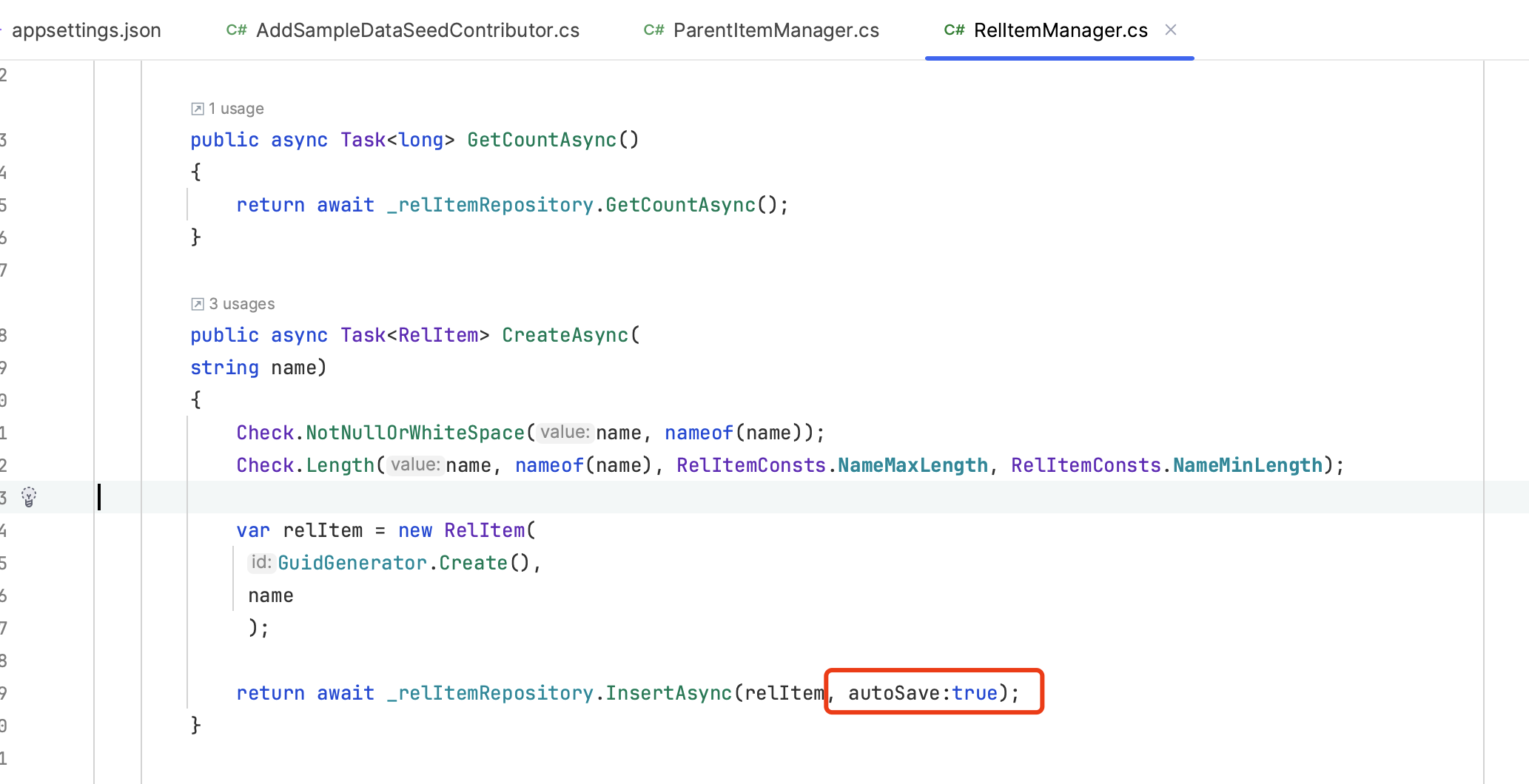 Markdown supported.Copy, paste, or drag & drop images and files (max 100 MB per file, 100 MB total per post)
 -
0
Ah, I see. That worked. Thanks!
Markdown supported.Copy, paste, or drag & drop images and files (max 100 MB per file, 100 MB total per post)


