






- ABP Framework version: v8.1.3
- UI Type: Angular
- Database System: EF Core (SQL Server)
- Tiered (for MVC) or Auth Server Separated (for Angular): yes/no
- Exception message and full stack trace:
- Steps to reproduce the issue:
Please give me instruction how to add localization resource from database table instead xml file.
17 Answer(s)
-
0
hi
We use
JSONfile to store localization texts by default.The language management module will store the change in the database. But the
jsonfiles still work.https://commercial.abp.io/modules/Volo.LanguageManagement https://docs.abp.io/en/commercial/latest/modules/language-management
Markdown supported.Copy, paste, or drag & drop images and files (max 100 MB per file, 100 MB total per post) -
0
Hi,
Sorry but made mistake with XML. In our system we have table which store amenities and on each change we update localization JSON file which we use as localization source to get multilingual amenities. I know that localization management module store all in database but we would like to avoid JSON file so that there is one step less, so that we do not save in amenities table, then JSON and finally language management module save to AbpLanguageTexts table. Just want to use Amenities table as language source and skip JSON.
Tnx
Markdown supported.Copy, paste, or drag & drop images and files (max 100 MB per file, 100 MB total per post) -
0
I am adding localization fields at the runtime in the localization resource file "Localization/Ldd/en.json" by using the following code.
//added localization resource
 options.Resources
  .Add<LddResource>("en")
  .AddBaseTypes(typeof(AbpValidationResource))
   .AddVirtualJson("/Localization/Ldd");
//Method to write to localization file at runtime. public virtual void WriteToLocatizaiton(Guid id, string name) { string json = ""; string s = ",\r\n \"" + id.ToString() + "\": \"" + name + "\"\r\n }\r\n}"; if (!Directory.Exists(Directory.GetParent(_localizationPath).FullName)) { throw new UserFriendlyException(L["The {0} path is not exist.", Directory.GetParent(_localizationPath).FullName]); } else if (!File.Exists(_localizationPath)) { throw new UserFriendlyException(L["The {0} File is not exist.", _localizationPath]); } else { using (StreamReader r = new StreamReader(_localizationPath)) { json = r.ReadToEnd(); if (json.Contains(id.ToString())) { int l = id.ToString().Length + 4; int start = json.IndexOf(id.ToString()); string first = json.Substring(start + l); int end = first.IndexOf("\""); string full = json.Substring(start, end + l); //string update = "MyProperty\": \"MyValue"; string update = id.ToString() + "\": \"" + name; json = json.Replace(full, update); } else { json = json.Replace("\r\n }\r\n}", s); } } System.IO.File.WriteAllText(_localizationPath, json); } }Can you help to modify the code and if you have any example where "ILanguageTextRepository" is injected to maintain the localization.
Markdown supported.Copy, paste, or drag & drop images and files (max 100 MB per file, 100 MB total per post) -
0
using Amm.Permissions;
using Microsoft.AspNetCore.Authorization;
using Microsoft.Extensions.Hosting;
using Microsoft.Extensions.Logging;
using System;
using System.Collections.Generic;
//using Newtonsoft.Json;
using System.IO;
using System.Linq;
using System.Linq.Dynamic.Core;
using System.Threading.Tasks;
using Volo.Abp;
using Volo.Abp.Application.Dtos;
using Volo.Abp.Application.Services;

namespace Amm.MasterDatas
{

    [Authorize(AmmPermissions.MasterDatas.Default)]
    public class MasterDatasAppService : ApplicationService, IMasterDatasAppService
    {
        private readonly IMasterDataRepository _masterDataRepository;
        private readonly string _localizationPath = "Localization\\Ldd\\en.json";


        public MasterDatasAppService(IMasterDataRepository masterDataRepository, IHostEnvironment env, ILogger<MasterDatasAppService> logger)
        {
            _masterDataRepository = masterDataRepository;

            if (env.IsDevelopment())
            {
                _localizationPath = "ATS.Domain.Shared\\Localization\\Ldd\\en.json";
                _localizationPath = Path.Combine(Directory.GetParent(env.ContentRootPath).FullName, _localizationPath);
            }
            else
            {
                _localizationPath = Path.Combine(env.ContentRootPath, _localizationPath);
            }
        }

        public virtual async Task<PagedResultDto<MasterDataDto>> GetListAsync(GetMasterDatasInput input)
        {
            var totalCount = await _masterDataRepository.GetCountAsync(input.TenantId, input.FilterText, input.ParentId, input.Name, input.KeyName, input.ValueMin, input.ValueMax, input.InlineValue, input.VisibleToTenant, input.IsSection, input.IsRadio, input.IsExportable, input.Icon, input.CultureName, input.SortOrderMin, input.SortOrderMax);
            var items = await _masterDataRepository.GetListAsync(input.TenantId, input.FilterText, input.ParentId, input.Name, input.KeyName, input.ValueMin, input.ValueMax, input.InlineValue, input.VisibleToTenant, input.IsSection, input.IsRadio, input.IsExportable, input.Icon, input.CultureName, input.SortOrderMin, input.SortOrderMax, input.Sorting, input.MaxResultCount, input.SkipCount);
            var data = ObjectMapper.Map<List<MasterData>, List<MasterDataDto>>(items);
            return new PagedResultDto<MasterDataDto>
            {
                TotalCount = totalCount,
                Items = data
            };
        }


        public virtual async Task<MasterDataDto> GetAsync(Guid id)
        {
            return ObjectMapper.Map<MasterData, MasterDataDto>(await _masterDataRepository.GetAsync(id));
        }

        public virtual async Task<List<MasterDataDto>> GetByParentIDAsync(Guid id)
        {
            return ObjectMapper.Map<List<MasterData>, List<MasterDataDto>>(await _masterDataRepository.GetListAsync(e => e.ParentId == id));
        }

        public virtual async Task<List<MasterDataDto>> GetByParentIdsAsync(string ids)
        {
            string[] guids = ids.Split(",");
            return ObjectMapper.Map<List<MasterData>, List<MasterDataDto>>(await _masterDataRepository.GetListAsync(e => ids.Contains(e.ParentId.ToString())));
        }

        public virtual async Task<List<MasterDataDto1>> GetUptoTwoLevelDataAsync()
        {
            List<MasterData> data = await _masterDataRepository.GetListAsync();
            List<MasterData> levelOneData = await _masterDataRepository.GetListAsync(e => e.ParentId == null);
            List<MasterDataDto1> levelTwoData = new List<MasterDataDto1>();

            if (levelOneData.Count() > 0)
            {
                foreach (var itemData in levelOneData)
                {
                    MasterDataDto1 child = new MasterDataDto1();
                    child.TenantId = itemData.TenantId;
                    child.ParentId = itemData.ParentId;
                    child.Id = itemData.Id;
                    child.Name = itemData.Name;
                    child.KeyName = itemData.KeyName;
                    child.Value = itemData.Value;
                    child.InlineValue = itemData.InlineValue;
                    child.VisibleToTenant = itemData.VisibleToTenant;
                    child.IsSection = itemData.IsSection;
                    child.IsRadio = itemData.IsRadio;
                    child.IsExportable = itemData.IsExportable;
                    child.Icon = itemData.Icon;
                    child.CultureName = itemData.CultureName;
                    child.SortOrder = itemData.SortOrder;
                    child.child = new List<MasterDataDto>();
                    if (data.Count() > 0)
                    {
                        foreach (var item in data)
                        {
                            if (item.ParentId == itemData.Id)
                            {
                                child.child.Add(ObjectMapper.Map<MasterData, MasterDataDto>(item));
                            }
                        }
                    }

                    levelTwoData.Add(child);
                }
            }
            return levelTwoData;
        }

        public virtual async Task<List<MasterDataDto>> GetLevelOneDataAsync()
        {
            return ObjectMapper.Map<List<MasterData>, List<MasterDataDto>>(await _masterDataRepository.GetListAsync(e => e.ParentId == null));
        }

        public virtual async Task<int> GetSortOrderAsync(Guid ParentID)
        {
            var res = await _masterDataRepository.GetListAsync(el => el.ParentId == ParentID);
            var f = res.OrderByDescending(el => el.SortOrder);
            return f.First().SortOrder;
        }

        [Authorize(AmmPermissions.MasterDatas.Delete)]
        public virtual async Task DeleteAsync(Guid id)
        {
            await _masterDataRepository.DeleteAsync(id);
        }

        [Authorize(AmmPermissions.MasterDatas.Create)]
        public virtual async Task<MasterDataDto> CreateAsync(MasterDataCreateDto input)
        {

            var masterData = ObjectMapper.Map<MasterDataCreateDto, MasterData>(input);
            masterData.TenantId = CurrentTenant.Id;
            masterData = await _masterDataRepository.InsertAsync(masterData, autoSave: true);
            WriteToLocatizaiton(masterData.Id, masterData.Name);
            return ObjectMapper.Map<MasterData, MasterDataDto>(masterData);
        }

        [Authorize(AmmPermissions.MasterDatas.Edit)]
        public virtual async Task<MasterDataDto> UpdateAsync(Guid id, MasterDataUpdateDto input)
        {
            //var masterData = new MasterData();
            //var masterData = await _masterDataRepository.GetAsync(id);
            var masterData = (await _masterDataRepository.GetListAsync(el => el.Id == id)).FirstOrDefault();
            ObjectMapper.Map(input, masterData);
            masterData = await _masterDataRepository.UpdateAsync(masterData, autoSave: true);
            WriteToLocatizaiton(masterData.Id, masterData.Name);
            return ObjectMapper.Map<MasterData, MasterDataDto>(masterData);
        }


        public virtual void WriteToLocatizaiton(Guid id, string name)
        {
            string json = "";

            string s = ",\r\n    \"" + id.ToString() + "\": \"" + name + "\"\r\n  }\r\n}";
            if (!Directory.Exists(Directory.GetParent(_localizationPath).FullName))
            {
                throw new UserFriendlyException(L["The {0} path is not exist.", Directory.GetParent(_localizationPath).FullName]);
            }
            else if (!File.Exists(_localizationPath))
            {
                throw new UserFriendlyException(L["The {0} File is not exist.", _localizationPath]);
            }
            else
            {
                using (StreamReader r = new StreamReader(_localizationPath))
                {
                    json = r.ReadToEnd();
                    if (json.Contains(id.ToString()))
                    {
                        int l = id.ToString().Length + 4;
                        int start = json.IndexOf(id.ToString());
                        string first = json.Substring(start + l);
                        int end = first.IndexOf("\"");
                        string full = json.Substring(start, end + l);

                        //string update = "MyProperty\": \"MyValue";
                        string update = id.ToString() + "\": \"" + name;

                        json = json.Replace(full, update);
                    }
                    else
                    {
                        json = json.Replace("\r\n  }\r\n}", s);
                    }
                }
                System.IO.File.WriteAllText(_localizationPath, json);
            }


        }
    }
}
Markdown supported.Copy, paste, or drag & drop images and files (max 100 MB per file, 100 MB total per post) -
0
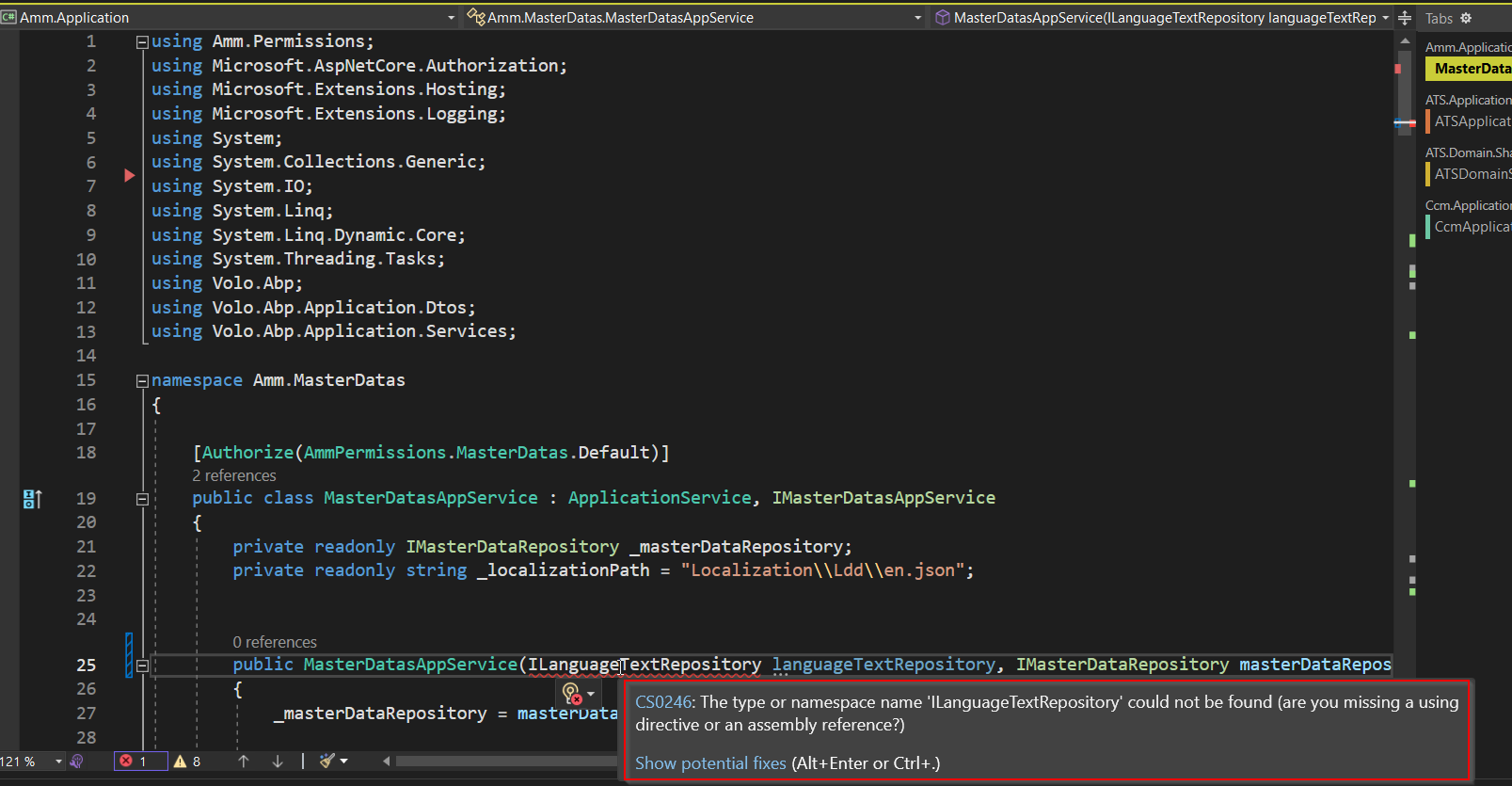
Getting this error, which package needs to be installed to Inject ILanguageTextRepository. Do you have sample code where this kind of implementation is done?
 Markdown supported.Copy, paste, or drag & drop images and files (max 100 MB per file, 100 MB total per post)
 -
0
hi
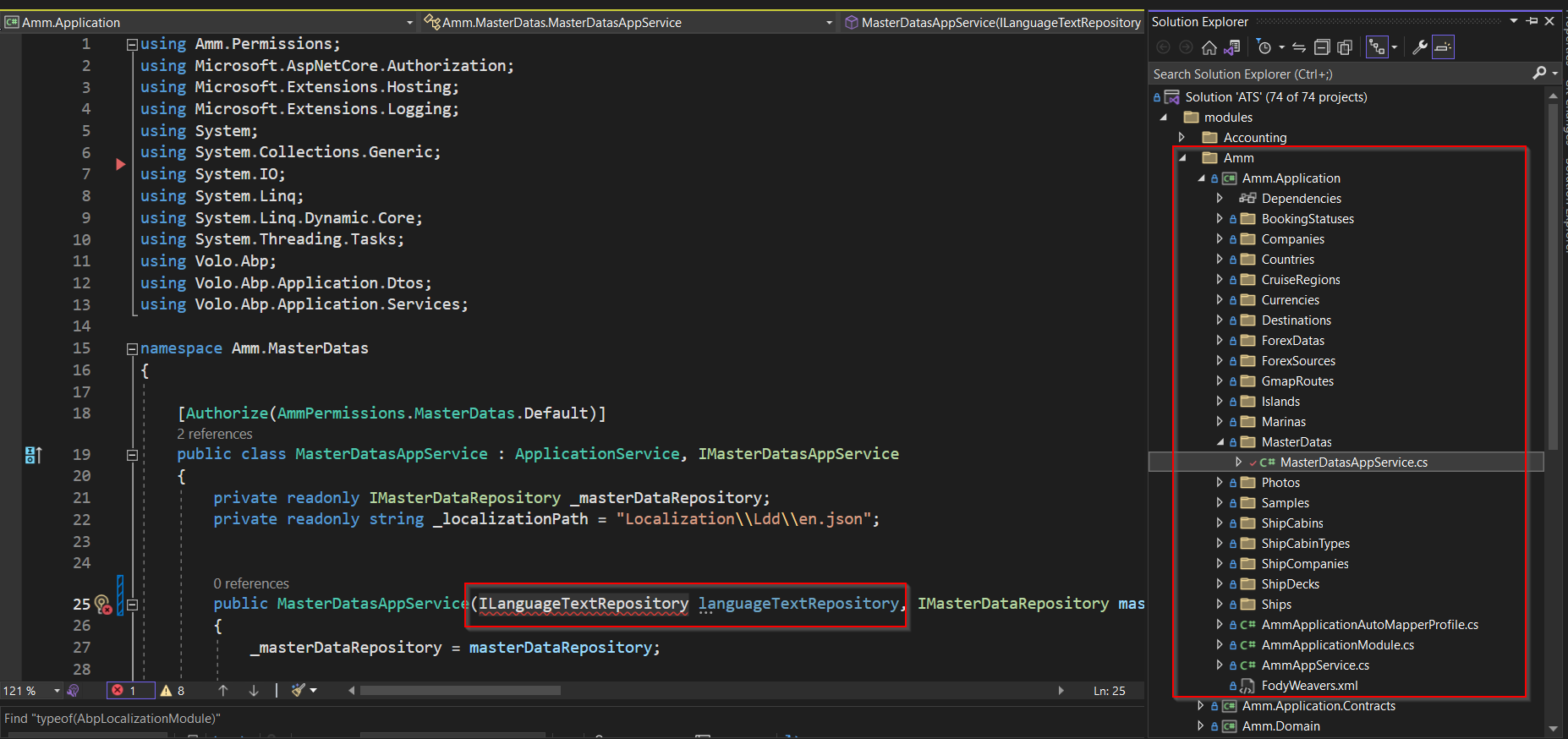
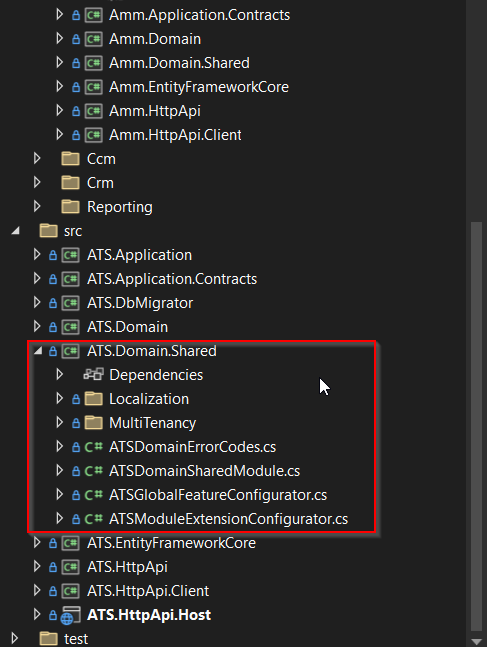
Can you share your project structure screenshot?
The implementation is the https://docs.abp.io/en/commercial/latest/modules/language-management module.
Thanks.
Markdown supported.Copy, paste, or drag & drop images and files (max 100 MB per file, 100 MB total per post) -
0
Project structure. Error we getting is after we implemented your solution. "You can inject the ILanguageTextRepository to your MasterDatasAppService to get/insert/update" ``
 Markdown supported.Copy, paste, or drag & drop images and files (max 100 MB per file, 100 MB total per post)
 -
0
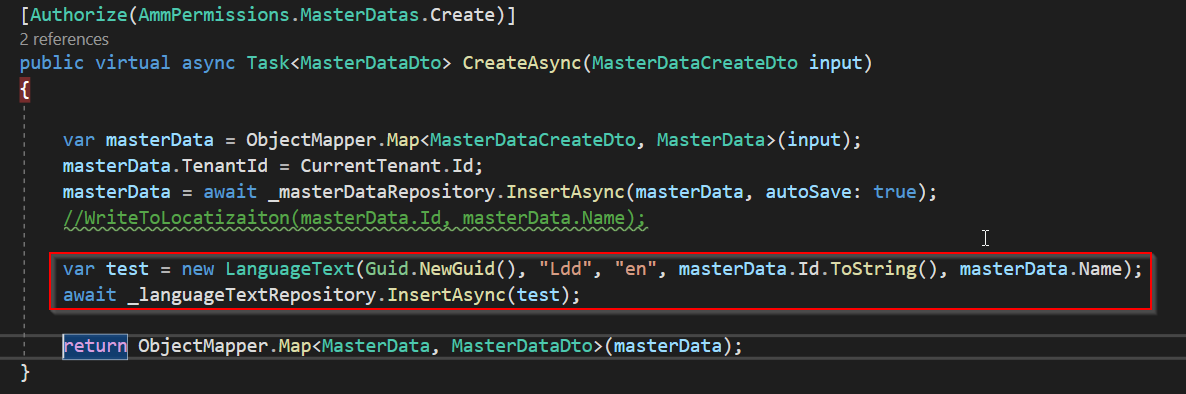
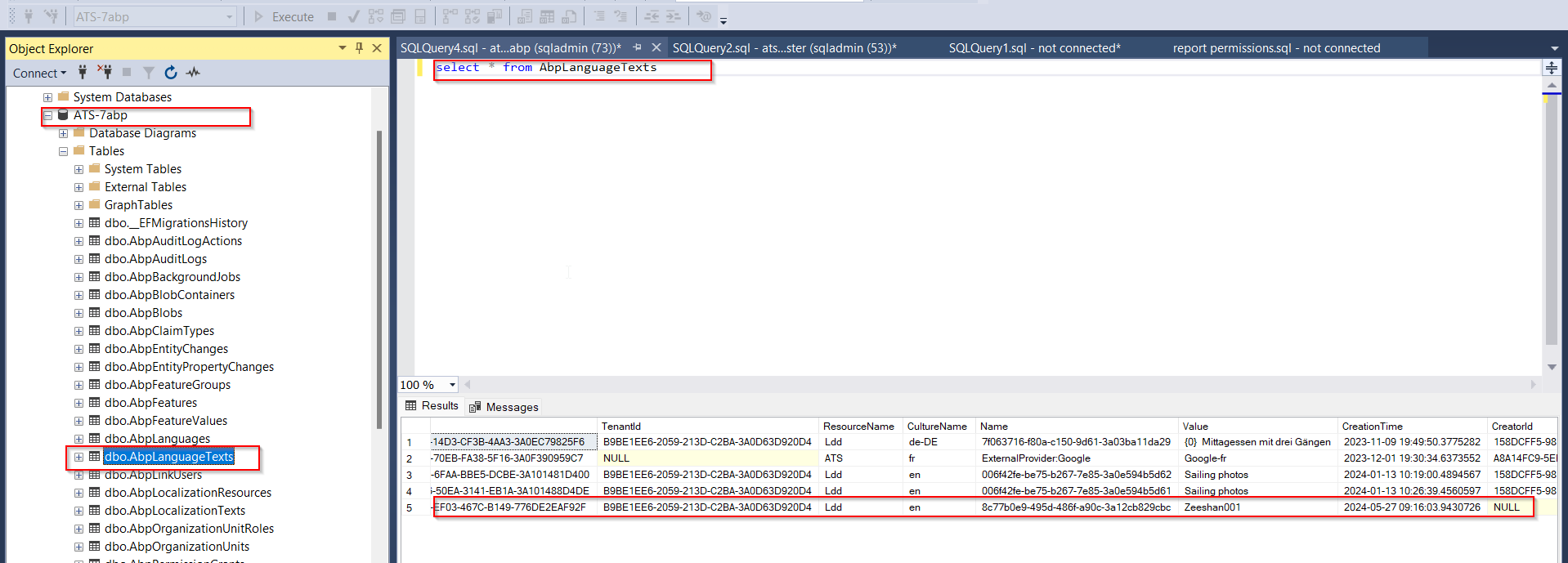
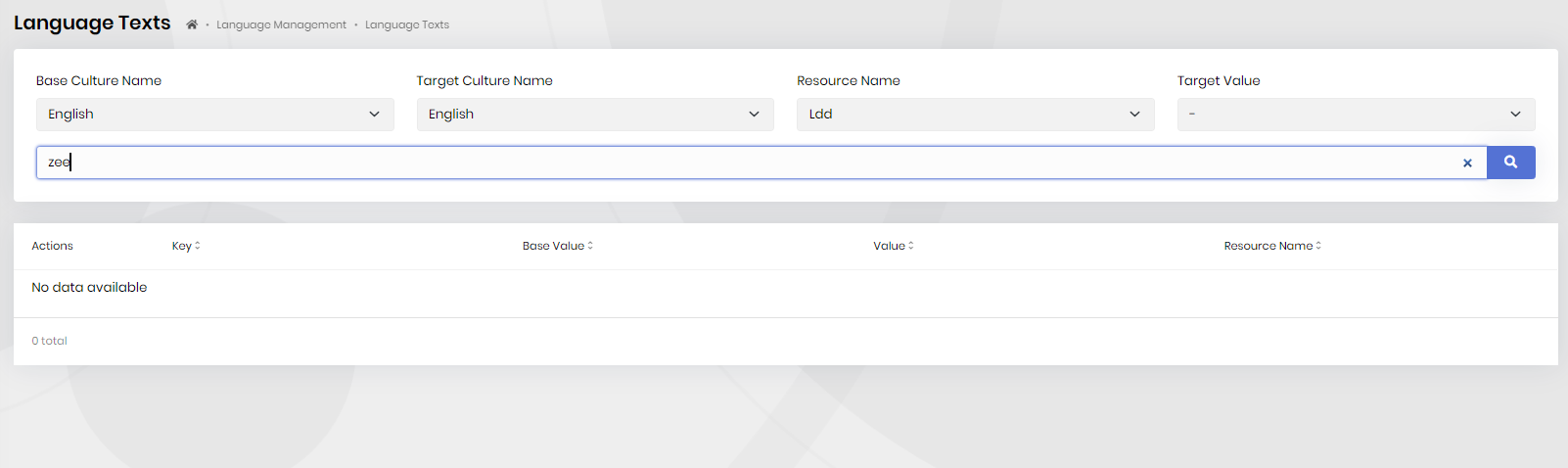
There is a single database for all modules.
I am able to insert record in the "AbpLanguageTexts" by using the "ILanguageTextRepository" repository But it is not coming in the Language Text.
 Markdown supported.Copy, paste, or drag & drop images and files (max 100 MB per file, 100 MB total per post)
 -
0
Can edit existing ones but ones inserted as new language source(masterData table) can not edit since not show up. It is coming after backend restarted
Markdown supported.Copy, paste, or drag & drop images and files (max 100 MB per file, 100 MB total per post) -
0
hi
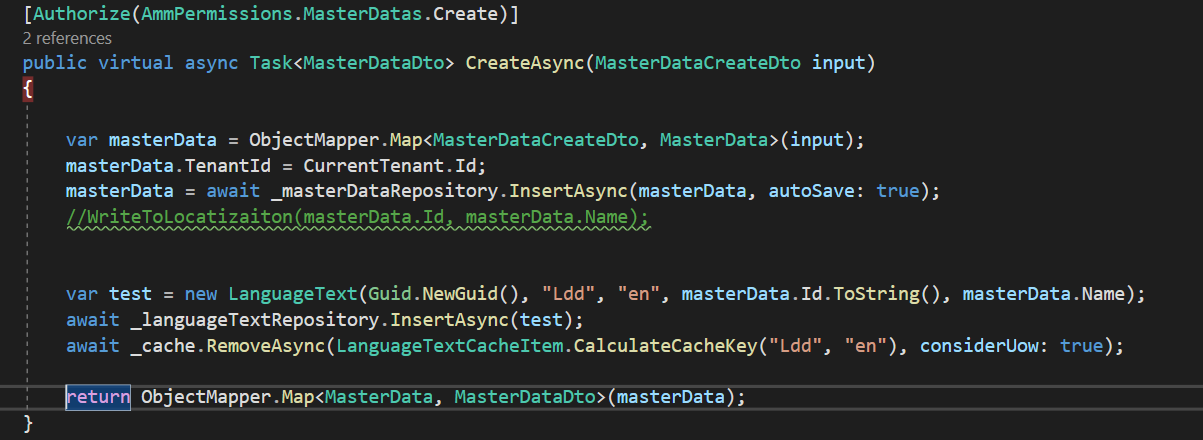
You can inject the
IDistributedCache<LanguageTextCacheItem>service and clear the cache.IDistributedCache<LanguageTextCacheItem> Cache await Cache.RemoveAsync(LanguageTextCacheItem.CalculateCacheKey(ResourceName, CultureName), considerUow: true);And
The web application may need to be restarted for the new language to be fully applied.
Markdown supported.Copy, paste, or drag & drop images and files (max 100 MB per file, 100 MB total per post) -
0
Still require restart.
 Markdown supported.Copy, paste, or drag & drop images and files (max 100 MB per file, 100 MB total per post)


