






- ABP Framework version: v8.2.1
- UI Type: Angular / MVC
- Database System: EF Core (MySQL) ** Tiered (for MVC) or Auth Server Separated (for Angular): Auth Server Separated (for Angular)
- Exception message and full stack trace: lnvalid grant type
- Steps to reproduce the issue:
- record login page using blazemeter and run the scripts in jmeter. login gets successfull but connect/token request fails with invalid grant type when you run the recorded scripts with jmeter.
- i have observe that connect/authorize request not getting correct location header in reponse correctly due to which conect/token request is failing.
14 Answer(s)
-
0
can you share the error logs
Markdown supported.Copy, paste, or drag & drop images and files (max 100 MB per file, 100 MB total per post) -
0
can you share the error logs
[11:02:47 INF] Request finished HTTP/1.1 GET https://scopeuat.doctrz.in:44322/.well-known/jwks - 200 1652 application/json;charset=UTF-8 1.7569ms [11:02:47 INF] Request starting HTTP/1.1 POST https://scopeuat.doctrz.in:44322/connect/token - application/x-www-form-urlencoded 217 [11:02:47 INF] The request URI matched a server endpoint: Token. [11:02:47 INF] The token request was successfully extracted: { "code": "[redacted]", "grant_type": "authorization_code", "redirect_uri": "https://scopeuat.doctrz.in", "client_id": "Angular", "code_verifier": "YTJ5bmdpQXBiQlZhcmxwODR4ak9Ed0RnQVlpbHVjcVYuRmxBenlDU2lnLl95" }. [11:02:47 INF] Dynamic claims is disabled, The session will not be checked. [11:02:47 INF] The response was successfully returned as a JSON document: { "error": "invalid_grant", "error_description": "The specified authorization code is no longer valid.", "error_uri": "https://documentation.openiddict.com/errors/ID2016" }. [11:02:47 INF] Request finished HTTP/1.1 POST https://scopeuat.doctrz.in:44322/connect/token - 400 178 application/json;charset=UTF-8 13.6781ms
Markdown supported.Copy, paste, or drag & drop images and files (max 100 MB per file, 100 MB total per post) -
0
The specified authorization code is no longer valid
The code has been used. so it can't be used again.
Markdown supported.Copy, paste, or drag & drop images and files (max 100 MB per file, 100 MB total per post) -
0
so how do i resolve these issue as im not getting correct location header with post login request to get the code. with connect/authorize request from jemeter i m getting location header as " Location: https://scopeuat.doctrz.in:44322/Account/Login?ReturnUrl=%2Fconnect%2Fauthorize" where as in chrome location header is "https://scopeuat.doctrz.in?code=DW_zxEc8N62TkiGKqRiiJV1HzbOkI5x8ADyGj40nYyQ&state=LW02fjUzVGFWZXZOZVJpTGdWTklSM01ZUHJVV1l-VzAxQ3pmRWRfT35KWXZz&iss=https%3A%2F%2Fuat.doctrz.in%3A44322%2F"
Markdown supported.Copy, paste, or drag & drop images and files (max 100 MB per file, 100 MB total per post) -
0
Hi,
sorry, i don't know jemeter much, you can try use
passwordflow instead ofcodeflowMarkdown supported.Copy, paste, or drag & drop images and files (max 100 MB per file, 100 MB total per post) -
0
Hi,
sorry, i don't know jemeter much, you can try use
passwordflow instead ofcodeflowthe issue is we want to do UI performance testing and using angular and mvc the code flow is implemented by default for authentication. so i can not change that as i need do perfrom UI performance testing. We want to use existing abp flow and capture the performance of the application. can you provide the documentation for password and code flow both. Moreover i could see cookie .AspNetCore.Identity.Application not being reported. so if we can provide the complete flow for setting this .AspNetCore.Identity.Application cookie in reponse header and what should be request header to get the set cookie .AspNetCore.Identity.Application will help us to understand if any issue.
Markdown supported.Copy, paste, or drag & drop images and files (max 100 MB per file, 100 MB total per post) -
0
can you provide the documentation for password and code flow both.
ABP uses the standard OAuth 2.0, see https://en.wikipedia.org/wiki/OAuth
i can sure this is a problem with jemeter. See https://stackoverflow.com/questions/60385233/unable-to-get-access-token-in-jmeter
Markdown supported.Copy, paste, or drag & drop images and files (max 100 MB per file, 100 MB total per post) -
0
can you provide the documentation for password and code flow both.
ABP uses the standard OAuth 2.0, see https://en.wikipedia.org/wiki/OAuth
i can show this is a problem with jemeter. See https://stackoverflow.com/questions/60385233/unable-to-get-access-token-in-jmeter
I have already gone through this. it does not look like an issue as request is exactly matching. Its about response we get from server is not sending the right cookies and location header. i would like to log this responses and response headers? how do i do that in abp for auth server?
Markdown supported.Copy, paste, or drag & drop images and files (max 100 MB per file, 100 MB total per post) -
0
Hi
I don't think so,
this is not related to Authserver. because you get
The specified authorization code is no longer validerror message.you can check this
https://medium.com/version-1/performance-testing-of-oauth-2-0-authorization-code-secured-apis-using-jmeter-7a9d711716a1
Markdown supported.Copy, paste, or drag & drop images and files (max 100 MB per file, 100 MB total per post) -
0
Hi
I don't think so,
this is not related to Authserver. because you get
The specified authorization code is no longer validerror message.you can check this
https://medium.com/version-1/performance-testing-of-oauth-2-0-authorization-code-secured-apis-using-jmeter-7a9d711716a1
Thanks will try but for future and debug purpose i would like to know how to log response header and body on the server.
Markdown supported.Copy, paste, or drag & drop images and files (max 100 MB per file, 100 MB total per post) -
0
See https://learn.microsoft.com/en-us/aspnet/core/fundamentals/http-logging/?view=aspnetcore-8.0
Markdown supported.Copy, paste, or drag & drop images and files (max 100 MB per file, 100 MB total per post) -
0
See https://learn.microsoft.com/en-us/aspnet/core/fundamentals/http-logging/?view=aspnetcore-8.0
yes i know this and have gone through this. but in abp module file i could not see in builder.Services.AddHttpLogging(logging => { line any where. moreover could not find the dependecy included "using Microsoft.AspNetCore.HttpLogging;". So is there any middleware code or file we have to keep this or we need to add the package and the builder.Services.AddHttpLogging code in module file?
Markdown supported.Copy, paste, or drag & drop images and files (max 100 MB per file, 100 MB total per post) -
0
Hi,
just :
public override void ConfigureServices(ServiceConfigurationContext context) { ..... context.Services.AddHttpLogging(_ => { }); } public override void OnApplicationInitialization(ApplicationInitializationContext context) { var app = context.GetApplicationBuilder(); var env = context.GetEnvironment(); app.UseHttpLogging(); ........ }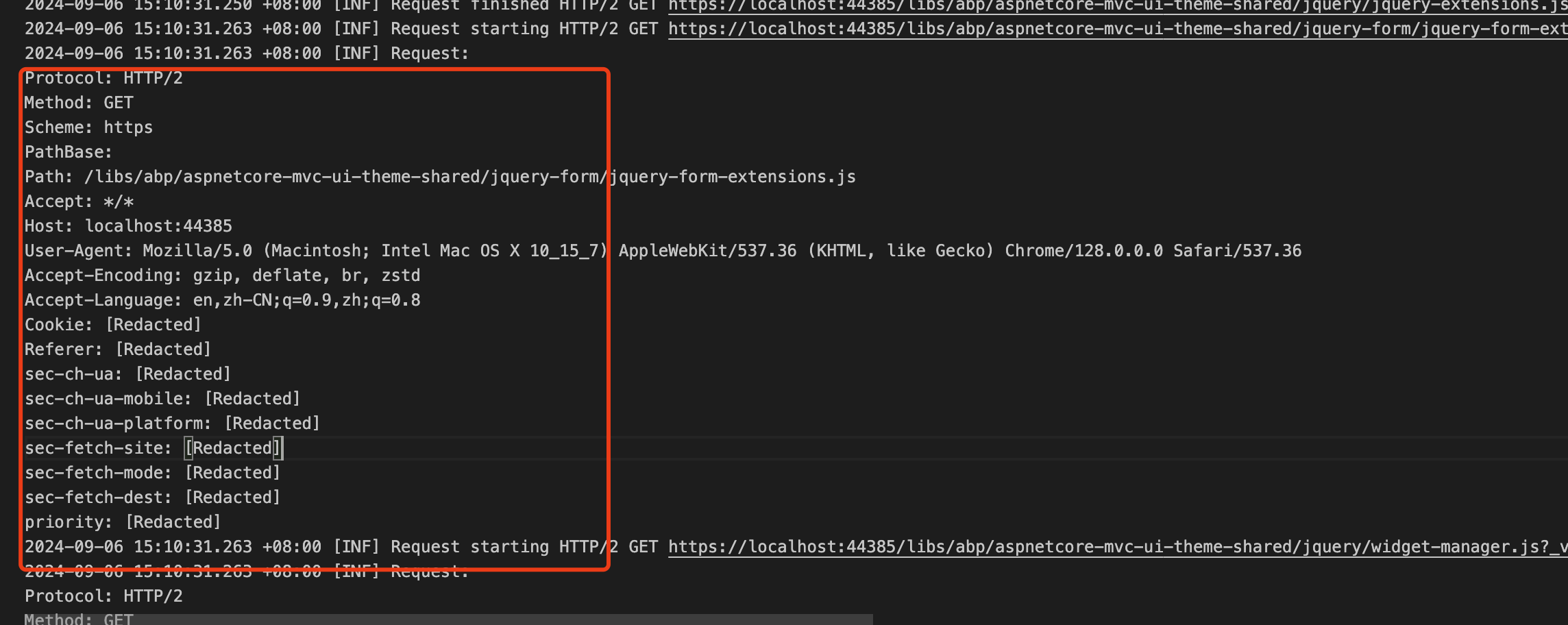 Markdown supported.Copy, paste, or drag & drop images and files (max 100 MB per file, 100 MB total per post)


