






- ABP Framework version: v8.2.1
- UI Type: Angular
- Database System: EF Core (MySQL)
- Tiered (for MVC) or Auth Server Separated (for Angular): Auth server separated angular
- Exception message and full stack trace:
- Steps to reproduce the issue:
I need to create a custom filter to filter my entity based on BranchId. The BranchId will be received as a List<long> from the request headers or parameters. Here's the approach I followed:
Created
IBranchEntityInterface:- Placed this interface in the
Domain.Sharedfolder. - It includes a
BranchIdproperty, which I inherited in the relevant entity.
- Placed this interface in the
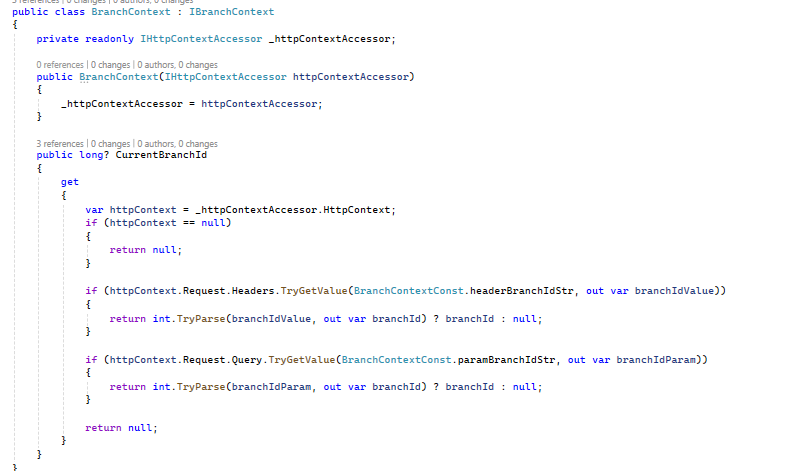
Defined
IBranchContextInterface:- This interface includes a
CurrentBranchIdproperty to store the branch ID. - Implemented the interface in a
BranchContextclass in theHttp.Hostproject with the necessary logic.
- This interface includes a
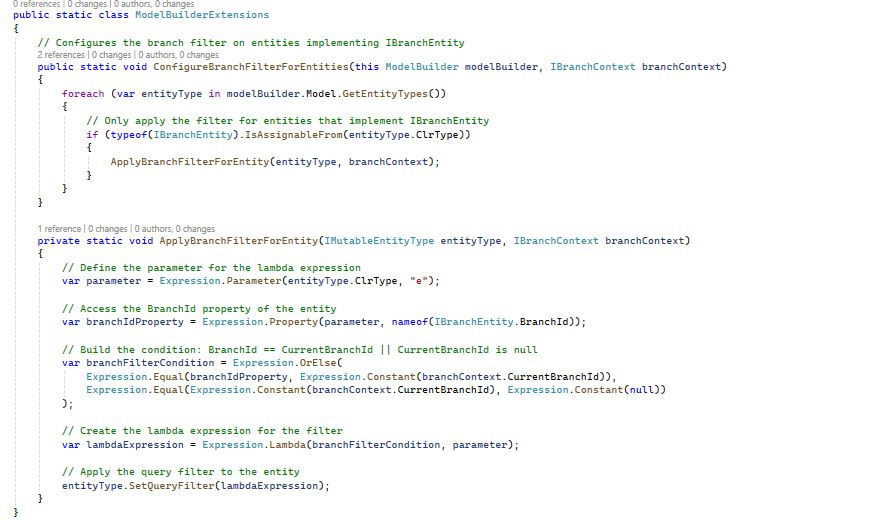
Entity Framework Filtering Logic:
- Created a file in the
EntityFrameworkfolder to define filtering logic for entities.
- Created a file in the
Service Registration:
- Registered the
IBranchContextin theHostModule.csunder theConfigureServicesmethod as follows:context.Services.AddHttpContextAccessor(); context.Services.AddScoped<IBranchContext, BranchContext>();
- Registered the
Database Context Changes:
- Updated the
ClinicServiceDbContextconstructor to accept theIBranchContext.private readonly IBranchContext _branchContext; public ClinicServiceDbContext( DbContextOptions<ClinicServiceDbContext> options, IBranchContext branchContext ) : base(options) { _branchContext = branchContext; } protected override void OnModelCreating(ModelBuilder builder) { base.OnModelCreating(builder); builder.ConfigureClinicService(); builder.ConfigureBranchFilterForEntities(_branchContext); }
- Updated the
After implementing the above, the filter is correctly identifying entities with the BranchFilter when the application is initially loaded. However, it is not being triggered for subsequent requests.
3 Answer(s)
-
0
you can check this document to know how to add a custom filter.
https://abp.io/docs/latest/framework/infrastructure/data-filtering
Markdown supported.Copy, paste, or drag & drop images and files (max 100 MB per file, 100 MB total per post) -
0
you can check this document to know how to add a custom filter.
https://abp.io/docs/latest/framework/infrastructure/data-filtering
I have already gone through the documentation when i try to keep the below code in dbcontext getting no suitable method to overload error on CreateFilterExpression method
protected bool IsBranchFilterEnabled => DataFilter?.IsEnabled<IBranchEntity>() ?? false;

protected int? CurrentBranchId => BranchContext?.CurrentBranchId;

protected override bool ShouldFilterEntity<TEntity>(IMutableEntityType entityType)
{
    if (typeof(IBranchEntity).IsAssignableFrom(typeof(TEntity)))
    {
        return true; // Apply filter to all entities implementing IBranchEntity
    }

    return base.ShouldFilterEntity<TEntity>(entityType);
}

protected override Expression<Func<TEntity, bool>> CreateFilterExpression<TEntity>(ModelBuilder modelBuilder)
{
    var expression = base.CreateFilterExpression<TEntity>(modelBuilder);

    if (typeof(IBranchEntity).IsAssignableFrom(typeof(TEntity)))
    {
        // Build the filter for BranchId
        Expression<Func<TEntity, bool>> branchFilter = e =>
            !IsBranchFilterEnabled ||
            (EF.Property<int?>(e, "BranchId") == CurrentBranchId || EF.Property<int?>(e, "BranchId") == null);

        // Combine the new filter with existing filters
        expression = expression == null ? branchFilter : QueryFilterExpressionHelper.CombineExpressions(expression, branchFilter);
    }

    return expression;
}
Markdown supported.Copy, paste, or drag & drop images and files (max 100 MB per file, 100 MB total per post) -
0
HI,
could you share a test project with me? i will check it. shiwei.liang@volosoft.com
Markdown supported.Copy, paste, or drag & drop images and files (max 100 MB per file, 100 MB total per post)


