0
jon.hallam@managed-desktop.com created
on creating or updating with ABP Suite I get this all the time in the code.
%%np-edit-modal-js-open-args%%
- ABP Framework version: v4.2.1
- UI type: / MVC
- DB provider: EF Core
- Tiered (MVC) or Identity Server Separated (Angular): / no
- Exception message and stack trace:
- Steps to reproduce the issue:
Markdown supported.
Copy, paste, or drag & drop images and files (max 100 MB per file, 100 MB total per post)
9 Answer(s)
-
0
Hi its on 4.2.1 already.
Markdown supported.Copy, paste, or drag & drop images and files (max 100 MB per file, 100 MB total per post) -
0
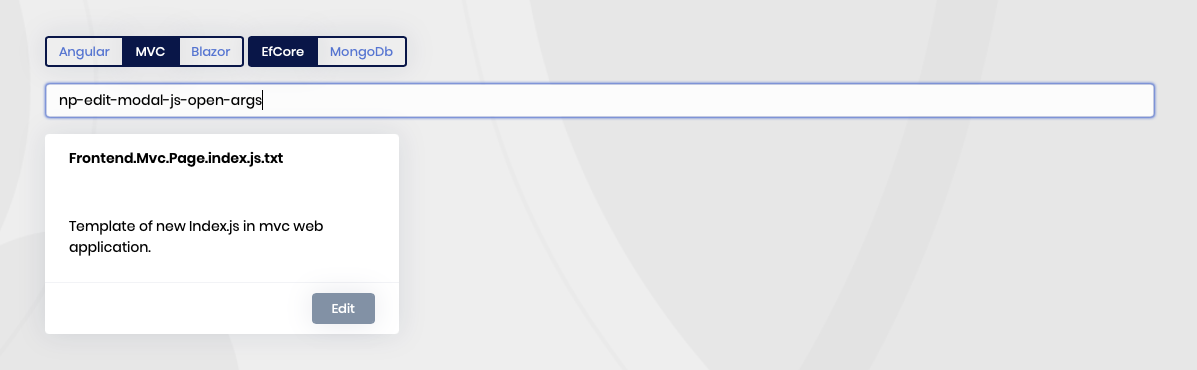
I have found it.
 Markdown supported.Copy, paste, or drag & drop images and files (max 100 MB per file, 100 MB total per post)
 -
0
@jon replace this with the below. it'll solve that.
$(function () {
    var l = abp.localization.getResource("%%only-project-name%%");
	%%<if:IsTieredArchitecture>%%var %%entity-name-camelcase%%Service = window.%%solution-namespace-camelcase%%.controllers.%%entity-namespace-camelcase%%.%%entity-name-camelcase%%;%%</if:IsTieredArchitecture>%%
	%%<if:IsNonTieredArchitecture>%%var %%entity-name-camelcase%%Service = window.%%solution-namespace-camelcase%%.%%entity-namespace-camelcase%%.%%entity-name-camelcase%%;%%</if:IsNonTieredArchitecture>%%
	%%navigation-property-lookup-common-methods%%
	%%navigation-property-lookup-methods%%
    var createModal = new abp.ModalManager({
        viewUrl: abp.appPath + "%%module-name-slash-postfix%%%%entity-name-plural%%/CreateModal",
        scriptUrl: "/Pages/%%module-name-slash-postfix%%%%entity-name-plural%%/createModal.js",
        modalClass: "%%entity-name-camelcase%%Create"
    });

	var editModal = new abp.ModalManager({
        viewUrl: abp.appPath + "%%module-name-slash-postfix%%%%entity-name-plural%%/EditModal",
        scriptUrl: "/Pages/%%module-name-slash-postfix%%%%entity-name-plural%%/editModal.js",
        modalClass: "%%entity-name-camelcase%%Edit"
    });

	var getFilter = function() {
        return {
            filterText: $("#FilterText").val(),
            %%index-js-filtering-fields%%
        };
    };

    var dataTable = $("#%%entity-name-plural%%Table").DataTable(abp.libs.datatables.normalizeConfiguration({
        processing: true,
        serverSide: true,
        paging: true,
        searching: false,
        scrollX: true,
        autoWidth: false,
        scrollCollapse: true,
        order: [%%order-%%],
        ajax: abp.libs.datatables.createAjax(%%entity-name-camelcase%%Service.getList, getFilter),
        columnDefs: [
            {
                rowAction: {
                    items:
                        [
                            {
                                text: l("Edit"),
                                visible: abp.auth.isGranted('%%only-project-name%%.%%entity-name-plural%%.Edit'),
                                action: function (data) {
                                    editModal.open({
                                     id: data.record%%add-entity-name-camelcase%%.id
                                     });
                                }
                            },
                            {
                                text: l("Delete"),
                                visible: abp.auth.isGranted('%%only-project-name%%.%%entity-name-plural%%.Delete'),
                                confirmMessage: function () {
                                    return l("DeleteConfirmationMessage");
                                },
                                action: function (data) {
                                    %%entity-name-camelcase%%Service.delete(data.record%%add-entity-name-camelcase%%.id)
                                        .then(function () {
                                            abp.notify.info(l("SuccessfullyDeleted"));
                                            dataTable.ajax.reload();
                                        });
                                }
                            }
                        ]
                }
            },
			%%index-js-TableProperties%%%%table-navigation-property-fields%%
        ]
    }));

    createModal.onResult(function () {
        dataTable.ajax.reload();
    });

    editModal.onResult(function () {
        dataTable.ajax.reload();
    });

    $("#New%%entity-name%%Button").click(function (e) {
        e.preventDefault();
        createModal.open();
    });

	$("#SearchForm").submit(function (e) {
        e.preventDefault();
        dataTable.ajax.reload();
    });

    $('#AdvancedFilterSectionToggler').on('click', function (e) {
        $('#AdvancedFilterSection').toggle();
    });

    $('#AdvancedFilterSection').on('keypress', function (e) {
        if (e.which === 13) {
            dataTable.ajax.reload();
        }
    });

    $('#AdvancedFilterSection select').change(function() {
        dataTable.ajax.reload();
    });
});
Markdown supported.Copy, paste, or drag & drop images and files (max 100 MB per file, 100 MB total per post) -
0
This question has been automatically marked as stale because it has not had recent activity.
Markdown supported.Copy, paste, or drag & drop images and files (max 100 MB per file, 100 MB total per post) -
0
@albert,
How can i find all list of template variables?
I have similar question but i didn't find the variable.
My template is below,
I need a variable what its will render navigation repository names like "_aRepository, _bRepository". I'll send them to base class.
I tried %%navigation-property-repositories-ctor%%, %%navigation-property-repositories%% ,
public partial class  %%entity-name-plural%%ExtendedAppService:  %%entity-name-plural%%AppService, I%%entity-name-plural%%ExtendedAppService
{
    private readonly I%%entity-name%%Repository _%%entity-name-camelcase%%Repository;
    %%navigation-property-repositories%%

    public %%entity-name-plural%%ExtendedAppService(I%%entity-name%%Repository %%entity-name-camelcase%%Repository %%navigation-property-repositories-inject%%):
    base(%%entity-name-camelcase%%Repository, %%navigation-property-repositories-ctor%%)
    {
        _%%entity-name-camelcase%%Repository = %%entity-name-camelcase%%Repository;
        %%navigation-property-repositories-ctor%%
    }

}
Markdown supported.Copy, paste, or drag & drop images and files (max 100 MB per file, 100 MB total per post) -
0
hi I want to set link instead modal in datatable as following bellow :
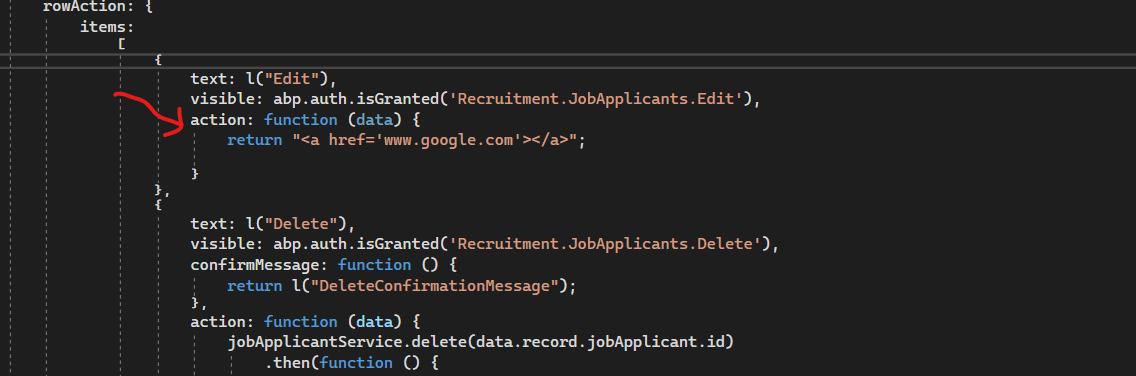
can you give me solution please
Markdown supported.Copy, paste, or drag & drop images and files (max 100 MB per file, 100 MB total per post)