Hi,
The only log that I can found in your logs is An error occurred using the connection to database 'sqldb-myapp' on server 'sql-myserver.database.windows.net'.
Is your SqlServer version, or nuget package sqlserver version changed? Is there any chance, latest EntityFrameworkCore prover don't support your database version?
Also there can be different errors too.
Do you still use IdentityServer or migrated to OpenIdDict?
And you mentioned your solution is tiered. Do this logs belong to HttpApi.Host project?
Hi,
Where did you installed the ABP Studio? We have different signing certificate right know on the Microsoft Store. Can you try the same operations after installing from Microsoft Store?
By the way, if possible can you share ABP Studio logs right after this warning? Which operation causes this detection?
Your support ticket is refunded
Unit tests are configured to execute all the migrations and data seeds initially by default.
Do you have required migrations for your custom tables in the project?
Even you don't use EF query, you can still add your custom tables to the DbContext and create migrations to apply database scheme to the database. This is the easiest way to create tables in the test environment.
Otherwise, you can customize your test module and add custom sceheme migration logic in the OnApplicationInitialization method.
Hi,
Thanks for the reply, i understand now what the issue is. I have a few questions reguarding this approach. Why would leptonX render both toolbars regardless of if im viewing the page from mobile or desktop? Wouldn't it be better perfomance wise if they only rendered when necessary? Is there an option to achieve this rather then having them both render always?
Unfortunately it's not a programming decision. The HTML structure of the LeptonX theme requires 2 different usage since desktop toolbar and mobile toolbar has completely different html tree. It cannot change menu & toolbars only visually by using CSS. The html structure also is different and both should be added separately. That's why we have 2 different component to match leptonx html structure in blazor.
https://x.leptontheme.com/side-menu/index.html
Hi,
I assume you're using LeptonX Theme right?
In the leptonx, Desktop Toolbar and Mobile Toolbar are separated and this component is rendered twice, one for desktop toolbar and one for mobile toolbar. That's why you see 2 different logs in your console.
If you wish to use it in the only for desktop view, I suggest you to use LeptonXToolbars.Main or LeptonXToolbars.MainMobile instead directly using StandardToolbars.Main from the framework:
if (context.Toolbar.Name == LeptonXToolbars.Main)
{
    context.Toolbar.Items.Insert(0, new ToolbarItem(typeof(Notification)));
}
If you want to share a state between those 2 component instances, you can use a Singleton or Scoped service to get data from a service and keep the data in that service and render directly from that service. In that case, you'll make a single request and share data that obtained once.
Hi,
Can you share your ABP Studio logs to determine the problem?
You'll see the logs tab at the bottom panel of the studio:
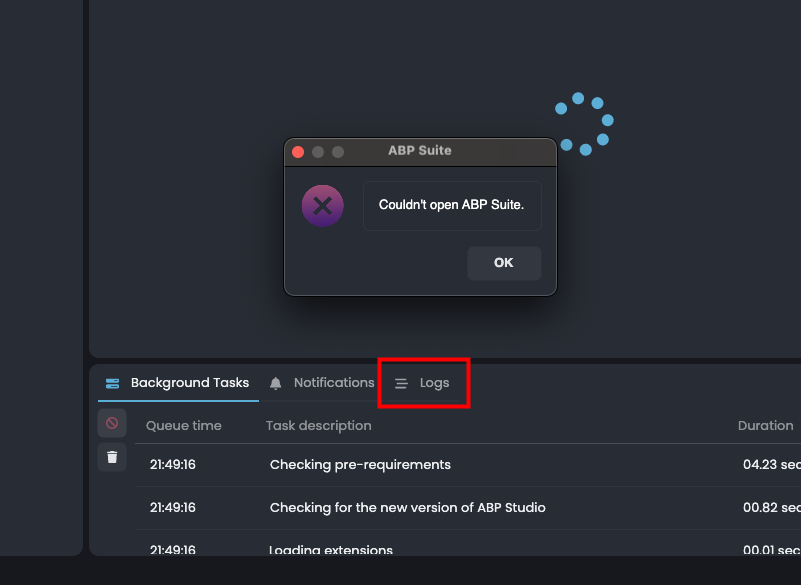
After closing the error modal, can you go to that tab and send us the problem that is related to ABP Suite?
Hi,
It's a business decision by ABP team.
After version v8.3, new project creation is moved to the new ABP Studio CLI and ABP Studio UI. Now, ABP provides new templates with much more options. The new way provides a lot more features, old templates won't be supported anymore.
https://abp.io/get-started
If you interested in with old templates, it's still possible with abp-old CLI command but it's not accessible from the ABP Suite UI.
You can continue creating project from legacy templates like abp-old new MyProjectName -u angular -d mongodb -csf
Hi,
Can you provide your steps to reproduce the problem?
Did you create a subscription link by using ISubscriptionAppService and redirected to that link in your code?
https://abp.io/docs/latest/modules/saas#usage
Hi,
The time required depends on your project structure and how much you've customized ABP's features and services. While we generally try to avoid breaking changes, they can sometimes occur.
I suggest following the migration guides step by step, incrementally updating versions instead of jumping directly to v9.0: ABP Migration Guides
Since you use modules from source codes, you won't be able to update modules with the NuGet package version. Instead, you'll need to re-download the latest versions of these modules, compare the changes made by the ABP team, and apply those changes to your local ones. If there aren't many changes in your modules, you can move your customizations to the newly downloaded source code, which might save you time.
I can't provide an exact estimate without knowing your overrides, but here's a general idea for a standard usage scenario:
Each version switch may take 2-4 hours, including building, running, and testing, assuming there are no issues.
Total time estimate: (2-4 hours) * 10 iterations = 20-40 hours
⚠️ This is just an assumption. I am a software developer, not a project manager, so the actual time might be more or less depending on your team's experience.
Hi @nabass
It seems the CSS variable is loaded much more earlier than your custom logo variable. The only way to prevent this problem permanently is replacing this physical files in your application:
/images/logo/leptonx/icon-logo.svg
/images/logo/leptonx/icon.svg
Overriding BrandingProvider also works but still there is a timing problem. When the theme's CSS file is loaded to the browser it automatcally starts download the given file from variable. Even you override, it was started download already. So replacing the original file prevents it.
Another approach is customizing the SCSS files and build your css on your own if you have access to source code of leptonx. But replacing the source file is much more easier solution for now









