Hi, can you please share your application logs?
It seems the server respond with HTTP status code 500 and details are kept in .HttpApi.Host project. Please check its logs share them.
Hi,
Normally there is no warning or threat found by any antivirus software: https://www.virustotal.com/gui/file-analysis/ODY4MDVjYmFkMzI3ODA5M2MzNTU0NTgwNTllYzBkZTA6MTczNjQ5MzM2OQ==
But this kind of warnings might happen according to behavioral actions by the application. If you can send the detailed log about this warning, we can try to find that action and find a better way to do that.
Hi
I realized that maui template is still using Microsoft.Windows.CsWin32 nuget package for msix. As i know you can debug it without msix by giving property
This Microsoft.Windows.CsWin32 was used as a workaround for a bug in openning browser while user clicks to login buttpn.
https://github.com/microsoft/WindowsAppSDK/issues/441
When this problem is resolved, we'll remove that package from templates. So, a regular MAUI application shouldn't have that pacakge by default. You can think about it's an msix app and you should develop like it is. Otherwise you can face some other MAUI issues too
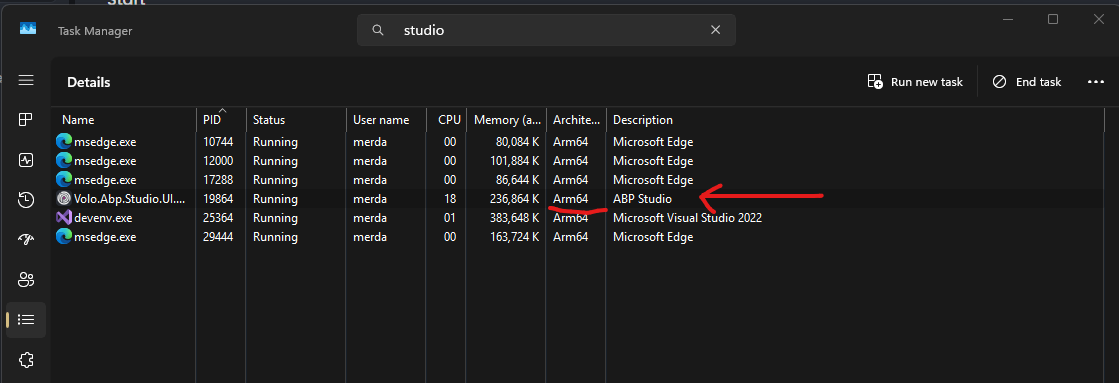
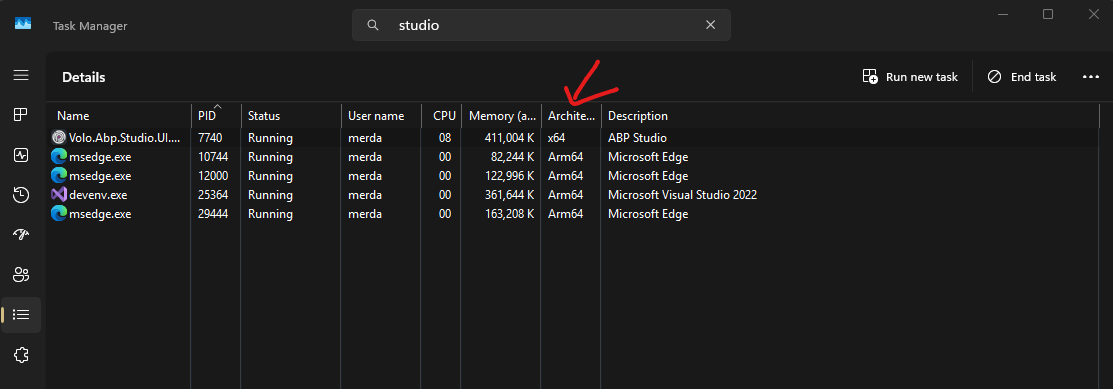
Automated update on Windows on Arm, brakes ABP Studio, so I have to uninstall it, and manually download and install the latest ARM version.
Automated update downloads and installs a wrong architecture (x64), which results in:
Which is also reported here
before update:
after update:
Hi,
Can you check the file at %UserProfile%\.abp\studio\update.json?
It seems a problem occurred while creating that file, if the path ends with windows, can you change it to windows-arm before the update?
In that way, you'll get ARM updates, we'll fix the problem soon.
Hi, you can manually manage the current menu item by using PageLayout
https://abp.io/docs/latest/framework/ui/blazor/page-layout#menuitemname
@inject PageLayout PageLayout


@code{
    protected async override Task OnInitializedAsync()
    {
        PageLayout.MenuItemName = "MyApplication.MenuItemName";
    }
}
- Can I create a complex pages by using CMS Kit out of the box or do I need to create custom page templates (that every tenant will have access to from "create page" button)?
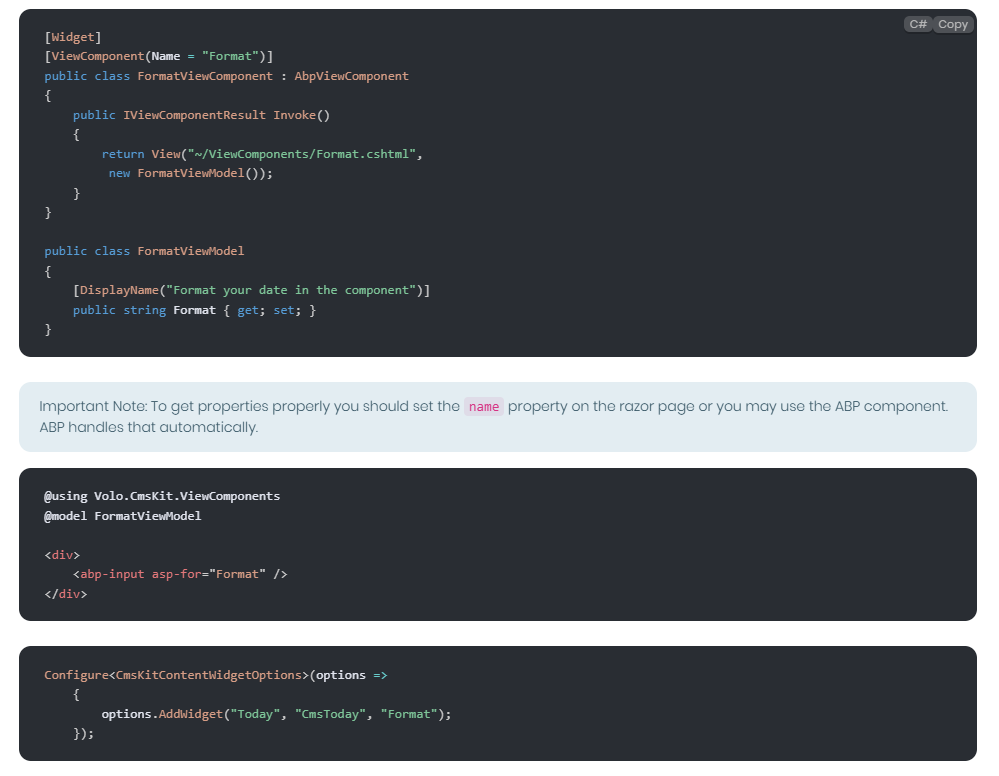
Yes, you can add any kind of ViewComponent to the widget list with their own editor. In the documentation we only show a single parameter which is Format, but you can design much more complex component editors for your components. The following example show a modal design that will be shown when you click the widget to add the page. You can add multiple parameters and inputs for a specific component:
2.If I need to create custom template page, can CMS Kit manage the content for the page? - If I allow the tenant to change from a template with different content placeholders then the content would be lost.
Widgets are application-wide. If a widget used across different tenants, it'll work unless you do something according to the TenantId or authneticated user in the ViewComponent code. But the page itself is multi-tenant and page content won't be shared across tenants.
- If I allow the tenant to change from a template with different content placeholders then the content would be lost.
Sorry, I couldn't recognize about "template", do you mean themes like: LeptonX, Basic Theme etc?
- Could a Dynamic Widget be used to create these "sections" of premade blocks (as seen on image below)? This would probably be the most ideal scenario. Then I would have a "Hero widget" a "Carousel widget" etc. that has different elements (text, images, placement of text, enable/disble etc.) that the user can change for that page. The only issue I see here is that the CMS menu will quickly fill up with many many widgets.
Yes, each section can be defined as Widget in the CmsKitContentWidgetOptions and users can add them directly into their own pages and it'll be rendered. For example, you can create a SliderViewComponent for this purpose and create a new Entity named Slider. So users can create and set multiple images and titles for a slider. Then they come back to page creation/edit page and add a SliderWidget by selecting slider entity from a dropdown to show in this component? So, you can keep data from different entity and make them selectable while widget is adding to the page. (You can even customize shown items according to authenticated user, since you build this modal design like I said in Q2)
- Do the Dynamic Widgets open up in design/edit mode when I click on them (in the text field of CMS Kit) after they have been added as content? If I have complex widget then I would like my tenants to have a UI (that might have extra information in it)
Dynamic widgets are rendered even in Edit mode. But because of limitation of editor, it can be shown in preview tab of the editor instead WYSIWYG mode. But still it can help to see entire page before saving it. In the editor mode, it'll be shown according to your parameters something like that:
[Widget Type="Slider" Id="ac41e19a-3398-459f-a382-3bd33f17a8d7" Animate="true" AutoCycle="false"]
- Can I intercept the "create page" button and offer my own popup UI for selecting a template?
Already mentioned in the previous post
Q1: Can I create complex pages like the image here below? And are the pages responsive?
CMS Kit is just a module that provides pages written in markdown or/and html + css + js. So, responsiveness is according to your design and styles. I.E. If you follow bootstrap grid system and classes, it will be responsive. You can attach additional CSS and JS for a specific pages or you can add globally them.
Can I add dynamic widgets into these pre-made pages? I´m pretty sure it is but want to ask.
Yes, The widget system aims this. All the widgets are rendered by requesting to the server-side. So, you can even make them rendered different according to the authenticated user.
https://abp.io/docs/latest/modules/cms-kit/dynamic-widget#adding-the-widget
In this example, TodayViewComponent will be executed on the server-side and you can make database operations, HTTP requests or whatever you need to render this component. I.E. You can create a ProductListComponent that lists the first 4 products from the database etc.
Can I intercept the "create page" button and offer my own popup UI for selecting a template?
You can completely replace Create.cshtml in your project and make it completely different than the original CMS Kit page. You can follow this guide to override a page from a module in your application: https://abp.io/docs/latest/framework/ui/mvc-razor-pages/customization-user-interface
Can you edit the dynamic widget from the page its on by clicking on the widget on the page its self? I would not want to go the the menu for it and I don´t want manual editing of text.
Currently it's not possible. It's designed to be managed by admin-side and page create/update editor. This data is stored application-wide, so if it can be edited in the page itself_(public-side)_ you may need to keep data per each client. So, you may need implement a different new logic for this kind of operation.
Hi,
After completing the first subscription with the following example:
public virtual async Task<IActionResult> OnPost()
{
    var paymentRequest = await PaymentRequestAppService.CreateAsync(
         new PaymentRequestCreateDto
         {
             Products =
             {
                    new PaymentRequestProductCreateDto
                    {
                        PaymentType = PaymentType.Subscription,
                        Name = DemoAppData.Plan_2_Name,
                        Code = "EP",
                        Count = 1,
                        PlanId = DemoAppData.Plan_2_Id,
                    }
             }
         });

    return LocalRedirectPreserveMethod("/Payment/GatewaySelection?paymentRequestId=" + paymentRequest.Id);
}
You need to add handler for the following events:
public class MySubscriptionCreatedHandler : IDistributedEventHandler<SubscriptionCreatedEto>, ITransientDependency
{
    public Task HandleEventAsync(SubscriptionCreatedEto eventData)
    {
        Console.WriteLine("Subscription Created with Payment Request Id:" + eventData.PaymentRequestId);

        // Map that PaymentRequest to your Subscription Entity. You'll use this PaymentRequestId in the future events.

        return Task.CompletedTask;
    }
}

public class MySubscriptionCanceledHandler : IDistributedEventHandler<SubscriptionCanceledEto>, ITransientDependency
{
    public Task HandleEventAsync(SubscriptionCanceledEto eventData)
    {
        Console.WriteLine("Subscription Cancelled with Payment Request Id:" + eventData.PaymentRequestId);
        // Find and Cancel the Subscription in your system.
        return Task.CompletedTask;
    }
}

public class MySubscriptionUpdatedHandler : IDistributedEventHandler<SubscriptionUpdatedEto>, ITransientDependency
{
    public Task HandleEventAsync(SubscriptionUpdatedEto eventData)
    {
        Console.WriteLine("Subscription Updated with Payment Request Id:" + eventData.PaymentRequestId);
        // Find and Update the Subscription in your system.

        if (eventData.State == PaymentRequestState.Completed)
        {
            // Another payment completed for the Subscription. You can keep subscription going on.
        }

        if (eventData.State == PaymentRequestState.Failed || eventData.State == PaymentRequestState.Refunded)
        {
            // Subscription is failed or refunded. You can cancel the subscription.
        }
        return Task.CompletedTask;
    }
}
Microsoft.AspNetCore.Authorization.DefaultAuthorizationService: Information: Authorization failed. These requirements were not met: PermissionRequirement: SettingManagement.Emailing Microsoft.AspNetCore.Authorization.DefaultAuthorizationService: Information: Authorization failed. These requirements were not met: PermissionRequirement: SettingManagement.TimeZone Microsoft.AspNetCore.Authorization.DefaultAuthorizationService: Information: Authorization failed. These requirements were not met: PermissionRequirement: AbpAccount.SettingManagement Microsoft.AspNetCore.Authorization.DefaultAuthorizationService: Information: Authorization failed. These requirements were not met: PermissionRequirement: AbpIdentity.SettingManagement Microsoft.AspNetCore.Authorization.DefaultAuthorizationService: Information: Authorization failed. These requirements were not met:
It's hard to understand this authentication problem, can I see your authserver configuration?
This is related to UI theme, it's solved and will be published in LeptonX nuget packages