hi
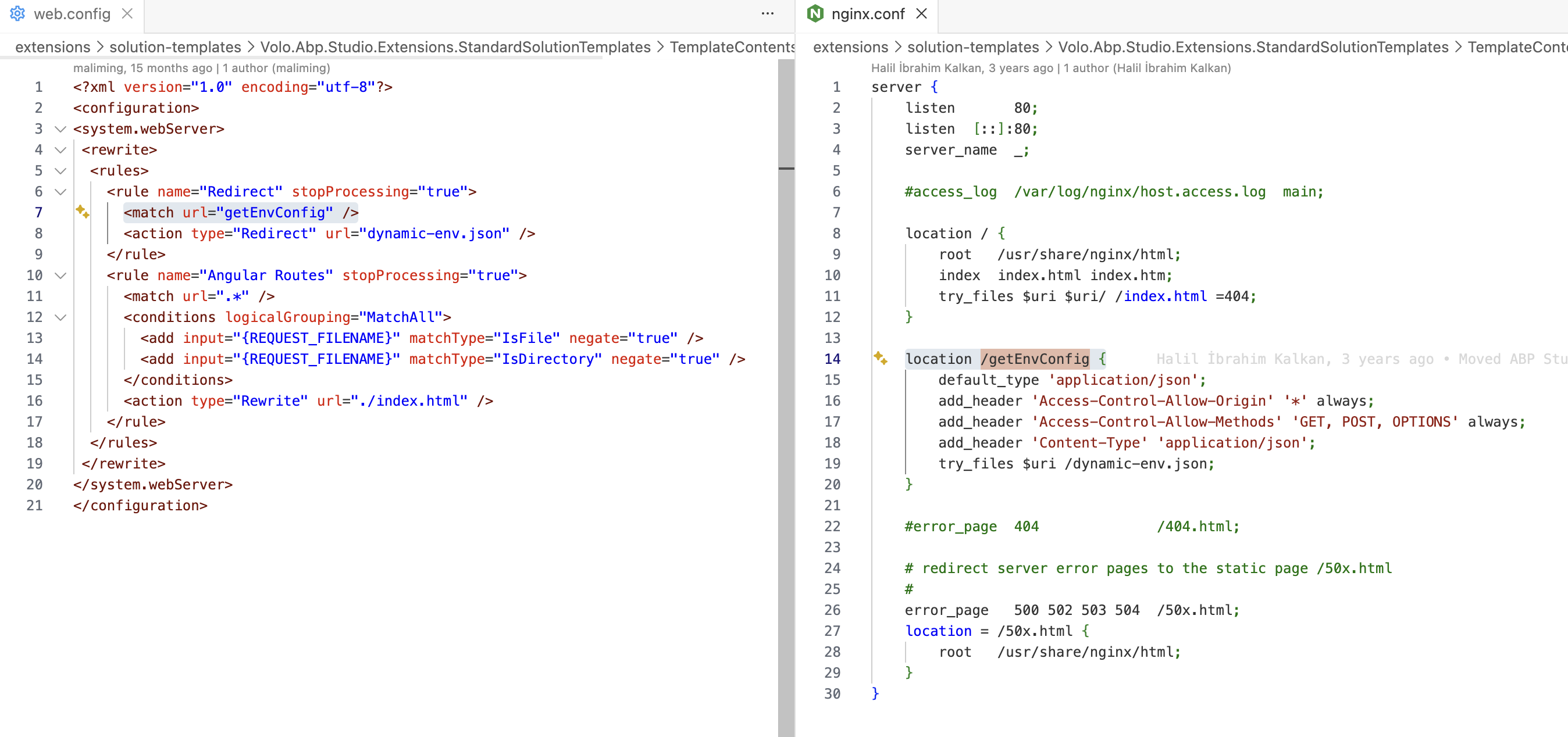
The problem is that the /getEnvConfig endpoint doesn't return the expected data.
You can :
remoteEnv from environment.prod.ts if you don't want to use the dynamic-env.json feature.remoteEnv: {
url: '/getEnvConfig',
mergeStrategy: 'overwrite'
}
2, Rewrite this endpoint in your IIS or nginx..
hi
Abp Azure event bus doesn't support multiple topics.
https://github.com/abpframework/abp/issues/22424
Thanks
hi
The @volo/abp.aspnetcore.mvc.ui.theme.leptonx doesn't depend on Dropzone by default.
You can add it yourself.
The lepptonx demo website uses "dropzone": "^6.0.0-beta.2"
Thanks.
hi
Can you clear the Redis cache if you are using it?
What is your current user info?
Can you share data in the AbpPermissionGrants table?
Maybe your current user's role has all permissions.
Thanks.
if there is a way to remove log entries for these jobs which run every 5 minutes after a relatively short period of time?
It seems this is related to Hangfire Dashboard?
Thanks.
hi
You can Custom Job Name by configure GetBackgroundJobName delegate of the AbpBackgroundJobOptions to change the default job name.
Configure<AbpBackgroundJobOptions>(options =>
{
    options.GetBackgroundJobName = (jobType) =>
    {
        if (jobTyep == typeof(EmailSendingArgs))
        {
            return "emails";
        }

        return BackgroundJobNameAttribute.GetName(jobType);
    };
});
Thanks.
hi
You can set only one app to execute the job, or set an application name for isolation(>= 9.2)
See: https://abp.io/docs/latest/framework/infrastructure/background-jobs#disable-job-execution https://abp.io/docs/latest/framework/infrastructure/background-jobs#using-the-same-storage-for-background-jobs--workers
Thanks.
hi
You can try code below:
app.UseSwagger();
app.UseAbpSwaggerUI(options =>
{
    options.SwaggerEndpoint("/portal/api/swagger/v1/swagger.json", "Approach API");

    var builder = new StringBuilder(options.HeadContent);
    builder.AppendLine($"<myscript>abp.appPath = '/portal/api/';</myscript>");
    options.HeadContent = builder.ToString();

    var configuration = context.GetConfiguration();
    options.OAuthClientId(configuration["AuthServer:SwaggerClientId"]);
});
Thanks.
hi
Hi We will provide you the Logs give us some time as our sever is experiencing downtime now
Please enable the Debug and Verbose logs
var loggerConfiguration = new LoggerConfiguration()
    .MinimumLevel.Debug()
    .MinimumLevel.Override("Microsoft.EntityFrameworkCore", LogEventLevel.Warning)
    .MinimumLevel.Override("OpenIddict", LogEventLevel.Verbose)
    .Enrich.FromLogContext()
    .WriteTo.Async(c => c.File("Logs/logs.txt"))
Thanks
hi
If you see a 400 error on the website. The error will be written to the logs.txt
Have you set the log level? MinimumLevel.Debug()
var loggerConfiguration = new LoggerConfiguration()
    .MinimumLevel.Debug()
    .MinimumLevel.Override("Microsoft.EntityFrameworkCore", LogEventLevel.Warning)
    .Enrich.FromLogContext()
    .WriteTo.Async(c => c.File("Logs/logs.txt"))
Can you clear logs.txt and reproduce the 400 error again?
Thanks.









