hi
Could you check the Routes section in your old yarp.json vs the current appsettings.json?
If your original routes were matching specific paths (e.g. only -public controllers), but the new config uses broader catch-all patterns, that would explain why more APIs are visible now — the Swagger UI reflects what's actually routed through YARP.
Also, you can create a new microservice template project with ABP Studio and compare the gateway configuration with yours. That should make it easier to spot any differences.
Thanks.
hi
Can you share all logs.txt and identitymodel.txt to liming.ma@volosoft.com
Thanks.
hi
You are right — in a tiered solution, the impersonation request is redirected from the Blazor host to the AuthServer as a GET request with access_token, so OnGetAsync is the correct method to override, not OnPostAsync.
Your approach of overriding OnGetAsync in OpenIddictImpersonateTenantModel is correct.
Thanks.
Hi,
I've investigated the issue and found the root cause.
The error System.ArgumentException: The path in 'value' must start with '/' is a bug in the Volo.Abp.AuditLogging.Blazor.Server package (version 9.3.0). In AuditLoggingScriptBundleContributor.cs, the export.js bundle path was registered without a leading /:
// correct (existing)
context.Files.AddIfNotContains("/_content/Volo.Abp.AuditLogging.Blazor/libs/chart/chart.min.js");
// bug — missing leading '/'
context.Files.AddIfNotContains("_content/Volo.Abp.AuditLogging.Blazor/libs/excel/export.js");
This was introduced in version **9.3.0 **and fixed in version 9.3.4.
Update your ABP packages from 9.3.0 to 9.3.4 or later (latest is 9.3.7). The bug is already fixed in those versions.
Also, please make sure to update all embedded Lepton theme source projects (Volo.Abp.AspNetCore.Components.Server.LeptonTheme, Volo.Abp.AspNetCore.Components.Web.LeptonTheme, Volo.Abp.LeptonTheme.Management.*, etc.) — their ABP package references and TargetFramework must match the main project. The abp update command only updates NuGet package references, not source-code project dependencies.
If you want to stay on 9.3.0, add the following workaround in your BlazorLeptonThemeScriptContributor.cs. Since this contributor runs last in the script bundle pipeline, it can fix the paths contributed by other modules:
public override void ConfigureBundle(BundleConfigurationContext context)
{
    context.Files.AddIfNotContains("/_content/Volo.Abp.AspNetCore.Components.Web.LeptonTheme/scripts/global.js");

    // Workaround: Fix bundle file paths missing leading '/' (ABP 9.3.0 ~ 9.3.3 bug)
    for (var i = 0; i < context.Files.Count; i++)
    {
        if (!context.Files[i].FileName.StartsWith("/"))
        {
            context.Files[i] = new BundleFile("/" + context.Files[i].FileName);
        }
    }
}
https://github.com/ipooxlba/omm/commit/beab44e
Thanks.
: )
Hi,
I created a test project using ABP Studio with the Blazor WebAssembly template and LeptonX theme to reproduce and verify the fix. The project structure is:
AbpSolution4.Blazor — Blazor Server Host projectAbpSolution4.Blazor.Client — Blazor WebAssembly Client projectStep 1: Download the Inter font files from https://github.com/rsms/inter/releases and place InterVariable.woff2 and InterVariable-Italic.woff2 in the Blazor Server Host project's wwwroot/fonts/ directory (e.g. AbpSolution4.Blazor/wwwroot/fonts/).
Step 2: In your Blazor module's OnApplicationInitialization, add the following middleware before MapAbpStaticAssets():
// Intercept font-bundle.css requests and return local font definitions
app.Use(async (httpContext, next) =>
{
    if (httpContext.Request.Path.Value != null &&
        httpContext.Request.Path.Value.EndsWith("/font-bundle.css", StringComparison.OrdinalIgnoreCase))
    {
        httpContext.Response.ContentType = "text/css";
        await httpContext.Response.WriteAsync(
            """
            @font-face {
                font-family: "Inter";
                font-style: normal;
                font-weight: 100 900;
                font-display: swap;
                src: url("/fonts/InterVariable.woff2") format("woff2");
            }

            @font-face {
                font-family: "Inter";
                font-style: italic;
                font-weight: 100 900;
                font-display: swap;
                src: url("/fonts/InterVariable-Italic.woff2") format("woff2");
            }
            """
        );
        return;
    }
    await next();
});

app.MapAbpStaticAssets();
I verified this on the test project — after the change, requesting https://localhost:44302/_content/Volo.Abp.AspNetCore.Components.Web.LeptonXTheme/side-menu/css/font-bundle.css returns the local font definitions with no Google Fonts reference.
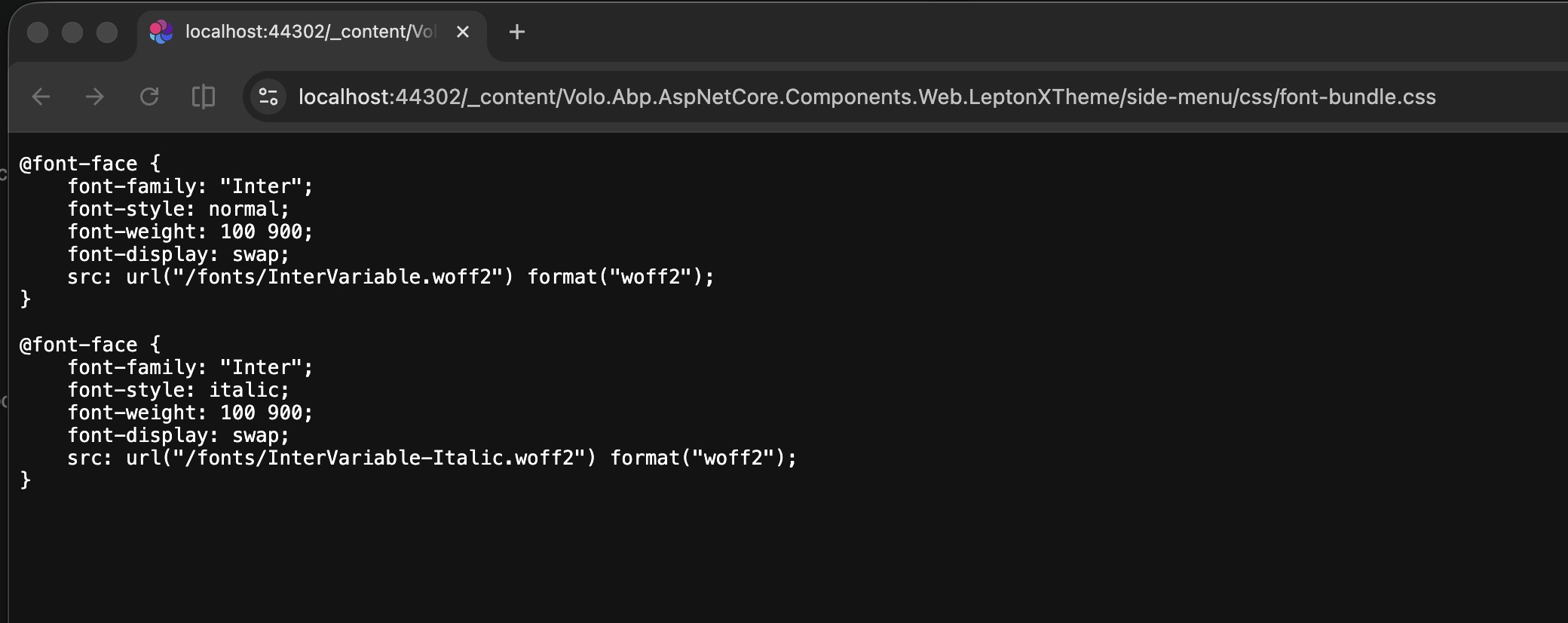
Thanks
hi
I will test it in a new Blazor WASM tiered project and share the code with you.
Please wait a moment.
Thanks.
hi
Can you refer to: https://abp.io/support/questions/10541/SystemIdentityModelTokensJwt-6261-has-a-known-high-severity-vulnerability#answer-3a202f9f-4c50-529b-26b8-b28a076a4f77
Thanks
hi
We have added a code-level fix in Volo.Abp.AutoMapper module by setting MaxDepth = 64 for all maps that don't have an explicit MaxDepth configured. This mitigates the actual DoS vulnerability (GHSA-rvv3-g6hj-g44x) at the framework level. See #25138.
However, since the NuGet security audit checks package versions rather than code, you will still see the NU1902/NU1903 warning as long as AutoMapper 14.0.0 is referenced. Unfortunately, the AutoMapper maintainer has confirmed that no patch will be released for version 14.x (see AutoMapper#4618). Only the commercial versions (15.x/16.x) have been patched.
Workaround: To suppress the NuGet audit warning, add the following to your project file (.csproj) or Directory.Build.props:
<ItemGroup>
  <NuGetAuditSuppress Include="https://github.com/advisories/GHSA-rvv3-g6hj-g44x" />
</ItemGroup>
Recommended long-term solution: We recommend migrating from AutoMapper to Mapperly. ABP Framework has built-in support for Mapperly, and we have been progressively migrating all modules to use it. See the migration guide for details.
See https://github.com/abpframework/abp/issues/25137 https://github.com/abpframework/abp/pull/25138
Thanks.
hi
I have cloned your solution. Can you share the steps to reproduce the error?
Thanks




