Hi,
Here is a page that uses the orderEditor.ts helper from my previous reply, built with the shadcn components of the React template. It shows the order header and an editable line items grid, like your screenshot.
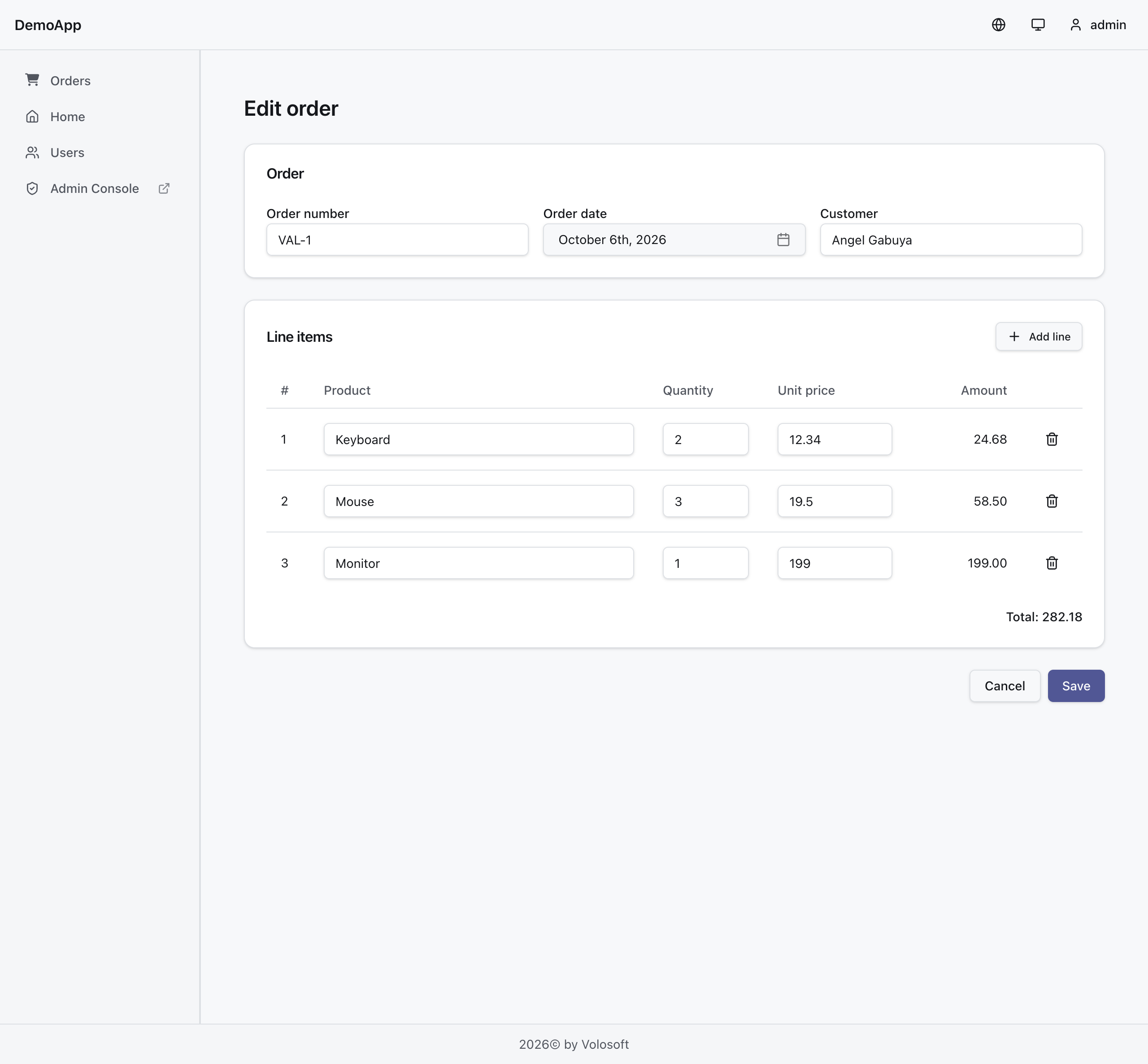
src/pages/orders/OrderEditorPage.tsx
import { useEffect, useState } from 'react'
import { useNavigate, useParams } from '@tanstack/react-router'
import { Plus, Trash2 } from 'lucide-react'
import { toast } from 'sonner'
import { isAxiosError } from 'axios'
import { api } from '@/lib/api/axios'
import { createOrderEditorApi } from '@/lib/api/orderEditor'
import type { GetOrderWithLineItems, OrderFormState, OrderWithLineItems } from '@/lib/api/orderEditor'
import { Button } from '@/components/ui/button'
import { Card, CardContent, CardHeader, CardTitle } from '@/components/ui/card'
import { DatePicker } from '@/components/ui/date-picker'
import { Input } from '@/components/ui/input'
import { Label } from '@/components/ui/label'
import { Table, TableBody, TableCell, TableHead, TableHeader, TableRow } from '@/components/ui/table'

const { load, onSubmit } = createOrderEditorApi(api)

type LineItem = OrderFormState['lineItems'][number]

const emptyForm: OrderFormState = {
  orderNumber: '',
  orderDate: '',
  customerName: '',
  lineItems: [],
}

function toForm(data: OrderWithLineItems): OrderFormState {
  return {
    id: data.order.Id,
    orderNumber: data.order.OrderNumber,
    orderDate: data.order.OrderDate,
    customerName: data.order.CustomerName,
    lineItems: data.lineItems.map((line) => ({
      id: line.Id,
      productName: line.ProductName,
      quantity: line.Quantity,
      unitPrice: line.UnitPrice,
    })),
  }
}

export function OrderEditorPage() {
  const { orderId } = useParams({ strict: false }) as { orderId?: string }
  // Remount when the route changes, so a new order never keeps the state of the previous one.
  return <OrderEditor key={orderId ?? 'new'} orderId={orderId} />
}

function OrderEditor({ orderId }: { orderId?: string }) {
  const navigate = useNavigate()
  const [form, setForm] = useState<OrderFormState>(emptyForm)
  const [loading, setLoading] = useState(!!orderId)
  const [loadError, setLoadError] = useState(false)
  const [saving, setSaving] = useState(false)

  useEffect(() => {
    if (!orderId) {
      return
    }

    let cancelled = false
    const run = async () => {
      try {
        const queryParams: GetOrderWithLineItems = { id: orderId }
        const form = await load(queryParams)
        if (!cancelled) setForm(form)
      } catch {
        if (!cancelled) setLoadError(true)
      } finally {
        if (!cancelled) setLoading(false)
      }
    }

    void run()
    return () => {
      cancelled = true
    }
  }, [orderId])

  const updateLine = (index: number, patch: Partial<LineItem>) =>
    setForm((f) => ({
      ...f,
      lineItems: f.lineItems.map((line, i) => (i === index ? { ...line, ...patch } : line)),
    }))

  const addLine = () =>
    setForm((f) => ({
      ...f,
      lineItems: [...f.lineItems, { productName: '', quantity: 1, unitPrice: 0 }],
    }))

  const removeLine = (index: number) =>
    setForm((f) => ({ ...f, lineItems: f.lineItems.filter((_, i) => i !== index) }))

  const validate = (): string | undefined => {
    if (!form.orderNumber.trim()) return 'Order number is required.'
    if (!form.orderDate) return 'Order date is required.'
    for (const [i, line] of form.lineItems.entries()) {
      const row = `Line ${i + 1}`
      if (!line.productName.trim()) return `${row}: product is required.`
      if (!Number.isInteger(line.quantity) || line.quantity < 0 || line.quantity > 2147483647) {
        return `${row}: quantity must be a whole number, 0 or more.`
      }
      if (!Number.isFinite(line.unitPrice) || line.unitPrice < 0) {
        return `${row}: unit price must be 0 or more.`
      }
    }
    return undefined
  }

  const lineAmount = (line: LineItem) => line.quantity * line.unitPrice
  const total = form.lineItems.reduce(
    (sum, line) => (Number.isFinite(lineAmount(line)) ? sum + lineAmount(line) : sum),
    0,
  )

  const save = async () => {
    const validationError = validate()
    if (validationError) {
      toast.error(validationError)
      return
    }

    setSaving(true)
    try {
      const result = await onSubmit(form)
      setForm(toForm(result))
      toast.success('Order saved.')
      if (!form.id) {
        await navigate({ to: '/order-editor/$orderId', params: { orderId: result.order.Id } })
      }
    } catch (error) {
      const remoteError = isAxiosError(error) ? error.response?.data?.error : undefined
      const details = (remoteError?.validationErrors as { message: string }[] | undefined)
        ?.map((x) => x.message)
        .join(' ')
      toast.error(details || remoteError?.message || 'Could not save the order.')
    } finally {
      setSaving(false)
    }
  }

  if (loading) {
    return <p className="p-6 text-muted-foreground">Loading...</p>
  }

  if (loadError) {
    return (
      <div className="mx-auto max-w-5xl p-6">
        <Card>
          <CardHeader>
            <CardTitle>Could not load the order</CardTitle>
          </CardHeader>
          <CardContent className="space-y-4">
            <p className="text-sm text-muted-foreground">
              The order doesn't exist or you don't have permission to view it.
            </p>
            <Button variant="outline" onClick={() => navigate({ to: '/' })}>
              Back
            </Button>
          </CardContent>
        </Card>
      </div>
    )
  }

  return (
    <div className="mx-auto max-w-5xl space-y-6 p-6">
      <h1 className="text-2xl font-semibold">{form.id ? 'Edit order' : 'New order'}</h1>

      {/* Lock the form while saving, so edits made during the request are not lost. */}
      <fieldset disabled={saving} className="space-y-6">
        <Card>
          <CardHeader>
            <CardTitle>Order</CardTitle>
          </CardHeader>
          <CardContent className="grid gap-4 sm:grid-cols-3">
            <div className="space-y-2">
              <Label htmlFor="orderNumber">Order number</Label>
              <Input
                id="orderNumber"
                value={form.orderNumber}
                onChange={(e) => setForm({ ...form, orderNumber: e.target.value })}
              />
            </div>
            <div className="space-y-2">
              <Label htmlFor="orderDate">Order date</Label>
              <DatePicker
                id="orderDate"
                disabled={saving}
                value={form.orderDate}
                onChange={(value) => setForm({ ...form, orderDate: value })}
              />
            </div>
            <div className="space-y-2">
              <Label htmlFor="customerName">Customer</Label>
              <Input
                id="customerName"
                value={form.customerName ?? ''}
                onChange={(e) => setForm({ ...form, customerName: e.target.value })}
              />
            </div>
          </CardContent>
        </Card>

        <Card>
          <CardHeader className="flex flex-row items-center justify-between space-y-0">
            <CardTitle>Line items</CardTitle>
            <Button variant="outline" size="sm" onClick={addLine}>
              <Plus /> Add line
            </Button>
          </CardHeader>
          <CardContent>
            <Table>
              <TableHeader>
                <TableRow>
                  <TableHead className="w-12">#</TableHead>
                  <TableHead>Product</TableHead>
                  <TableHead className="w-32">Quantity</TableHead>
                  <TableHead className="w-40">Unit price</TableHead>
                  <TableHead className="w-32 text-right">Amount</TableHead>
                  <TableHead className="w-12" />
                </TableRow>
              </TableHeader>
              <TableBody>
                {form.lineItems.length === 0 && (
                  <TableRow>
                    <TableCell colSpan={6} className="text-center text-muted-foreground">
                      No line items yet.
                    </TableCell>
                  </TableRow>
                )}
                {form.lineItems.map((line, index) => (
                  <TableRow key={line.id ?? `new-${index}`}>
                    <TableCell>{index + 1}</TableCell>
                    <TableCell>
                      <Input
                        aria-label={`Product ${index + 1}`}
                        value={line.productName}
                        onChange={(e) => updateLine(index, { productName: e.target.value })}
                      />
                    </TableCell>
                    <TableCell>
                      <Input
                        aria-label={`Quantity ${index + 1}`}
                        type="number"
                        min={0}
                        step={1}
                        value={Number.isNaN(line.quantity) ? '' : line.quantity}
                        onChange={(e) => updateLine(index, { quantity: e.target.valueAsNumber })}
                      />
                    </TableCell>
                    <TableCell>
                      <Input
                        aria-label={`Unit price ${index + 1}`}
                        type="number"
                        min={0}
                        step="0.01"
                        value={Number.isNaN(line.unitPrice) ? '' : line.unitPrice}
                        onChange={(e) => updateLine(index, { unitPrice: e.target.valueAsNumber })}
                      />
                    </TableCell>
                    <TableCell className="text-right">
                      {Number.isFinite(lineAmount(line)) ? lineAmount(line).toFixed(2) : '—'}
                    </TableCell>
                    <TableCell>
                      <Button
                        variant="ghost"
                        size="icon"
                        aria-label={`Remove line ${index + 1}`}
                        onClick={() => removeLine(index)}
                      >
                        <Trash2 />
                      </Button>
                    </TableCell>
                  </TableRow>
                ))}
              </TableBody>
            </Table>
            <div className="mt-4 flex justify-end text-sm font-medium">Total: {total.toFixed(2)}</div>
          </CardContent>
        </Card>

        <div className="flex justify-end gap-2">
          <Button variant="outline" onClick={() => navigate({ to: '/' })}>
            Cancel
          </Button>
          <Button onClick={save} disabled={saving}>
            {saving ? 'Saving...' : 'Save'}
          </Button>
        </div>
      </fieldset>
    </div>
  )
}
Register the routes in src/routes/router.tsx, one for a new order and one for editing:
import { OrderEditorPage } from '@/pages/orders/OrderEditorPage'

const orderEditorNewRoute = createRoute({
  getParentRoute: () => rootRoute,
  path: '/order-editor',
  component: OrderEditorPage,
  beforeLoad: authGuard,
})

const orderEditorEditRoute = createRoute({
  getParentRoute: () => rootRoute,
  path: '/order-editor/$orderId',
  component: OrderEditorPage,
  beforeLoad: authGuard,
})

const routeTree = rootRoute.addChildren([
  orderEditorNewRoute,
  orderEditorEditRoute,
  // ...your existing routes
])
Open /order-editor to create an order and /order-editor/<order-id> to edit one. Link to these pages from your own menu or order list.
On the edit page the order ID comes from the route, and load({ id }) reads the order with all lines. A new order starts with an empty form and doesn't call load. After saving, the page refreshes the form from the returned data, so new lines get their IDs before the next save.
Thanks
Hi,
A custom page is a good way to do this. The samples below are for ABP 10.6.0 and the React UI template.
Calling the Low-Code API directly
These are the endpoints for your orders page:
GET / PUT /api/low-code/pages/orders/data/{id} and POST /api/low-code/pages/orders/dataGET / POST /api/low-code/pages/orders/children/DemoApp.Orders.OrderLineItem/data, and PUT / DELETE .../data/{lineId}Property values are sent as strings (or null). Creating an order:
{
  "properties": {
    "OrderNumber": "SO-1001",
    "OrderDate": "2026-10-06",
    "CustomerName": "Contoso"
  }
}
Creating a line item, with the Id of the order you created:
{
  "properties": {
    "OrderId": "<order-id>",
    "ProductName": "Keyboard",
    "Quantity": "2",
    "UnitPrice": "12.34"
  }
}
To read the lines of one order, filter by OrderId with these query parameters: filters[0].name=OrderId, filters[0].value={orderId}, filters[0].filterType=1. The result is paged.
The problem is that saving the page this way needs several requests: one for the order and one for each line. They don't run in one transaction, so a later request can fail after the order or some lines have already been saved.
Saving the order and its lines in one request
The /api/low-code/... create and update endpoints above save one record per request. A better way is your own small endpoint, /api/app/order, that saves the order and all its lines in one request. When database transactions are enabled (they are in a SQL Server solution), the order and all lines are saved or rolled back together. The SQLite template disables transactions, so there the save isn't atomic.
It uses IDynamicPageAppService, so the Low-Code validation, unique checks, permissions and interceptors still run as they do on the generated pages.
Add range rules to the OrderLineItem class from my previous reply. Low-Code validates them on every save, so negative values are rejected even if a client skips its own checks:
[Range(0, int.MaxValue)]
public int Quantity { get; set; }

[Range(0, double.MaxValue)]
[DynamicPropertyType(EntityPropertyType.Money)]
public decimal UnitPrice { get; set; }
using System;
using System.Collections.Generic;
using System.ComponentModel.DataAnnotations;
using System.Globalization;
using System.Linq;
using System.Threading.Tasks;
using Microsoft.AspNetCore.Authorization;
using Volo.Abp;
using Volo.Abp.LowCode;
using Volo.Abp.LowCode.Pages;
using Volo.Abp.Uow;

namespace DemoApp.Services.Orders;

public class OrderWithLineItemsDto
{
    public DynamicEntityDto Order { get; set; } = new();
    public List<DynamicEntityDto> LineItems { get; set; } = new();
}

public class OrderLineInput
{
    public Guid? Id { get; set; }

    [Required]
    public Dictionary<string, string?> Properties { get; set; } = null!;
}

public class SaveOrderWithLineItemsInput
{
    [Required]
    public Dictionary<string, string?> Properties { get; set; } = null!;

    [Required]
    public List<OrderLineInput> LineItems { get; set; } = null!;
}

[Authorize]
public class OrderAppService : DemoAppAppService
{
    private const string PageName = "orders";
    private const string ChildEntityName = "DemoApp.Orders.OrderLineItem";
    private readonly IDynamicPageAppService _pages;

    public OrderAppService(IDynamicPageAppService pages)
    {
        _pages = pages;
    }

    public virtual async Task<OrderWithLineItemsDto> GetAsync(Guid id)
    {
        return new OrderWithLineItemsDto
        {
            Order = await _pages.GetRecordAsync(PageName, id),
            LineItems = await GetLinesAsync(id)
        };
    }

    [UnitOfWork(true)]
    public virtual async Task<OrderWithLineItemsDto> CreateAsync(
        SaveOrderWithLineItemsInput input)
    {
        ValidateInput(input);
        if (input.LineItems.Any(x => x.Id.HasValue))
        {
            throw new UserFriendlyException("New order lines must not contain an ID.");
        }

        var order = await _pages.CreateAsync(PageName, new DynamicEntityCreateInput
        {
            Properties = input.Properties
        });
        var orderId = GetId(order);

        foreach (var line in input.LineItems)
        {
            await _pages.CreateChildAsync(PageName, ChildEntityName,
                new DynamicEntityCreateInput
                {
                    Properties = GetLineProperties(orderId, line)
                });
        }

        return await GetAsync(orderId);
    }

    [UnitOfWork(true)]
    public virtual async Task<OrderWithLineItemsDto> UpdateAsync(
        Guid id, SaveOrderWithLineItemsInput input)
    {
        ValidateInput(input);
        await _pages.GetRecordAsync(PageName, id);
        var existingIds = (await GetLineIdsAsync(id)).ToHashSet();
        var suppliedIds = input.LineItems
            .Where(x => x.Id.HasValue)
            .Select(x => x.Id!.Value)
            .ToList();

        if (suppliedIds.Distinct().Count() != suppliedIds.Count ||
            suppliedIds.Any(x => !existingIds.Contains(x)))
        {
            throw new UserFriendlyException("Invalid or duplicate order line ID.");
        }

        await _pages.UpdateAsync(PageName, id, new DynamicEntityUpdateInput
        {
            EntityId = id,
            Properties = input.Properties
        });

        foreach (var line in input.LineItems)
        {
            var properties = GetLineProperties(id, line);
            if (line.Id.HasValue)
            {
                await _pages.UpdateChildAsync(PageName, ChildEntityName, line.Id.Value,
                    new DynamicEntityUpdateInput
                    {
                        EntityId = line.Id.Value,
                        Properties = properties
                    });
            }
            else
            {
                await _pages.CreateChildAsync(PageName, ChildEntityName,
                    new DynamicEntityCreateInput { Properties = properties });
            }
        }

        foreach (var removedId in existingIds.Except(suppliedIds))
        {
            await _pages.DeleteChildAsync(PageName, ChildEntityName, removedId);
        }

        await CurrentUnitOfWork!.SaveChangesAsync();
        return await GetAsync(id);
    }

    private async Task<List<DynamicEntityDto>> GetLinesAsync(Guid orderId)
    {
        // Read full records, so fields hidden on a line item DataGrid page are still returned.
        var lines = new List<DynamicEntityDto>();
        foreach (var lineId in await GetLineIdsAsync(orderId))
        {
            lines.Add(await _pages.GetChildRecordAsync(PageName, ChildEntityName, lineId));
        }
        return lines;
    }

    private async Task<List<Guid>> GetLineIdsAsync(Guid orderId)
    {
        var result = new List<DynamicEntityDto>();
        while (true)
        {
            var page = await _pages.GetChildDataAsync(PageName, ChildEntityName,
                new DynamicEntityListRequestDto
                {
                    SkipCount = result.Count,
                    MaxResultCount = 100,
                    Filters = new()
                    {
                        new()
                        {
                            Name = "OrderId",
                            Value = orderId.ToString(),
                            FilterType = DynamicEntityFilterType.Equal
                        }
                    },
                    Sortings = new() { new() { Name = "Id", IsDescending = false } }
                });

            result.AddRange(page.Items);
            if (result.Count >= page.TotalCount)
            {
                return result.Select(GetId).ToList();
            }
            if (page.Items.Count == 0)
            {
                throw new UserFriendlyException("Order lines changed. Reload the order.");
            }
        }
    }

    private static Dictionary<string, string?> GetLineProperties(
        Guid orderId, OrderLineInput line)
    {
        var properties = new Dictionary<string, string?>(line.Properties);
        properties["OrderId"] = orderId.ToString();
        return properties;
    }

    private static Guid GetId(DynamicEntityDto row)
    {
        return Guid.Parse(Convert.ToString(row["Id"], CultureInfo.InvariantCulture)!);
    }

    private static void ValidateInput(SaveOrderWithLineItemsInput input)
    {
        if (input.Properties == null || input.LineItems == null ||
            input.LineItems.Any(x => x == null || x.Properties == null))
        {
            throw new UserFriendlyException("Order properties and line items are required.");
        }
    }
}
Change PageName, ChildEntityName (the full name of your line item class) and the base class DemoAppAppService to match your project. ABP exposes it as GET /api/app/order/{id}, POST /api/app/order and PUT /api/app/order/{id}.
TypeScript
Put this in src/lib/api/orderEditor.ts. It's for the React template and its axios instance. The base URL of that instance already ends with /api, so the paths start with /app/order. If you use another UI, call the same /api/app/order endpoints with that UI's own HTTP client.
import type { AxiosInstance } from 'axios';

export interface GetOrderWithLineItems {
  id: string;
}

export interface DynamicOrder {
  Id: string;
  OrderNumber: string;
  OrderDate: string;
  CustomerName?: string | null;
}

export interface DynamicOrderLine {
  Id: string;
  OrderId: string;
  ProductName: string;
  Quantity: number;
  UnitPrice: number;
}

export interface OrderWithLineItems {
  order: DynamicOrder;
  lineItems: DynamicOrderLine[];
}

export interface OrderFormState {
  id?: string;
  orderNumber: string;
  orderDate: string;
  customerName?: string | null;
  lineItems: Array<{
    id?: string;
    productName: string;
    quantity: number;
    unitPrice: number;
  }>;
}

export function createOrderEditorApi(api: AxiosInstance) {
  async function load(queryParams: GetOrderWithLineItems): Promise<OrderFormState> {
    const { data } = await api.get<OrderWithLineItems>(
      `/app/order/${encodeURIComponent(queryParams.id)}`,
    );

    return {
      id: data.order.Id,
      orderNumber: data.order.OrderNumber,
      orderDate: data.order.OrderDate,
      customerName: data.order.CustomerName,
      lineItems: data.lineItems.map((line) => ({
        id: line.Id,
        productName: line.ProductName,
        quantity: line.Quantity,
        unitPrice: line.UnitPrice,
      })),
    };
  }

  async function onSubmit(form: OrderFormState): Promise<OrderWithLineItems> {
    const input = {
      properties: {
        OrderNumber: form.orderNumber,
        OrderDate: form.orderDate,
        CustomerName: form.customerName ?? null,
      },
      lineItems: form.lineItems.map((line) => ({
        id: line.id,
        properties: {
          ProductName: line.productName,
          Quantity: String(line.quantity),
          UnitPrice: String(line.unitPrice),
        },
      })),
    };

    const response = form.id
      ? await api.put<OrderWithLineItems>(
          `/app/order/${encodeURIComponent(form.id)}`, input,
        )
      : await api.post<OrderWithLineItems>('/app/order', input);

    return response.data;
  }

  return { load, onSubmit };
}
The next reply has a full React page that uses this helper, with the order header and the editable line items grid.
A few things to keep in mind:
lineItems: [] removes all lines.About the preview: the Low-Code System is still in preview. The 10.6 documentation doesn't give a stable release date.
Thanks
Hi,
This is a bug in the feature management modal. It also breaks built-in groups like Setting Management, since their display names differ from their names too.
You can use this workaround for now. Create src/app/feature-management.patch.ts:
import { FeatureManagementComponent } from '@abp/ng.feature-management';

const proto = FeatureManagementComponent.prototype as any;

proto.getCurrentGroup = function (this: any) {
  const group = this.groups().find((g: { name: string; displayName: string }) => g.displayName === this.selectedGroupDisplayName());
  return group ? (this.features()[group.name] ?? []) : [];
};
Then import it at the top of src/main.ts:
import './app/feature-management.patch';
The fix is in https://github.com/abpframework/abp/pull/26241. Please remove the patch when you upgrade to a version that includes it, because the fix renames the field the patch reads.
Thanks
Hi,
The fix will be included in 10.7. Until you upgrade, you can keep the workaround code in main.ts.
Thanks
Hi,
Thanks for the update. I'll close this ticket now. If anything else shows up under a path base, just open a new one.
Thanks
Hi,
This is a bug in the lookup components in 10.6.1. setDisabledState doesn't refresh the view, and when the control starts as disabled, the disabled input sets it back to false.
You can keep your [disabled] binding for now. If you don't want to touch the templates, add this to main.ts, before bootstrapApplication:
import { AbstractLookupSelectComponent } from '@volo/abp.commercial.ng.ui';

Object.defineProperty(AbstractLookupSelectComponent.prototype, 'disabled', {
  configurable: true,
  get(this: any) {
    return !!(this._inputDisabled || this._formDisabled);
  },
  set(this: any, value: boolean) {
    this._inputDisabled = value;
  },
});

AbstractLookupSelectComponent.prototype.setDisabledState = function (this: any, isDisabled: boolean) {
  this._formDisabled = isDisabled;
  this.cdRef.markForCheck();
};
It works for abp-lookup-select and abp-lookup-typeahead, both when the control starts as disabled and when you call disable() / enable() later.
We'll fix this in a future release. You can remove the code after upgrading to that version.
Thanks
Hi,
The fix is released in 10.6.1 (also in 10.7). After upgrading the Volo.Abp.* packages, the Admin Console works under a non-root PathBase. The shell URLs, the router base path and the API calls all keep the path base, so you can remove your response-rewriting middleware.
Thanks
Hi,
This is fixed in 10.6.1. In 10.6.0 the Admin Console shell and the SPA router base path are built with a fixed /admin-console, so it can't work under a path base. From 10.6.1, the middleware adds Request.PathBase to the shell URLs, and the SPA reads its router base path and API base at runtime.
It's the same issue as https://abp.io/support/questions/10823/, you can check it for reference.
Please upgrade the Volo.Abp.* packages to 10.6.1 (or 10.7) and keep UsePathBase before InitializeApplicationAsync in Program.cs:
var app = builder.Build();
app.UsePathBase("/dev/svc");
await app.InitializeApplicationAsync();
After the upgrade you can remove your HTML URL rewrite. The shell already comes with the path base, so you don't need it anymore. No extra Admin Console setting is needed, and your current RootUrl and redirect URIs with /dev/svc are correct.
So hosting several environments on one origin with a path base for each is fine once you're on 10.6.1.
Thanks




