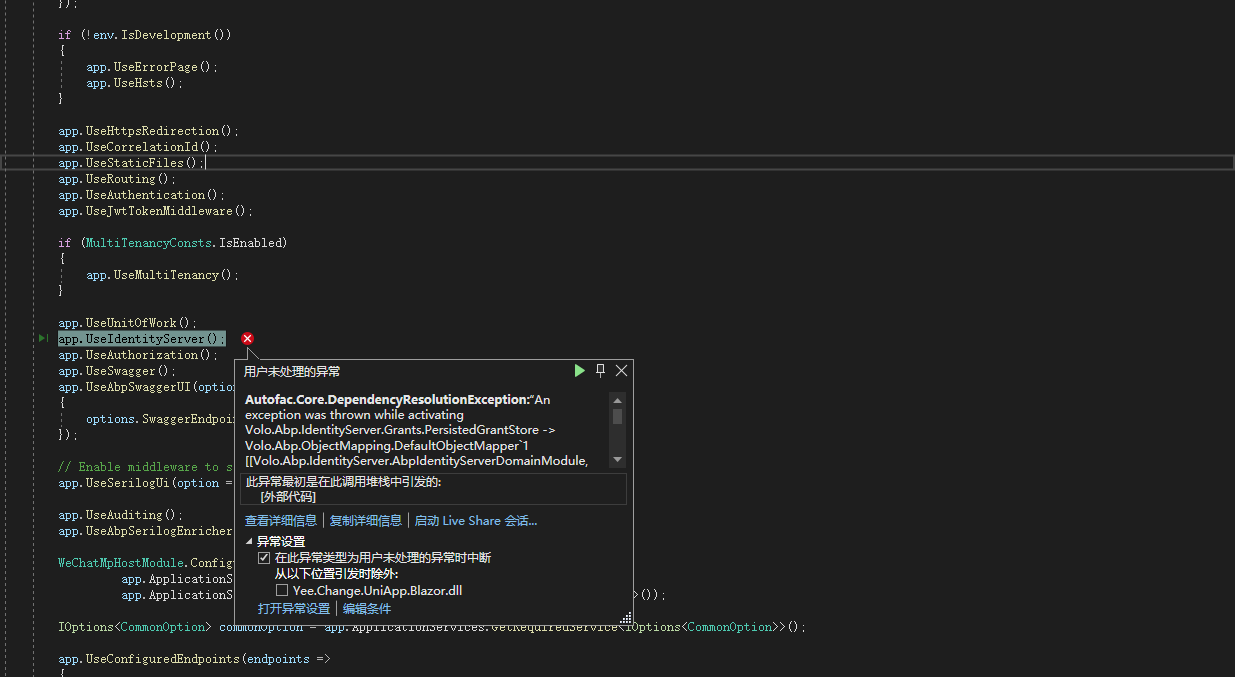
Autofac.Core.DependencyResolutionException:“An exception was thrown while activating Volo.Abp.IdentityServer.Grants.PersistedGrantStore -> Volo.Abp.ObjectMapping.DefaultObjectMapper`1[[Volo.Abp.IdentityServer.AbpIdentityServerDomainModule, Volo.Abp.IdentityServer.Domain, Version=5.2.0.0, Culture=neutral, PublicKeyToken=null]] -> Volo.Abp.AutoMapper.AutoMapperAutoObjectMappingProvider`1[[Volo.Abp.IdentityServer.AbpIdentityServerDomainModule, Volo.Abp.IdentityServer.Domain, Version=5.2.0.0, Culture=neutral, PublicKeyToken=null]] -> λ:Volo.Abp.AutoMapper.IMapperAccessor -> λ:Volo.Abp.AutoMapper.MapperAccessor.”
Stack Query Cookies Headers Routing AbpException: Could not find the bundle file '/libs/flag-icon-css/css/flag-icons.min.css' for the bundle 'Blazor.LeptonTheme.Global'! Volo.Abp.AspNetCore.Mvc.UI.Bundling.TagHelpers.AbpTagHelperResourceService.ProcessAsync(ViewContext viewContext, TagHelper tagHelper, TagHelperContext context, TagHelperOutput output, List<BundleTagHelperItem> bundleItems, string bundleName) Volo.Abp.AspNetCore.Mvc.UI.Bundling.TagHelpers.AbpBundleTagHelperService<TTagHelper, TService>.ProcessAsync(TagHelperContext context, TagHelperOutput output) Microsoft.AspNetCore.Razor.Runtime.TagHelpers.TagHelperRunner.<RunAsync>g__Awaited|0_0(Task task, TagHelperExecutionContext executionContext, int i, int count) Yee.Change.PayH5App.Blazor.Pages._Pages__Host.<ExecuteAsync>b__16_0() in _Host.cshtml + <abp-style-bundle name="@BlazorLeptonThemeBundles.Styles.Global" /> Microsoft.AspNetCore.Razor.Runtime.TagHelpers.TagHelperExecutionContext.SetOutputContentAsync() Yee.Change.PayH5App.Blazor.Pages._Pages__Host.ExecuteAsync() in _Host.cshtml + <html lang="@CultureInfo.CurrentCulture.Name" dir="@rtl"> Microsoft.AspNetCore.Mvc.Razor.RazorView.RenderPageCoreAsync(IRazorPage page, ViewContext context) Microsoft.AspNetCore.Mvc.Razor.RazorView.RenderPageAsync(IRazorPage page, ViewContext context, bool invokeViewStarts) Microsoft.AspNetCore.Mvc.Razor.RazorView.RenderAsync(ViewContext context) Microsoft.AspNetCore.Mvc.ViewFeatures.ViewExecutor.ExecuteAsync(ViewContext viewContext, string contentType, Nullable<int> statusCode) Microsoft.AspNetCore.Mvc.ViewFeatures.ViewExecutor.ExecuteAsync(ViewContext viewContext, string contentType, Nullable<int> statusCode) Microsoft.AspNetCore.Mvc.Infrastructure.ResourceInvoker.<InvokeNextResultFilterAsync>g__Awaited|30_0<TFilter, TFilterAsync>(ResourceInvoker invoker, Task lastTask, State next, Scope scope, object state, bool isCompleted) Microsoft.AspNetCore.Mvc.Infrastructure.ResourceInvoker.Rethrow(ResultExecutedContextSealed context) Microsoft.AspNetCore.Mvc.Infrastructure.ResourceInvoker.ResultNext<TFilter, TFilterAsync>(ref State next, ref Scope scope, ref object state, ref bool isCompleted) Microsoft.AspNetCore.Mvc.Infrastructure.ResourceInvoker.<InvokeResultFilters>g__Awaited|28_0(ResourceInvoker invoker, Task lastTask, State next, Scope scope, object state, bool isCompleted) Microsoft.AspNetCore.Mvc.Infrastructure.ResourceInvoker.<InvokeNextResourceFilter>g__Awaited|25_0(ResourceInvoker invoker, Task lastTask, State next, Scope scope, object state, bool isCompleted) Microsoft.AspNetCore.Mvc.Infrastructure.ResourceInvoker.Rethrow(ResourceExecutedContextSealed context) Microsoft.AspNetCore.Mvc.Infrastructure.ResourceInvoker.Next(ref State next, ref Scope scope, ref object state, ref bool isCompleted) Microsoft.AspNetCore.Mvc.Infrastructure.ResourceInvoker.<InvokeFilterPipelineAsync>g__Awaited|20_0(ResourceInvoker invoker, Task lastTask, State next, Scope scope, object state, bool isCompleted) Microsoft.AspNetCore.Mvc.Infrastructure.ResourceInvoker.<InvokeAsync>g__Logged|17_1(ResourceInvoker invoker) Microsoft.AspNetCore.Mvc.Infrastructure.ResourceInvoker.<InvokeAsync>g__Logged|17_1(ResourceInvoker invoker) Microsoft.AspNetCore.Routing.EndpointMiddleware.<Invoke>g__AwaitRequestTask|6_0(Endpoint endpoint, Task requestTask, ILogger logger) Volo.Abp.AspNetCore.Serilog.AbpSerilogMiddleware.InvokeAsync(HttpContext context, RequestDelegate next) Microsoft.AspNetCore.Builder.UseMiddlewareExtensions+<>c__DisplayClass6_1+<<UseMiddlewareInterface>b__1>d.MoveNext() Volo.Abp.AspNetCore.Auditing.AbpAuditingMiddleware.InvokeAsync(HttpContext context, RequestDelegate next) Volo.Abp.AspNetCore.Auditing.AbpAuditingMiddleware.InvokeAsync(HttpContext context, RequestDelegate next) Microsoft.AspNetCore.Builder.UseMiddlewareExtensions+<>c__DisplayClass6_1+<<UseMiddlewareInterface>b__1>d.MoveNext() Swashbuckle.AspNetCore.SwaggerUI.SwaggerUIMiddleware.Invoke(HttpContext httpContext) Swashbuckle.AspNetCore.Swagger.SwaggerMiddleware.Invoke(HttpContext httpContext, ISwaggerProvider swaggerProvider) Microsoft.AspNetCore.Authorization.AuthorizationMiddleware.Invoke(HttpContext context) IdentityServer4.Hosting.IdentityServerMiddleware.Invoke(HttpContext context, IEndpointRouter router, IUserSession session, IEventService events, IBackChannelLogoutService backChannelLogoutService) IdentityServer4.Hosting.MutualTlsEndpointMiddleware.Invoke(HttpContext context, IAuthenticationSchemeProvider schemes) Microsoft.AspNetCore.Authentication.AuthenticationMiddleware.Invoke(HttpContext context) IdentityServer4.Hosting.BaseUrlMiddleware.Invoke(HttpContext context) Volo.Abp.AspNetCore.Uow.AbpUnitOfWorkMiddleware.InvokeAsync(HttpContext context, RequestDelegate next) Microsoft.AspNetCore.Builder.UseMiddlewareExtensions+<>c__DisplayClass6_1+<<UseMiddlewareInterface>b__1>d.MoveNext() Volo.Abp.AspNetCore.ExceptionHandling.AbpExceptionHandlingMiddleware.InvokeAsync(HttpContext context, RequestDelegate next) Volo.Abp.AspNetCore.ExceptionHandling.AbpExceptionHandlingMiddleware.InvokeAsync(HttpContext context, RequestDelegate next) Microsoft.AspNetCore.Builder.UseMiddlewareExtensions+<>c__DisplayClass6_1+<<UseMiddlewareInterface>b__1>d.MoveNext() Volo.Abp.AspNetCore.MultiTenancy.MultiTenancyMiddleware.InvokeAsync(HttpContext context, RequestDelegate next) Microsoft.AspNetCore.Builder.UseMiddlewareExtensions+<>c__DisplayClass6_1+<<UseMiddlewareInterface>b__1>d.MoveNext() Microsoft.AspNetCore.Builder.ApplicationBuilderAbpJwtTokenMiddlewareExtension+<>c__DisplayClass0_0+<<UseJwtTokenMiddleware>b__0>d.MoveNext() Microsoft.AspNetCore.Authentication.AuthenticationMiddleware.Invoke(HttpContext context) Volo.Abp.AspNetCore.Tracing.AbpCorrelationIdMiddleware.InvokeAsync(HttpContext context, RequestDelegate next) Microsoft.AspNetCore.Builder.UseMiddlewareExtensions+<>c__DisplayClass6_1+<<UseMiddlewareInterface>b__1>d.MoveNext() Microsoft.AspNetCore.Localization.RequestLocalizationMiddleware.Invoke(HttpContext context) Microsoft.AspNetCore.RequestLocalization.AbpRequestLocalizationMiddleware.InvokeAsync(HttpContext context, RequestDelegate next) Microsoft.AspNetCore.Builder.UseMiddlewareExtensions+<>c__DisplayClass6_1+<<UseMiddlewareInterface>b__1>d.MoveNext() Microsoft.AspNetCore.Diagnostics.DeveloperExceptionPageMiddleware.Invoke(HttpContext context)
https://community.abp.io/posts/abp-suite-how-to-add-the-user-entity-as-a-navigation-property-of-another-entity-furp75ex
I follow above topic. But I got an error. (await GetDbContextAsync()).Users There is no property named Users in EasyCommentDbContext.
 protected virtual async Task<IQueryable<CommentWithNavigationProperties>> GetQueryForNavigationPropertiesAsync()
        {
            return from comment in (await GetDbSetAsync())
                   join appUser in (await GetDbContextAsync()).Users on comment.AppUserId equals appUser.Id into users
                   from appUser in users.DefaultIfEmpty()

                   select new CommentWithNavigationProperties
                   {
                       Comment = comment,
                       AppUser = appUser
                   };
        }
 context.Services.AddAuthentication()
            .AddGoogle(GoogleDefaults.AuthenticationScheme, _ => { })
            .WithDynamicOptions<GoogleOptions, GoogleHandler>(
                GoogleDefaults.AuthenticationScheme,
                options =>
                {
                    options.WithProperty(x => x.ClientId);
                    options.WithProperty(x => x.ClientSecret, isSecret: true);
                }
            )
My question is How to get the danymic option manually? I wan't to use it in Volo.Abp.Account.Pro.Publick.Web.Pages.Accounts.Login.cshtml.cs I must use the values of the danymicoption in below stage.
 [UnitOfWork]
        public virtual async Task<IActionResult> OnGetExternalLoginCallbackAsync(string returnUrl = "", string returnUrlHash = "", string remoteError = null)
    public class RmsMenuContributor : IMenuContributor
    {

        public RmsMenuContributor()
        {
        }

        public async Task ConfigureMenuAsync(MenuConfigurationContext context)
        {
            bool isGranted = await context.AuthorizationService.IsGrantedAsync(Yee.Change.Common.Permissions.AdminPermissions.Admin.Default);

            if (!isGranted)
            {
                return;
            }

            this._L = context.GetLocalizer<RmsResource>();

            if (context.Menu.Name == StandardMenus.Main)
            {
                await ConfigureMainMenuAsync(context);
            }

            await SetAiRulesMenu(context);

            await SetDic(context);

            await SetZipingBazi(context);

            await SetLianshanMenus(context);

            await SetLiuyaoMenus(context);

            await SetKanyuMenus(context);

            await SetBasicMenu(context);

            await SetTestResultMenu(context);

            await SetOperationMenu(context);

            await SetProductsMenu(context);
        }

        [RequiresFeature(Yee.Change.ZipingBazi.Features.ZipingBaziFeature.IsEnabled)]
        public virtual async Task SetOperationMenu(MenuConfigurationContext context)
        {
            var operateMenu = AddOperateMenuItem(context);

            AddMenuItemPictures(context, operateMenu);

            AddMenuItemUploadPicture(context, operateMenu);
namespace Yee.Change.Config.Permissions;

public class ConfigPermissions
{
    public const string GroupName = "ChangeConfig";
hCheck the docs before asking a question: https://docs.abp.io/en/commercial/latest/ Check the samples, to see the basic tasks: https://docs.abp.io/en/commercial/latest/samples/index The exact solution to your question may have been answered before, please use the search on the homepage.
If you're creating a bug/problem report, please include followings:
I found this attribute in TenantManagementDbContext. I want to use this function, ignore TenantId in a single query, not whole DbContext, How to do?
using Microsoft.EntityFrameworkCore;
using Volo.Abp.Data;
using Volo.Abp.EntityFrameworkCore;
using Volo.Abp.MultiTenancy;

namespace Volo.Abp.TenantManagement.EntityFrameworkCore;

[IgnoreMultiTenancy]
[ConnectionStringName(AbpTenantManagementDbProperties.ConnectionStringName)]
public class TenantManagementDbContext : AbpDbContext<TenantManagementDbContext>, ITenantManagementDbContext
{
There is an artilce introduce ... https://community.abp.io/posts/how-to-add-custom-property-to-the-user-entity-6ggxiddr
But in ABP 5.1.4, I can not found Appuser.cs in the folder named Users of Domain project. What's the best practice to add propertity to User now?
I want to add some fuction while Redirect to login.
Volo.Abp.AspNetCore.Components.Web.LeptonTheme/Components/RedirectToLogin.razor
@inject NavigationManager Navigation
@inject IJSRuntime JSRuntime

@code {
    protected override void OnInitialized()
    {
        bool isWebAssembly = JSRuntime is IJSInProcessRuntime;
        if (isWebAssembly)
        {
            Navigation.NavigateTo($"authentication/login?returnUrl={Uri.EscapeDataString(Navigation.Uri)}");
        }
        else
        {
            Navigation.NavigateTo($"account/login?returnUrl={Uri.EscapeDataString(Navigation.Uri)}", true);
        }
    }
}
My question is where is the source code of "account/login"?









