What should we write at the top of our WebServiceLogon method to activate the ResponseAuditLogContributor?
public virtual async Task<WebserviceLogonResponse> WebServiceLogon(string username,string password)
{
    WebserviceLogonResponse webserviceLogonResponse = await LogonAsync(username,password);
    return webserviceLogonResponse;
}
How can I use ResponseAuditLogContributor in this method? Also, could you provide an example of writing this log to a text file
thanks
Where exactly should I put this icon, it's not just about the icon, it's about favorite pages. We don't have a favorite page in the crud project. Can you send a code
Hi, I solved my problem. Here I would like to write an explanation for people who may encounter the same problem. First make sure you have successfully upgraded all your project's nuget packages. Some nuget packages may need to remain in the same version, depending on your project. For example, in my case, since .net 8 was not supported, the System.ServiceModel nuget packages had to remain in version 4.4.*. This may be another nuget package or another version in your project. var application = new AbpApplicationDescriptor { ClientId = name, ClientType = type, ClientSecret = secret, ConsentType = consentType, DisplayName = displayName, ClientUri = clientUri, LogoUri = logoUri, }; Don't forget to change Type to ClientType.
After checking these, make sure that the project is built successfully. Run "dotnet ef migrations add Updated_OpenIddict" in the EntityFrameworkCore project. In this way, you will migrate the necessary entity changes to your project. Finally, if DbMigrator gives an error due to old settings, run the "dotnet ef database update" code in your EntityFrameworkCore project.
Since OpenIddict was not migrated automatically, we had to downgrade the project. As I explained in the e-mail, we have to continue writing code. The problem is, when I create the migration file I sent you above by adding and updating it as in the link you sent, we try it on the test database. and it gives the error I sent above.
Which part do you want me to share with you?

We are using a suite and it creates all of entities for oracle so I dont think provider is a problem.
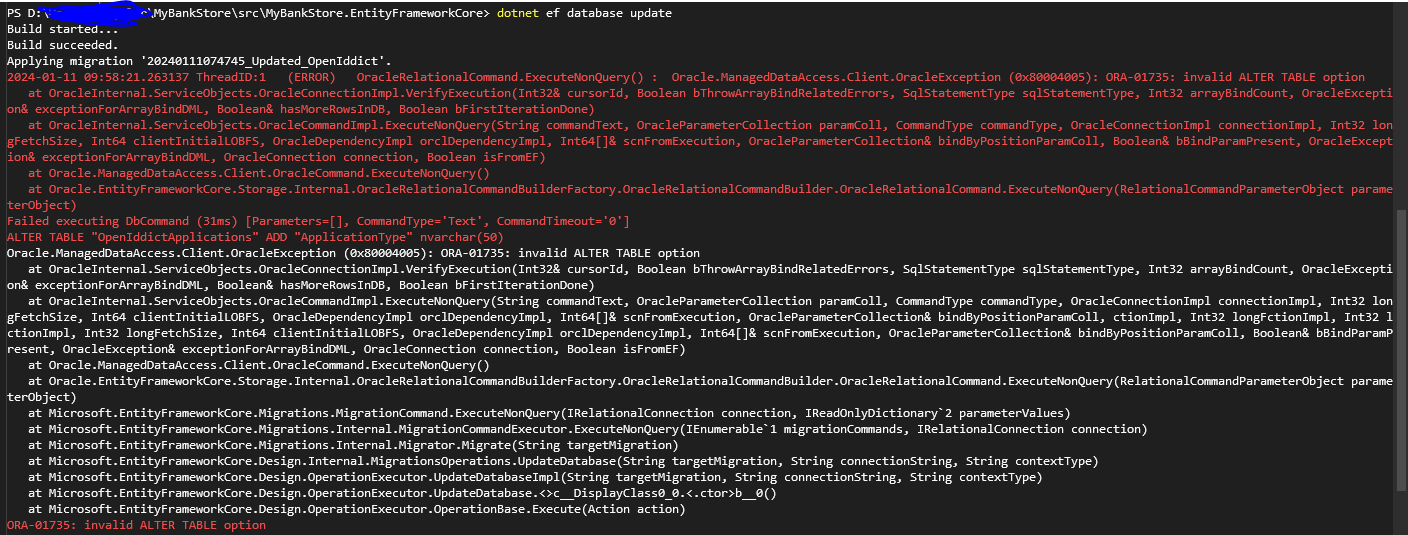
I update the database it gives this error.
What does update database mean? I add this file myself and i didnt change anything else. While developing in .net7, we were using abp 7 version. And the migration was working without any problems. With my migration to abp 8, I added only the migration file I sent you for openIddict to the Migrations folder. and now when it goes to the migration seed data section it gives me the error I got.
Yes i added new migration :
using System;
using Microsoft.EntityFrameworkCore.Migrations;

#nullable disable

namespace MyBankStore.Migrations
{
    /// <inheritdoc />
    public partial class Updated_OpenIddict : Migration
    {
        /// <inheritdoc />
        protected override void Up(MigrationBuilder migrationBuilder)
        {
            migrationBuilder.RenameColumn(
                name: "Type",
                table: "OpenIddictApplications",
                newName: "ClientType");

            migrationBuilder.AddColumn<string>(
                name: "ApplicationType",
                table: "OpenIddictApplications",
                type: "nvarchar(50)",
                maxLength: 50,
                nullable: true);

            migrationBuilder.AddColumn<string>(
                name: "JsonWebKeySet",
                table: "OpenIddictApplications",
                type: "nvarchar(max)",
                nullable: true);

            migrationBuilder.AddColumn<string>(
                name: "Settings",
                table: "OpenIddictApplications",
                type: "nvarchar(max)",
                nullable: true);
        }

        /// <inheritdoc />
        protected override void Down(MigrationBuilder migrationBuilder)
        {
            migrationBuilder.DropColumn(
                name: "ApplicationType",
                table: "OpenIddictApplications");

            migrationBuilder.DropColumn(
                name: "JsonWebKeySet",
                table: "OpenIddictApplications");

            migrationBuilder.DropColumn(
                name: "Settings",
                table: "OpenIddictApplications");

            migrationBuilder.RenameColumn(
                name: "ClientType",
                table: "OpenIddictApplications",
                newName: "Type");
        }
    }
}
I changed this part as well
   var application = new AbpApplicationDescriptor {
       ClientId = name,
       ClientType = type,
       ClientSecret = secret,
       ConsentType = consentType,
       DisplayName = displayName,
       ClientUri = clientUri,
       LogoUri = logoUri,
   };









