Each module can define its database table prefix. For example Blog module sets its database table as Blg. This is done in the module. See BloggingDbProperties.cs . If you want to overwrite this prefix you can do it in your Domain Module class as below.
Volo.Blogging.BloggingDbProperties.DbTablePrefix = "Xyz"
For Identity Server module you can set it as below
Volo.Abp.IdentityServer.AbpIdentityServerDbProperties.DbTablePrefix = "Ids";
This behavour is same for other modules as well.
The essential framework modules have Abp prefix. Check out the documentation
https://docs.abp.io/en/abp/latest/Entity-Framework-Core-Migrations#table-prefixes
In your application, your table prefix is App by default. You can change this in the following file:
Acme.BookStore\src\Acme.BookStore.Domain\BookStoreConsts.cs
namespace Acme.BookStore
{
    public static class BookStoreConsts
    {
        public const string DbTablePrefix = "Xyz"; //<----- this is the variable to set your table prefix

        public const string DbSchema = null;
    }
}
This change requires the re-creation of migrations. To do this; delete your existing migrations in the Migrations folder Acme.BookStore.EntityFrameworkCore.DbMigrations\Migrations\ and then add migrations using add-migration Initial
Publish your Angular application and copy the output to wwwroot of your Host. Then a middleware like this in the Host side
app.Use(async (context, next) =>
            {
                await next();
                if (context.Response.StatusCode == 404 && !Path.HasExtension(context.Request.Path.Value))
                {
                    context.Request.Path = "/index.html";
                    await next();
                }
            });
You can use SetSubItemOrder method to set an order in YourProjectMenuContributor.cs class.
 private static async Task ConfigureMainMenuAsync(MenuConfigurationContext context)
        {
            var l = context.GetLocalizer<SAMResource>();

            context.Menu.AddItem(new ApplicationMenuItem(
                SAMMenus.Home,
                l["Menu:Home"],
                "/",
                icon: "fas fa-home",
                order: 1
            ));

            //Administration
            var administration = context.Menu.GetAdministration();
            administration.Order = 2;

            //Administration->Saas
            administration.SetSubItemOrder(SaasHostMenus.GroupName, 1);

            //Administration->Identity
            administration.SetSubItemOrder(IdentityProMenus.GroupName, 2);

            //Administration->Language Management
            administration.SetSubItemOrder(LanguageManagementMenus.GroupName, 3);

            //Administration->Text Template Management
            administration.SetSubItemOrder(TextTemplateManagementMenus.GroupName, 4);

            //Administration->Audit Logs
            administration.SetSubItemOrder(AbpAuditLoggingMenus.GroupName, 5);

            //Administration->Settings
            administration.SetSubItemOrder(SettingManagementMenus.GroupName, 6);

   }
this component is a typeahead component. it's used for large data. if you want to load all data you can use Dropdown
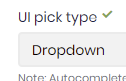
on the other hand you can also increase the max limit of the Autocomplete result.
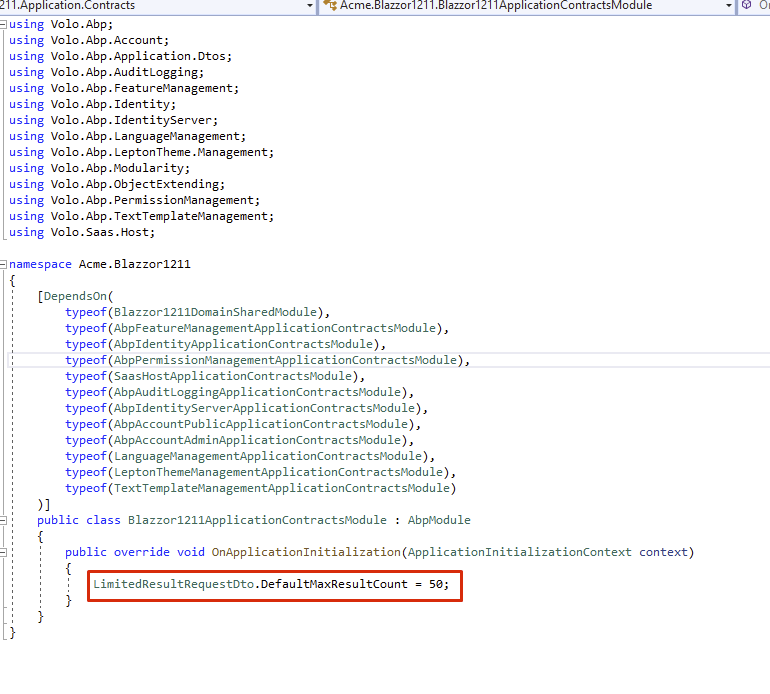
Open ApplicationContractsModule and write LimitedResultRequestDto.DefaultMaxResultCount = 50;
In the microservice structure, we add Application.Contracts packages of all modules to the gateway.
Thus, all permissions can be available and we can get them from the gateway.
For example, In the microservice demo application, the BackendAdminAppGateway.Host project has references
https://github.com/abpframework/abp-samples/blob/master/MicroserviceDemo/gateways/BackendAdminAppGateway.Host/BackendAdminAppGateway.Host.csproj
In this project you can see Application.Contracts of Blogging and ProductManagement module are added.
  <PackageReference Include="Volo.Blogging.Application.Contracts" Version="3.2.1" />
  <ProjectReference Include="..\..\modules\product\src\ProductManagement.HttpApi\ProductManagement.HttpApi.csproj" />
Also essential references of the other cross-cutting featured projects are added. Eg: PermissionManagement, FeatureManagement, and SettingManagement
<PackageReference Include="Volo.Abp.PermissionManagement.Domain.Identity" Version="3.2.1" />
<PackageReference Include="Volo.Abp.PermissionManagement.Domain.IdentityServer" Version="3.2.1" />
<PackageReference Include="Volo.Abp.PermissionManagement.Application" Version="3.2.1" />
<PackageReference Include="Volo.Abp.PermissionManagement.HttpApi" Version="3.2.1" />
<PackageReference Include="Volo.Abp.PermissionManagement.EntityFrameworkCore" Version="3.2.1" />
So the gateway does not route the permission request but sends its own.
Check out Microservice Demo document.
You can also set up a seperate microservice for only Permission Management but it will be unncessary as it's not a part of the business logic.
hi @JmBdo, there's currently no doc for CI/CD pipelines. But you can follow this official Microsoft document. It can be applied to ABP projects. If you block in any step, feel free to ask.
seems like an Identity Server misconfiguration. check your database table IdentityServerClientRedirectUris
Hi, this was inside the Angular app before but we have moved it to the MVC project because we started to use Authorization Code Flow in v3.1. See the related blog post https://blog.abp.io/abp/ABP-Framework-v3.1-RC-Has-Been-Released
after this change account related features are also moved to MVC side.
for your second question @mehmet can you check it out?
I just want you to show that enum declaration is specific to that proeject. Because the namepsace of enum is written here:
"EnumNamespace": "Angular.EfCoreSeperated1215",
GuidePostDesigner.json
{
  "Id": "732251aa-2808-4217-9bfa-9a9ea1b33652",
  "Name": "GuidePostDesigner",
  "OriginalName": "GuidePostDesigner",
  "NamePlural": "GuidePostDesigners",
  "DatabaseTableName": "GuidePostDesigners",
  "Namespace": "GuidePostDesigners",
  "BaseClass": "FullAuditedAggregateRoot",
  "PrimaryKeyType": "Guid",
  "IsMultiTenant": true,
  "ShouldCreateUserInterface": true,
  "ShouldCreateBackend": true,
  "ShouldAddMigration": true,
  "ShouldUpdateDatabase": true,
  "CreateTests": true,
  "Properties": [
    {
      "Id": "34e7af50-3dba-4a88-881f-000d9a598587",
      "Name": "GuidePostId",
      "Type": "long",
      "EnumType": "",
      "EnumNamespace": "",
      "EnumAngularImport": "shared/enums",
      "IsNullable": false,
      "IsRequired": true,
      "MinLength": null,
      "MaxLength": null,
      "SortOrder": 0,
      "SortType": 0,
      "Regex": "",
      "EmailValidation": false,
      "EnumValues": null
    },
    {
      "Id": "0e7c1555-8ae5-4edc-8ed6-2de7cbb5b8eb",
      "Name": "ViewUri",
      "Type": "string",
      "EnumType": "",
      "EnumNamespace": "",
      "EnumAngularImport": "shared/enums",
      "IsNullable": false,
      "IsRequired": true,
      "MinLength": null,
      "MaxLength": null,
      "SortOrder": 0,
      "SortType": 0,
      "Regex": "",
      "EmailValidation": false,
      "EnumValues": null
    },
    {
      "Id": "8911dfc5-1a75-41b9-ac85-285713745a43",
      "Name": "CreateUri",
      "Type": "string",
      "EnumType": "",
      "EnumNamespace": "",
      "EnumAngularImport": "shared/enums",
      "IsNullable": false,
      "IsRequired": true,
      "MinLength": null,
      "MaxLength": null,
      "SortOrder": 0,
      "SortType": 0,
      "Regex": "",
      "EmailValidation": false,
      "EnumValues": null
    },
    {
      "Id": "ffd56da6-8935-40a5-86c2-f4374fb553bd",
      "Name": "UpdateUri",
      "Type": "string",
      "EnumType": "",
      "EnumNamespace": "",
      "EnumAngularImport": "shared/enums",
      "IsNullable": false,
      "IsRequired": false,
      "MinLength": null,
      "MaxLength": null,
      "SortOrder": 0,
      "SortType": 0,
      "Regex": "",
      "EmailValidation": false,
      "EnumValues": null
    },
    {
      "Id": "4e21fa2c-57f4-474f-a8cf-c43254123b90",
      "Name": "Title",
      "Type": "string",
      "EnumType": "",
      "EnumNamespace": "",
      "EnumAngularImport": "shared/enums",
      "IsNullable": false,
      "IsRequired": true,
      "MinLength": null,
      "MaxLength": null,
      "SortOrder": 0,
      "SortType": 0,
      "Regex": "",
      "EmailValidation": false,
      "EnumValues": null
    },
    {
      "Id": "5a010fd1-f0c2-4b2c-9124-204b40618769",
      "Name": "ContentStatus",
      "Type": "enum",
      "EnumType": "ContentStatus",
      "EnumNamespace": "Angular.EfCoreSeperated1215",
      "EnumAngularImport": "shared/enums/content-status",
      "IsNullable": false,
      "IsRequired": false,
      "MinLength": null,
      "MaxLength": null,
      "SortOrder": 0,
      "SortType": 0,
      "Regex": "",
      "EmailValidation": false,
      "EnumValues": {
        "Draft": 1,
        "Reviewed": 2,
        "Published": 3
      }
    }
  ],
  "NavigationProperties": [],
  "PhysicalFileName": "GuidePostDesigner.json"
}
WorkflowSetting.json
{
  "Id": "7f5856e9-41d2-4390-91da-35a9ff0697b8",
  "Name": "WorkflowSetting",
  "OriginalName": "WorkflowSetting",
  "NamePlural": "WorkflowSettings",
  "DatabaseTableName": "WorkflowSettings",
  "Namespace": "WorkflowSettings",
  "BaseClass": "FullAuditedAggregateRoot",
  "PrimaryKeyType": "Guid",
  "IsMultiTenant": true,
  "ShouldCreateUserInterface": true,
  "ShouldCreateBackend": true,
  "ShouldAddMigration": true,
  "ShouldUpdateDatabase": false,
  "CreateTests": true,
  "Properties": [
    {
      "Id": "db2c63a5-f47a-4ca5-8f82-8240408a1995",
      "Name": "DesignerUri",
      "Type": "string",
      "EnumType": "",
      "EnumNamespace": "",
      "EnumAngularImport": "shared/enums",
      "IsNullable": false,
      "IsRequired": true,
      "MinLength": null,
      "MaxLength": null,
      "SortOrder": 0,
      "SortType": 0,
      "Regex": "",
      "EmailValidation": false,
      "EnumValues": null
    },
    {
      "Id": "7b648d0c-ba29-4c54-b938-3ed0ee798e21",
      "Name": "ApiUri",
      "Type": "string",
      "EnumType": "",
      "EnumNamespace": "",
      "EnumAngularImport": "shared/enums",
      "IsNullable": false,
      "IsRequired": true,
      "MinLength": null,
      "MaxLength": null,
      "SortOrder": 0,
      "SortType": 0,
      "Regex": "",
      "EmailValidation": false,
      "EnumValues": null
    },
    {
      "Id": "56361a31-c80d-47e8-be79-d51cefc0dee9",
      "Name": "EnvironmentId",
      "Type": "string",
      "EnumType": "",
      "EnumNamespace": "",
      "EnumAngularImport": "shared/enums",
      "IsNullable": false,
      "IsRequired": true,
      "MinLength": null,
      "MaxLength": null,
      "SortOrder": 0,
      "SortType": 0,
      "Regex": "",
      "EmailValidation": false,
      "EnumValues": null
    },
    {
      "Id": "cc172074-774d-4792-9c90-71388704a0f1",
      "Name": "OrganizationId",
      "Type": "string",
      "EnumType": "",
      "EnumNamespace": "",
      "EnumAngularImport": "shared/enums",
      "IsNullable": false,
      "IsRequired": true,
      "MinLength": null,
      "MaxLength": null,
      "SortOrder": 0,
      "SortType": 0,
      "Regex": "",
      "EmailValidation": false,
      "EnumValues": null
    },
    {
      "Id": "860b9647-9f6e-44e5-b6fb-6d673ed4016a",
      "Name": "RegionalSubDomain",
      "Type": "string",
      "EnumType": "",
      "EnumNamespace": "",
      "EnumAngularImport": "shared/enums",
      "IsNullable": false,
      "IsRequired": true,
      "MinLength": null,
      "MaxLength": null,
      "SortOrder": 0,
      "SortType": 0,
      "Regex": "",
      "EmailValidation": false,
      "EnumValues": null
    },
    {
      "Id": "999992ee-52b9-4c8d-b1a9-32bf4527c859",
      "Name": "Name",
      "Type": "string",
      "EnumType": "",
      "EnumNamespace": "",
      "EnumAngularImport": "shared/enums",
      "IsNullable": false,
      "IsRequired": true,
      "MinLength": null,
      "MaxLength": null,
      "SortOrder": 0,
      "SortType": 0,
      "Regex": "",
      "EmailValidation": false,
      "EnumValues": null
    }
  ],
  "NavigationProperties": [],
  "PhysicalFileName": "WorkflowSetting.json"
}
hi,
I created a new solution with the following command
abp new Angular.EfCoreSeperated1215 -t app-pro -u angular -m none --separate-identity-server -csf
then I copied your Suite json files to my project
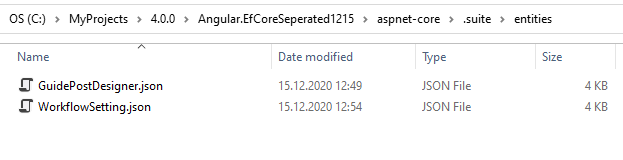
removed your enum property and create a new enum called ContentStatus in Domain.Shared project as below
public enum ContentStatus
{
       Draft = 1,
       Reviewed = 2,
       Published = 3
}
I generated 2 entites ... I saw that we have a Angular issue on v4.0.1 (our Angular team has been fixed this error and it'll be released as v4.0.2) but there's a workaround see this post.
And I can successfully see these 2 entities in my Angular app. I couldn't reproduce your case!
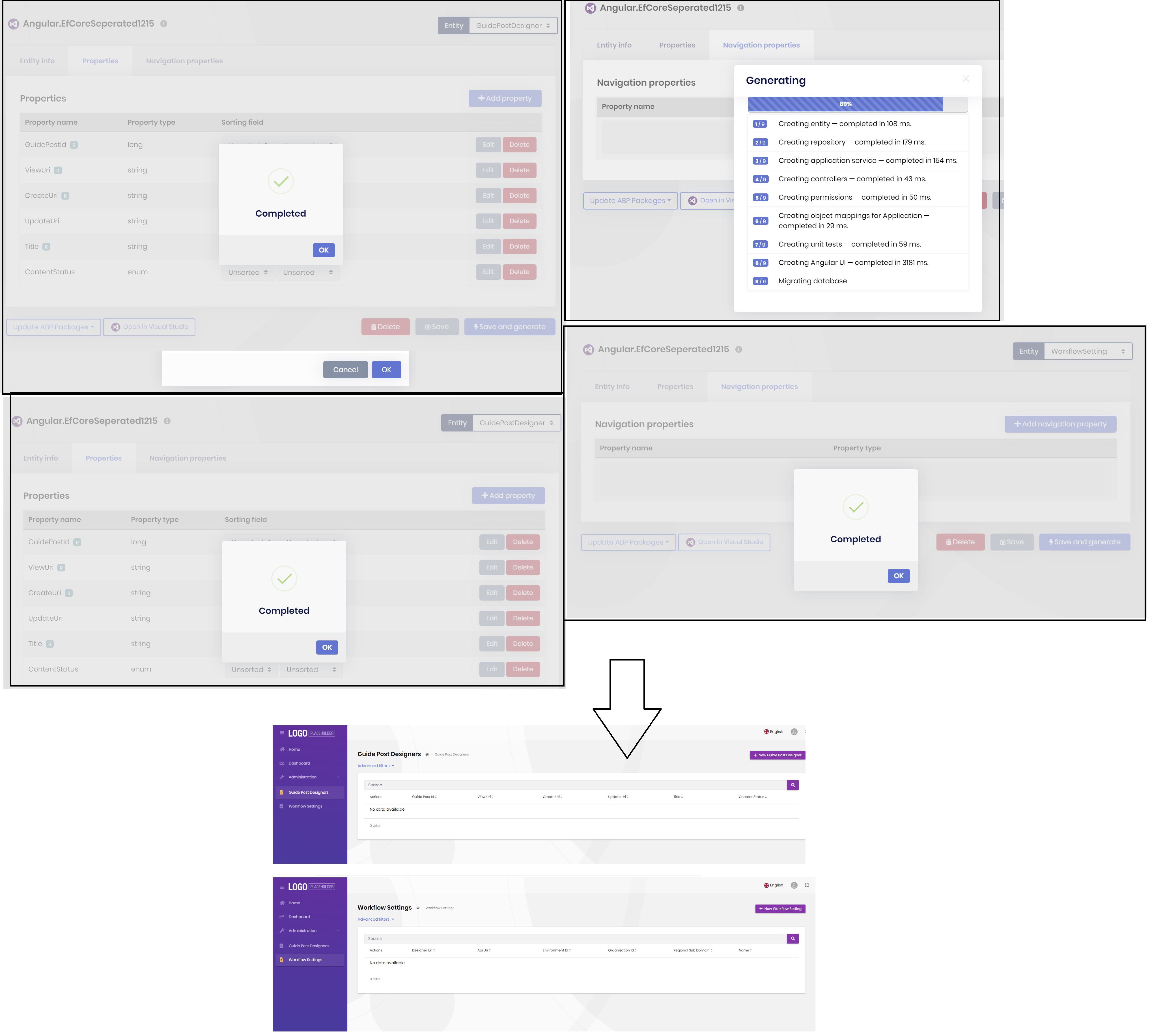
I think you have a problem with the ContentStatus enum. Try to generate the entity without ContentStatus property to see if it works.









