by relavant directory, I mean the current user's home directory.
For Windows it's => %UserProfile%\.abp\cli\
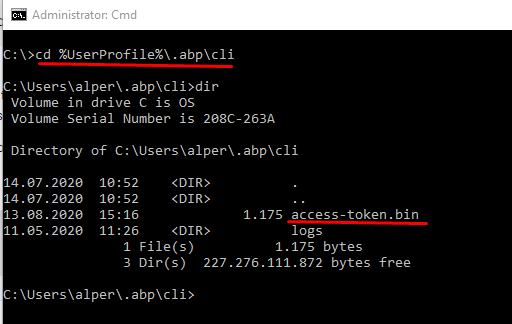
For Linux it must be $HOME => /home/user/.abp/cli/
See Windows and Linux variable equivalents from https://blog.softhints.com/windows-and-linux-variable-equivalents/ and https://blog.softhints.com/windows-cmd-vs-linux-shell-commands/
@anthonyh, to fix the problem saying "DataTables warning: Non-table node initialisation (ABP-TABLE)." :
in your module solution, move _ViewImports.cshtml file from src\Acme.MyProModule.Web\Pages\MyProModule to src\Acme.MyProModule.Web\Pages
@KittyJuggins , remove AppUser from Note and keep the AppUserId only. When you fetch Note from database, fetch the user in a seperate query . Then map the both to your DTO. This is the best practise
credit for this question has been refunded.
Don't use navigation properties to other aggregate roots. See https://github.com/abpframework/abp/issues/1517
Hi Rodrigo ,
Thanks for your feedback. I created an internal issue. (also credit for this question has been refunded)
@alexandru-bagu 
@anthonyh, you are correct! it's already fixed for the next release.
@anthonyh, I'll check the module template code generation and get back to you.
We created a patch for Chrome login issue when HTTP is used. Check out https://community.abp.io/articles/patch-for-chrome-login-issue-identityserver4-samesite-cookie-problem-weypwp3n









