Organization Unit data is not included in the claims.
you can include it manually by writing your custom UserClaimsPrincipalFactory
See https://github.com/abpframework/abp/issues/2614#issuecomment-575090708
by the way you can set your AbpLicenseCode, nobody can use it without logging into abp.io via ABP CLI.
Offline License Check is always being performed. Online license check is being performed when you are debugging or in Development environment.
you can use Settings to store UserAccessControl
OneTimeRunner.Run(() =>
{
     AbpPermissionManagementDbProperties.DbTablePrefix = "Abc"
});
Hi,
Suite finds the location of the code class via RegEx expressions. And some of them are precisely fine-tuned to inject the code to the right place. If I see your DbContext.cs file I can understand the reason.
@Nicolas my bad! it will come with v4.4
What would you do if you have a plain ASP.NET Core application?
4.3 file management module.
file upload api works on local host after deploying to server it won't work. redirects to home page. all other apis works well.
on the UI I can upload files well
have you tested this ?
there must be 2 identical enum value. you can remove the enum property and add again.
or you can edit the entity.json file which is located in your .suite\entities folder.

Adding a new multi-tenanted entity through ABP Suite has AutoMapperConfigurationException
ABP Framework version: v4.3.0 ( module template) UI type: MVC DB provider: EF Core Identity Server Separated: no
When starting the Unified App from a Module template, after generating a multi-tenanted entity, adding migration and updating SQL database, the application has exception on startup:
An unhandled exception occurred while processing the request.
AutoMapperConfigurationException: Unmapped members were found. Review the types and members below. Add a custom mapping expression, ignore, add a custom resolver, or modify the source/destination type For no matching constructor, add a no-arg ctor, add optional arguments, or map all of the constructor parameters
ResourceClassTypeCreateDto -> ResourceClassType (Destination member list) Acs.ResourceLibrary.ResourceClassTypes.ResourceClassTypeCreateDto -> Acs.ResourceLibrary.ResourceClassTypes.ResourceClassType (Destination member list)
Unmapped properties:
TenantId
ResourceClassTypeUpdateDto -> ResourceClassType (Destination member list) Acs.ResourceLibrary.ResourceClassTypes.ResourceClassTypeUpdateDto -> Acs.ResourceLibrary.ResourceClassTypes.ResourceClassType (Destination member list)
Unmapped properties: TenantId AutoMapper.ConfigurationValidator.AssertConfigurationIsValid(IEnumerable typeMaps)
<br> DependencyResolutionException: An exception was thrown while activating λ:Microsoft.AspNetCore.Identity.ISecurityStampValidator -> Castle.Proxies.AbpSecurityStampValidatorProxy -> Volo.Abp.MultiTenancy.TenantConfigurationProvider -> Volo.Saas.Tenants.TenantStore -> Volo.Abp.ObjectMapping.DefaultObjectMapper
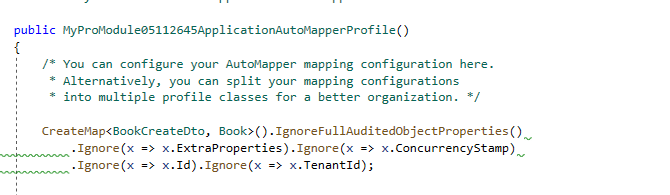
1[[Volo.Saas.SaasDomainModule, Volo.Saas.Domain, Version=4.3.0.0, Culture=neutral, PublicKeyToken=null]] -> Volo.Abp.AutoMapper.AutoMapperAutoObjectMappingProvider1[[Volo.Saas.SaasDomainModule, Volo.Saas.Domain, Version=4.3.0.0, Culture=neutral, PublicKeyToken=null]] -> λ:Volo.Abp.AutoMapper.IMapperAccessor -> λ:Volo.Abp.AutoMapper.MapperAccessor. Autofac.Core.Resolving.Middleware.ActivatorErrorHandlingMiddleware.Execute(ResolveRequestContext context, Action next)<br> Was able to resolve the issue by adding .Ignore(x => x.TenantId) extension on the CreateMap in the src/Project.Application ProjectAutoMapperProfile class:
Is that the correct approach?
@AlderCove that's right.
I created a new entity with the latest Suite (4.3.1 not published yet) and it also ignores TenantId