Hello,
I can say that nothing has changed in this regard recently. However, based on your question, I deleted the cache of the existing packages in case there is a bottleneck. It should be cached again soon. Other than that, I don't know what extra we can do about it. For now, everything seems to be fine on our side.
Hello,
\Users\rogers\.nuget\volo.abp.studio.extensions.standardsolutiontemplates\0.9.23\lib\net8.0
Can you send me the contents of this path?
You can't set different retry count for each job with DefaultBackgroundJobManager. If you want a custom implementation, you can replace DefaultBackgroundJobManager with your CustomBackgroundJobManager. So it's open-source: https://github.com/abpframework/abp/blob/dev/framework/src/Volo.Abp.BackgroundJobs/Volo/Abp/BackgroundJobs/DefaultBackgroundJobManager.cs
[Dependency(ReplaceServices = true)]
public class CustomBackgroundJobManager : DefaultBackgroundJobManager
{
    public CustomBackgroundJobManager(IClock clock, IBackgroundJobSerializer serializer, IBackgroundJobStore store, IGuidGenerator guidGenerator) : base(clock, serializer, store, guidGenerator)
    {
    }

    protected override Task<Guid> EnqueueAsync(string jobName, object args, BackgroundJobPriority priority = BackgroundJobPriority.Normal, TimeSpan? delay = null)
    {
        // Custom implementation
        throw new NotImplementedException();
    }
}
I was able to reproduce the problem according to the information you provided. I have opened an issue related to the issue, you can follow it here if you want.
As a workaround solution, you can add the following code to the blazor-global-styles.css file under wwwroot:
.lpx-main-title {
    visibility: hidden!important;
}```
Can you give me a little more detail about what errors you are getting so I can help you?
The public website does not display the logo and brand name as expected (see image below):
This was done on purpose. The app name with too many characters looks bad for this place. However, if you want, you can update the MyAppBrandingProvider in your project to show the logo instead of the application name as follows.
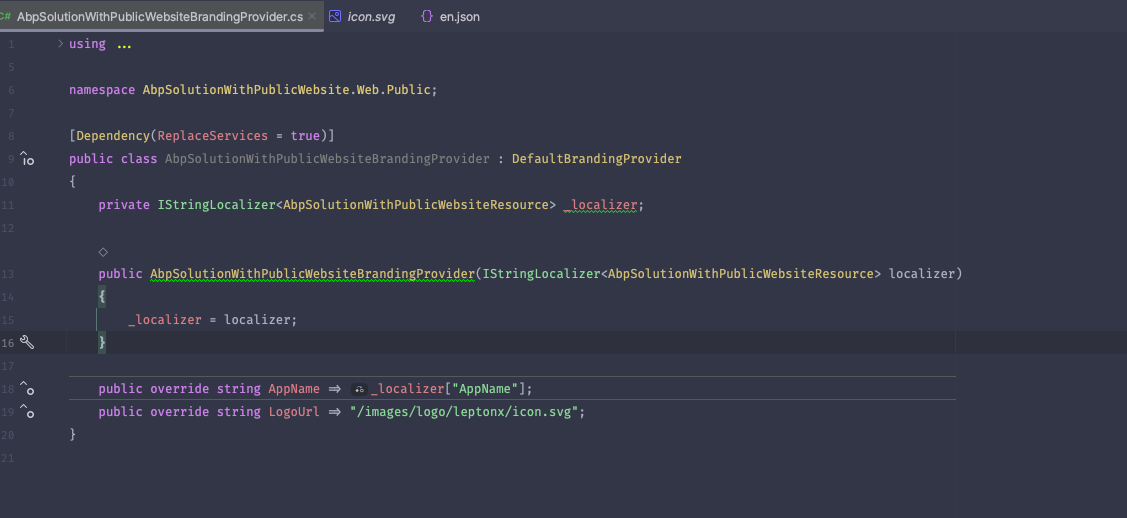
If you still want the application name to be visible and have no character limit, you can do this by adding the following code to the global.css file under wwwroot:
.lpx-brand-name {
    overflow: visible;
}
There is a big white space at the bottom of each page before the default footer (see image below):
I can't reproduce it. Client side packages may not have been updated after updating the application. If so, you can follow the steps below.
abp install-libs commandThe logo does not fully display in the login page (see image below)
I will open an issue about this. Please let me know if you want a workaround solution. I think we can solve this with a small CSS code addition.
Failed to build Angular project
Can you share the relevant log records etc. with me?
Okay, I'm waiting to hear from you.
Hello,
Thank you for providing detailed information. In order to minimize the surface of the problem, could you first try to unplug both of your modules from the Host application and try to reproduce the problem? If the problem does not persist, can you add the modules one by one and try again so that we can understand which module or host application is causing the problem.
Hello there,
I think there's been some confusion. I can't find the Onedrive link, the only e-mail you sent me seems to be the one in the picture below. Any chance you can send it again?

Hello,
Can you update abp.resourcemapping.js in the MyApp.Web project as follows and try again?
module.exports = {
    aliases: {
    },
    mappings: {
        "@node_modules/datatables.net/js": "@libs/datatables.net/js/"
    }
};









