There was a bug occurred when used documentation with FileSystem related to version. And also there is a merged PR about it: https://github.com/abpframework/abp/pull/22891
That might solve your case, too. You can apply changes of this PR in your application until this PR is shipped in the next release.
Similar issue: https://abp.io/support/questions/9278/Docs-Module-not-working-with-the-FileSystem-document-source#answer-3a19db6b-af40-1362-3269-1a3ec5ba8543
Hi,
We checked and couldn't find any problem currently. Can you share your scenario and environment with us to identify the problem better?
Hi,
IIdentityUserRepository implements IBasicRepository that does not have GetQueryableAsync() method on it.
If you need, you can use IRepository<IdentityUser,Guid> by injecting it.
It has GetQueryableAsync method that you can use:
public class MyService
{
    protected readonly IRepository<IdentityUser, Guid> _userRepository;
    public MyService(IRepository<IdentityUser, Guid> userRepository)
    {
        _userRepository = userRepository;
    }

    public async Task DoSomethingAsync()
    {
        var queryable = await _userRepository.GetQueryableAsync();
        // Do something with the users
    }
}
Hi,
Recently I dropped an article about the login page customization, you can check it for more detailed information: https://abp.io/community/articles/you-do-it-wrong-customizing-abp-login-page-correctly-bna7wzt5
As I understand you need to customize account layout.
abp get-source Volo.Abp.LeptonXTheme
/Themes/LeptonX/Layouts/Account/Default.cshtml file in the source code and copy it to the exact same folder structure in your AuthServer project.
Volo.Abp.AspNetCore.Mvc.UI.Theme.LeptonX project in the source code.And get one of the login page html structure from https://x.leptontheme.com/ website and apply it to that original file you copied to the project.
LeptonX theme MVC implementation doesn't have it built-in, you'll need to replace and implement it manually in that page
Hi,
Which themes they're using currently?
Do you need to customize the Login Page? or Account Layout?
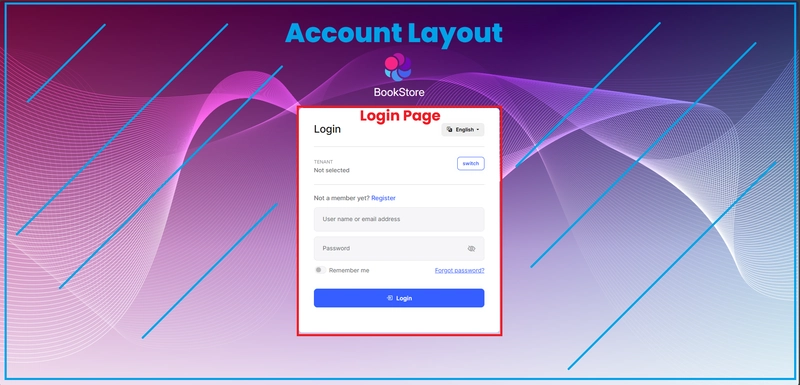
I wrote an article for this recently: https://dev.to/enisn/you-do-it-wrong-customizing-abp-login-page-correctly-l2k
Here is the main takeaway from the article:
Themes/Basic/Layouts/Account.cshtml or its LeptonX equivalent) is the correct approach. This gives you control over headers, footers, and surrounding content without touching the core login mechanism.Pages/Account/Login.cshtml) from the Account Module.If you need to customize Login page, yes you could do for both applications in the same way. But if you need to customize Account layout, it won't be that easy, you'll need to override each theme manually. If you provide me more information about your both application's themes, I can share some sample code to customize it
You link in the https://pms.ntouch.ai/ returns 500 right now not 502. Probably you fixed something on your side.
Right now the only thing you can do is checking docker container logs and determine the problem that occurs in the application.
Here is the possible problems:
libs folder, make sure abp install-libs abp CLI command is executed in the publish pipeline.AuthServer.pfx file. This file is auto-generated for your solution once while you creating it and it's ignored from the git. So you should mount that file to your container or include it in the image.For the further actions, we'll need to see your application server logs
Can you please provide your solution structure and build logs here?
Does dotnet CLI say Menucontributor not found? Or you did not found it?
build operation doesn't look for a specific file unless you define its name in the csproj file. You can check the related project's csproj file if there is a pbysMenuContributor.cs file defined.
Or like other hand, if you cannot find it in the project, you can create a new one that implements the IMenuContributor and configure it in the Module.cs file
Configure<AbpNavigationOptions>(options =>
{
    options.MenuContributors.Add(new MyProjectMenuContributor());
});
Hi,
I found its registration like below:
await context.ServiceProvider
            .GetRequiredService<IBackgroundWorkerManager>()
            .AddAsync(context.ServiceProvider.GetRequiredService<ExpiredAuditLogDeleterWorker>());
It works as background worker.
It resolves ExpiredAuditLogDeleterOptions in the main ExpiredAuditLogDeleterWorker service. And that option class is like below:
public class ExpiredAuditLogDeleterOptions
{
    /// <summary>
    /// Default: Everyday once.
    /// </summary>
    public int Period { get; set; } = (int)TimeSpan.FromDays(1).TotalMilliseconds;
}
Unfortunately, there is no a CRON-like condiguration that identifies exact time to work right now. Here a suggestion about how you can do it manually:
dotnet add package Cronos
[Dependency(ReplaceServices = true)]
[ExposeServices(typeof(ExpiredAuditLogDeleterWorker))]
public class MyCustomExpiredAuditLogDeleterWorker : ExpiredAuditLogDeleterWorker
{
    // Your expression here:
    public const string Expression = "0 23 * * *";
    public MyCustomExpiredAuditLogDeleterWorker(
        AbpAsyncTimer timer,
        IServiceScopeFactory serviceScopeFactory,
        IOptions<ExpiredAuditLogDeleterOptions> options) : base(timer, serviceScopeFactory, options)
    {
        // Cron expressions resolution is 1 minute, so we need to set the period to 1 minute
        // Each minute, the worker will check if there are any expired audit logs and delete them
        timer.Period = (int)TimeSpan.FromMinutes(1).TotalMilliseconds;
    }

    protected override async Task DoWorkAsync(PeriodicBackgroundWorkerContext workerContext)
    {
        var cronExpression = CronExpression.Parse(Expression);
        var now = DateTimeOffset.UtcNow;
        var nextOccurrence = cronExpression.GetNextOccurrence(now.AddSeconds(-1), TimeZoneInfo.Utc);

        // If the next occurrence is within this minute, run the job
        if (nextOccurrence.HasValue &&
            nextOccurrence.Value > now.AddSeconds(-60) &&
            nextOccurrence.Value <= now)
        {
            await base.DoWorkAsync(workerContext);
        }
        // else: do nothing, wait for the next tick
    }
}
It seems it's better to use background jobs instead background worker, but it's what it's right now. You can use this workaround and I'll inform the ABP team about it. They may want to make an enhancement
Hi,
Our @designteam will answer on this topic
Hi,
When you create a new project, it it's not tiered, they're configured to host IdentityServer in the same application. So they use their own as IdentityServer. You'll need to remove OpenIdDict packages from the application and add configure it to use your existing authentication server.
You can create a new Tiered project and check how it's differently configured to consume a separate AuthServer, you can remove .AuthServer, configure the appsettings.json to use your existing AuthServer and sztart using.
Here how you can process manually:
Volo.Abp.Http.Client.IdentityModel.Web package is installed,appsettings.json: "AuthServer": {
"Authority": "https://localhost:44385",
"RequireHttpsMetadata": true,
"ClientId": "AbpSolution2741_Web",
"ClientSecret": "1q2w3e*"
},









