Hello,
We are experiencing an issue while migrating an existing project from ABP 6 to ABP 8.3 and from .NET 6 to .NET 8.0, specifically related to LeptonX.
After upgrading all ABP packages to 8.3 and updating the UI theme package Volo.Abp.AspNetCore.Mvc.UI.Theme.LeptonX to version 3.1, we are getting the following runtime error:
System.MissingMethodException: Method not found: 'Void Volo.Abp.Localization.LanguageInfo..ctor(System.String, System.String, System.String, System.String)'.
   at Volo.Abp.AspNetCore.Mvc.UI.Theme.LeptonX.Themes.LeptonX.Components.SideMenu.Toolbar.LanguageSwitch.ThemeLanguageInfoProvider.GetLanguageSwitchViewComponentModel()
   at System.Runtime.CompilerServices.AsyncMethodBuilderCore.Start[TStateMachine](TStateMachine& stateMachine)
   at Volo.Abp.AspNetCore.Mvc.UI.Theme.LeptonX.Themes.LeptonX.Components.SideMenu.Toolbar.LanguageSwitch.ThemeLanguageInfoProvider.GetLanguageSwitchViewComponentModel()
   at yhKcjc17RxVmb8V46wq.jJ8b3n16fi6ybZX3WqD.ExecuteAsync()
   at Microsoft.AspNetCore.Mvc.Razor.RazorView.RenderPageCoreAsync(IRazorPage page, ViewContext context)
   at Microsoft.AspNetCore.Mvc.Razor.RazorView.RenderPageAsync(IRazorPage page, ViewContext context, Boolean invokeViewStarts)
   at Microsoft.AspNetCore.Mvc.Razor.RazorView.RenderLayoutAsync(ViewContext context, ViewBufferTextWriter bodyWriter)
   at Microsoft.AspNetCore.Mvc.Razor.RazorView.RenderAsync(ViewContext context)
   at Microsoft.AspNetCore.Mvc.ViewFeatures.ViewExecutor.ExecuteAsync(ViewContext viewContext, String contentType, Nullable`1 statusCode)
   at Microsoft.AspNetCore.Mvc.ViewFeatures.ViewExecutor.ExecuteAsync(ViewContext viewContext, String contentType, Nullable`1 statusCode)
   at Microsoft.AspNetCore.Mvc.Infrastructure.ResourceInvoker.<InvokeNextResultFilterAsync>g__Awaited|30_0[TFilter,TFilterAsync](ResourceInvoker invoker, Task lastTask, State next, Scope scope, Object state, Boolean isCompleted)
   at Microsoft.AspNetCore.Mvc.Infrastructure.ResourceInvoker.Rethrow(ResultExecutedContextSealed context)
   at Microsoft.AspNetCore.Mvc.Infrastructure.ResourceInvoker.ResultNext[TFilter,TFilterAsync](State& next, Scope& scope, Object& state, Boolean& isCompleted)
   at Microsoft.AspNetCore.Mvc.Infrastructure.ResourceInvoker.InvokeResultFilters()
--- End of stack trace from previous location ---
   at Microsoft.AspNetCore.Mvc.Infrastructure.ResourceInvoker.<InvokeNextResourceFilter>g__Awaited|25_0(ResourceInvoker invoker, Task lastTask, State next, Scope scope, Object state, Boolean isCompleted)
   at Microsoft.AspNetCore.Mvc.Infrastructure.ResourceInvoker.Rethrow(ResourceExecutedContextSealed context)
   at Microsoft.AspNetCore.Mvc.Infrastructure.ResourceInvoker.Next(State& next, Scope& scope, Object& state, Boolean& isCompleted)
   at Microsoft.AspNetCore.Mvc.Infrastructure.ResourceInvoker.InvokeFilterPipelineAsync()
--- End of stack trace from previous location ---
   at Microsoft.AspNetCore.Mvc.Infrastructure.ResourceInvoker.<InvokeAsync>g__Logged|17_1(ResourceInvoker invoker)
   at Microsoft.AspNetCore.Mvc.Infrastructure.ResourceInvoker.<InvokeAsync>g__Logged|17_1(ResourceInvoker invoker)
   at Microsoft.AspNetCore.Routing.EndpointMiddleware.<Invoke>g__AwaitRequestTask|7_0(Endpoint endpoint, Task requestTask, ILogger logger)
   at Volo.Abp.AspNetCore.Serilog.AbpSerilogMiddleware.InvokeAsync(HttpContext context, RequestDelegate next)
   at Microsoft.AspNetCore.Builder.UseMiddlewareExtensions.InterfaceMiddlewareBinder.<>c__DisplayClass2_0.<<CreateMiddleware>b__0>d.MoveNext()
--- End of stack trace from previous location ---
   at Volo.Abp.AspNetCore.Auditing.AbpAuditingMiddleware.InvokeAsync(HttpContext context, RequestDelegate next)
   at Volo.Abp.AspNetCore.Auditing.AbpAuditingMiddleware.InvokeAsync(HttpContext context, RequestDelegate next)
   at Microsoft.AspNetCore.Builder.UseMiddlewareExtensions.InterfaceMiddlewareBinder.<>c__DisplayClass2_0.<<CreateMiddleware>b__0>d.MoveNext()
--- End of stack trace from previous location ---
   at Microsoft.AspNetCore.Authorization.AuthorizationMiddleware.Invoke(HttpContext context)
   at Volo.Abp.AspNetCore.Uow.AbpUnitOfWorkMiddleware.InvokeAsync(HttpContext context, RequestDelegate next)
   at Microsoft.AspNetCore.Builder.UseMiddlewareExtensions.InterfaceMiddlewareBinder.<>c__DisplayClass2_0.<<CreateMiddleware>b__0>d.MoveNext()
--- End of stack trace from previous location ---
   at Volo.Abp.AspNetCore.ExceptionHandling.AbpExceptionHandlingMiddleware.InvokeAsync(HttpContext context, RequestDelegate next)
   at Volo.Abp.AspNetCore.ExceptionHandling.AbpExceptionHandlingMiddleware.InvokeAsync(HttpContext context, RequestDelegate next)
   at Microsoft.AspNetCore.Builder.UseMiddlewareExtensions.InterfaceMiddlewareBinder.<>c__DisplayClass2_0.<<CreateMiddleware>b__0>d.MoveNext()
--- End of stack trace from previous location ---
   at Microsoft.AspNetCore.Builder.ApplicationBuilderAbpOpenIddictMiddlewareExtension.<>c__DisplayClass0_0.<<UseAbpOpenIddictValidation>b__0>d.MoveNext()
--- End of stack trace from previous location ---
   at Cincaporc.WebApp.Middleware.Logging.SessionLoggingMiddleware.InvokeAsync(HttpContext context, RequestDelegate next) in C:\Users\level4\source\repos\Cincaporc\Cincaporc.WebApp\src\Cincaporc.WebApp.Middleware\Logging\SessionLoggingMiddleware.cs:line 23
   at Microsoft.AspNetCore.Builder.UseMiddlewareExtensions.InterfaceMiddlewareBinder.<>c__DisplayClass2_0.<<CreateMiddleware>b__0>d.MoveNext()
--- End of stack trace from previous location ---
   at Microsoft.AspNetCore.Authentication.AuthenticationMiddleware.Invoke(HttpContext context)
   at Volo.Abp.AspNetCore.Security.AbpSecurityHeadersMiddleware.InvokeAsync(HttpContext context, RequestDelegate next)
   at Microsoft.AspNetCore.Builder.UseMiddlewareExtensions.InterfaceMiddlewareBinder.<>c__DisplayClass2_0.<<CreateMiddleware>b__0>d.MoveNext()
--- End of stack trace from previous location ---
   at Volo.Abp.AspNetCore.Tracing.AbpCorrelationIdMiddleware.InvokeAsync(HttpContext context, RequestDelegate next)
   at Microsoft.AspNetCore.Builder.UseMiddlewareExtensions.InterfaceMiddlewareBinder.<>c__DisplayClass2_0.<<CreateMiddleware>b__0>d.MoveNext()
--- End of stack trace from previous location ---
   at Microsoft.AspNetCore.Localization.RequestLocalizationMiddleware.Invoke(HttpContext context)
   at Microsoft.AspNetCore.RequestLocalization.AbpRequestLocalizationMiddleware.InvokeAsync(HttpContext context, RequestDelegate next)
   at Microsoft.AspNetCore.Builder.UseMiddlewareExtensions.InterfaceMiddlewareBinder.<>c__DisplayClass2_0.<<CreateMiddleware>b__0>d.MoveNext()
--- End of stack trace from previous location ---
   at Microsoft.AspNetCore.Diagnostics.DeveloperExceptionPageMiddlewareImpl.Invoke(HttpContext context)
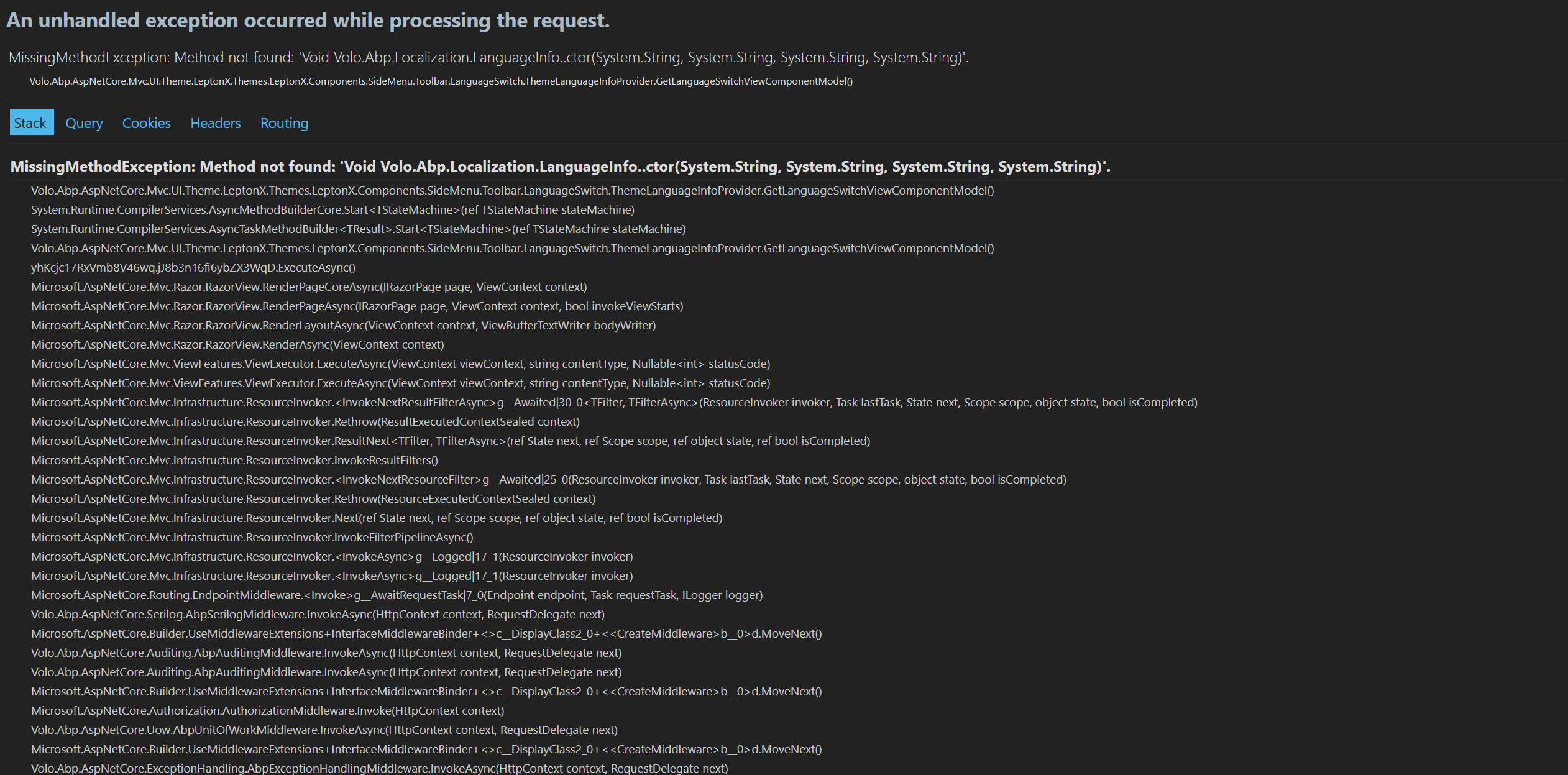
What is confusing to us is the following:
In our previous ABP version, we were creating LanguageInfo instances using a constructor with 4 parameters
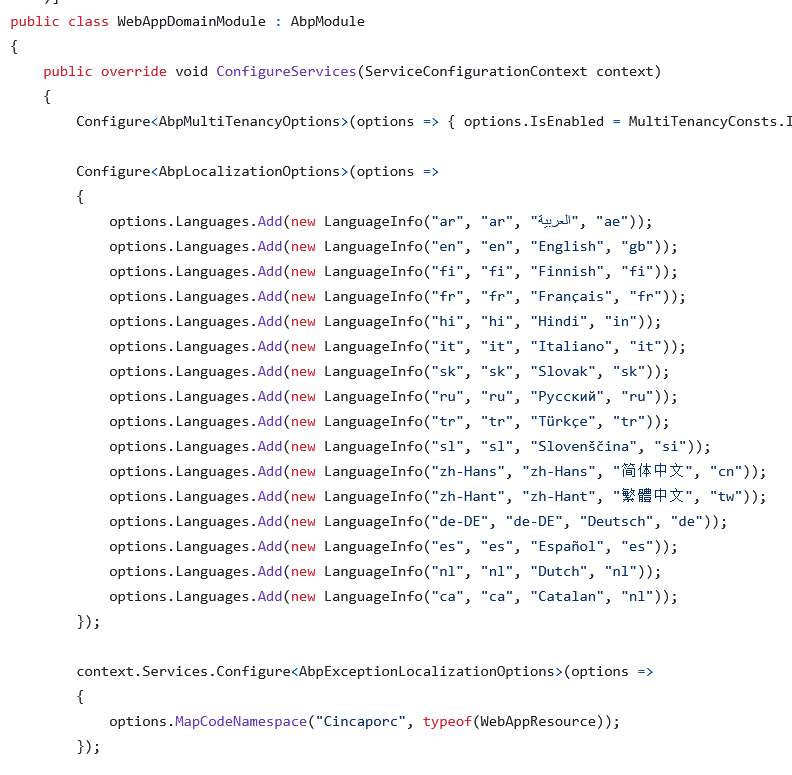
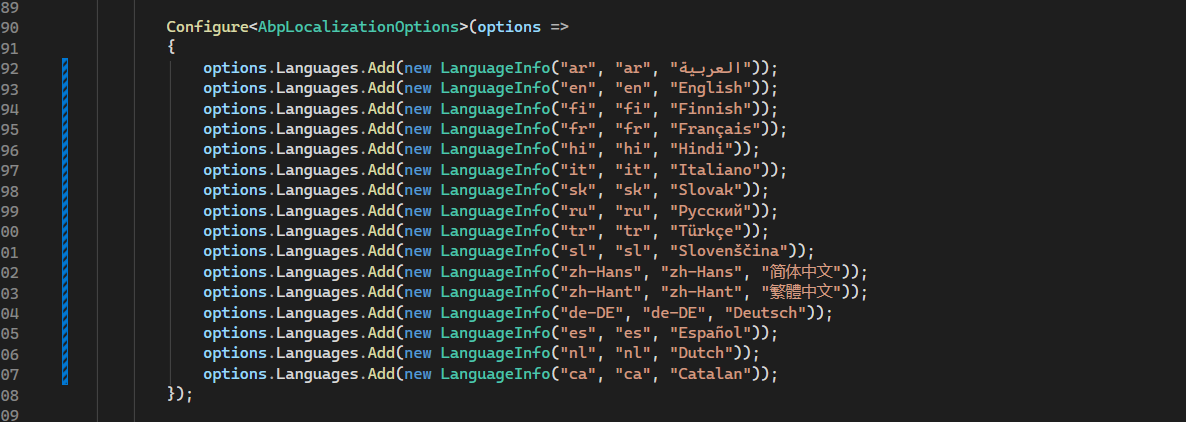
After upgrading, we updated our code to use the 3-parameter constructor, as required by the newer ABP packages (see PROOF_2.png).
We then inspected the method mentioned in the exception:
Volo.Abp.AspNetCore.Mvc.UI.Theme.LeptonX.Themes.LeptonX.Components.SideMenu.Toolbar.LanguageSwitch.ThemeLanguageInfoProvider.GetLanguageSwitchViewComponentModel()
In the LeptonX source code (v3.1) this method also uses the 3-parameter LanguageInfo constructor:
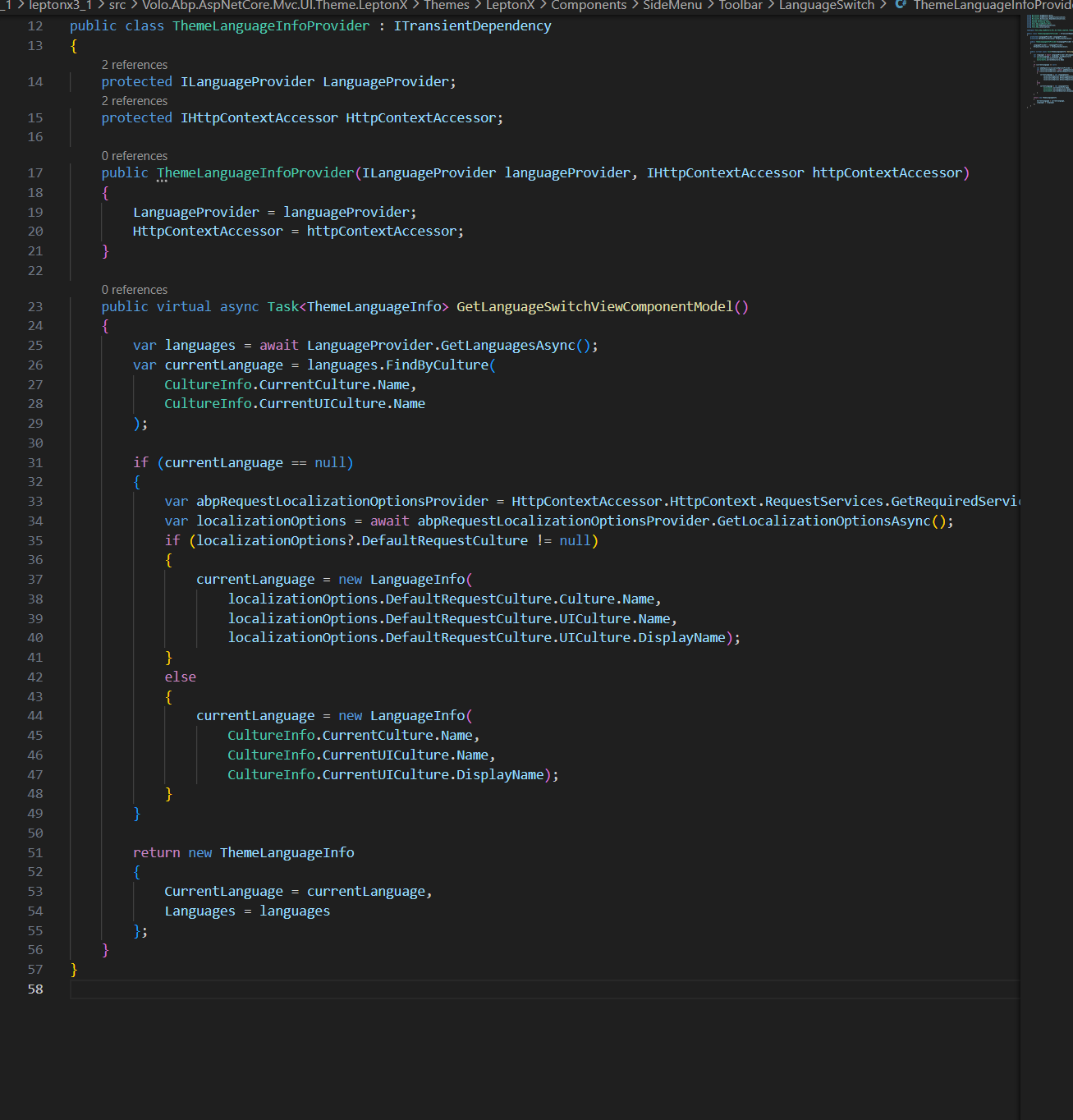
Because of this, we do not understand why the application is still trying to resolve the 4-parameter constructor at runtime.
Thank you in advance for your support.
Best regards,
Hello, we are trying to implement a continuous deployment of our ABP Core App via Github Actions.
The deployment to our Azure infrastructure works just fine, but we are also trying to apply the database migrations onto our DB (also in azure). The relevant parts of the workflow are:
- name: Setup .NET Core SDK
      uses: actions/setup-dotnet@v1
      with:
        dotnet-version: '6.0.x'

- name: Install ABP CLI
      run: dotnet tool install -g Volo.Abp.Cli --version 6.0.1

- name: Install ABP libs
      run: abp install-libs`

... # Other deployment steps (not relevant)

- name: ABP Login
      id: abp_login
      run: abp login "$ABP_COMMERCIAL_LOGIN" -p "$ABP_COMMERCIAL_PASS"

- name: Run Migrations
      run: cd src/Cincaporc.OurAppName.DbMigrator && dotnet run --Environment Production && cd

- name: ABP Logout
      if: ${{ always() && steps.abp_login.conclusion == 'success' }}
      run: abp logout
This should work just fine as we do a login, apply the migrations and the consequent logout but we get the following licensing error:
[03:18:46 INF] Started database migrations...
[03:18:46 INF] Migrating schema for host database...
[03:18:47 ERR] ABP-LIC-0012 - License Error! Given user 'ina********' has reached the maximum allowed developer computer count (2) for the organization 'Cincaporc'! Can not use the license in a new computer. Contact to license@abp.io if you think that this is an error.
[03:18:47 ERR] ABP-LIC-ERROR - License check failed for 'Volo.Abp.Identity.Pro.Domain-v6.0.1.0'.
How could we approach our workflow so that we can execute the migrations from it without this licensing error?
Thanks in advance,









