I see that the seeder only uses a single RootUrl value, but you need different redirect URI formats for different platforms. In this case, The OpenIddict seeder needs to be modified to support multiple redirect URIs for the mobile client configuration. Here's what needs to change:
// src/YourApp.DbMigrator/appsettings.json
{
  //...
  "OpenIddict": {
    "Applications": {
      //..
      "YourApp_Mobile": {
        "ClientId": "YourApp_Mobile",
        "NativeRootUrl": "exp://localhost:19000",
        "WebRootUrl": "https://localhost",
        "ExpoDevWebRootUrl": "http://localhost:19000"
      },
     //..
    }
  }
}
// src/YourApp.Domain/OpenIddict/OpenIddictDataSeedContributor.cs
public class OpenIddictDataSeedContributor : OpenIddictDataSeedContributorBase, IDataSeedContributor, ITransientDependency
{
    private async Task CreateApplicationsAsync()
    {
        //Mobile Client (dual config: native scheme + web URLs)
        var mobileClientId = configurationSection["YourApp_Mobile:ClientId"];
        if (!mobileClientId.IsNullOrWhiteSpace())
        {
            var mobileNativeRootUrl = configurationSection["YourApp_Mobile:NativeRootUrl"]?.TrimEnd('/');
            var mobileWebRootUrl = configurationSection["YourApp_Mobile:WebRootUrl"]?.TrimEnd('/');
            var mobileExpoDevWebRootUrl = configurationSection["YourApp_Mobile:ExpoDevWebRootUrl"]?.TrimEnd('/');

            var mobileRedirectUris = new List<string>();
            var mobilePostLogoutRedirectUris = new List<string>();

            // Native scheme redirect (e.g. yourapp://)
            if (!mobileNativeRootUrl.IsNullOrWhiteSpace())
            {
                mobileRedirectUris.Add(mobileNativeRootUrl!);
                mobilePostLogoutRedirectUris.Add(mobileNativeRootUrl!);
            }

            // Web redirect via SSL proxy (e.g. https://localhost)
            if (!mobileWebRootUrl.IsNullOrWhiteSpace())
            {
                mobileRedirectUris.Add(mobileWebRootUrl!);
                mobilePostLogoutRedirectUris.Add(mobileWebRootUrl!);
            }

            // Expo Web dev redirect (e.g. http://localhost:19000)
            if (!mobileExpoDevWebRootUrl.IsNullOrWhiteSpace())
            {
                mobileRedirectUris.Add(mobileExpoDevWebRootUrl!);
                mobilePostLogoutRedirectUris.Add(mobileExpoDevWebRootUrl!);
            }

            await CreateOrUpdateApplicationAsync(
                applicationType: OpenIddictConstants.ApplicationTypes.Native,
                name: mobileClientId!,
                type: OpenIddictConstants.ClientTypes.Public,
                consentType: OpenIddictConstants.ConsentTypes.Implicit,
                displayName: "Mobile Application",
                secret: null,
                grantTypes: new List<string> {
                    OpenIddictConstants.GrantTypes.AuthorizationCode,
                    OpenIddictConstants.GrantTypes.Password,
                    OpenIddictConstants.GrantTypes.ClientCredentials,
                    OpenIddictConstants.GrantTypes.RefreshToken
                },
                scopes: commonScopes,
                redirectUris: mobileRedirectUris,
                postLogoutRedirectUris: mobilePostLogoutRedirectUris
            );
        }
    }
}
Hello,
This feature is currently available in the preview version. To use it, you need to switch your application to the latest preview release: 10.1.0-rc.3.
You can follow these documents for guidance:
Switching to the preview version:
https://abp.io/docs/latest/cli#switch-to-preview
Solution Explorer documentation:
https://abp.io/docs/latest/studio/solution-explorer#solution
After switching to the preview version, install the AI Management module as described here: https://abp.io/docs/latest/modules/ai-management
As a final step, update your Angular application configuration.
package.json file and run the installation:"@volo/abp.ng.ai-management":"~10.1.0-rc.3"
app.config.ts file:import { provideAIManagementConfig }from'@volo/abp.ng.ai-management/config';
export const appConfig: ApplicationConfig = {
providers: [
provideAIManagementConfig(),
],
};
export const APP_ROUTES: Routes = [
  {
    path: 'ai-management',
    loadChildren: () => import('@volo/abp.ng.ai-management').then(c => c.createRoutes()),
  },
];
After completing these steps, the AI Management module should be available in your application.
Let me know if you need any further assistance.
Thank you for sharing the related details. However, I cannot produce the same problem on my end. Could you share a minimal reproducible example via e-mail? Here is my address: sumeyye.kurtulus@volosoft.com
Thank you for your cooperation.
Thank you again for your response. Could you please clarify the following points for this specific case?
Please verify that all @abp/ng-* and Angular packages are on compatible versions. If possible, could you share your package.json file?
Is there any custom APP_INITIALIZER or other startup logic that could be affecting this behavior?
Are you able to reproduce the issue locally (without Docker)? If the same error occurs after login in a local environment, it would indicate that the problem is related to Angular/runtime rather than Docker or Nginx.
Hello,
I’ve tried to reproduce the issue on my end, but I wasn’t able to replicate it.
If you’re still seeing the default Nginx page, it’s likely that either a different Dockerfile or build context is being used, or the Angular build is failing. In that case, /app/dist/ventra-hub-structure/browser/index.html may not be getting generated, rather than the Dockerfile pointing to the wrong dist folder.
Could you please confirm whether the Angular build completes successfully within Docker?
Hello, We suggest you to modify the Suite templates like below instead. You can also follow the related documentation https://abp.io/docs/latest/suite/editing-templates
        <ngx-datatable-column name="CreationTime" prop="creationTime">
          <ng-template let-row="row" ngx-datatable-cell-template>
            {{ row.creationTime | date: 'dd/MM/yyyy HH:mm' }}
          </ng-template>
        </ngx-datatable-column>
        <ngx-datatable-column name="LastModificationTime" prop="lastModificationTime">
          <ng-template let-row="row" ngx-datatable-cell-template>
            {{ row.lastModificationTime | date: 'dd/MM/yyyy HH:mm' }}
          </ng-template>
        </ngx-datatable-column>
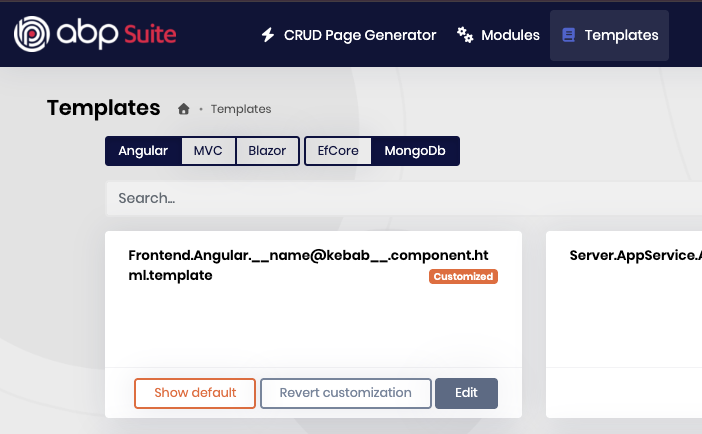
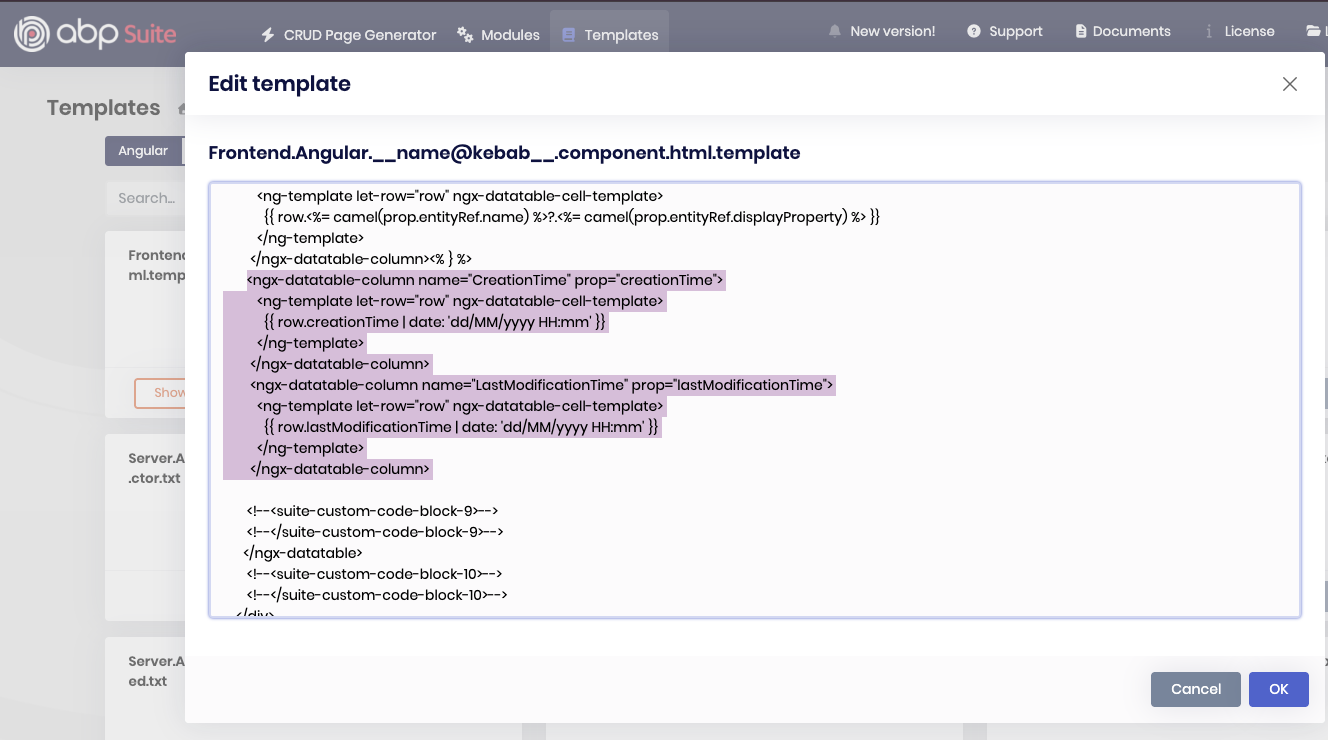
You can let us know if you need further assistance. Thank you for your cooperation.
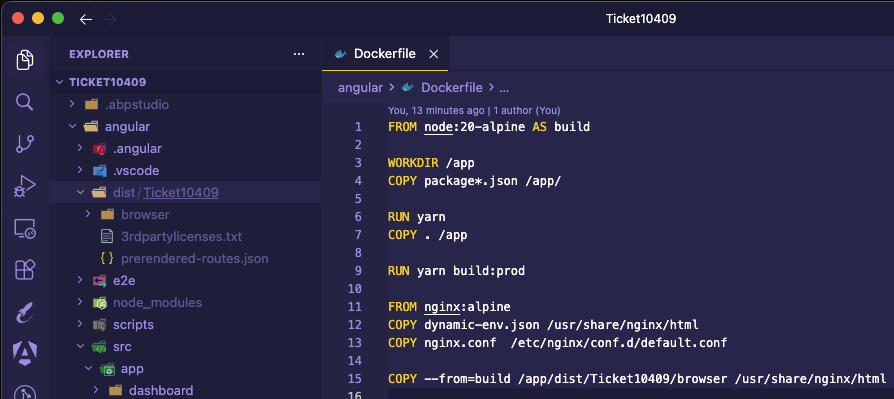
Hello,
This issue is likely related to the path reference for the built dist folder. Could you please ensure that the final copy command matches the output generated after running yarn build:prod?
Yes, you’re right. You’ll need to adjust the application configuration based on your test environment. You can refer to this preview documentation for more details: https://abp.io/docs/10.1/framework/ui/react-native?Architecture=Monolith#web-view-recommended---quickest-method
Hello,
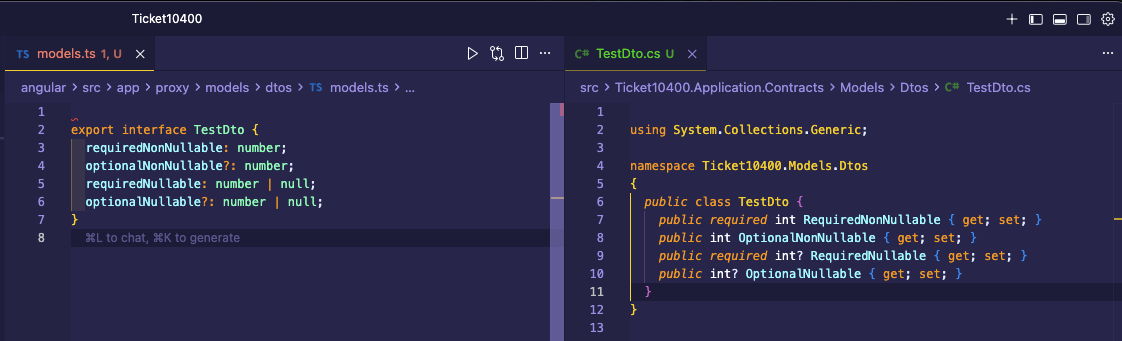
Thank you for explaining the problem with details. We have released a latest fix for this matter for the version 10.0.3 You can find the related thread here https://github.com/abpframework/abp/issues/24306.
Updating the ABP version may solve your problem. As a result, a sample generation should be like this
I am glad to hear that your problem has been solved. Thank you for reminding us upon this.









