






Hi
As we know webassembly is slow so my client wants to convert it to server so can you please guide me for this.
- ABP Framework version: v4.4.3
- UI type: Blazor
- DB provider: EF Core
- Tiered (MVC) or Identity Server Separated (Angular): no
- Exception message and stack trace:
- Steps to reproduce the issue:"
20 Answer(s)
-
0
It depends which project type are you using. Is your blazor-server will connect directly database or make requests to you existing HttpApi.Host?
Best way to change it to blazor server is creating new project and compare changes like I did in this PR: https://github.com/enisn/abp-blazor-wasm-to-server/pull/1
If your new blazor-server will send requests to HttpApi.Host like exactly same with current webassembly, you can create the project with
--tieredparameter.Markdown supported.Copy, paste, or drag & drop images and files (max 100 MB per file, 100 MB total per post) -
0
It depends which project type are you using. Is your blazor-server will connect directly database or make requests to you existing HttpApi.Host?
Best way to change it to blazor server is creating new project and compare changes like I did in this PR: https://github.com/enisn/abp-blazor-wasm-to-server/pull/1
If your new blazor-server will send requests to HttpApi.Host like exactly same with current webassembly, you can create the project with
--tieredparameter.Hi
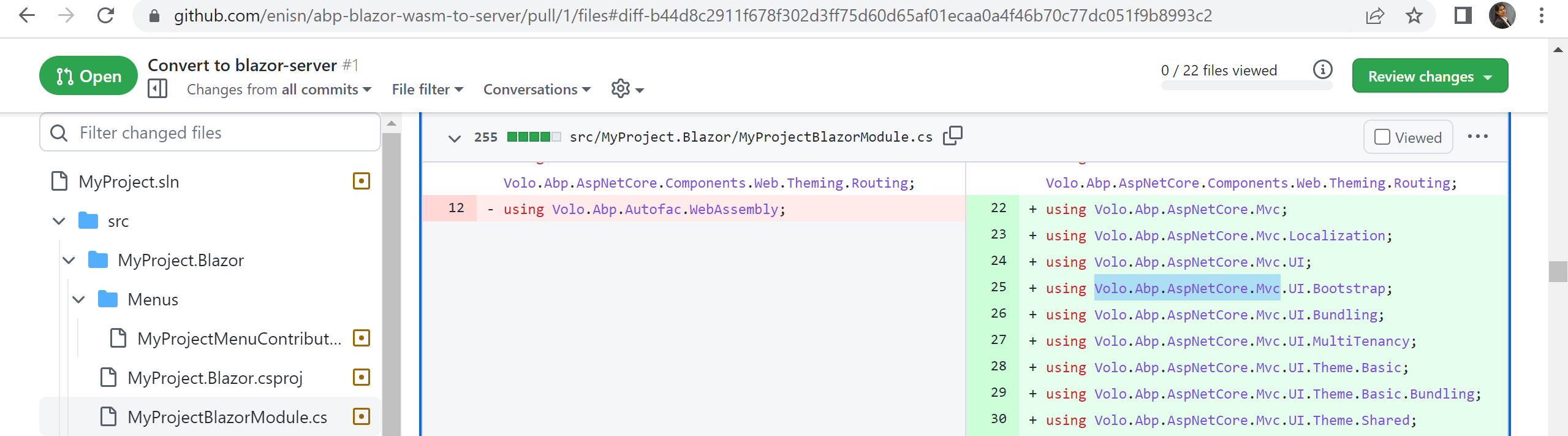
I checked the files and I am not able to add this reference in blazor project. Can u pls tell me how can I add this?
 Markdown supported.Copy, paste, or drag & drop images and files (max 100 MB per file, 100 MB total per post)
 -
0
It depends which project type are you using. Is your blazor-server will connect directly database or make requests to you existing HttpApi.Host?
Best way to change it to blazor server is creating new project and compare changes like I did in this PR: https://github.com/enisn/abp-blazor-wasm-to-server/pull/1
If your new blazor-server will send requests to HttpApi.Host like exactly same with current webassembly, you can create the project with
--tieredparameter.Hi
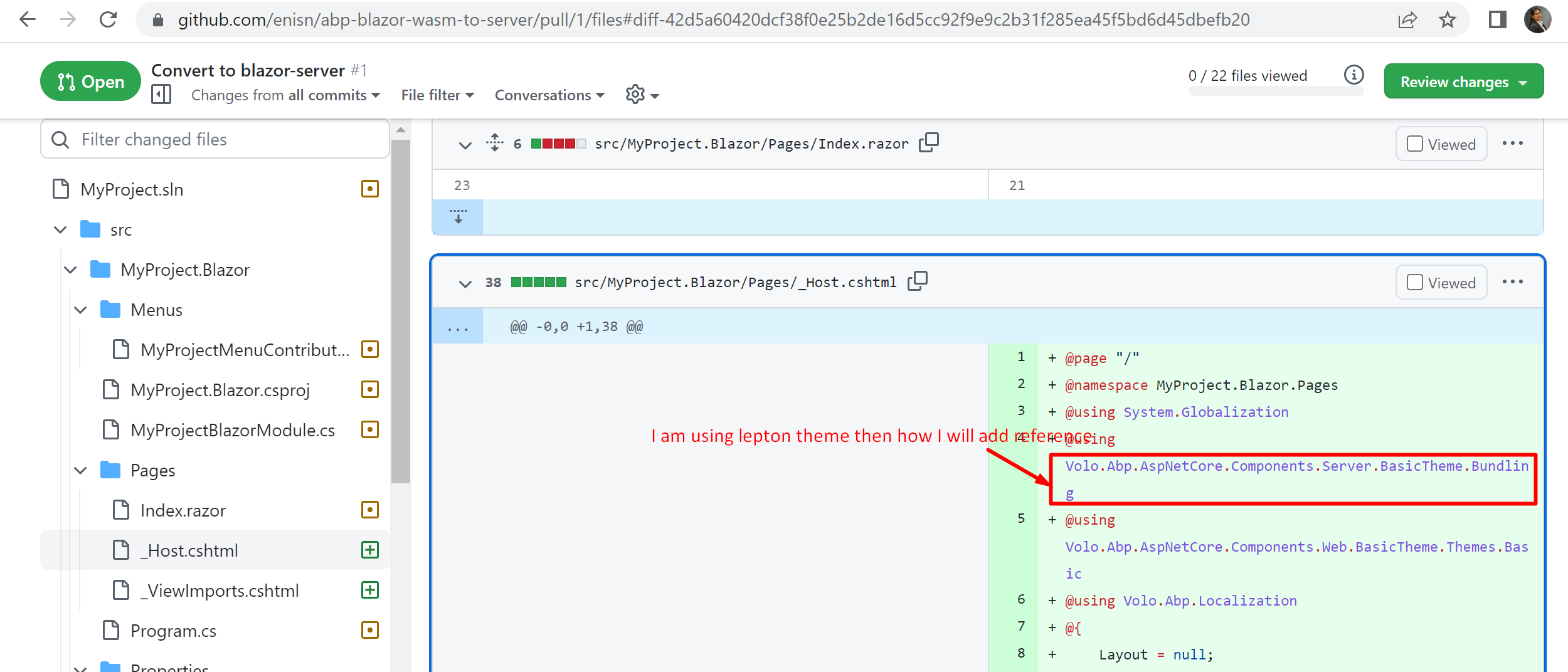
I checked the files and I am not able to add this reference in blazor project. Can u pls tell me how can I add this?
How I will add this reference in blazor project
 Markdown supported.Copy, paste, or drag & drop images and files (max 100 MB per file, 100 MB total per post)
 -
0
It depends which project type are you using. Is your blazor-server will connect directly database or make requests to you existing HttpApi.Host?
Best way to change it to blazor server is creating new project and compare changes like I did in this PR: https://github.com/enisn/abp-blazor-wasm-to-server/pull/1
If your new blazor-server will send requests to HttpApi.Host like exactly same with current webassembly, you can create the project with
--tieredparameter.what i need to do in this case If your new blazor-server will send requests to HttpApi.Host like exactly same with current webassembly, you can create the project with --tiered parameter.
Markdown supported.Copy, paste, or drag & drop images and files (max 100 MB per file, 100 MB total per post) -
0
Blazor WASM is a client-side application and entire code is shipped to browsers. So it can't connect to database directly and it requires a HTTP backend application, in that case it's your HttpApi.Host project.
But Blazor Server is a typical AspNetCore web application and performs blazor actions with websocket. So, this AspNetCore application can connect database directly, it can work without HTTP API, because itself is a server-side application.
If you want to still use your HttpApi.Host as a backend service with blazor-server, you have to create a new project with
--tieredparameter and compare differences with your existing project. But if you want to unify your backend application and blazor in a single Blazor Server application, you can just create a regular blazor server application and compare it with your existing application to see differences.(
abp new MyProjectName -u blazor-server: This command creates a unified blazor server project without an extraHttpApi.Hostproject.abp new MyProjectName -u blazor-server --tiered: This command creates a blazor server and HttpApi.Host project together and that blazor project sends requests to HTTP API instead of directly connecting database.Markdown supported.Copy, paste, or drag & drop images and files (max 100 MB per file, 100 MB total per post) -
0
It depends which project type are you using. Is your blazor-server will connect directly database or make requests to you existing HttpApi.Host?
Best way to change it to blazor server is creating new project and compare changes like I did in this PR: https://github.com/enisn/abp-blazor-wasm-to-server/pull/1
If your new blazor-server will send requests to HttpApi.Host like exactly same with current webassembly, you can create the project with
--tieredparameter.Hi
I checked the files and I am not able to add this reference in blazor project. Can u pls tell me how can I add this?
How I will add this reference in blazor project
can u pls answer this
Markdown supported.Copy, paste, or drag & drop images and files (max 100 MB per file, 100 MB total per post) -
0
It's for a demonstration, you can create a new project with your favorite project template such as
app-proin this case. and make a comparison of what should be changed. Configuring a Blazor Server from zero is really complicated and might be buggy. So, create a new blazor-server project and compare changes.Or, you can move your existing pages to the newly created blazor-server project instead of modifying the old one. After moving the files, you can remove the old project. That is a different way but you can lose your git history
Markdown supported.Copy, paste, or drag & drop images and files (max 100 MB per file, 100 MB total per post) -
0
It's for a demonstration, you can create a new project with your favorite project template such as
app-proin this case. and make a comparison of what should be changed. Configuring a Blazor Server from zero is really complicated and might be buggy. So, create a new blazor-server project and compare changes.Or, you can move your existing pages to the newly created blazor-server project instead of modifying the old one. After moving the files, you can remove the old project. That is a different way but you can lose your git history
I created a server app and now tell me where I need to put my existing host project code?
Markdown supported.Copy, paste, or drag & drop images and files (max 100 MB per file, 100 MB total per post) -
0
sorry, but the question is explicitly asking "How can I convert existing blazor webassembly project into server?" If you are asking something different than this, please create a new question.
Markdown supported.Copy, paste, or drag & drop images and files (max 100 MB per file, 100 MB total per post) -
0
sorry, but the question is explicitly asking "How can I convert existing blazor webassembly project into server?" If you are asking something different than this, please create a new question.
Created a new ticket.https://support.abp.io/QA/Questions/3217/How-can-I-customize-login-page-in-blazor-server-app
Markdown supported.Copy, paste, or drag & drop images and files (max 100 MB per file, 100 MB total per post) -
0
sorry, but the question is explicitly asking "How can I convert existing blazor webassembly project into server?" If you are asking something different than this, please create a new question.
can u pls reply
Markdown supported.Copy, paste, or drag & drop images and files (max 100 MB per file, 100 MB total per post)



