






- ABP Framework version: v5.3.4
- UI type: Angular
- DB provider: EF Core
- Tiered (MVC) or Identity Server Separated (Angular): no
- Exception message and stack trace:
- 2022-09-15 11:56:30.129 +03:00 [WRN] requestId: 8000003d-0000-f200-b63f-84710c7967bb, previousRequestId: no previous request id, message: Error Code: ConnectionToDownstreamServiceError Message: Error connecting to downstream service, exception: System.Net.Http.HttpRequestException: The SSL connection could not be established, see inner exception.
- ---> System.Security.Authentication.AuthenticationException: The remote certificate is invalid because of errors in the certificate chain: UntrustedRoot at System.Net.Security.SslStream.SendAuthResetSignal(ProtocolToken message, ExceptionDispatchInfo exception) at System.Net.Security.SslStream.CompleteHandshake(SslAuthenticationOptions sslAuthenticationOptions) at System.Net.Security.SslStream.ForceAuthenticationAsync[TIOAdapter](TIOAdapter adapter, Boolean receiveFirst, Byte[] reAuthenticationData, Boolean isApm) at System.Net.Http.ConnectHelper.EstablishSslConnectionAsync(SslClientAuthenticationOptions sslOptions, HttpRequestMessage request, Boolean async, Stream stream, CancellationToken cancellationToken) --- End of inner exception stack trace --- at System.Net.Http.ConnectHelper.EstablishSslConnectionAsync(SslClientAuthenticationOptions sslOptions, HttpRequestMessage request, Boolean async, Stream stream, CancellationToken cancellationToken) at System.Net.Http.HttpConnectionPool.ConnectAsync(HttpRequestMessage request, Boolean async, CancellationToken cancellationToken) at System.Net.Http.HttpConnectionPool.CreateHttp11ConnectionAsync(HttpRequestMessage request, Boolean async, CancellationToken cancellationToken) at System.Net.Http.HttpConnectionPool.AddHttp11ConnectionAsync(HttpRequestMessage request) at System.Threading.Tasks.TaskCompletionSourceWithCancellation`1.WaitWithCancellationAsync(CancellationToken cancellationToken) at System.Net.Http.HttpConnectionPool.GetHttp11ConnectionAsync(HttpRequestMessage request, Boolean async, CancellationToken cancellationToken) at System.Net.Http.HttpConnectionPool.SendWithVersionDetectionAndRetryAsync(HttpRequestMessage request, Boolean async, Boolean doRequestAuth, CancellationToken cancellationToken) at System.Net.Http.DiagnosticsHandler.SendAsyncCore(HttpRequestMessage request, Boolean async, CancellationToken cancellationToken) at System.Net.Http.HttpClient.
Question:When we deploy the microservice project running in the development environment on IIS, we get an SSL error. We created the SSL with the help of the code below.
$rootCN = "frame-test" $authServerCns = "app-authserver", "localhost" $publicWebCns = "app-public-web", "localhost" $administrationServiceCNs = "administration-service", "localhost" $identityServiceCNs = "identity-service", "localhost" $saasServiceCNs = "saas-service", "localhost" $localCNs="localhost"
$alreadyExistingCertsRoot = Get-ChildItem -Path Cert:\LocalMachine\My -Recurse | Where-Object { $_.Subject -eq "CN=$rootCN" }
if ($alreadyExistingCertsRoot.Count -eq 1) { Write-Output "Skipping creating Root CA certificate as it already exists." $rootCA = [Microsoft.CertificateServices.Commands.Certificate] $alreadyExistingCertsRoot[0] } else { $rootCA = New-SelfSignedCertificate -Subject $rootCN -KeyUsageProperty Sign -KeyUsage CertSign -CertStoreLocation Cert:\LocalMachine\My }
$localhostCert = New-SelfSignedCertificate -DnsName $localCNs -CertStoreLocation Cert:\LocalMachine\My #$publicWebCert = New-SelfSignedCertificate -DnsName $publicWebCns -CertStoreLocation Cert:\LocalMachine\My #$administrationServiceCert = New-SelfSignedCertificate -DnsName $administrationServiceCNs -CertStoreLocation Cert:\LocalMachine\My #$identityServiceCert = New-SelfSignedCertificate -DnsName $identityServiceCNs -CertStoreLocation Cert:\LocalMachine\My #$saasServiceCert = New-SelfSignedCertificate -DnsName $saasServiceCNs -CertStoreLocation Cert:\LocalMachine\My
$password = ConvertTo-SecureString -String "b65bdeef-3b4c-4417-a92d-636f8c481437" -Force -AsPlainText
Export-PfxCertificate -Cert $rootCA -FilePath hit-frame-test.pfx -Password $password | Out-Null
Export-PfxCertificate -Cert $localhostCert -FilePath localhost.pfx -Password $password | Out-Null #Export-PfxCertificate -Cert $publicWebCert -FilePath app-public-web.pfx -Password $password | Out-Null #Export-PfxCertificate -Cert $administrationServiceCert -FilePath administration-service.pfx -Password $password | Out-Null #Export-PfxCertificate -Cert $identityServiceCert -FilePath identity-service.pfx -Password $password | Out-Null #Export-PfxCertificate -Cert $saasServiceCert -FilePath saas-service.pfx -Password $password | Out-Null
#Export-Certificate -Cert $rootCA -FilePath hit-frame-test.cer -Type CERT | Out-Null
Trust it on your host machine.
$store = New-Object System.Security.Cryptography.X509Certificates.X509Store "Root","LocalMachine" $store.Open("ReadWrite")
$rootCertAlreadyTrusted = ($store.Certificates | Where-Object {$_.Subject -eq "CN=$rootCN"} | Measure-Object).Count -eq 1
if ($rootCertAlreadyTrusted -eq $false) { Write-Output "Adding the root CA certificate to the trust store." $store.Add($rootCA) }
$store.Close()
8 Answer(s)
-
0
Hi,
It works when I request from swagger without login. But when I run it again after getting token from authserve, the request doesn't work. Also, https://localhost:5001/abp/Swashbuckle/SetCsrfCookie SetCsrfCookie endpoint is notfound.
Markdown supported.Copy, paste, or drag & drop images and files (max 100 MB per file, 100 MB total per post) -
0
It is not related to ABP and the error indicates its about server trusting the self-signed certificate.
Sorry but I have no idea about self-signed certificate creations on IIS.
Markdown supported.Copy, paste, or drag & drop images and files (max 100 MB per file, 100 MB total per post) -
0
Hi gterdem,
Yes, this is not ABP's problem.
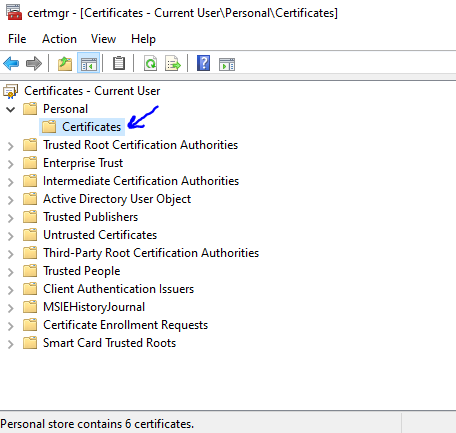
I created the domain-specific pfx with the help of the cert creation code that you shared in the microservice project. I uploaded this pfx to the place in the picture from the Manage User Certificate menu in windows.
 Markdown supported.Copy, paste, or drag & drop images and files (max 100 MB per file, 100 MB total per post)
 -
0
Can you share the cert creation code? If it is the
dotnet dev certscommand, it will only generate for localhost and won't work in the production.You can use tools like cmake, openssl for generating self-signed certificates or use Lets Encrypt. dotnet dev certs is for localhost only and not for production.
Markdown supported.Copy, paste, or drag & drop images and files (max 100 MB per file, 100 MB total per post) -
0
Hi @gterdem, $saasServiceCNs = "saas-service", "localhost" $saasServiceCert = New-SelfSignedCertificate -DnsName $saasServiceCNs -CertStoreLocation Cert:\LocalMachine\My $password = ConvertTo-SecureString -String "b65bdeef-3b4c-4417-a92d-636f8c481437" -Force -AsPlainText
Export-PfxCertificate -Cert $saasServiceCert -FilePath saas-service.pfx -Password $password | Out-Null
Markdown supported.Copy, paste, or drag & drop images and files (max 100 MB per file, 100 MB total per post) -
0
Sorry, I don't have knowledge about self-signed certificates on IIS or the IIS itself. There should be guides about it on the web.
Considering the OpenSSL and the mkcert, you should be passing the domain names for the SSL but I don't know about the IIS.
Markdown supported.Copy, paste, or drag & drop images and files (max 100 MB per file, 100 MB total per post) -
0
thanks @gterdem.
$saasServiceCNs = "saas-service", "localhost" $saasServiceCert = New-SelfSignedCertificate -DnsName $saasServiceCNs -CertStoreLocation Cert:\LocalMachine\My $password = ConvertTo-SecureString -String "b65bdeef-3b4c-4417-a92d-636f8c481437" -Force -AsPlainText
Export-PfxCertificate -Cert $saasServiceCert -FilePath saas-service.pfx -Password $password | Out-Null
With the help of the code above, I create a domain-specific pfx. Then, after typing windows+R, I write "mmc". On the screen that opens, I add the local certificate I created to "Personnel" and "Trusted Certificates" from the Certificate management. With this method, I made the certificate I installed on IIS trusted.
thank you for your interest.
By the way, we can't install docker on every client. That's why we use IIS. I didn't get any errors about certificate reliability in docker. IIS didn't trust. Anyway, I took care of it :)
Markdown supported.Copy, paste, or drag & drop images and files (max 100 MB per file, 100 MB total per post)


