






If you're creating a bug/problem report, please include followings:
- ABP Framework version: v6.0.0
- UI type: MVC
- DB provider: EF Core
- Tiered (MVC) or Identity Server Separated (Angular): yes
I have 3 menu items at the 2nd structural level of my left side nav menu. The structure is as follows. As shown in the screenshot when I click the Test Sub Menu the 3 menu items belonging to Test Sub Menu do not show. If you want to reproduce this issue just add the below code to your class that implements the IMenuContributor interface.
Test Menu 1 Test Sub Menu Test Menu Item 1 Test Menu Item 2 Test Menu Item 3
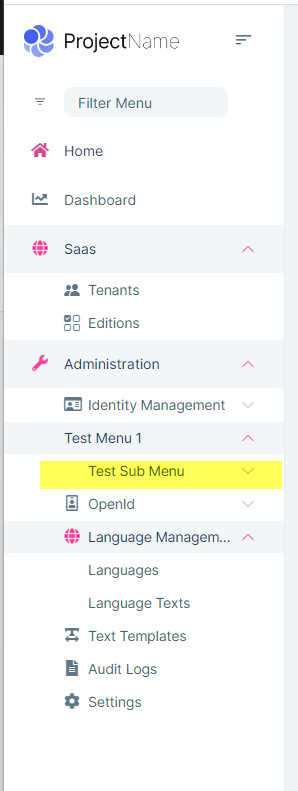
Code to reproduce
    var miMenu1 = new ApplicationMenuItem(
        name: "TestMenu1",
        displayName: "Test Menu 1",
        elementId: "TestMenu1",
        order: 1
        ).RequireAuthenticated();

    var miMenu1SubMenu1 = new ApplicationMenuItem(
        name: "TestMenu1SubMenu1",
        displayName: "Test Sub Menu",
        elementId: "TestMenu1SubMenu1",
        order: 1
        ).RequireAuthenticated();

    miMenu1SubMenu1.Items.Add(
        new ApplicationMenuItem (
        "TestMenuItem1",
        "Test Menu Item 1",
        "TestMenuItem1",
        order: 1
        ).RequireAuthenticated());

    miMenu1SubMenu1.Items.Add(
        new ApplicationMenuItem(
        "TestMenuItem2",
        "Test Menu Item 2",
        "TestMenuItem2",
        order: 2
        ).RequireAuthenticated());

    miMenu1SubMenu1.Items.Add(
        new ApplicationMenuItem(
        "TestMenuItem3",
        "Test Menu Item 3",
        "TestMenuItem3",
        order: 3
        ).RequireAuthenticated());

    miMenu1.Items.Add(miMenu1SubMenu1);

    //Add Application Security Group menu item
    context.Menu.GetAdministration().AddItem(miMenu1);
19 Answer(s)
-
0
Hi, sorry for the late response. We'll try to reproduce the problem (a support member assigned to your question) and take the necessary action on it. Best regards.
Markdown supported.Copy, paste, or drag & drop images and files (max 100 MB per file, 100 MB total per post) -
0
Hi,
If you use the code I provided you should be able to reproduce it as when I create a tiered solution in ABP suite and then add the code I provided it'll reproduce the issue for you.
Steve
Markdown supported.Copy, paste, or drag & drop images and files (max 100 MB per file, 100 MB total per post) -
0
Hi @Spospisil, I was able to reproduce it and created an internal issue (#956) for your problem. I will inform you when it's fixed. Best regards.
Markdown supported.Copy, paste, or drag & drop images and files (max 100 MB per file, 100 MB total per post) -
0
Hi,
Can I get an update in terms of when/what release the fix for this issue will happen in? This is a blocking issue for my development for my company's project.
Hi, we've created an issue and prioritized it and planning to fix it within the new LeptonX Theme release.
Markdown supported.Copy, paste, or drag & drop images and files (max 100 MB per file, 100 MB total per post) -
0
Hi,
Since we are a commercial license owner and thus have all the source code is it possible you can get me the coding fix to this issue so I may have it prior to the end of the year and I'll just apply it to my local version of the source code until I am ready to update my solution to the newest release at the end of the year?
Thanks.
Markdown supported.Copy, paste, or drag & drop images and files (max 100 MB per file, 100 MB total per post) -
0
Hi,
Since we are a commercial license owner and thus have all the source code is it possible you can get me the coding fix to this issue so I may have it prior to the end of the year and I'll just apply it to my local version of the source code until I am ready to update my solution to the newest release at the end of the year?
Thanks.
Yes, sure. I will share the solution with you 👍
Markdown supported.Copy, paste, or drag & drop images and files (max 100 MB per file, 100 MB total per post) -
0
Hello,
You can replace the existing lepton-x js bundle by copying the
lepton-x.bundle.min.jsinto/src/YourProject.Web/Themes/LeptonX/Global/side-menu/jsNote: Side menu of lepton x has been styled to have a maximum of 4 levels. If you want a space after the fourth level, you need to add the style below to your global-styles.css file.
.lpx-nav-menu
  .lpx-inner-menu
  .lpx-inner-menu
  .lpx-inner-menu
  .lpx-menu-item-link {
  padding-left: 108px;
}
Markdown supported.Copy, paste, or drag & drop images and files (max 100 MB per file, 100 MB total per post) -
0
Hello,
File sent to your email
Markdown supported.Copy, paste, or drag & drop images and files (max 100 MB per file, 100 MB total per post)



