






0
david.hurtado created
We need to send to users a personalized Error Message for Required Fields
If you're creating a bug/problem report, please include followings:
- ABP Framework version: v7.0.1
- UI type: Blazor Server
- DB provider: EF Core
- Tiered (MVC) or Identity Server Separated (Angular): yes
- Exception message and stack trace:
- We Made this code
- DTO File
public class TestDto
{
[Required(ErrorMessage = "RequiredField")]
public string Name { get; set; }
[Required]
public string Title { get; set; }
}
On a JSON Localized File, we have this code: en.json
{
  "Culture": "en",
  "Texts": {
    "Menu:Home": "Home",
    "Home": "Home",
    "Welcome": "Welcome",
    "LongWelcomeMessage": "Welcome to App. This is an experimental project.",
    "WelcomeMessageCont": "To use this App you must be registered before.",
    "LogInWelcomeMessage": "General Interactions.",
    "EndDate": "End date",
    "StartDate": "Start date",
    "RequiredField":"Please provide a value for field {0}"
  }
}
On the razor file we'd test to way to implement validations, via data annotations (on Name Field) or via blazorise validations (See Title field)
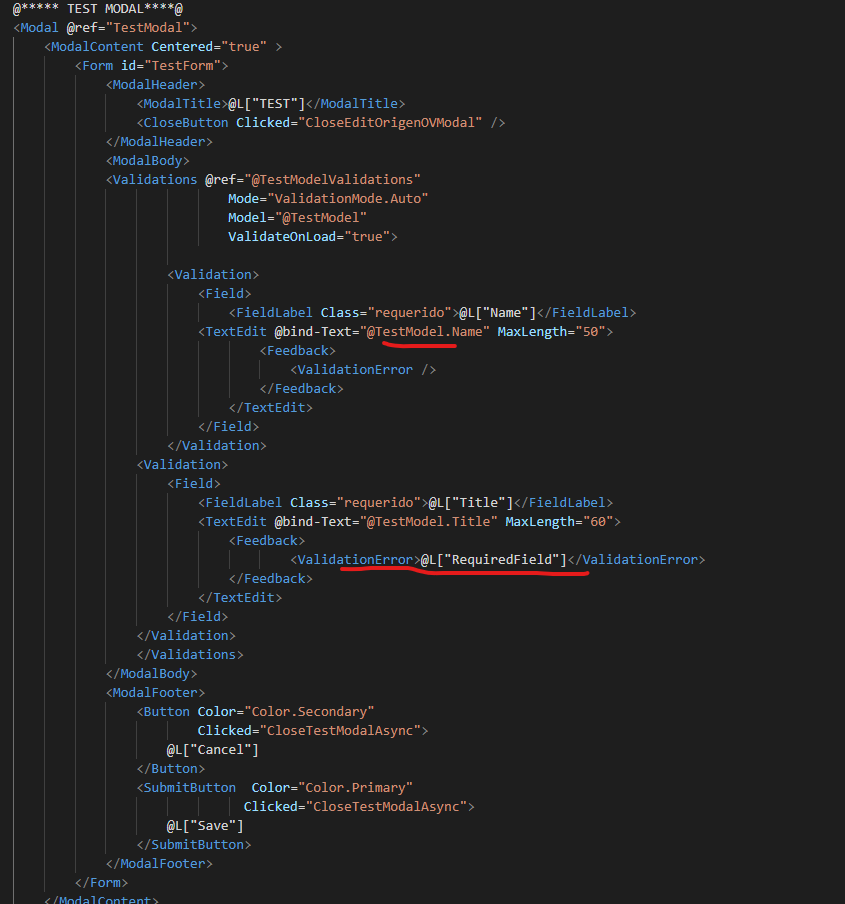
- Steps to reproduce the issue:"
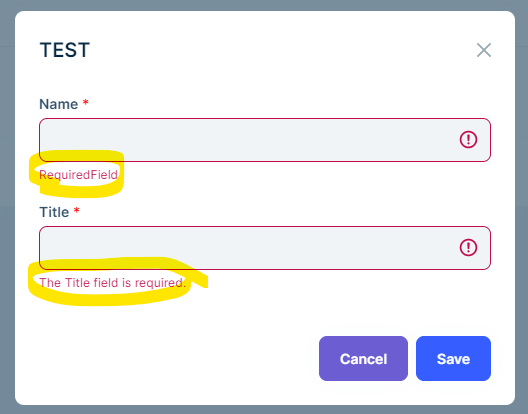
- What we could do for this?
Markdown supported.
Copy, paste, or drag & drop images and files (max 100 MB per file, 100 MB total per post)
1 Answer(s)
-
-3
Hi,
This has nothing to do with ABP Even if you use the ASPNETCore application without ABP, it is the same, you can create an issue on the Blazorise repo.
See: https://blazorise.com/docs/components/validation
Markdown supported.Copy, paste, or drag & drop images and files (max 100 MB per file, 100 MB total per post)


