






- ABP Framework version: v9.X.X
- UI Type: MVC
- Database System: SQL Server
- Tiered (for MVC) or Auth Server Separated (for Angular): no
- Exception message and full stack trace:
- Steps to reproduce the issue:
I have a running ABP website that does not support multi-tenancy. How should I add the multi-tenancy feature to this website?
6 Answer(s)
-
0
Hi there,
Can you provide me more information?
Didn't you check this checkbox while creating a new project?
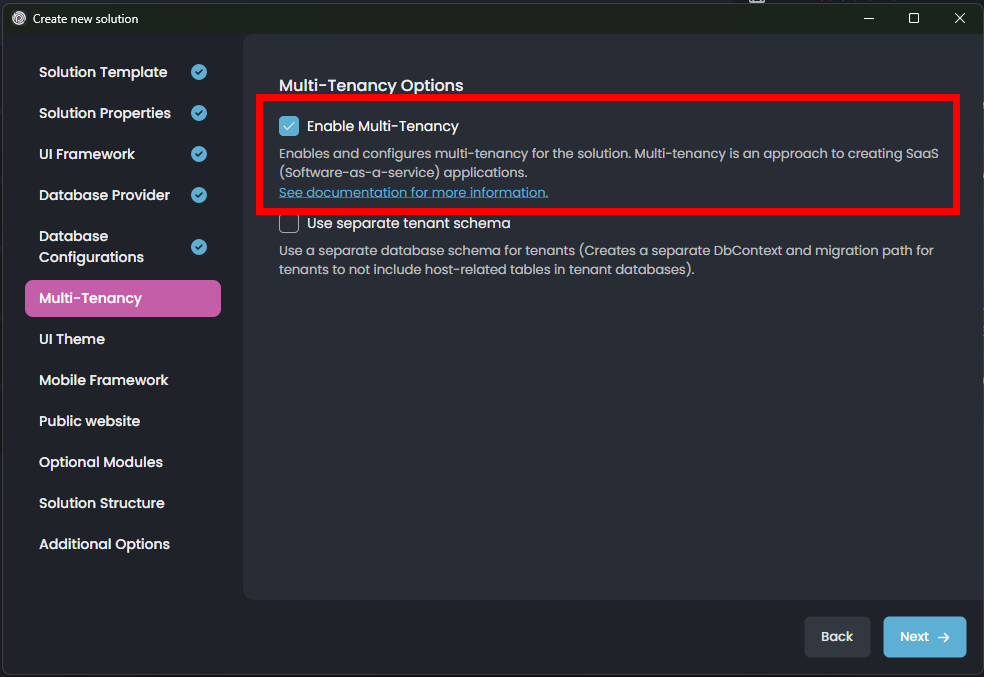
If not, your project is still configured to use multi-tenancy and it's disabled, Navigate to
MultiTenancyConsts.csand enable it easily:public static class MultiTenancyConsts { // Set this to 'true' 👇 public const bool IsEnabled = true; }Markdown supported.Copy, paste, or drag & drop images and files (max 100 MB per file, 100 MB total per post) -
0
my project was not configured to use multi-tenacy when I created it. I enabled it through code I created a new project with "enable multi tenancy" checkbox and then, I checked the database schema, seems like they are different
Markdown supported.Copy, paste, or drag & drop images and files (max 100 MB per file, 100 MB total per post) -
0
Yes, this is normal, adding the
TenantIdcolumn. If you want to activate MultiTenancy after creating the project. You can follow the steps below:- Navigate to
MultiTenancyConsts.csand enable it easily:
public static class MultiTenancyConsts { // Set this to 'true' 👇 public const bool IsEnabled = true; }- Add new migration
- Run DBMigrator
Markdown supported.Copy, paste, or drag & drop images and files (max 100 MB per file, 100 MB total per post) - Navigate to
-
0
I need to modify the title and content of the Email Confirmation email template. Is there a way to apply my modifications to all tenants? Or can tenants inherit the title and content from the tenant with
tenantIdset tonull(host)? so I don't need to update for each tenant one by one.These modifications involve language texts and text templates.

 Markdown supported.Copy, paste, or drag & drop images and files (max 100 MB per file, 100 MB total per post)
 -
0
Hello,
You can create a new ticket. Thanks
Markdown supported.Copy, paste, or drag & drop images and files (max 100 MB per file, 100 MB total per post)



