I need to log out all logged-in users upon execution of a background worker (HangfireBackgroundWorkerBase). Also, I need the action inserted in the security log against this to be 'Forced Logout' instead of 'Logout'. How can I do that?
- ABP Framework version: v8.1
- UI Type: MVC
- Database System: EF Core (SQL Serve)
- **Template Type: **: Application Template
- **Tiered (for MVC) **: No
19 Answer(s)
-
0
hi
You can do that after enabling session management. You can remove all sessions, and then the user will log out.
see https://abp.io/docs/latest/modules/identity/session-management#how-it-works
Inject the
ISecurityLogManagerto add new logs.await _securityLogManager.SaveAsync(securityLog => { securityLog.Identity = "Test"; securityLog.Action = "Test-Action"; securityLog.UserName = "Test-User"; });https://abp.io/docs/latest/modules/identity/session-management https://abp.io/docs/latest/modules/account/session-management
Markdown supported.Copy, paste, or drag & drop images and files (max 100 MB per file, 100 MB total per post) -
0
hi
how can I programmatically revoke user sessions?
There are few method to revoke session in
IdentitySessionManager, You can inject it then call the revoke method.RevokeAsync(Guid id) RevokeAsync(string sessionId) RevokeAsync(IdentitySession session) RevokeAllAsync(Guid userId, Guid? exceptSessionId = null) RevokeAllAsync(Guid userId, string device, Guid? exceptSessionId = null)Markdown supported.Copy, paste, or drag & drop images and files (max 100 MB per file, 100 MB total per post) -
0
Hi, So after revoking sessions, I need users to immediately be logged out from the system but I see the users are still able to use the system. How can I force the users to login again as soon as the sessions are revoked.
Markdown supported.Copy, paste, or drag & drop images and files (max 100 MB per file, 100 MB total per post) -
0
hi
Can you share the debug logs of all your apps?
https://abp.io/support/questions/8622/How-to-enable-Debug-logs-for-troubleshoot-problems
Thanks.
Markdown supported.Copy, paste, or drag & drop images and files (max 100 MB per file, 100 MB total per post) -
0
hi
Please do that:
- Remove
logst.txtfile of all websites - Enable debug logs.
- Run all of your apps.
- Reproduce the problem
- Share all
logs.txtof all websites
Markdown supported.Copy, paste, or drag & drop images and files (max 100 MB per file, 100 MB total per post) - Remove
-
0
hi
I can see the
sessionall exist in the cache.Can you share your
revokecode?Are you sue the sessions are revoked by
IdentitySessionManager?You can enable the EF Core debug to see the revoke SQL. see https://abp.io/support/questions/8622/How-to-enable-Debug-logs-for-troubleshoot-problems
Thanks.
Markdown supported.Copy, paste, or drag & drop images and files (max 100 MB per file, 100 MB total per post) -
0
Hi, Maliming I am using RevokeAsync(session) method of the IdentitySessionManager object as shown below. And yes, I am sure that sessions are revoked using this piece of code because no session is found in the sessions list of the user after running this piece of code. I also made sure via debugging this piece of code.
var sessions = await _identitySessionManager.GetListAsync(); foreach (var _session in sessions) { await _identitySessionManager.RevokeAsync(_session); } await uow.SaveChangesAsync();
Markdown supported.Copy, paste, or drag & drop images and files (max 100 MB per file, 100 MB total per post) -
0
hi
Your project uses memory cache. Are the revoke code and your account on the same website?
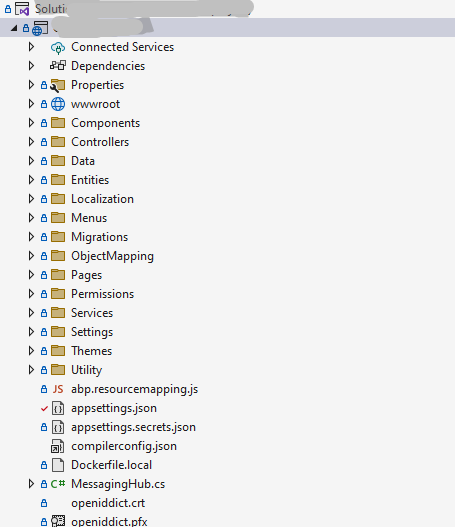
Can you share a screenshot of your project structure?
Thanks.
Markdown supported.Copy, paste, or drag & drop images and files (max 100 MB per file, 100 MB total per post)