Activities of "Bryan-EDV"

Answer

Thank you, its MVC pages have the correct css now.

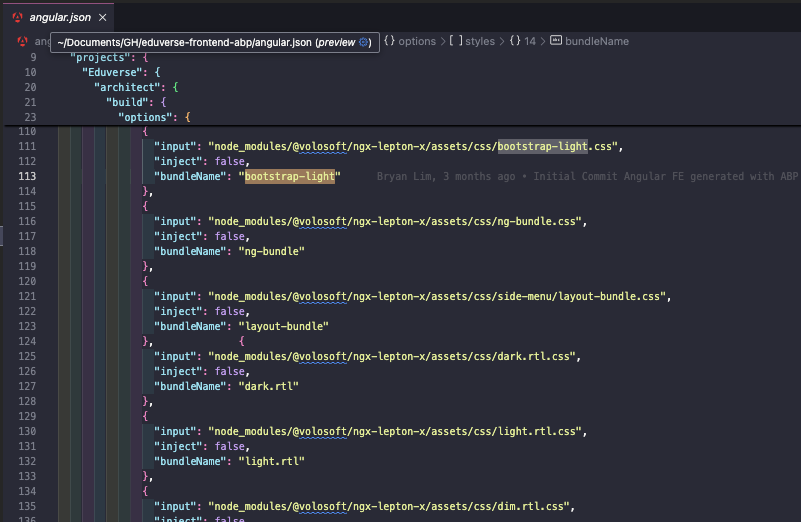
However, how about the angular project? When i log in, i realized bootstrap-light.css gets downloaded again.

are the files being read / downloaded from here?
Answer

let me try and get back to you

Answer

Answer

its in the folder provided in the source code, i did not change it's location:

<Project Sdk="Microsoft.NET.Sdk.Web">

  <Import Project="..\..\common.props" />

  <PropertyGroup>
    <TargetFramework>net8.0</TargetFramework>
    <Nullable>enable</Nullable>
    <AspNetCoreHostingModel>InProcess</AspNetCoreHostingModel>
    <RootNamespace>Eduverse</RootNamespace>
    <PreserveCompilationReferences>true</PreserveCompilationReferences>
  </PropertyGroup>

  <PropertyGroup Condition=" '$(RunConfiguration)' == 'Eduverse.HttpApi.Host' " />

  <ItemGroup>
    <PackageReference Include="AspNetCore.HealthChecks.UI" Version="8.0.0" />
    <PackageReference Include="AspNetCore.HealthChecks.UI.Client" Version="8.0.0" />
    <PackageReference Include="Microsoft.EntityFrameworkCore.InMemory" Version="8.0.4" />
    <PackageReference Include="AspNetCore.HealthChecks.UI.InMemory.Storage" Version="8.0.0" />
    <PackageReference Include="Owl.TokenWildcardIssuerValidator" Version="1.0.0" />
    <PackageReference Include="Serilog.AspNetCore" Version="8.0.0" />
    <PackageReference Include="Serilog.Sinks.Async" Version="1.5.0" />
    <PackageReference Include="Microsoft.AspNetCore.Authentication.Google" Version="8.0.4" />
    <PackageReference Include="Microsoft.AspNetCore.Authentication.MicrosoftAccount" Version="8.0.4" />
    <PackageReference Include="Microsoft.AspNetCore.Authentication.Twitter" Version="8.0.4" />
  </ItemGroup>

  <ItemGroup>
    <PackageReference Include="Volo.Abp.AspNetCore.MultiTenancy" Version="8.3.4" />
    <PackageReference Include="Volo.Abp.Autofac" Version="8.3.4" />
    <PackageReference Include="Volo.Abp.AspNetCore.Serilog" Version="8.3.4" />
    <PackageReference Include="Volo.Abp.BlobStoring.Aws" Version="8.3.4" />
    <PackageReference Include="Volo.Abp.Caching.StackExchangeRedis" Version="8.3.4" />
    <PackageReference Include="Volo.Abp.Swashbuckle" Version="8.3.4" />
  </ItemGroup>

  <ItemGroup>
    <PackageReference Include="Volo.Abp.Account.Pro.Public.Web.OpenIddict" Version="8.3.4" />
    <PackageReference Include="Volo.Abp.Account.Pro.Public.Web.Impersonation" Version="8.3.4" />
  </ItemGroup>

  <ItemGroup>
    <PackageReference Include="Volo.Abp.AspNetCore.Mvc.UI.Theme.LeptonX" Version="3.3.4" />
  </ItemGroup>

  <ItemGroup>
    <ProjectReference Include="..\Eduverse.Application\Eduverse.Application.csproj" />
    <ProjectReference Include="..\Eduverse.HttpApi\Eduverse.HttpApi.csproj" />
    <ProjectReference Include="..\Eduverse.EntityFrameworkCore\Eduverse.EntityFrameworkCore.csproj" />
  </ItemGroup>

  <ItemGroup>
    <PackageReference Include="Volo.Abp.Studio.Client.AspNetCore" Version="0.9.7" />
  </ItemGroup>

  <ItemGroup Condition="Exists('./openiddict.pfx')">
    <None Remove="openiddict.pfx" />
    <EmbeddedResource Include="openiddict.pfx">
      <CopyToOutputDirectory>Always</CopyToOutputDirectory>
    </EmbeddedResource>
  </ItemGroup>

  <ItemGroup>
    <Compile Remove="Logs\**" />
    <Content Remove="Logs\**" />
    <EmbeddedResource Remove="Logs\**" />
    <None Remove="Logs\**" />
  </ItemGroup>

</Project>
Question
  • ABP Framework version: v8.3.4
  • UI Type: Angular / MVC
  • Database System: EF Core (SQL Server, Oracle, MySQL, PostgreSQL, etc..) / MongoDB
  • Tiered (for MVC) or Auth Server Separated (for Angular): yes/no
  • Exception message and full stack trace:
  • Steps to reproduce the issue:

Hi team,

I have angular front end but my login pages are built on MVC.

During deployment, i notice the CSS files that i've changed in the backend are not being reflected, the default bootstrap files are still being loaded (https://idp.preprod.eduverse.vision/Account/Login) - you can view in the network tab that the below css new code is not being deployed (colours are still blue).

I've added these code to /Themes/LeptonX/Global/side-menu/css/bootstrap-light.css

However on my local it is working correctly.

How do i solve this issue?

Hello, I happen to be looking for the sample pages in angular also. Specifically this page - https://x.leptontheme.com/side-menu/custom-pages/subscriptions-list

The cli get-source returns module not found

Hi Maliming just following up again on this ticket. Thanks

Noted that there is a more minimal signalr.html file is also present in the zip file.

Try this in wwwroot.. You do not need to click any button. In the developer console it should indicate that signalR connected

<!DOCTYPE html>
<html lang="en">

<head>
    <meta charset="UTF-8">
    <meta name="viewport" content="width=device-width, initial-scale=1.0">
    <title>WebRTC with SignalR Cli Demo</title>
    <script src="https://cdnjs.cloudflare.com/ajax/libs/microsoft-signalr/8.0.7/signalr.min.js"></script>
</head>

<body>
    <h1>WebRTC with SignalR</h1>
    <div>
        <form id="initForm" onsubmit="handleFormSubmit(event)">
            <label for="scenarioId">Scenario ID:</label>
            <input type="text" id="scenarioId" name="scenarioId" value="3a15abf7-237d-ebab-bdc4-345a639725ce" required>
            <label for="personaId">Persona ID:</label>
            <input type="text" id="personaId" name="personaId" value="3a15aae8-923b-7cec-53b4-3c98a1d942b8" required>
            <button type="submit" id="startWebRTCButton">Start Conversation</button>
        </form>

        <script>
            function handleFormSubmit(event) {
                event.preventDefault();
                const scenarioId = document.getElementById("scenarioId").value;
                const personaId = document.getElementById("personaId").value;
                startWebRTC(scenarioId, personaId)
            }
        </script>
    </div>
    <ul id="messagesList"></ul>

    <script>
        const configuration = {};
        const _rtc = new RTCPeerConnection(configuration);
        let localStream;
        let inboundStream = null;
        let remoteAudio = null;

        const _signalR = new signalR.HubConnectionBuilder()
            .withUrl("/signalr-hubs/messaging", { withCredentials: true })
            .build();

        _signalR.on("ReceiveMessage", (message) => {
            console.log(message)
            const li = document.createElement("li");
            li.textContent = `${tag}: ${message}`;
            document.getElementById("messagesList").prepend(li);
        });

        _signalR.on("ReceiveWebRtcMessage", async (message) => {
            console.log("ReceiveWebRtcMessage: ", message);

            const messageObj = JSON.parse(message);
            if (messageObj.type) {
                switch (messageObj.type) {
                    case 'offer':
                        // Handle offer
                        let offerSdp = messageObj.sdp;
                        console.log("Received sdp offer: ", offerSdp);

                        // Set the remote description (the offer from the server)

                        await _rtc.setRemoteDescription(new RTCSessionDescription({ type: 'offer', sdp: offerSdp }));
                        // Create an answer to the offer
                        const answer = await _rtc.createAnswer();
                        // Set the local description with the answer
                        await _rtc.setLocalDescription(answer);
                        sendAnswer(answer.sdp);
                        break;
                    case 'answer':
                        let sdp = messageObj.sdp;
                        console.log("Received sdp answer: ", sdp);
                        await _rtc.setRemoteDescription(new RTCSessionDescription({ type: 'answer', sdp }));
                        break;
                    case 'icecandidate':
                        console.log("handling icecandidate: ", message);

                        try {
                            while (!_rtc.remoteDescription) {
                                await new Promise(resolve => setTimeout(resolve, 200));
                            }

                            const candidateInit = JSON.parse(messageObj.candidate);
                            await _rtc.addIceCandidate(new RTCIceCandidate(candidateInit));
                        } catch (e) {
                            console.error("Error adding received ICE candidate", e);
                        }
                        break;
                    default:
                        console.warn("Unknown message type:", messageObj.type);
                }
            } else {
                console.warn("Message does not contain a type property");
            }
        });

        _signalR.on("ReceiveOffer", async (offer) => {
            console.log("Received SDP offer:", offer);
            await _rtc.setRemoteDescription(new RTCSessionDescription({ type: 'offer', offer }));
            const answer = await _rtc.createAnswer();
            await _rtc.setLocalDescription(answer);
            sendAnswer(answer.sdp);
        });

        _signalR.on("ReceiveAnswer", async (sdp) => {
            console.log("Received SDP answer:", sdp);
            await _rtc.setRemoteDescription(new RTCSessionDescription({ type: 'answer', sdp }));
        });

        _signalR.on("ReceiveIceCandidate", async (candidate) => {
            console.log("Received ICE candidate:", candidate);
            try {
                await _rtc.addIceCandidate(new RTCIceCandidate(candidate));
            } catch (e) {
                console.error("Error adding received ICE candidate", e);
            }
        });

        async function startWebRTC(scenarioId, personaId) {
            document.getElementById("startWebRTCButton").disabled = true;
            const devices = await navigator.mediaDevices.enumerateDevices();
            const audioDevices = devices.filter(device => device.kind === 'audioinput');
            if (audioDevices.length === 0) {
                throw new Error("No audio input devices found");
            }

            localStream = await navigator.mediaDevices.getUserMedia({ video: false, audio: true });
            remoteAudio = document.createElement("audio");
            remoteAudio.autoplay = true;
            document.body.appendChild(remoteAudio);

            localStream.getTracks().forEach(track => _rtc.addTrack(track, localStream));

            _rtc.onicecandidate = event => {
                if (event.candidate) {
                    console.log("event candidate", event.candidate);
                    sendIceCandidate(event);
                }
            };

            _rtc.ontrack = (ev) => {
                console.log('Received remote audio stream');

                console.log("*** ontrack event ***", ev.track);
                console.log("*** ontrack event ***", ev.streams);
                if (ev.streams && ev.streams[0]) {
                    remoteAudio.srcObject = ev.streams[0];
                } else {
                    if (!inboundStream) {
                        inboundStream = new MediaStream();
                        remoteAudio.srcObject = inboundStream;
                    }
                    inboundStream.addTrack(ev.track);
                }
            };

            _rtc.oniceconnectionstatechange = () => {
                console.log("ICE connection state:", _rtc.iceConnectionState);

                if (_rtc.iceConnectionState === 'connected') {
                    // Connection is stable and ready
                    console.log("ICE connection state: connected");
                    console.log("Initialising conversation...");
                    initializeConversation({ ScenarioId: scenarioId, PersonaId: personaId });
                }
            };

            _rtc.onnegotiationneeded = async () => {
                console.log("Negotiation needed, creating offer");
                const offer = await _rtc.createOffer();
                await _rtc.setLocalDescription(offer);
                sendOffer(offer.sdp);
            };

            const transcriptionChannel = _rtc.createDataChannel("transcription");
            transcriptionChannel.onopen = () => {
                console.log("Data channel Transcription opened");
                transcriptionChannel.send(JSON.stringify({ type: "transcription", message: "Hello from client" }));
            };
            transcriptionChannel.onmessage = (event) => {
                console.log(`Data channel Transcription: ${event.data}`);
            };
            transcriptionChannel.onclose = () => {
                console.log("Data channel Transcription closed");
            }
        }

        _signalR.start().then(() => {
            console.log("SignalR connected");
            //startWebRTC();
        }).catch(err => console.error(err.toString()));

        function sendOffer(sdp) {
            console.log("Sending SDP offer:", sdp);
            _signalR.invoke("OnReceivedWebRtcMessageAsync", JSON.stringify({ type: "offer", sdp: sdp })).catch(err => console.error(err.toString()));
        }

        function sendAnswer(sdp) {
            console.log("Sending SDP answer:", sdp);
            _signalR.invoke("OnReceivedWebRtcMessageAsync", JSON.stringify({ type: "answer", sdp: sdp })).catch(err => console.error(err.toString()));
        }

        function sendIceCandidate(ev) {
            console.log("Sending ICE candidate: ", ev);
            _signalR.invoke("OnReceivedWebRtcMessageAsync", JSON.stringify({ type: ev.type, candidate: JSON.stringify(ev.candidate) }))
                .catch(err => console.error(err.toString()));
        }

        function initializeConversation(input) {
            _signalR.invoke("InitializeConversation", JSON.stringify(input)).catch(err => console.error(err.toString()));
        }

        window.onload = () => {
            console.log("Window loaded");
        };
    </script>
</body>
</html>

Sent

Showing 51 to 60 of 124 entries
Boost Your Development
ABP Live Training
Packages
See Trainings
Mastering ABP Framework Book
The Official Guide
Mastering
ABP Framework
Learn More
Mastering ABP Framework Book
Made with ❤️ on ABP v10.1.0-preview. Updated on December 17, 2025, 07:08
1
ABP Assistant
🔐 You need to be logged in to use the chatbot. Please log in first.