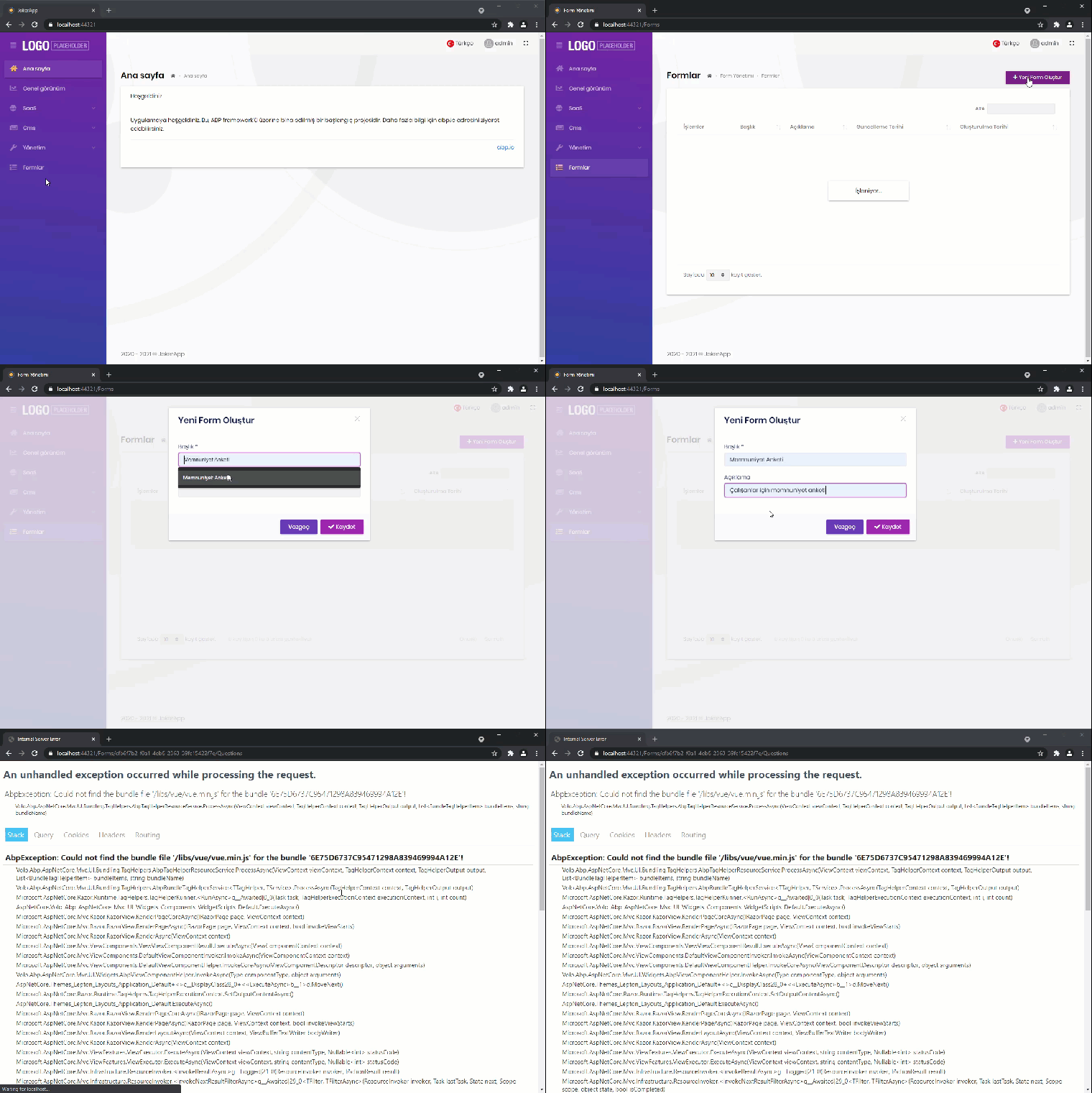
Hi,
I have explained in details at https://support.abp.io/QA/Questions/1259/How-can-I-change-the-database-table-prefix
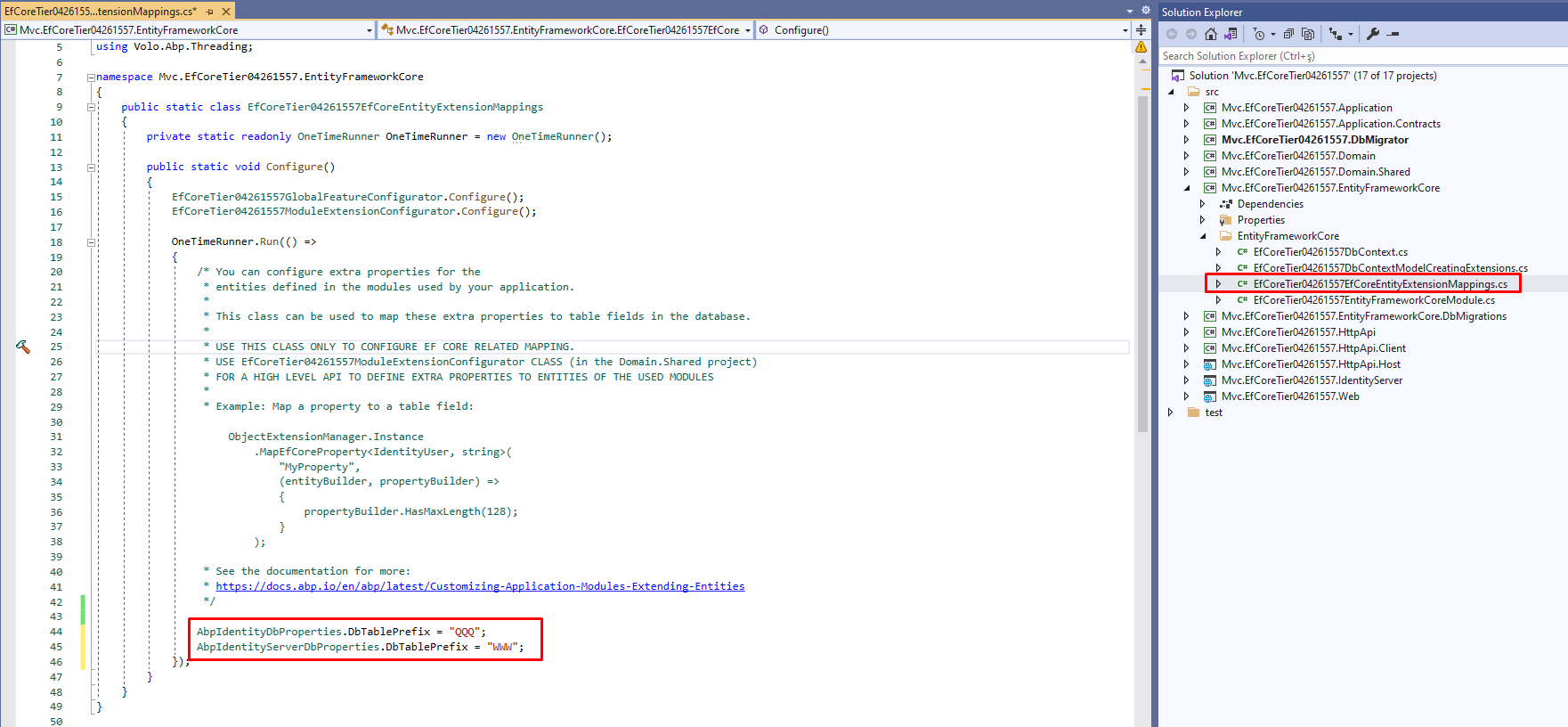
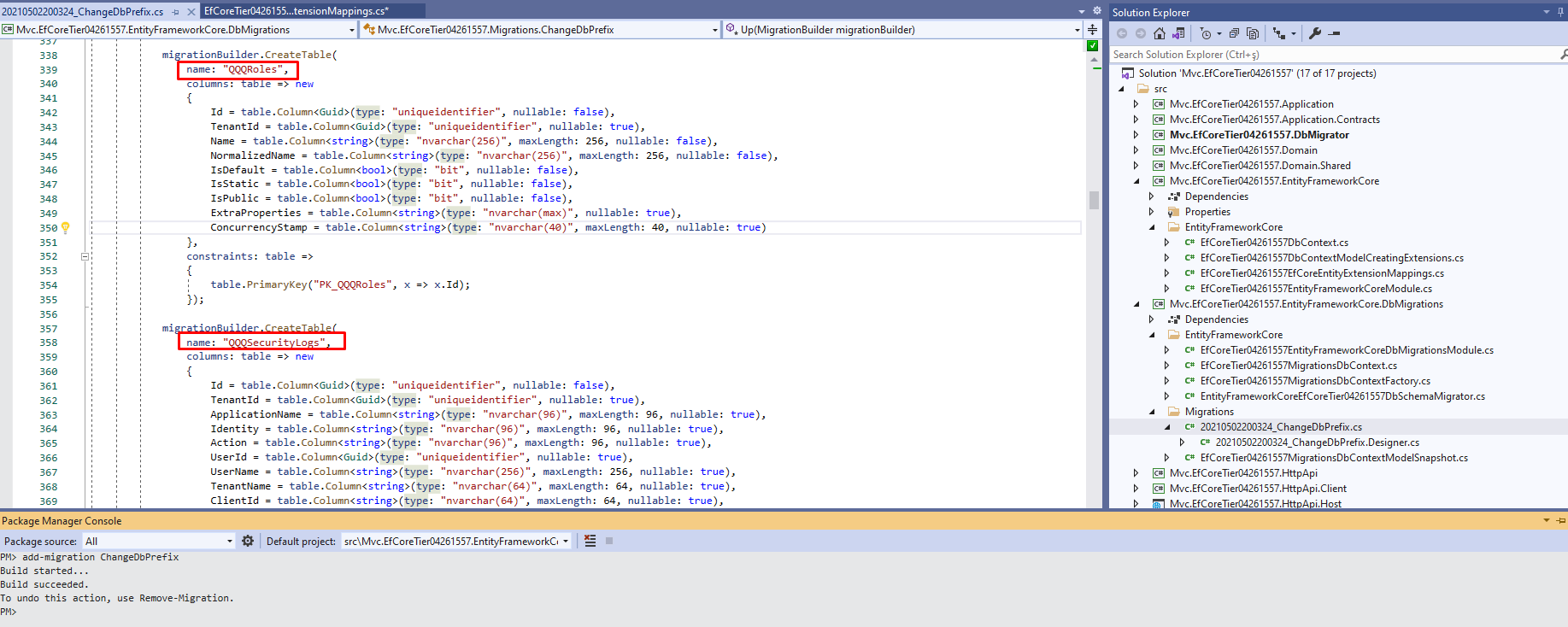
The table prefix change must be done in BookStoreEfCoreEntityExtensionMappings.cs file.
All modules have static variables to be able to change the database table prefix.
After changing the table prefix, you need to add a new migration and apply it to the database.
   OneTimeRunner.Run(() =>
    {
        string newDbTablePrefix = "Abc";
        AbpIdentityDbProperties.DbTablePrefix = newDbTablePrefix; //Identity
        AbpIdentityServerDbProperties.DbTablePrefix = newDbTablePrefix; //Identity Server
        AbpAuditLoggingDbProperties.DbTablePrefix = newDbTablePrefix; //Audit Logging
        FileManagementDbProperties.DbTablePrefix = newDbTablePrefix; //File Management
        LanguageManagementDbProperties.DbTablePrefix = newDbTablePrefix; //Language Management
        SaasDbProperties.DbTablePrefix = newDbTablePrefix; //SaaS
        TextTemplateManagementDbProperties.DbTablePrefix = newDbTablePrefix; //Text Template
        PaymentDbProperties.DbTablePrefix = newDbTablePrefix; //Payment
        AbpPermissionManagementDbProperties.DbTablePrefix = newDbTablePrefix; //Permission Management
    });
See the location where you need to write this code
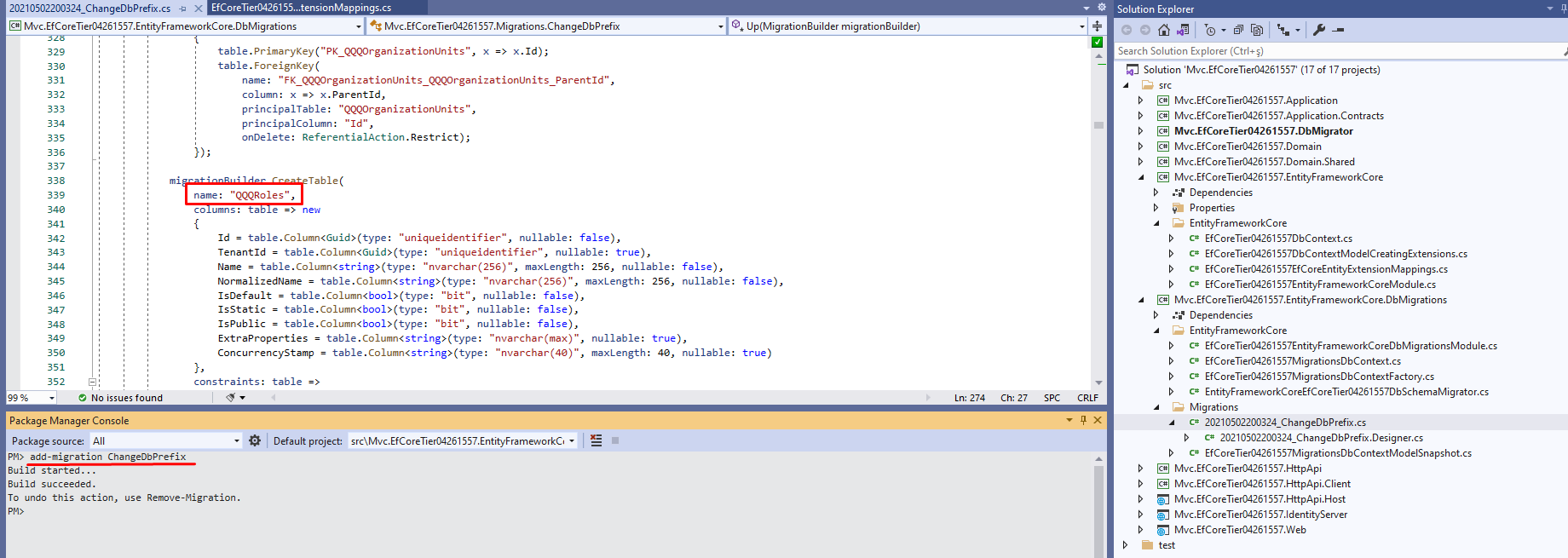
In the corresponding module document, you can see the static variable of the table prefix.
Identity Module:
 File Management Module:
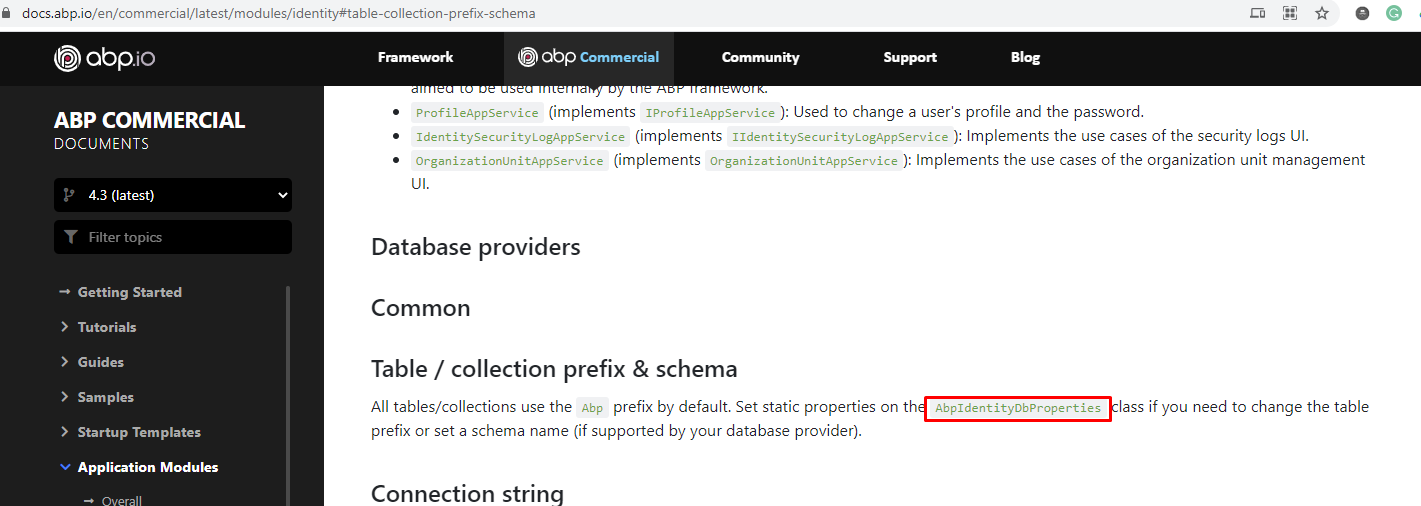
Add new migration to create the migration script
@scott7106 I've checked the issue and related Suite template will be updated in v4.31.
For a workaround you can update your Suite template.
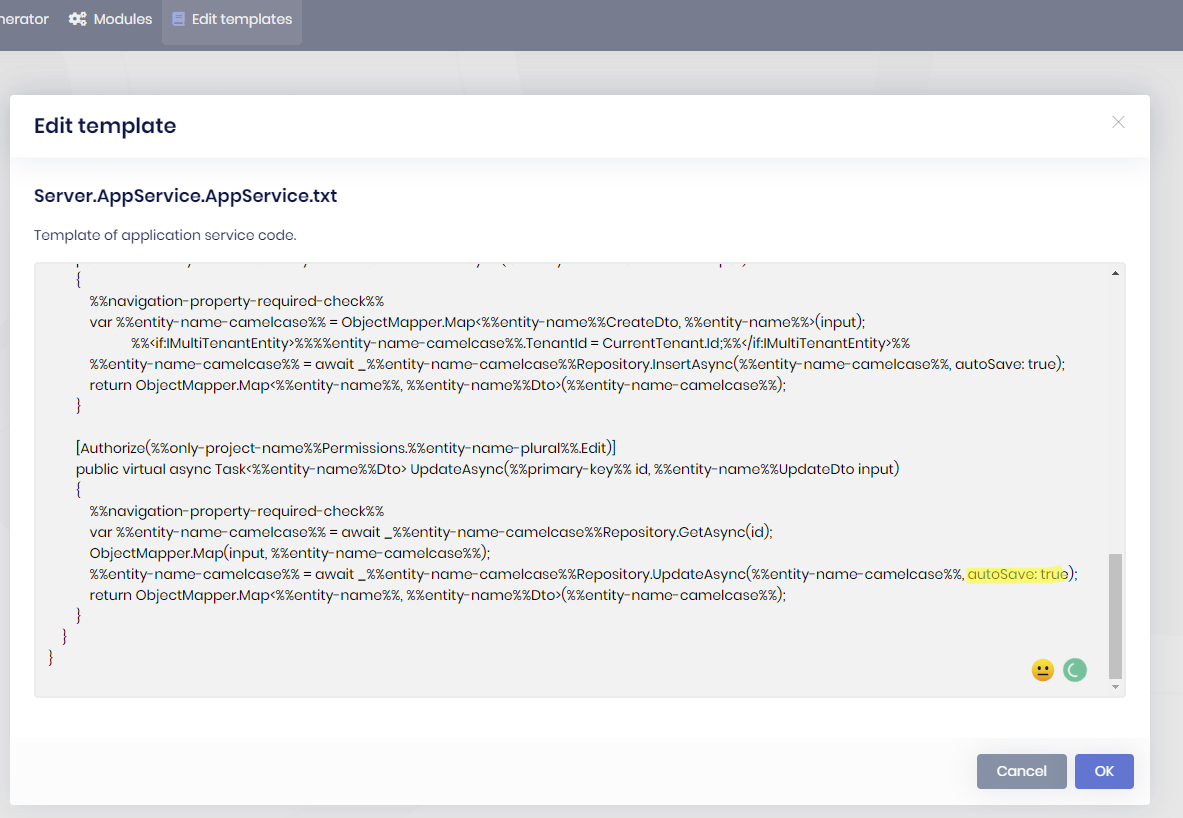
Open Suite, go to Templates tab.
Search for AppService.txt
Find the UpdateAsync line and add the autoSave: true argument.
%%entity-name-camelcase%% = await _%%entity-name-camelcase%%Repository.UpdateAsync(%%entity-name-camelcase%%, autoSave: true);
ABP Framework version: v4.3 UI type: Angular DB provider: EF Core Tiered (MVC) or Identity Server Separated (Angular): no
When we replace the account module with the source code we get the errors below in the angular project.
Error: ./src/main.ts Module build failed (from ./node_modules/@ngtools/webpack/src/ivy/index.js): Error: Debug error: DtsModuleScopeResolver.read(AccountSettingsModule from E:/Development/abp/Version43/angular/projects/account/admin/src/account-settings.module.ts), but not a .d.ts file
at MetadataDtsModuleScopeResolver.resolve (E:\Development\abp\Version43\angular\node_modules@angular\compiler-cli\src\ngtsc\scope\src\dependency.js:52:23) at MetadataDtsModuleScopeResolver.resolve (E:\Development\abp\Version43\angular\node_modules@angular\compiler-cli\src\ngtsc\scope\src\dependency.js:100:46) at LocalModuleScopeRegistry.getExportedScope (E:\Development\abp\Version43\angular\node_modules@angular\compiler-cli\src\ngtsc\scope\src\local.js:529:51) at LocalModuleScopeRegistry.getScopeOfModuleReference (E:\Development\abp\Version43\angular\node_modules@angular\compiler-cli\src\ngtsc\scope\src\local.js:271:44) at LocalModuleScopeRegistry.getScopeOfModule (E:\Development\abp\Version43\angular\node_modules@angular\compiler-cli\src\ngtsc\scope\src\local.js:148:22) at LocalModuleScopeRegistry.getScopeForComponent (E:\Development\abp\Version43\angular\node_modules@angular\compiler-cli\src\ngtsc\scope\src\local.js:122:22) at ComponentDecoratorHandler.resolve (E:\Development\abp\Version43\angular\node_modules@angular\compiler-cli\src\ngtsc\annotations\src\component.js:365:42) at TraitCompiler.resolve (E:\Development\abp\Version43\angular\node_modules@angular\compiler-cli\src\ngtsc\transform\src\compilation.js:392:50) at NgCompiler.resolveCompilation (E:\Development\abp\Version43\angular\node_modules@angular\compiler-cli\src\ngtsc\core\src\compiler.js:542:27) at NgCompiler.<anonymous> (E:\Development\abp\Version43\angular\node_modules@angular\compiler-cli\src\ngtsc\core\src\compiler.js:423:34) at step (E:\Development\abp\Version43\angular\node_modules\tslib\tslib.js:143:27) at Object.next (E:\Development\abp\Version43\angular\node_modules\tslib\tslib.js:124:57) at fulfilled (E:\Development\abp\Version43\angular\node_modules\tslib\tslib.js:114:62) at process._tickCallback (internal/process/next_tick.js:68:7)Error: ./src/polyfills.ts Module build failed (from ./node_modules/@ngtools/webpack/src/ivy/index.js): Error: Debug error: DtsModuleScopeResolver.read(AccountSettingsModule from E:/Development/abp/Version43/angular/projects/account/admin/src/account-settings.module.ts), but not a .d.ts file
at MetadataDtsModuleScopeResolver.resolve (E:\Development\abp\Version43\angular\node_modules@angular\compiler-cli\src\ngtsc\scope\src\dependency.js:52:23) at MetadataDtsModuleScopeResolver.resolve (E:\Development\abp\Version43\angular\node_modules@angular\compiler-cli\src\ngtsc\scope\src\dependency.js:100:46) at LocalModuleScopeRegistry.getExportedScope (E:\Development\abp\Version43\angular\node_modules@angular\compiler-cli\src\ngtsc\scope\src\local.js:529:51) at LocalModuleScopeRegistry.getScopeOfModuleReference (E:\Development\abp\Version43\angular\node_modules@angular\compiler-cli\src\ngtsc\scope\src\local.js:271:44) at LocalModuleScopeRegistry.getScopeOfModule (E:\Development\abp\Version43\angular\node_modules@angular\compiler-cli\src\ngtsc\scope\src\local.js:148:22) at LocalModuleScopeRegistry.getScopeForComponent (E:\Development\abp\Version43\angular\node_modules@angular\compiler-cli\src\ngtsc\scope\src\local.js:122:22) at ComponentDecoratorHandler.resolve (E:\Development\abp\Version43\angular\node_modules@angular\compiler-cli\src\ngtsc\annotations\src\component.js:365:42) at TraitCompiler.resolve (E:\Development\abp\Version43\angular\node_modules@angular\compiler-cli\src\ngtsc\transform\src\compilation.js:392:50) at NgCompiler.resolveCompilation (E:\Development\abp\Version43\angular\node_modules@angular\compiler-cli\src\ngtsc\core\src\compiler.js:542:27) at NgCompiler.<anonymous> (E:\Development\abp\Version43\angular\node_modules@angular\compiler-cli\src\ngtsc\core\src\compiler.js:423:34) at step (E:\Development\abp\Version43\angular\node_modules\tslib\tslib.js:143:27) at Object.next (E:\Development\abp\Version43\angular\node_modules\tslib\tslib.js:124:57) at fulfilled (E:\Development\abp\Version43\angular\node_modules\tslib\tslib.js:114:62) at process._tickCallback (internal/process/next_tick.js:68:7)Error: (webpack)-dev-server/client?http://0.0.0.0:0&sockPath=/sockjs-node Module build failed (from ./node_modules/@ngtools/webpack/src/ivy/index.js): Error: Debug error: DtsModuleScopeResolver.read(AccountSettingsModule from E:/Development/abp/Version43/angular/projects/account/admin/src/account-settings.module.ts), but not a .d.ts file
at MetadataDtsModuleScopeResolver.resolve (E:\Development\abp\Version43\angular\node_modules@angular\compiler-cli\src\ngtsc\scope\src\dependency.js:52:23) at MetadataDtsModuleScopeResolver.resolve (E:\Development\abp\Version43\angular\node_modules@angular\compiler-cli\src\ngtsc\scope\src\dependency.js:100:46) at LocalModuleScopeRegistry.getExportedScope (E:\Development\abp\Version43\angular\node_modules@angular\compiler-cli\src\ngtsc\scope\src\local.js:529:51)39m at LocalModuleScopeRegistry.getScopeOfModuleReference (E:\Development\abp\Version43\angular\node_modules@angular\compiler-cli\src\ngtsc\scope\src\local.js:271:44) at LocalModuleScopeRegistry.getScopeOfModule (E:\Development\abp\Version43\angular\node_modules@angular\compiler-cli\src\ngtsc\scope\src\local.js:148:22) at LocalModuleScopeRegistry.getScopeForComponent (E:\Development\abp\Version43\angular\node_modules@angular\compiler-cli\src\ngtsc\scope\src\local.js:122:22) at ComponentDecoratorHandler.resolve (E:\Development\abp\Version43\angular\node_modules@angular\compiler-cli\src\ngtsc\annotations\src\component.js:365:42) at TraitCompiler.resolve (E:\Development\abp\Version43\angular\node_modules@angular\compiler-cli\src\ngtsc\transform\src\compilation.js:392:50) at NgCompiler.resolveCompilation (E:\Development\abp\Version43\angular\node_modules@angular\compiler-cli\src\ngtsc\core\src\compiler.js:542:27) at NgCompiler.<anonymous> (E:\Development\abp\Version43\angular\node_modules@angular\compiler-cli\src\ngtsc\core\src\compiler.js:423:34) at step (E:\Development\abp\Version43\angular\node_modules\tslib\tslib.js:143:27) at Object.next (E:\Development\abp\Version43\angular\node_modules\tslib\tslib.js:124:57) at fulfilled (E:\Development\abp\Version43\angular\node_modules\tslib\tslib.js:114:62) at process._tickCallback (internal/process/next_tick.js:68:7)
duplicate of https://support.abp.io/QA/Questions/1126#answer-4438182b-8955-8de1-60ff-39fc1869ff5d
here's the SetCsrfCookie. https://github.com/abpframework/abp/blob/dev/framework/src/Volo.Abp.Swashbuckle/Volo/Abp/Swashbuckle/AbpSwashbuckleController.cs
@alper Any idea on how to resolve the new 4.3.0 error? Cannot read the template Volo.Abp.Commercial.SuiteTemplates.Templates.Server.Entity.Partials.ConfigureEntityMultiTenantCondition.txt
@MCrawford yes I know the solution. actually every release I see this error. You need to be running the same version for both Suite and your project. If you update suite and keep your project abp version old, it will not work. see https://support.abp.io/QA/Questions/671/ABP-Suite-throws-Cannot-read-the-template-VoloAbpCommercialSuiteTemplatesTemplatesXXXX
Dears,
I downloaded account module with source code on exisiting project (4.3.0-rc.1)
I get this error when I run the application, it deos not work!:
Error: Debug error: DtsModuleScopeResolver.read(AccountSettingsModule from D:/Dev/NoonClouds.Hub/angular/projects/account/admin/src/account-settings.module.ts), but not a .d.ts file
P.S:
I already tried the old solution but did not work in 4.3.0-rc.1: https://support.abp.io/QA/Questions/807/Bugs--Issues-v42X#answer-64a151bf-76ea-027b-8be3-39fadb31c2ac
@MILLENNIUM
thanks for reporting. I've created a bug ticket internally. Probably will be fixed in the 4.3.1
Hi,
i just updated to v4.3.0 an noticed that the
abp bundlecommand throws an exception related to the file management module.PS C:\Users\Nico\Source\Repos\nl-bae-crm\aspnet-core\src\NL.Bae.Crm.Blazor> abp bundle [11:21:13 INF] ABP CLI (https://abp.io) [11:21:13 INF] Version 4.3.0 (Stable) [11:21:15 INF] Generating style bundle... [11:21:15 INF] Style bundle has been generated successfully. [11:21:15 INF] Generating script bundle... [11:21:15 WRN] Unable to minify the file: AuthenticationService.js. Adding file to the bundle without minification. [11:21:15 ERR] Could not find a part of the path 'C:\Users\Nico\.nuget\packages\volo.filemanagement.blazor\4.3.0\staticwebassets\filemanagement\js\filemanagement.js'. System.IO.DirectoryNotFoundException: Could not find a part of the path 'C:\Users\Nico\.nuget\packages\volo.filemanagement.blazor\4.3.0\staticwebassets\filemanagement\js\filemanagement.js'. at System.IO.FileStream.ValidateFileHandle(SafeFileHandle fileHandle) at System.IO.FileStream.CreateFileOpenHandle(FileMode mode, FileShare share, FileOptions options) at System.IO.FileStream..ctor(String path, FileMode mode, FileAccess access, FileShare share, Int32 bufferSize, FileOptions options) at System.IO.StreamReader.ValidateArgsAndOpenPath(String path, Encoding encoding, Int32 bufferSize) at System.IO.StreamReader..ctor(String path, Encoding encoding, Boolean detectEncodingFromByteOrderMarks) at System.IO.File.InternalReadAllText(String path, Encoding encoding) at System.IO.File.ReadAllText(String path) at Volo.Abp.Cli.Bundling.BundlerBase.GetFileContent(String filePath, Boolean minify) in D:\ci\Jenkins\workspace\abp-framework-release\abp\framework\src\Volo.Abp.Cli.Core\Volo\Abp\Cli\Bundling\BundlerBase.cs:line 113 at Volo.Abp.Cli.Bundling.BundlerBase.BundleFiles(BundleOptions options, List`1 bundleDefinitions) in D:\ci\Jenkins\workspace\abp-framework-release\abp\framework\src\Volo.Abp.Cli.Core\Volo\Abp\Cli\Bundling\BundlerBase.cs:line 78 at Volo.Abp.Cli.Bundling.BundlerBase.Bundle(BundleOptions options, BundleContext context) in D:\ci\Jenkins\workspace\abp-framework-release\abp\framework\src\Volo.Abp.Cli.Core\Volo\Abp\Cli\Bundling\BundlerBase.cs:line 37 at Volo.Abp.Cli.Bundling.BundlingService.BundleAsync(String directory, Boolean forceBuild) in D:\ci\Jenkins\workspace\abp-framework-release\abp\framework\src\Volo.Abp.Cli.Core\Volo\Abp\Cli\Bundling\BundlingService.cs:line 86 at Volo.Abp.Cli.Commands.BundleCommand.ExecuteAsync(CommandLineArgs commandLineArgs) in D:\ci\Jenkins\workspace\abp-framework-release\abp\framework\src\Volo.Abp.Cli.Core\Volo\Abp\Cli\Commands\BundleCommand.cs:line 43 at Volo.Abp.Cli.CliService.RunAsync(String[] args) in D:\ci\Jenkins\workspace\abp-framework-release\abp\framework\src\Volo.Abp.Cli.Core\Volo\Abp\Cli\CliService.cs:line 59It seems that the js asset of the file management module are missing in v4.3.0.
As a workaround i copied the js folder from v4.2 nuget to the 4.3.0 directory, to get the bundling working.
@nlachmuth
this javascript file has been removed and not used anymore. this is a bug and we have fixed it. your workaround is good. thanks
but ReportingService is not an ApplicationService also CreateReport is not registered to Dependency Injection. This is not related to DevExpress. Even you run this code with Postman you'll get error. Use ABP Suite to create your service and try to consume it.
@maliming
@serdar,
you need to run gulp command after adding Forms module.
To do this, open your Web folder and write gulp