Activities of "brauerj@gc.adventist.org"
(Same issue/concern here.)
I was able to create a work around by adding my own CSS LINK reference at the bottom of the page outside of the bundling system. Then when I use the "!important" keyword it actually overrides the "!important" from "blazor-bundle" (which seems to come directly from internal ABP source code). Not ideal but that at least got me moving for now.
Just putting it at the bottom of <head> is not enough because the "blazor-bundle" link reference gets "injected" at the end of the <head> by the ABP system.
Please let us know if this will be something you can fix or if we need to hack a work around somehow. If you have a hackable work around for now please suggest. The main issue seems to be that /_content/Volo.Abp.AspNetCore.Components.Web.LeptonXTheme/side-menu/css/blazor-bundle.css is not easily overridable and that its definition of b-table includes plenty of !important statements which are difficult to override.
You may set padding in
blazor-bundle.cssfile in the class.b-table.table tbody th, .b-table.table tbody td { padding: 1rem 1.25rem !important; vertical-align: middle; }
But this changes it for the whole site! According to Blazorise we should be able to just do a custom class https://github.com/Megabit/Blazorise/discussions/2760
.ise-grid-tight tbody tr td {
    padding: .25rem; !important;
}
but this does NOT work because the LeptonX code overrides it!
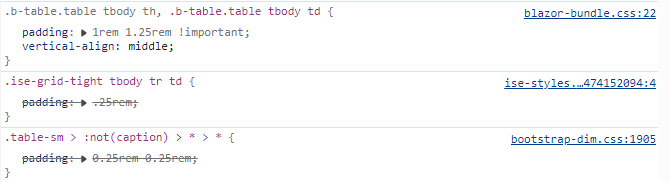
Why does blazor-bundle.css have the !important on that line?! That seems like the problem.
Jonathan
It turned out this was because of trying to use script bunding for the TinyMCE .js depencies which doesn't work since it loads lots of other dependencies based on relative URLs.
Instead I created my own LayoutComponent which includes the dependencies.
=====MyCustomLayout.razor===== @inherits LayoutComponentBase @using Volo.Abp.AspNetCore.Components.Web.BasicTheme.Themes.Basic @layout MainLayout
@Body
<HeadContent> <script src="_content/Blazeditor.TinyMCE/tinymce.min.js"></script> <script src="_content/Blazeditor.TinyMCE/blazeditor.js"></script> </HeadContent>
I agree. It seems clear to me that a setting and pattern or two are missing somewhere to make this much cleaner for the various desired outcomes we each are working towards.
<HeadOutlet/> doesn't seem to be recognized in the code I have from the template.
Without <component type="typeof(HeadOutlet)" render-mode="Server" /> my styling "outlets" from blazor don't seem to be getting set.
Besides later on in the same _Host.cshtml file.
<component type="typeof(App)" render-mode="Server" />
is used instead of
<App>
Blazor tags are not supported in .cshtml files.
This would be a GREAT solution but no longer seems to be available.
I do see I can still override OnGetExternalLoginCallbackAsync for LoginModel which is a bit more messy but seems like it should work.
Perhaps a true/false "enable external user auto creation" setting which defaults to running a function which could be overridden would make the most sense to me.
Do you have a sample on how you'd best see that done? The Authentication-Customization sample in abp-samples still seems to override CreateExternalUserAsync.
The page will have a warning message. This is the default behavior.
I believe this is the default behavior when there are no External Providers but if there are one or more external login providers I believe CheckSelfRegistrationAsync will ALWAYS be true because of line 204:
 protected virtual async Task<bool> CheckSelfRegistrationAsync()
    {
        EnableLocalRegister = await SettingProvider.IsTrueAsync(AccountSettingNames.EnableLocalLogin) &&
                              await SettingProvider.IsTrueAsync(AccountSettingNames.IsSelfRegistrationEnabled);

204     if (IsExternalLogin)
        {
            return true;
        }

        if (!EnableLocalRegister)
        {
            return false;
        }

        return true;
    }
Thus it will show the form WITHOUT the SelfRegistrationDisabledMessage warning and never run OnPostExternalLogin. But anyways I'm hoping I don't need to concern myself with this page as I don't really want them to see a "registration" page, but to auto register in the background (like I used to have it).
IsExternalLoginOnly => EnableLocalLogin == false && ExternalProviders?.Count() == 1;
Which equates to true in my case but line 69 never runs from what I can see:
    public virtual async Task<IActionResult> OnGetAsync()
    {
        ExternalProviders = await GetExternalProviders();

        if (!await CheckSelfRegistrationAsync())
        {
70          if (IsExternalLoginOnly)
            {
                return await OnPostExternalLogin(ExternalLoginScheme);
            }

            Alerts.Warning(L["SelfRegistrationDisabledMessage"]);
        }

        await TrySetEmailAsync();

        return Page();
    }
I think the new method is protected virtual async Task<IdentityUser> RegisterExternalUserAsync(ExternalLoginInfo externalLoginInfo, string userName, string emailAddress)
RegisterExternalUserAsync only seems to run when the Register page is filled out and submitted? I want to avoid that and have them registered in the background without the users involvement. Overriding CreateExternalUserAsync(ExternalLoginInfo info) (referenced here) allowed me to do this. It looks like this was available recently?
Main point, how can I register someone automatically based on the claims received from an external provider? Previously I just overrode CreateExternalUserAsync on LoginModel.
Thanks in advance.
Adding [DependsOn(typeof(CmsKitProPublicWebModule))] to the MainBlazorModule obtained what I was looking for.