[maliming] said: I haven't encountered this issue before, so I need to reproduce it. Right now, I haven't even seen any logs, so I really have no idea where the issue is.
Do you have any ideas how I can reproduce it?
Thanks.
The lack of logs is kind of the problem here, especially considering that besides the error dialog, we have not really seen anything being broken :)
Since there seem to be no logging behind whatever is triggering the error message, is there perhaps a way that we could temporarily modify some code just to get a feeling for what's triggering it?
Seems to be related to Angular app being in Azure, as just calling the backend in Azure from the Angular app running locally does not produce this error message.
[maliming] said: hi
Can you share the requests HAR file first?
https://abp.io/support/questions/8622/How-to-enable-Debug-logs-for-troubleshoot-problems#answer-3a1a1c4b-691e-3403-98b9-5f23fa024759
liming.ma@volosoft.com
Thanks.
Distributing HAR files will have to be considered as they contain a lot of information we might not want to share.
Is there no way of at least getting an idea from logs etc what is triggering this error message? I assume it cant just magically appear on its own, there has be be some ABP logic somewhere catching something and then creating the message?
Seems like disabling the Chat module makes the exceptions go away, it does not however seem to affect the error message being displayed in the app. So probably not related although you should considering creating a new ticket to handle the Chat related Exceptions.
That error message above is then followed by this usually
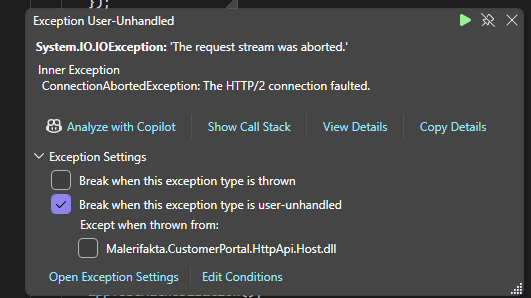
Research seem to indicate that this could be OAuth related. We have noticed that when running backend in debug mode (locally) we are getting frequent Exceptions in the Use() method in the XXXHttpApiHostModule. which seem to be related to the chat module. Could perhaps be related to this but that is more of a guess....
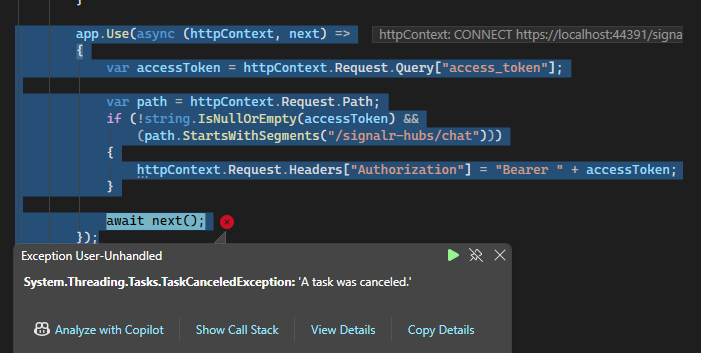 app.Use(async (httpContext, next) =>
{
var accessToken = httpContext.Request.Query["access_token"];
app.Use(async (httpContext, next) =>
{
var accessToken = httpContext.Request.Query["access_token"];
var path = httpContext.Request.Path;
        if (!string.IsNullOrEmpty(accessToken) &&
            (path.StartsWithSegments("/signalr-hubs/chat")))
        {
            httpContext.Request.Headers["Authorization"] = "Bearer " + accessToken;
        }

        await next();
    });
[maliming] said: hi
Can you share your Angular website URL and test username&password?
liming.ma@volosoft.com
Thanks
It is currently in an internal (IP protected) Azure resource so that could turn out to be problematic.
Did try to run the Angular app locally and we are getting the 204s there as well but without the "An error has occurred".
Is there no logging behind those error messages even serverside? What/how are they triggered, something must be setting them off?
[maliming] said: hi
How did you customize this footer in your mvc project?
Can you share your project file structure info?
Thanks.
We haven't (AFAICR), which was the main reason I was surprised that it was different between different pages.
What is weird though is that only the error pages seem to have this footer, not the main login which I assume is also in MVC?
Regardless, please consider just removing this as discussed before, I see zero added value in having the default footer being displayed by default and then having to do code changes just to hide it. Outside of Volosoft, I find it hard to imagine that anyone would want a "Copyright Volosoft" displayed in their apps...
Not sure what "and copy your account _Footer.cshtml in it?" refers to?
[maliming] said: hi
Here is an example to use the log configuration with
appsettings.json{ "Serilog": { "MinimumLevel": { "Default": "Debug", "Override": { "Microsoft": "Information", "Microsoft.EntityFrameworkCore": "Warning" } }, "WriteTo": [ { "Name": "Async", "Args": { "configure": [ { "Name": "File", "Args": { "path": "Logs/logs.txt" } } ] } }, { "Name": "Async", "Args": { "configure": [ { "Name": "Console" } ] } } ], "Enrich": [ "FromLogContext" ] } }using System; using System.Threading.Tasks; using Microsoft.AspNetCore.Builder; using Microsoft.Extensions.DependencyInjection; using Microsoft.Extensions.Hosting; using Serilog; namespace AbpSolution1.Web; public class Program { public async static Task<int> Main(string[] args) { Log.Logger = new LoggerConfiguration() .WriteTo.Async(c => c.File("Logs/logs.txt")) .WriteTo.Async(c => c.Console()) .CreateBootstrapLogger(); try { Log.Information("Starting web host."); var builder = WebApplication.CreateBuilder(args); builder.Host .AddAppSettingsSecretsJson() .UseAutofac() .UseSerilog((context, services, loggerConfiguration) => { loggerConfiguration .ReadFrom.Configuration(context.Configuration) .ReadFrom.Services(services) .WriteTo.Async(c => c.AbpStudio(services)); }); await builder.AddApplicationAsync<AbpSolution1WebModule>(); var app = builder.Build(); await app.InitializeApplicationAsync(); await app.RunAsync(); return 0; } catch (Exception ex) { Log.Fatal(ex, "Host terminated unexpectedly!"); return 1; } finally { Log.CloseAndFlush(); } } }Thanks.
This is actually quite similar to the one we implemented now except for that we added rollover for log files and we named the "startup log" as startup.txt to keep it separate from the Serilog logging (which probably won't work for the earliest logging so still need that in ABP code probably, just as you did).. This seem to work fine even though we are still in early testing.
There are a couple of 204s for
but if those are triggering this, I believe it is the error handling in ABP that is not working as it should as 204s are perfectly valid http codes to get back.









