I need hide or show Main Menú Items from Abp Modules.
For example I need hide FileManagement from main menu based on roles or permissions, don't matter if I added permissions inside application I need always hide menu based in other permission. This not found:
        var fileMenu = context.Menu.FindMenuItem(FileManagementMenuNames.GroupName);
        fileMenu.RequirePermissions("MyProject.Crm.Shared");
Thank you.
- ABP Framework version: v5.0.0-rc2
- UI type: Blazor
- DB provider: EF Core
- Tiered (MVC) or Identity Server Separated (Angular): no
- Exception message and stack trace: no
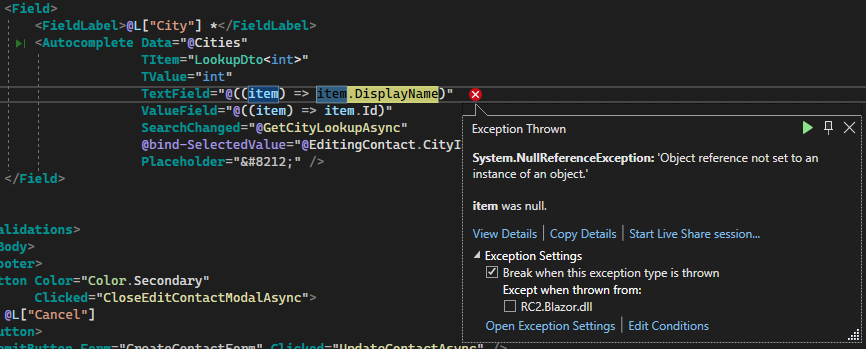
- Steps to reproduce the issue:"generate page from ABP Suite (rc1 is lastest available now) autocomplete item.DisplayName null exception on edit modal"
- looks like something else is changed in Blazorise
We'll check this
This problem have a solution?, I'm having the same problem.
Hello finding in google a solution, I found this:
https://tagmerge.com/issue/abpframework/abp/11364
The solution offered by Lian found.
Then please close this issue.
Thank you,
Hello after update to 5.1.3 versión, the BlazorWasm not found.
The issue showing in browser is:
crit: Microsoft.AspNetCore.Components.WebAssembly.Rendering.WebAssemblyRenderer[100] Unhandled exception rendering component: WebAssemblyCachedApplicationConfigurationClient should be initialized before using it. Volo.Abp.AbpException: WebAssemblyCachedApplicationConfigurationClient should be initialized before using it. at Volo.Abp.AspNetCore.Components.WebAssembly.WebAssemblyCachedApplicationConfigurationClient.GetConfigurationByChecking() at Volo.Abp.AspNetCore.Components.WebAssembly.WebAssemblyCachedApplicationConfigurationClient.Get() at Volo.Abp.AspNetCore.Mvc.Client.RemoteLocalizationContributor.GetResourceOrNull() at Volo.Abp.AspNetCore.Mvc.Client.RemoteLocalizationContributor.GetOrNull(String cultureName, String name) at Volo.Abp.Localization.LocalizationResourceContributorList.GetOrNull(String cultureName, String name) at Volo.Abp.Localization.AbpDictionaryBasedStringLocalizer.GetLocalizedStringOrNull(String name, String cultureName, Boolean tryDefaults) at Volo.Abp.Localization.AbpDictionaryBasedStringLocalizer.GetLocalizedString(String name, String cultureName) at Volo.Abp.Localization.AbpDictionaryBasedStringLocalizer.GetLocalizedString(String name) at Volo.Abp.Localization.AbpDictionaryBasedStringLocalizer.get_Item(String name) at Volo.Abp.UI.Navigation.DefaultMenuContributor.Configure(MenuConfigurationContext context) at Volo.Abp.UI.Navigation.DefaultMenuContributor.ConfigureMenuAsync(MenuConfigurationContext context) at Volo.Abp.UI.Navigation.MenuManager.GetInternalAsync(String name) at Volo.Abp.UI.Navigation.MenuManager.GetAsync(String[] menuNames) at Volo.Abp.AspNetCore.Components.Web.LeptonTheme.Components.ApplicationLayout.Navigation.MainMenuProvider.GetMenuAsync() at Volo.Abp.AspNetCore.Components.Web.LeptonTheme.Components.ApplicationLayout.MainHeader.MainHeader.OnInitializedAsync() at Microsoft.AspNetCore.Components.ComponentBase.RunInitAndSetParametersAsync() global.js:249:35461
After I updated my solution to 5.1.3
Thank you,
Thank you cotur.
Hello, can you close this question and refund?, because not was anwared many days.
Thank you,
Hi,
We found the problem and will fix it in the next version. your ticket refunded.
Fow now, you can try:
Open
<YourProjectName>HttpApiClientModule:Configure<AbpVirtualFileSystemOptions>(options => { options.FileSets.AddEmbedded<<YourProjectName>HttpApiClientModule>(); });Put the JSON file in the
ClientProxiesdirectory of.HttpApi.Clientproject and set it as an embedded file.BTW, you can delete these changes when you upgrade to next version.
This steps fix my issue.
Thank you so much.
Sorry, I remember wrong. We are trying to fix that.
No problem thank you for your help.
Hello I got this answare of maliming: Answered by maliming. — Solution: Add these configure to your Blazor project.
Configure<AbpAspNetCoreMvcOptions>(options => { options.ConventionalControllers.FormBodyBindingIgnoredTypes.Add(typeof(CreateFileInputWithStream)); });
Configure<AbpAspNetCoreMvcOptions>(options => { options.ConventionalControllers.FormBodyBindingIgnoredTypes.Add(typeof(ProfilePictureInput)); });
But I don't know where include this code:
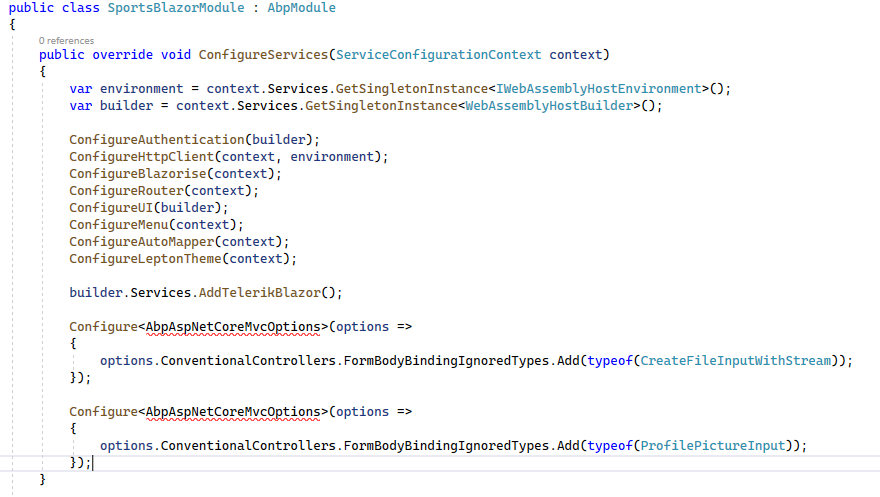 If I include inside this method, not recognize this type: AbpAspNetCoreMvcOptions