The top-level package is Volo.Abp.Http.Client.IdentityModel 10.1.1, which pulls in Volo.Abp.IdentityModel, which in turn depends on Microsoft.IdentityModel.* 6.26.1 and System.IdentityModel.Tokens.Jwt 6.26.1.
Can ABP package upgrade to System.IdentityModel.Tokens.Jwt version 8?
If I set app or tenant level to EST, and get datetime value from database, which method I should call to Convert Utc to EST time?
Just wondering except for: Configure<AbpClockOptions>(options => { options.Kind = DateTimeKind.Utc; // recommended in ABP });
Is it possible set the IClock to certain time zone, eg EST, so when using Clock.Now, it is EST's time?
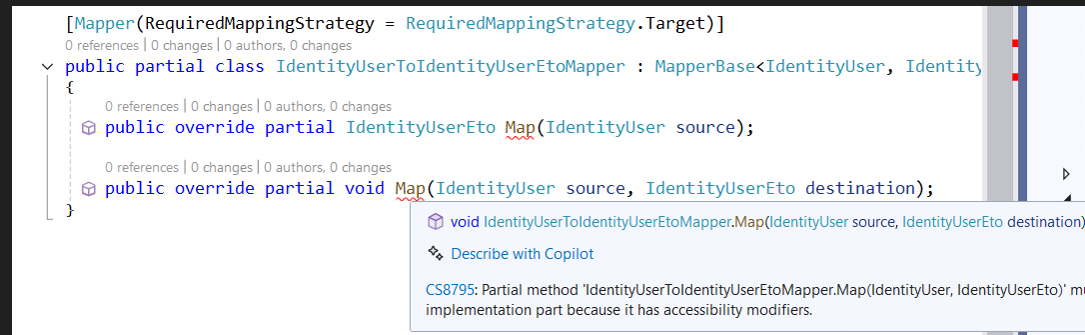
Finally figure out the solution, I am using VS 2026 or command line to build, still got same build error. First make sure the two partial override has no any implementation, public override partial IdentityUserEto Map(IdentityUser source); public override partial void Map(IdentityUser source, IdentityUserEto destination);
And add these lines to project file: <PropertyGroup> <EmitCompilerGeneratedFiles>true</EmitCompilerGeneratedFiles> <CompilerGeneratedFilesOutputPath>Generated</CompilerGeneratedFilesOutputPath> </PropertyGroup> <ItemGroup> <Compile Remove="$(CompilerGeneratedFilesOutputPath)/**/*.cs" /> </ItemGroup>
I tried Visual Studio 2026 Enterprise V18.4.0 and Visual Studio 2022 17.14.28
I checked all steps you mentioned, under Dependencies -> Analyzers -> Rick.Mapperly, there is empty class generated
public partial class IdentityUserToIdentityUserEtoMapper
{
}
}
When upgrade from ABP8 to ABP 10, follow Mapperly migration guide web page, the old code just simply sentence to map from IdentityUser to IdentityUserEto, with new code:
We are going to upgrading ABP 8 to ABP 10 (Micro Services template)
I noticed that since ABP9, each MicroService project layout is simplified,
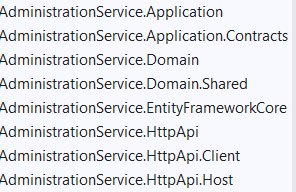
Now it becomes
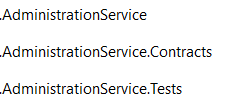
But I feel like for a system already go lives for years, It is safer to continue using legacy ABP Cli doing the upgrade so that the projects layout would not change significantly.
ABP would keep upgrading legacy ABP cli, right? Any suggestion?
[maliming] said: hi
Switch Ocelot to YARP for the API Gateway
Until this version, ABP Commercial was using the Ocelot for the API Gateway, in the Microservice Startup Template. Since the Ocelot library is not actively maintained, we have searched for an alternative and decided to switch from Ocelot to YARP for the API Gateway. YARP is maintained by Microsoft and is actively being developed and seems a better alternative than Ocelot and provides the same feature stack and even more.
You can read the Migrating to YARP documentation for migrating your existing microservice application's API Gateway from Ocelot to YARP.
We have made the all related changes in the Microservice Startup Template, and also updated the documentation, which you can read here. https://abp.io/docs/commercial/8.0/startup-templates/microservice/gateways
https://abp.io/community/articles/abp.io-platform-8.0-rc-has-been-published-3d8z8i16#switch-ocelot-to-yarp-for-the-api-gateway&gsc.tab=0
Is your project a microservice?
Thanks.
Yes
We have a project currently is ABP 8.1.3 which still uses Ocelot, we are going to upgrade it to ABP 10.1.0, do we have to upgrade to Yarp? Recommendation?









